


 Video Converter Ultimate
 Grabador de pantalla
 Reparación de vídeo
 Descarga segura
Aprenda a agregar etiquetas a un archivo con las mejores formas en un minuto
Si publicas un archivo multimedia en línea, lo ideal es utilizar una etiqueta para proteger a los usuarios que quieran asumir la autoría de tu publicación. Sin embargo, algunos usuarios saben cómo eliminar los metadatos del archivo multimedia. Aunque se puedan borrar, seguir añadiendo etiquetas al archivo sigue siendo una buena medida de seguridad. Así que, antes de publicar cualquier cosa en la web, tienes suerte, porque ya estás en este artículo. Pero antes de continuar, primero debemos aprender lo básico sobre cómo añadir etiquetas a un archivo en menos de un minuto.

Parte 1. Editor de etiquetas fenomenal para agregar etiquetas a un archivo sin esfuerzo [Ultimate Software]
Nos gustaría que conozca el FVC Video Converter Ultimate; ¿por qué? La primera razón es que es una herramienta capaz de agregar etiquetas a cualquier archivo multimedia, ya sea una imagen o un video. En segundo lugar, en lugar de aprender a usar otras herramientas, la curva de aprendizaje de esta herramienta es mucho más fluida de lo que piensa mientras tiene un toque experto. En tercer lugar, el software está disponible en todas las plataformas, como Windows y Mac, por lo que ambos usuarios de dicho sistema pueden experimentar el máximo rendimiento de un editor de metadatos.
¿Quieres mas? Millones de usuarios ya aprueban que esta es su primera opción para editar las etiquetas al realizar otras tareas relacionadas con el audio y el video, y están satisfechos con los resultados. De hecho, el software es perfecto tal como es, desde la GUI hasta sus características y funciones.
Funciones de FVC Video Converter Ultimate:
Admite un formato de amplio rango en el que puede cargar y cambiar los metadatos, como MP4, AVI, WMV, TS, RMVB y 1000+ más.
Tiene un proceso ultrarrápido y aceleración de hardware para ayudarlo a terminar una tarea en poco tiempo.
Una de las GUI más atractivas que un editor de metadatos y un editor confiable en un escritorio.
Tiene una caja de herramientas multipropósito para realizar la edición avanzada y más básica que necesitará en su video y audio.
Está disponible tanto en Windows como en Mac; tienen las mismas características y funciones.
Sorprendentemente, hemos añadido un tutorial con el que puedes aprender cómo añadir etiquetas a un archivo en un abrir y cerrar de ojos.
Paso 1. Puedes descargar el software al instante en tu Windows y Mac haciendo clic en el botón de descarga. Haz clic en el archivo descargado, configúralo según tus preferencias e instálalo.
Descarga gratuitaPara Windows 7 o posteriorDescarga segura
Descarga gratuitaPara macOS 10.7 o posteriorDescarga segura
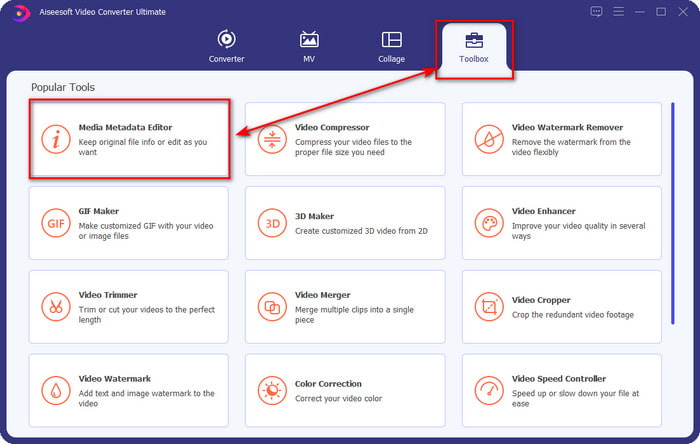
Paso 2. Inicia el software haciendo clic en Start Now. Una vez que hayas abierto el programa definitivo, debes abrir la Toolbox haciendo clic en ella y buscarla en Media Metadata Editor.
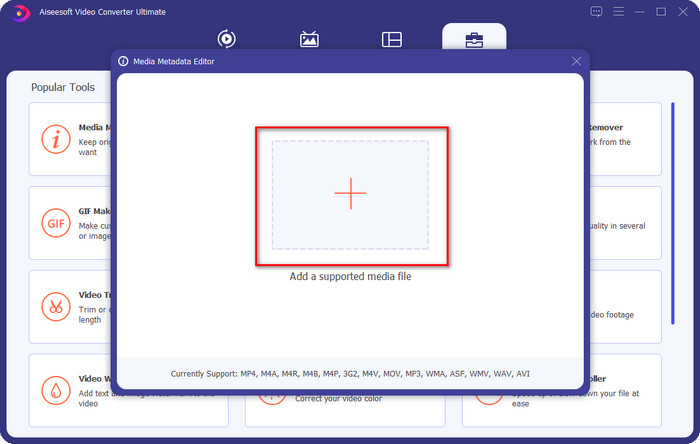
Paso 3. Pulsa el icono +, busca el archivo multimedia en el explorador de archivos y, a continuación, haz clic en Open.
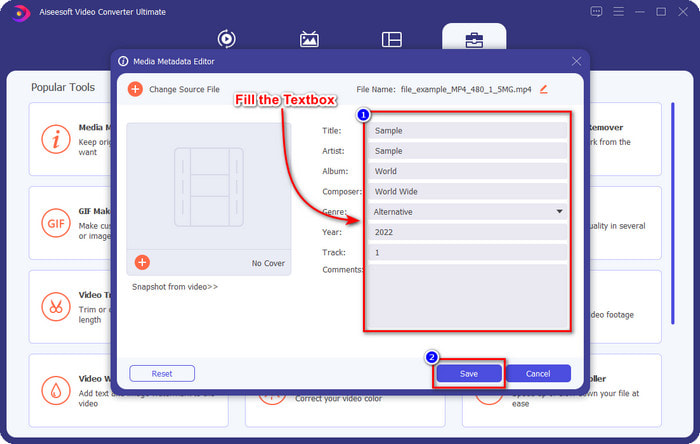
Paso 4. Introduce toda la información que necesites como metadatos en el text box. Cuando termines de rellenarlo todo, ya puedes hacer clic en el botón Save.
Relacionado:
Cómo editar las propiedades de los archivos WAV
Cómo cambiar los detalles de un archivo en Windows
Parte 2. Cómo agregar etiquetas a un archivo sin software de terceros [Editor de etiquetas incorporado en Windows]
Estos métodos sucesivos para agregar una etiqueta a los archivos solo están disponibles en Windows. El paso puede variar en la versión actualizada de Windows en breve; si eres un Windows 10 u 11, debes conocer este método. Sin más preámbulos, profundicemos en las funciones integradas que puede usar para cambiar o editar las etiquetas en la PC con Windows.
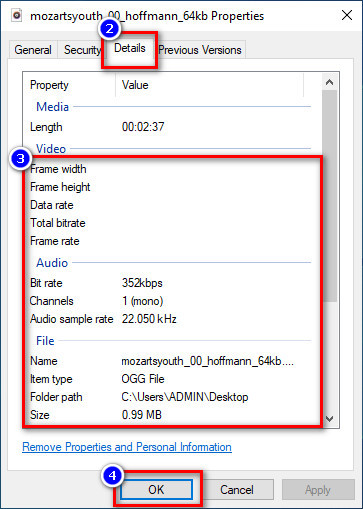
Propiedades en Windows
Este método no es nuevo para nosotros, porque es el más conocido para modificar las etiquetas de los archivos multimedia en cualquier Windows. Properties on Windows es una herramienta sencilla que hace un trabajo simple de forma fácil. Además, aprender cómo añadir etiquetas a un archivo es aún más simple con la ayuda de esta herramienta. Para saber más, sigue leyendo los detalles a continuación.
Paso 1. Busca el archivo multimedia en tu unidad de Windows.
Paso 2. Pulsa con el botón derecho y ve a Properties.
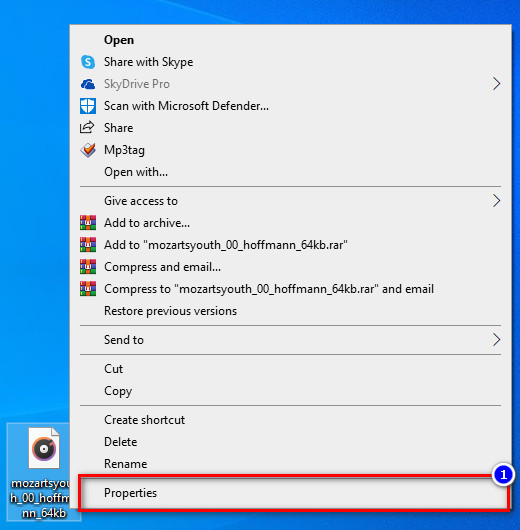
Paso 3. En Propiedades, verás Details; añade la información o las etiquetas que necesites y pulsa OK.
Panel de detalles
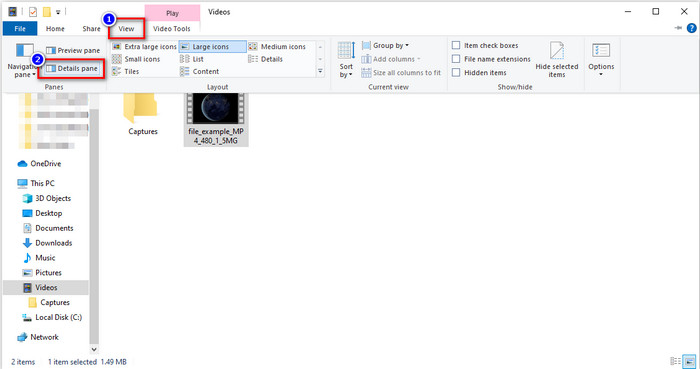
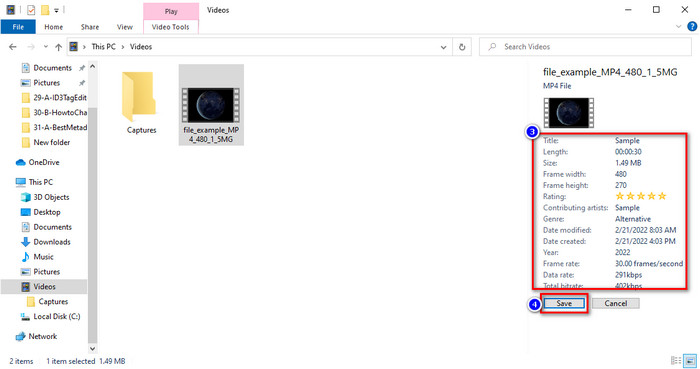
No todos los usuarios de Windows saben que podemos usar el Details Pane para ajustar los metadatos del archivo multimedia. Sin embargo, no puedes añadir más información que con el primer método. Pero si quieres probar este método, ahora debes seguir cómo añadir etiquetas a un archivo sin abrirlo, con pasos detallados.
Paso 1. Abre el File Explorer y localiza el archivo.
Paso 2. Haz clic en el archivo y ve a View. Si ya has hecho clic en View en su panel, haz clic en Details Pane.
Paso 3. Ahora puedes ajustar las etiquetas y hacer clic en Save cuando hayas terminado.
Parte 3. Preguntas frecuentes sobre cómo agregar etiquetas a un archivo
¿Qué es mejor: un editor de etiquetas integrado o de terceros?
Ambas técnicas para agregar o eliminar metadatos funcionan bien. Sin embargo, si necesitamos un software profesional, sugerimos instalar una herramienta que brinde más opciones de las que el integrado no puede brindar. Al igual que FVC Video Converter Ultimate, es la herramienta de terceros perfecta para editar la etiqueta de un archivo multimedia diferente. Lea la información anterior para saber más.
¿Cuál es la ventaja de usar un editor de metadatos integrado?
En lugar de descargarlo, instalarlo y configurarlo todo, puede ir directamente a los pasos para cambiar los metadatos, a diferencia de las herramientas de terceros. Además, una de las mejores ventajas de usar una función integrada es que, sin duda, es seguro de usar porque ya está en su disco. Pero recuerde, el editor de etiquetas incorporado no proporciona una amplia opción para etiquetar el archivo multimedia; Por lo tanto, la descarga de un tercero apropiado es imprescindible, pero asegúrese de que el software que descargará sea seguro y tenga más opciones con respecto a los metadatos. Sin embargo, el editor de metadatos incorporado es confiable y fácil de usar.
¿Puedo editar metadatos en línea?
Sí, puede editar los metadatos en línea. Editar metadatos en línea es mucho mejor que usar aplicaciones integradas, pero no todas las herramientas web son seguras de usar. Por lo tanto, si está utilizando una herramienta en línea, asegúrese de que la web esté protegida para evitar piratería o virus. Y si no está seguro acerca del sitio web, puede leer algunos artículos confiables sobre la revisión de la herramienta web y saber si es seguro acceder a ellos.
Conclusión
Tanto si eliges añadir metadatos con funciones integradas como con herramientas de terceros, la tasa de éxito al hacerlo es totalmente segura. Aunque la herramienta que hemos mencionado funciona muy bien por sí sola, sigue siendo mejor si confías en el mejor software, como la herramienta definitiva para este trabajo. ¿Por qué? Porque es capaz de hacer mucho más que el editor de etiquetas integrado en tu Windows. Si no crees en nuestra reseña sobre FVC Video Converter Ultimate, deberás instalarlo y probarlo para comprobar si funciona tal como decimos.
-
 Revisión completa de los metadatos de FFmpeg sobre uso y funcionalidad
 ¿Quieres saber cómo usar el editor de metadatos FFmpeg? Seguramente, el software no es fácil de usar, pero con este artículo, puede lograrlo fácilmente.
-
 Cómo ver fácilmente metadatos de fotos y videos en iOS
 ¿Quieres saber cómo ver metadatos en iPhone y iPad? Entonces, leer este artículo podría ayudarlo a resolver este problema sin esfuerzo.
-
 Las mejores técnicas sobre cómo editar etiquetas iD3 en iTunes [Consejos efectivos]
 ¿Necesita saber cómo editar etiquetas en iTunes? Entonces usted está en el lugar correcto. Como discutimos los métodos, puede seguir para editar las etiquetas usando iTunes.
