


 Video Converter Ultimate
 Grabador de pantalla
 Reparación de vídeo
2 métodos para comprimir videos para Instagram en línea y en el escritorio
¿Cómo comprimir videos para Instagram? ¿Te desesperaste al descubrir que el video en el que trabajaste durante horas no se podía subir a Instagram por su gran tamaño? Que no cunda el pánico. Acabas de llegar al lugar correcto. Este artículo le proporcionará las 2 formas más fáciles de comprimir videos para subirlos a Instagram.

Parte 1: ¿Por qué necesito comprimir videos para Instagram?
T Tal como se mencionó anteriormente, los archivos de video de gran tamaño no se pueden cargar en Instagram. Debe comprimir los videos de Instagram a archivos MP4 de menos de 20 MB. La velocidad de fotogramas del video debe ser de 30 fotogramas por segundo, con 3500KBPS como velocidad de bits. El tamaño del video suele ser de 1080 píxeles de ancho. Se recomienda una resolución de 4: 5. Además, sus videos deben estar por encima de los 3 segundos y por debajo de los 60 segundos.
Parte 2: Cómo comprimir archivos de video para Instagram en línea
FVC Free Video Compressor es una herramienta online inteligente para comprimir vídeos de varios formatos. No necesitas descargar ningún programa. Todo el proceso de compresión se realiza en una página web. Con ella, puedes reducir tus vídeos al tamaño que quieras.
Funciones principales:
- 1. Comprima varios videos grandes como MKV, FLV, WMV, AVI, TS, MOV, etc.
- 2. Interfaz fácil de usar para que los principiantes personalicen la configuración.
- 3. Trabaje a una velocidad 30 veces más rápida y no deje marcas de agua en las salidas.
- 4. Maneja videos 4K Ultra HD sin pérdida de calidad
Estos son los pasos para comprimir archivos de video para Instagram en línea con esta herramienta:
Paso 1: Abre FVC Free Video Compressor en tu navegador.
Haz clic en el botón Add Files to Compress que aparece en el centro. La primera vez que utilices esta herramienta, tendrás que descargar un archivo llamado fvc-launcher y ejecutarlo antes de continuar. Después, haz clic de nuevo en el botón Add Files to Compress. Entonces podrás elegir los archivos de vídeo que quieras comprimir para Instagram.

Paso 2: Personaliza los ajustes del vídeo que quieres comprimir para Instagram
Tamaño: Puedes ajustar la barra de porcentaje arrastrándola. Para comprimir un vídeo para Instagram, asegúrate de que el tamaño de salida sea inferior a 20 MB. Los cambios en el tamaño de salida afectarán al mismo tiempo al bitrate de salida.
Formato: Actualmente puedes convertir el vídeo a 12 formatos, incluidos MP4, MKV, AVI, FLV, etc. Para comprimir un vídeo para Instagram, solo tienes que elegir el formato MP4.
Resolución: Puedes reducir la resolución a valores más bajos como 320*240, 480*360 y más. O puedes mantener la resolución original y comprimir el vídeo para Instagram simplemente reduciendo el bitrate.

Paso 3: Empieza a comprimir y espera a que la herramienta complete la tarea.
Haz clic en el botón morado Compress y elige una carpeta de destino donde quieras guardar el vídeo de salida. No cierres el navegador ni la página web mientras el vídeo esté en proceso. De lo contrario, tendrás que comprimir el vídeo para Instagram desde el principio otra vez. La velocidad del proceso depende en gran medida de tu hardware.
Parte 3: Cómo comprimir archivos de video para Instagram en el escritorio
Además del tamaño, la duración de tu vídeo debe ser de entre 3 y 60 segundos. Sin embargo, las funciones de la herramienta online son bastante sencillas porque funciona en una página web. No puedes recortar el vídeo con la herramienta online. ¿Qué herramienta puedes usar si quieres no solo comprimir sino también editar el vídeo? Aiseesoft Video Converter Ultimate es probablemente tu mejor opción.
Funciones principales:
- 1. Compatible con más de 1000 formatos, incluidos WMA, MP4, AVI, MOV, WMV, MP3, FLAC, etc.
- 2. La tecnología de aceleración de hardware avanzada garantiza una velocidad sin precedentes
- 3. Recorte y combine clips de video con un arco iris de filtros y efectos básicos.
- 4. La herramienta 3D Maker te permite disfrutar de increíbles videos 3D en tus gafas 3D
- 5. Cree videos de pantalla dividida casi profesionales
- 6. Cuatro formas definitivas integradas de mejorar su video
Descarga gratuitaPara Windows 7 o posteriorDescarga segura
Descarga gratuitaPara macOS 10.7 o posteriorDescarga segura
Pasos para comprimir videos para Instagram con Video Converter Ultimate:
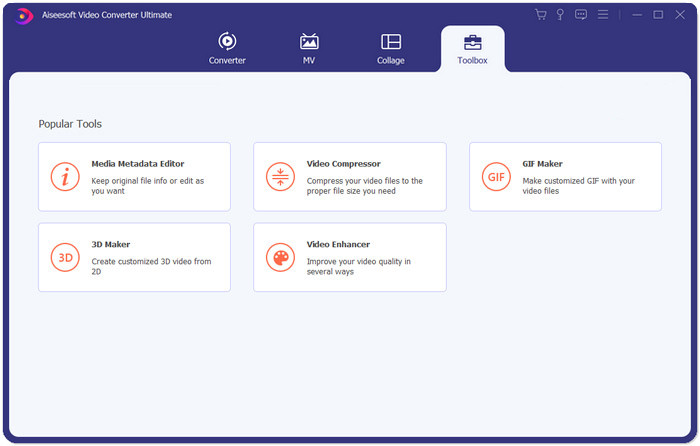
Paso 1: Descarga, instala y ejecuta Aiseesoft Video Converter Ultimate. Ve a la pestaña Toolbox y haz clic en el botón “+” para añadir el vídeo que quieres comprimir para Instagram.
Paso 2: Después de añadir el vídeo, entrarás en la interfaz de Video Compressor. Arrastra la barra de tamaño para ajustar el tamaño del archivo de salida y elige la resolución y el formato de salida que desees.
Nota: Solo puedes cambiar el bitrate de forma indirecta probando diferentes combinaciones de resolución y tamaño de salida.
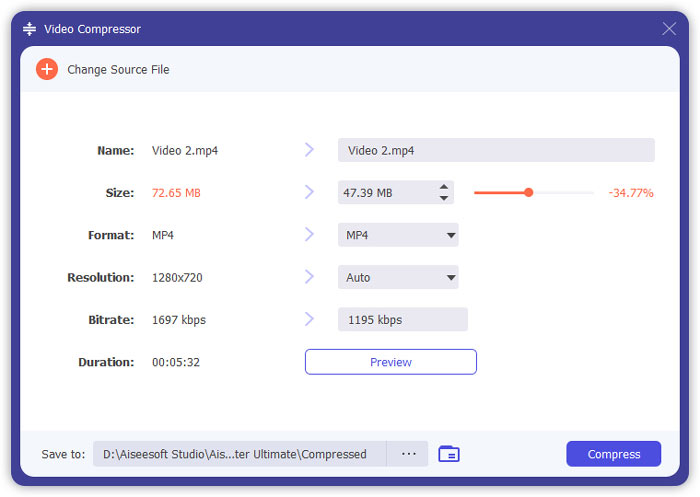
Paso 3: Haz clic en el botón Compress en la parte inferior derecha para empezar a comprimir el vídeo para Instagram.
Lectura ampliada:
Cómo comprimir vídeos online para WhatsApp (100 MB/500 MB/1 GB…)
Cómo comprimir un vídeo para enviarlo por correo electrónico y dejarlo en menos de 25 MB
Parte 4: Preguntas frecuentes sobre la carga de videos en Instagram
¿Cuáles son los requisitos para subir videos de Instagram?
Formato: MP4
Códec: H.264
Bitrate: inferior a 3500 kbps
Frecuencia de imagen: menos de 30 fotogramas por segundo.
¿Cuál es la mejor relación de aspecto para los videos de Instagram?
La mejor relación de aspecto es 9:16, que también es la relación estándar de la mayoría de los teléfonos inteligentes.
¿Qué formato de audio debería usar mi video para subir a Instagram?
Audio AAC.
Conclusión
De este artículo, tiene dos herramientas útiles para comprimir su video para Instagram. Son FVC Free Video Compressor y Video Converter Ultimate. Cuando comprime el video para Instagram, no olvide asegurarse de que su video sea de 3 a 60 segundos y menos de 20 MB.
-
 La mejor manera de reducir el tamaño de los videos de Vimeo para subirlos
 En esta publicación, le mostraremos cómo comprimir su archivo de video para cargar el archivo en Vimeo, junto con las pautas que puede necesitar para la compresión de video y audio.
-
 Cómo deducir el tamaño del archivo de video para YouTube de 2 maneras
 ¿Los videos de YouTube son grandes y lentos de cargar? Simplemente comprima el tamaño del archivo de video en un tamaño más pequeño para YouTube de 2 maneras en línea y en la computadora.
-
 Cómo comprimir videos para Facebook gratis y en línea
 Si tiene prohibido subir un video grande en Facebook, no se preocupe. Simplemente comprima el tamaño de video grande de GB a MB con el compresor de video gratuito.
