


 Video Converter Ultimate
 Grabador de pantalla
 Reparación de vídeo
 Descarga segura
Potente controlador de velocidad de video - DaVinci Resolve Speed Editor
Si quieres usar un potente editor de velocidad de vídeo, probablemente quieras usar esta herramienta. DaVinci Resolve Speed Editor es una herramienta para cambiar la velocidad de vídeo que utiliza un teclado USB. Este speed editor ofrece un control de hardware personalizado que te permite editar la velocidad de tu vídeo con facilidad. Así que, si te preguntas qué más puede hacer esta herramienta, lee este artículo para saber más sobre el DaVinci Resolve Speed Editor.

Parte 1. Información básica, características, funciones y precio de DaVinci Resolve Speed Editor
Muchos editores profesionales usan DaVinci Resolve Speed Editor para cambiar la velocidad de su vídeo. Y si eres nuevo usando DaVinci Resolve Speed Editor, seguramente querrás conocer la información, las funciones y el precio de esta herramienta. En esta parte, conocerás la información básica, las funciones y el precio de este speed editor.
Información básica
DaVinci Resolve es un teclado tipo USB que te permite editar tu archivo. Si desea una herramienta que pueda cambiar la velocidad de su video, entonces esta herramienta es la mejor para usted. DaVinci Resolve proporciona una forma más rápida y fácil de editar videos. Es más que un simple teclado porque tiene muchas funciones de edición que puede usar, incluido un editor de velocidad de video, control de marcación de búsqueda, agregar/eliminar efectos, selección de varias cámaras en el contenedor de sincronización y más. Además de eso, esta herramienta de edición de velocidad también tiene una versión inalámbrica.
Cuando compre un teclado DaVinci Resolve, verá un cable USB y un indicador de energía de la batería. Una vez que retire el cable USB de la parte posterior del dispositivo, el Bluetooth intentará emparejarse automáticamente en su dispositivo.
Además, si está solicitando el editor de velocidad de esta herramienta, puede usar los controles de la rueda de desplazamiento, los controles de reproducción y los controles de edición y recorte en su teclado.
Caracteristicas y funciones
Si se pregunta cuáles son las características y funciones de DaVinci Resolve, le presentamos a continuación las características y funciones más comunes de esta herramienta.
Speed Editor
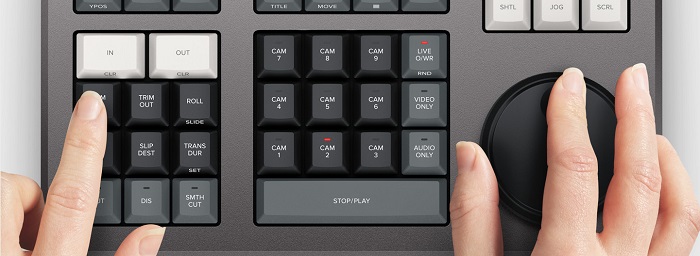
DaVinci Resolve Speed Editor está hecho para editores profesionales que quieren mejorar los efectos de transición en su vídeo. Usando este controlador de velocidad de vídeo, puedes ralentizar o acelerar los fps de tu vídeo, destacando la mejor escena de tu vídeo. Hay muchas formas de usar DaVinci Resolve para acelerar un clip.
◆ Usa los puntos In and Out simplemente desplazándote con el dial de búsqueda y colocando los puntos de entrada y salida en la línea de tiempo de tu vídeo, y luego ve a las funciones de edición para editar tu vídeo.
◆ Usa los botones Trim in and Trim out simplemente manteniendo pulsados los botones de recorte y girando el dial de búsqueda. El indicador inteligente en la línea de tiempo te permite ver qué parte estás recortando.
Añadir y eliminar efectos
Con DaVinci Resolve Speed Editor, también puedes añadir y eliminar efectos en tu vídeo. El indicador inteligente en la línea de tiempo determina en qué punto de edición estás trabajando. Pulsa la tecla CUT para eliminar un efecto en el punto de edición. Y si quieres aplicar una disolución en el punto de edición de tu línea de tiempo, pulsa la tecla DIS (dissolve). Además, si quieres una transición de corte suave en el punto de edición, pulsa SMTH CUT (smooth cut).



Color
Esta función le permite cambiar el contraste, la temperatura, los tonos medios, la saturación y otros. La página de color es una de las funciones más apreciadas de DaVinci Resolve y puede ser utilizada fácilmente por principiantes.
Sync Bin
La función sync bin es donde puedes encontrar vídeos o tomas sincronizados en la línea de tiempo de edición. Después, puedes usar las teclas de cámara para seleccionar una toma alternativa y editarla en tu línea de tiempo.
Nivel de audio y marca
DaVinci Resolve también puede ajustar el audio de tu vídeo. Para configurar los niveles de audio de tu clip, mantén pulsada la tecla y ajusta el nivel de audio usando el dial de búsqueda. Si pulsas dos veces la tecla de nivel de audio, se añadirá un marcador. Y si pulsas dos veces la tecla y la mantienes pulsada, podrás establecer el color de los marcadores.
Visor a pantalla completa y revisión
Esta tecla le permite convertir su visor en pantalla completa. Tiene un color rojo para que puedas encontrarlo fácilmente. Si presiona dos veces esta tecla, rezará desde su edición más reciente.
Añadir transiciones
Al usar la tecla Transition se añadirá una transición personalizada a tu vídeo. Es casi similar a los botones de corte y smooth cut.
Snapper y visor
Al pulsar la tecla Snap se activa el ajuste magnético (snapping) en tu línea de tiempo. Y si mantienes pulsada la tecla Snap, se ajustará el tamaño del visor.
Eliminación con ripple
Eliminar ondulación le permite eliminar el clip en el punto de reproducción; ondula la línea de tiempo para eliminar el espacio entre los dos clips. Ripple delete es una buena manera de reducir la duración de la línea de tiempo de su video.
Precio
Puedes comprar DaVinci Resolve Speed Editor por $395. Y si está buscando una versión de software de esta herramienta, puede descargarla gratis en Windows, Mac y Linux. Sin embargo, la versión de software de esta herramienta es complicada de usar.
Alternativa para DaVinci Resolve Video Speed Editor
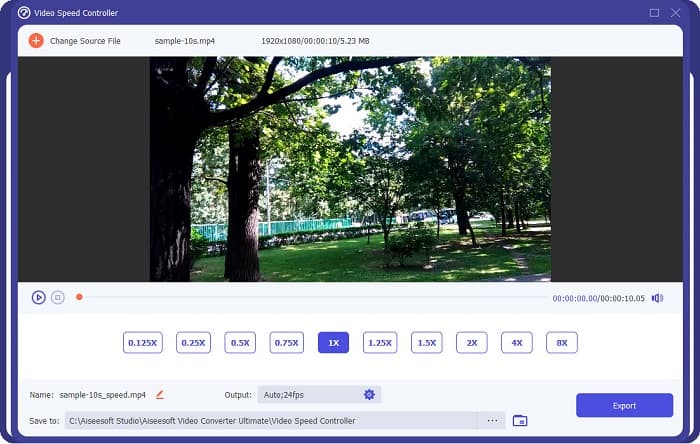
Si quieres una forma más sencilla de editar la velocidad de tu vídeo, usa FVC Video Converter Ultimate. Esta aplicación de software te permite acelerar o ralentizar tu vídeo fácilmente. Con su rápido proceso de funcionamiento, no consumirás mucho tiempo editando la velocidad de tu vídeo. Además, hay muchos preajustes de velocidad entre los que puedes elegir para tu vídeo. Y si te preguntas qué más puede hacer, esta herramienta cuenta con muchas funciones de edición, entre ellas un compresor de audio, compresor de vídeo, editor de metadatos de vídeo y más. También es compatible con numerosos formatos de archivo, como MP4, MKV, MOV, AVI, FLV, WMV y más de 1000 formatos. Para saber más sobre esta aplicación de software, lee las descripciones que aparecen a continuación.
Ventajas de usar FVC Video Converter Ultimate:
1. Tiene una interfaz de usuario intuitiva.
2. Le permite cambiar la velocidad de su video de 0.125x, 0.50x, 0.75x, 1.25x, 1.5x, 2x, 4x y 8x velocidades predeterminadas.
3. Tiene muchas funciones de edición avanzadas para usar, como un recortador de video, fusión de video, creador de 3D y más.
4. Disponible en todas las plataformas multimedia, incluidas Windows, Mac y Linux.
Parte 2. Preguntas frecuentes sobre DaVinci Resolve Video Speed Editor
¿Vale la pena DaVinci Resolve Video Speed Editor?
Con su precio, vale la pena usar esta herramienta de edición de velocidad de video porque puede producir resultados de gran calidad y tiene muchas funciones de edición para usar.
¿DaVinci Video Speed Editor es compatible con algún formato?
No es compatible con todos los formatos de archivo. Sin embargo, puede admitir numerosos formatos de archivo, incluidos MOV, MXF, DNG, DCP, ARI, MTS, etc.
¿DaVinci Resolve Video Speed Editor tiene una versión gratuita?
DaVinci Resolve Video Speed Editor tiene una versión de prueba gratuita solo por tiempo limitado. Para usarlo de por vida, compre la herramienta para $395.
Conclusión
Todas tus dudas sobre DaVinci Resolve Video Speed Editor ya están resueltas. Con esta herramienta pensada para la edición de velocidad de vídeo, puedes ralentizar o acelerar tu vídeo fácilmente y crear transiciones bonitas con ella. Pero, si estás buscando una herramienta más práctica y fácil de usar, ¡prueba FVC Video Converter Ultimate gratis!
-
 Cómo avanzar rápidamente un video en iPhone: ajustar la velocidad del video
 ¿Cómo puedo adelantar un video en mi iPhone? ¿Cómo avanzar rápidamente un video en iPhone usando iMovie? Aprenda 3 formas de acelerar un video en dispositivos iPhone y iPad.
-
 Cómo acelerar el video en Premiere Pro y con sus alternativas
 ¿Quieres saber cómo usar Premiere Pro para acelerar un video? Entonces está en el artículo correcto, ya que proporcionamos pasos y otras alternativas asequibles.
-
 2 formas sencillas de acelerar un video en TikTok
 ¿Quieres saber el secreto sobre cómo acelerar el video en TikTok? Entonces lee este artículo para tener una idea de cómo hacerlo y saber cuáles son las otras 2 herramientas que te ayudarán.
