


 Video Converter Ultimate
 Grabador de pantalla
 Reparación de vídeo
Reseña sobre los editores de metadatos de FLV para editar metadatos de FLV [sin esfuerzo]
FLV es un formato popular utilizado para distribuir contenido digital mediante Adobe Flash Player incrustado en archivos SWF. Aunque lo ideal es transferir archivos con la extensión .flv, se puede perder parte del contenido, especialmente si la transferencia se interrumpe. Entonces, si esto ocurre, ¿qué deberías hacer? Afortunadamente, disponemos de metadatos en el mercado. ¿Quieres saber qué herramientas para Windows, Mac y en línea puedes usar? Sigue leyendo para conocer las mejores formas de cambiar fácilmente el formato de metadatos FLV.

Parte 1. 3 del mejor editor de metadatos de video disponible en Windows/Mac/en línea
Video Converter Ultimate
Video Converter Ultimate es uno de los editores de metadatos FLV más potentes para actualizar y cambiar fácilmente las etiquetas FLV. Esta herramienta está disponible para cualquier sistema operativo Windows o Mac. Al usar esta herramienta definitiva, puedes añadir, eliminar o actualizar rápidamente los metadatos en más de 1000 formatos, no solo en FLV. A diferencia de otros editores de metadatos, esta herramienta ofrece una variedad de opciones que son perfectas para cualquier problema relacionado con el vídeo, como convertir, acelerar o ralentizar, invertir y otros conjuntos de filtros sorprendentes para hacer tu vídeo muy único, algo que otros editores de etiquetas no te ofrecen.
Además, planee editar su video FLV, como agregar efectos, filtros, cortar, fusionar, agregar texto o marca de agua. Esta herramienta puede ayudar a cumplir la tarea fácilmente en cualquier usuario. Todas estas cosas son posibles con la ayuda de la herramienta definitiva. No tendrá que buscar nada con la mejor GUI y características. Si tiene dudas y desea intentar usar esta herramienta, puede seguir los pasos a continuación para saber cómo usar la herramienta.
Paso 1. Pulsa el botón de descarga para tener el inyector de metadatos FLV en tu escritorio; elige Windows o Mac. Instala la herramienta haciendo clic en el archivo, siguiendo las instrucciones y ejecútala.
Descarga gratuitaPara Windows 7 o posteriorDescarga segura
Descarga gratuitaPara macOS 10.7 o posteriorDescarga segura
Paso 2. Después de abrir el software, ve a la Caja de herramientas y selecciona Editor de metadatos multimedia para editar las etiquetas de tu FLV.
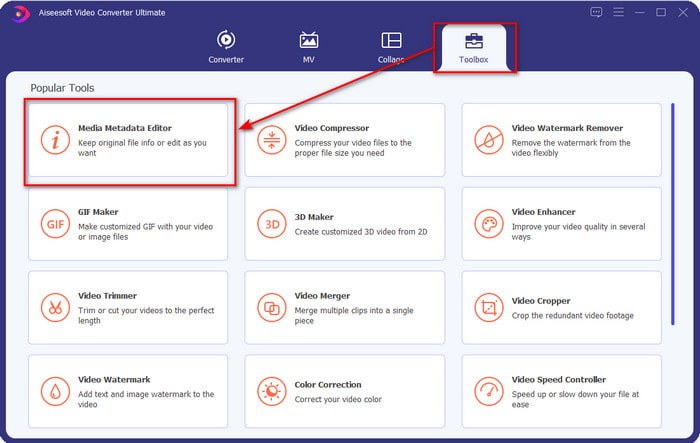
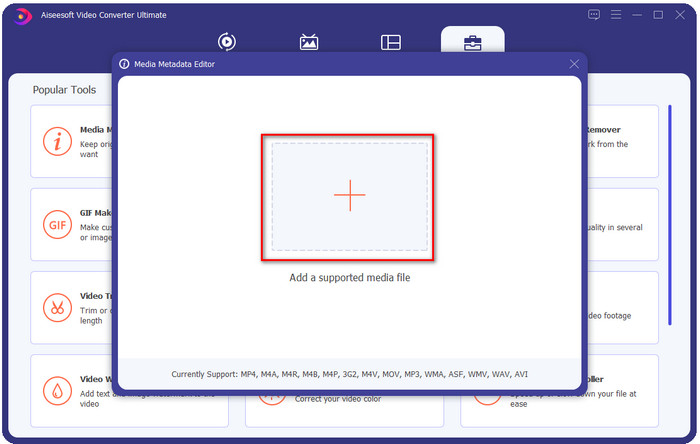
Paso 3. Añade los archivos FLV pulsando el icono +, localiza el archivo en la carpeta que aparecerá en tu pantalla y haz clic en Abrir.
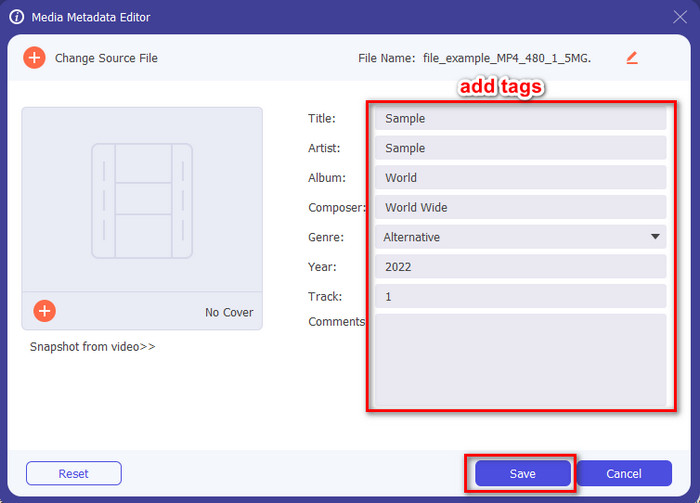
Paso 4. Añade, cambia o elimina la información en el cuadro de texto y pulsa Guardar. Con esto, ya has añadido etiquetas a tu archivo FLV de la manera más sencilla.
FLVMeta - Editor de metadatos FLV
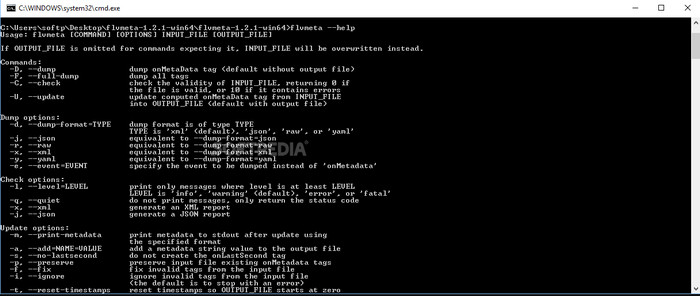
Si eres un usuario avanzado y quieres probar un editor de metadatos FLV dedicado que puedas descargar, nos gustaría presentarte FLVMeta – FLV Metadata Editor. Esta herramienta no es el típico editor que ya hayas visto, porque es una herramienta de línea de comandos. Esto significa que, para darle órdenes a la herramienta, tendrás que introducir un código concreto. De forma similar a FFmpeg, deberás indicar la ubicación, el nombre del archivo, los datos y muchas otras cosas complicadas. Aunque no es la mejor opción para principiantes que necesitan editar los metadatos de sus FLV, merece la pena mencionarla porque realiza el trabajo a la perfección.
Además, el software no funciona con los otros formatos; solo puede usarlo en FLV si desea usar la herramienta. Si tiene muchos archivos FLV y desea cambiar sus etiquetas y tiene un conocimiento básico sobre cómo manipular una herramienta de línea de comandos, le sugerimos que use esto. De lo contrario, necesitará tiempo para estudiar la herramienta y realizar una tarea simple, como agregar metadatos.
Editor de metadatos FLV en línea
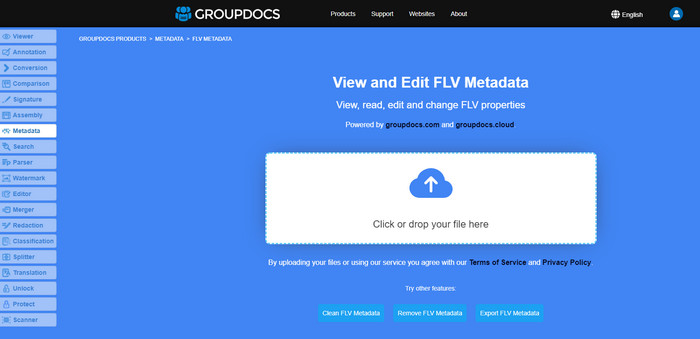
¿No quieres descargar una herramienta para editar el formato de metadatos FLV? En ese caso, puedes usar el Online FLV Metadata Editor. Con esta herramienta, puedes editar los metadatos de tu FLV sin instalar ningún software y de forma gratuita, ya que es una herramienta basada en la web. Aunque la herramienta es gratuita en la red, no funcionará si no tienes conexión a Internet y el proceso podría interrumpirse si tu conexión es lenta.
A diferencia de FLVMeta, esta herramienta admite más formatos y no solo FLV; no es tan compatible como la herramienta definitiva. Por lo tanto, si desea terminar de editar la tarea sin descargar el software, le sugerimos que use esto, ya que también es seguro acceder. Pero recuerda, para evitar problemas inesperados, asegúrate de tener una conexión a Internet estable.
Parte 2. Cuadro comparativo sobre los 3 mejores editores de metadatos FLV
| Características | Video Converter Ultimate | FLVMeta: editor de metadatos FLV | Editor de metadatos FLV en línea |
| Seguro de usar |  | | |
| Fácil de usar | |  | |
| Dependiente de Internet | | | |
| Funciones de edición, como cortar, recortar, recortar, fusionar, etc. | | | |
| La mejor interfaz gráfica de usuario | | | |
Parte 3. Preguntas frecuentes sobre FLV Metadata Editor
¿Son lo mismo FLV y F4V?
Aunque ambos están relacionados con Adobe Flash, su finalidad es diferente. Por ejemplo, FLV utiliza el mismo codificador que los archivos SWF y se emplea principalmente para transferir datos por Internet. En cambio, F4V es un formato basado en ISO que se asemeja a MP4. Aunque ambos son buenos para transferir archivos por Internet, su aspecto y su estructura son diferentes. Si quieres convertir tu F4V a FLV, haz clic aquí y aprende a convertir el formato a FLV.
¿Dónde puedo jugar FLV?
No todos los reproductores multimedia pueden reproducir el formato FLV debido a su compatibilidad limitada. Aun así, tienes suerte, porque hemos reunido los mejores reproductores FLV que puedes usar en tu dispositivo para reproducir tus archivos FLV sin preocuparte por si son compatibles. Estas herramientas han sido probadas para garantizar que pueden reproducir archivos FLV en Windows, Mac, Android y iPhone; para saber más, haz clic en este enlace.
¿Es FLV el formato estándar para compartir videos?
Antes lo considerábamos el mejor formato para compartir videos que puede usar en la web para reproducir videos de alta calidad; sin embargo, existen formatos aún mejores en esta nueva era, como el MP4. Debido a que es más compatible con los diferentes dispositivos que tienen los usuarios, esto se conoce como el formato de video estándar. Aunque aún puede compartir los archivos FLV en la web, aún deberá reconsiderar el dispositivo del receptor de ese archivo. Y si usted es el receptor, deberá descargar una herramienta de terceros para reproducirlo o convertirlo a un formato reproducible.
Conclusión
Aunque hay herramientas limitadas que soportan FLV, todavía tenemos suerte; porque todavía podemos editar los metadatos de FLV gracias a las herramientas anteriores. Pero nos entristece el corazón que necesitamos elegir uno para usar, a pesar de que pueden ayudarnos. Si no ha decidido qué usar, debe optar por la herramienta definitiva. Es la opción más segura porque es simple pero puede ayudarlo fácilmente a manejar la tarea. ¿Aún no crees cuáles son las habilidades de esta herramienta? En ese caso, debe descargarlo en su escritorio para usarlo y probarlo usted mismo para ver si realiza la tarea. Le agradeceríamos que nos enviara un mensaje con su sugerencia, recomendación y más sobre la aplicación.
-
 Qué son los metadatos: aprenda la información básica sobre los metadatos
 ¿Qué son los metadatos? ¿Es esto importante? ¿Cuáles son las partes de los metadatos? Tienes la misma pregunta? En este artículo, aprenderá la información básica sobre los metadatos.
-
 4 de los mejores visualizadores de metadatos online y offline [Actualizado en 2025]
 ¿Puedo consultar los metadatos de mi archivo? Sí, puede, con la ayuda de esta publicación, le presentaremos los diferentes visores de metadatos que puede usar.
-
 6 filtros de Snapchat animados de Snapchat de elección favorita en Snapchat
 ¿Quieres saber las mejores formas de agregar filtros en los videos de Snapchat? Bueno, puede hacer clic aquí y aprender los diferentes filtros que puede usar para aplicar en los videos de Snapchat.
