


 Video Converter Ultimate
 Grabador de pantalla
 Reparación de vídeo
Revisión sobre la importancia del editor de etiquetas ID3 en 2022
Las canciones que has descargado en sitios web de música sí tienen metadatos, también conocidos como etiquetas ID3. Normalmente, toda la información que necesitas sobre esa canción está en la información de la etiqueta. En algunas ocasiones, la música no incluye etiquetas o contiene información incorrecta. En este tipo de situación, necesitarás usar un software que te ayude a gestionar fácilmente la tarea. En este contexto, te presentamos con gusto el mejor editor de etiquetas ID3 que puedes descargar en tu Windows, Mac, iOS y Android para editar las etiquetas de tus canciones.

Parte 1. ¿Qué es la etiqueta ID3?
Las etiquetas ID3 son esenciales para cualquier usuario que quiera conocer información detallada sobre una canción. Un gran ejemplo de etiquetas que puedes ver sin necesidad de abrir los datos de la etiqueta en sí son el nombre del artista y el título de la canción. Aunque no los hayamos añadido manualmente al archivo de audio, siguen estando incrustados para ayudarnos a saber si estamos reproduciendo la música correcta.
Sin embargo, si no tiene una etiqueta en sus canciones o podcast, existe la posibilidad de que los archivos estén codificados en toda la biblioteca o carpeta donde están almacenados. Agregar las etiquetas en su archivo puede ayudarlo a determinar el archivo y organizarlo para que se vea organizado. Si su archivo no tiene uno, entonces debe agregar datos. Mantenga la pelota en marcha para ayudarlo a buscar el editor de etiquetas ID3 que debe usar y que se ajuste a sus necesidades.
Pero antes de comenzar, tenga la amabilidad de preparar los metadatos que desea agregar a su archivo de audio; estos incluyen título, autor, capítulo, páginas, comentarios, letras y demás. Después de leer esto, se sorprenderá con nuestra reseña sobre los mejores editores de etiquetas que puede usar en todos los dispositivos.
Parte 2. El mejor editor de etiquetas ID3 en Windows/Mac para cambiar metadatos fácilmente
FVC Video Converter Ultimate: el mejor editor de etiquetas ID3
Uno de los conocimientos básicos que debes tener al seleccionar un editor de etiquetas ID3 en Mac o Windows es que debe ser preciso, fácil de usar y accesible; todo esto lo encontrarás en FVC Video Converter Ultimate. Es conocido como un editor de metadatos de primera clase que es fácil de manejar incluso si los usuarios no saben cómo ajustarlos correctamente. A diferencia de otros editores de etiquetas, no necesitarás hacer muchas cosas complicadas para añadir o corregir las etiquetas de audio o vídeo. Así que, si eres nuevo en este ámbito de edición o corrección de etiquetas ID3, sin duda este es tu software todo en uno.
Además, no lo llamamos un editor integral sin motivo; tal vez pienses por qué. Si exploramos más en la herramienta, verá que puede hacer una edición de video básica y avanzada aquí para que su video se vea sobresaliente al agregar efectos y filtros. Todavía hay demasiadas características no mencionadas que puede revelar si descarga la herramienta. Pero hoy, nos centraremos en usar este software de edición de etiquetas ID3 para ayudarlo a editar y corregir rápidamente las etiquetas de sus canciones.
Paso 1. Primero, descarga el software en el sistema operativo que elijas; hay dos opciones disponibles, Windows y Mac. A continuación, instálalo correctamente, sigue el proceso de configuración y abre la herramienta una vez hayas hecho todo esto.
Descarga gratuitaPara Windows 7 o posteriorDescarga segura
Descarga gratuitaPara macOS 10.7 o posteriorDescarga segura
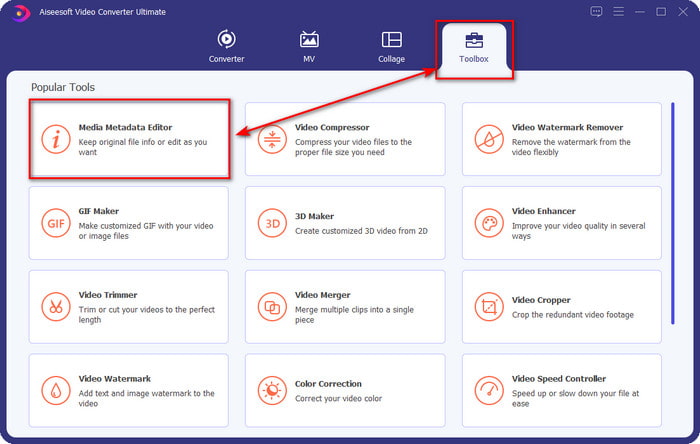
Paso 2. Una vez hayas abierto la herramienta, debes ir a la sección Herramientas y abrir el Editor de metadatos multimedia haciendo clic en él.
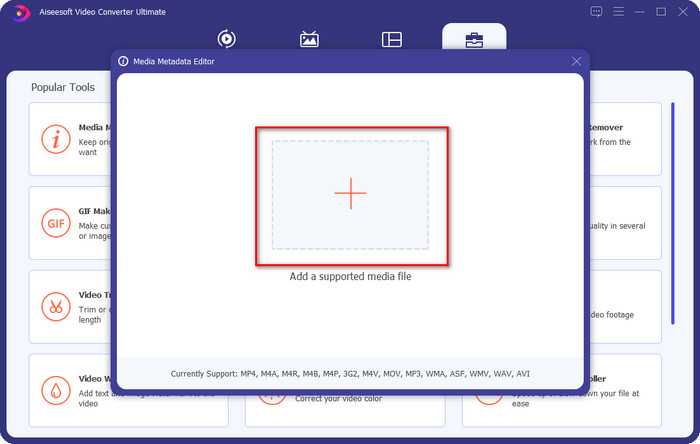
Paso 3. Pulsa el icono + en la nueva ventana que aparecerá en tu pantalla, selecciona el archivo de audio al que quieras cambiar las etiquetas ID3 y pulsa Abrir para subirlo.
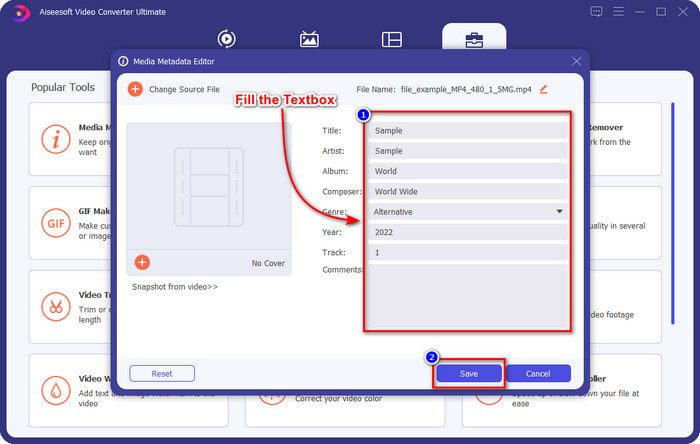
Paso 4. Ahora puedes escribir la información que quieras añadir a tu archivo de audio y hacer clic en Guardar cuando hayas terminado con cada cuadro de texto. Así de fácil, ya habrás añadido etiquetas al archivo de audio con la ayuda de este software.
Pros
- Admite cambiar MP3, WMA, WAV y más de 1000 metadatos sin esfuerzo.
- Se admite la conversión ultrarrápida y la aceleración de hardware para un proceso a la velocidad del rayo.
- Las funciones primarias y avanzadas de edición de video están disponibles en Toolbox.
- Es la primera opción de millones de usuarios en todo el mundo para realizar esta tarea.
Contras
- Es necesario comprar la herramienta para tener todas las funciones de edición sofisticadas.
- No disponible en Android e iOS.
Reproductor de multimedia VLC
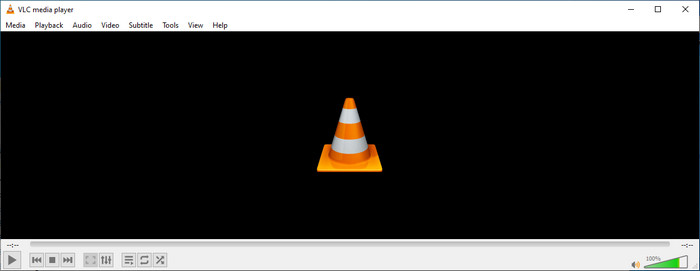
VLC Media Player es un reproductor multimedia de primer nivel que puedes descargar en Windows y Mac. Esta herramienta puede ayudarte a reproducir vídeos sin descargar ningún códec en tu sistema, pero también puedes usarla para editar las etiquetas ID3 de tu archivo de audio. Aunque la herramienta no es un editor de metadatos dedicado, aún puede corregir etiquetas incorrectas. Por lo tanto, si ya tienes esta herramienta, puedes ajustar fácilmente los metadatos de tu canción, pero no esperes demasiado de ella porque no es tan buena como el editor de etiquetas ID3 de primera clase para escritorio.
Pros
- Un reproductor multimedia y editor de metadatos que puede usar en cualquier dispositivo.
- Admite un formato de medios promedio para cambiar las etiquetas.
- La GUI es simple y llana.
Contras
- No es un editor de metadatos profesional.
- Admite funciones limitadas con respecto a la edición de etiquetas.
Parte 3. Los 3 principales editores de etiquetas ID3 en dispositivos móviles iOS/Android
Editor de etiquetas de música estrella
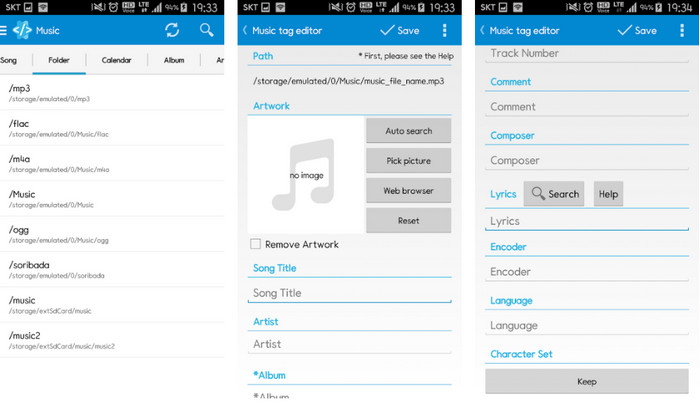
Star Music Tag Editor es uno de los editores de etiquetas ID3 más utilizados en Android. Esta aplicación puede mostrarte distinta información sobre tu música, y puedes cambiarla si lo necesitas. Su interfaz gráfica es muy sencilla, así que puedes aprender a usarla con facilidad incluso si no estás familiarizado con una herramienta para editar etiquetas. Aunque la app es excelente, sigue teniendo algunos fallos al añadir metadatos, especialmente en la carátula del álbum. Aunque puedan surgir problemas, sigue siendo un editor de etiquetas fiable que puedes descargar en tu teléfono Android.
Pros
- Gratis para descargar el editor de metadatos en Android.
- La GUI es simple y fácil de entender.
- Agregue las etiquetas en el archivo de audio fácilmente.
Contras
- Tiene un problema al agregar una portada de imagen en el archivo de audio.
- A veces, los errores siguen sucediendo.
Reproductor de música Clouds para Clouds
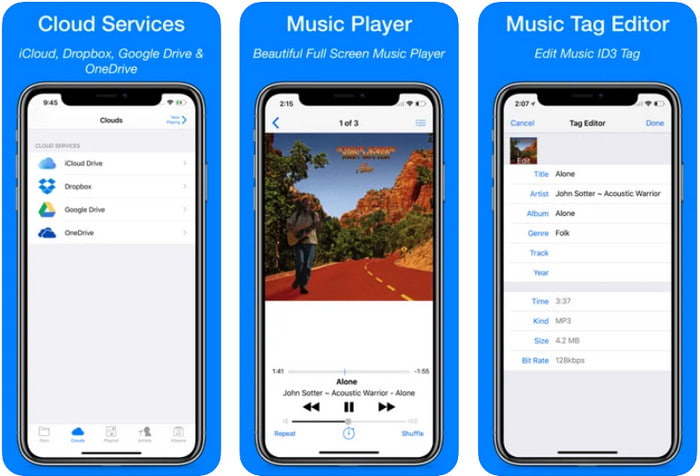
Clouds Music Player for Clouds es una aplicación multifunción que puedes descargar en tus dispositivos iOS. Puede editar etiquetas ID3 en iPhone, reproducir música y crear tonos de llamada a partir de las canciones. A pesar de sus funciones, su interfaz es simple y clara, y puedes acceder a tu servicio en la nube a través de la app. Incluso con su interfaz fácil de usar, la información que puedes añadir como metadatos a tu archivo de audio es limitada, lo que significa que solo las etiquetas básicas están disponibles para editar. No obstante, es una excelente opción para descargar si eres usuario de iOS.
Pros
- Disponible en cualquier dispositivo iOS para descargar.
- Editor de música multifuncional y editor de etiquetas.
- Editor de metadatos intuitivo en iOS.
Contras
- No admite agregar más metadatos.
- Los errores y problemas de cambio de metadatos están ocurriendo, pero no con frecuencia.
Dash: aplicación de infoentretenimiento
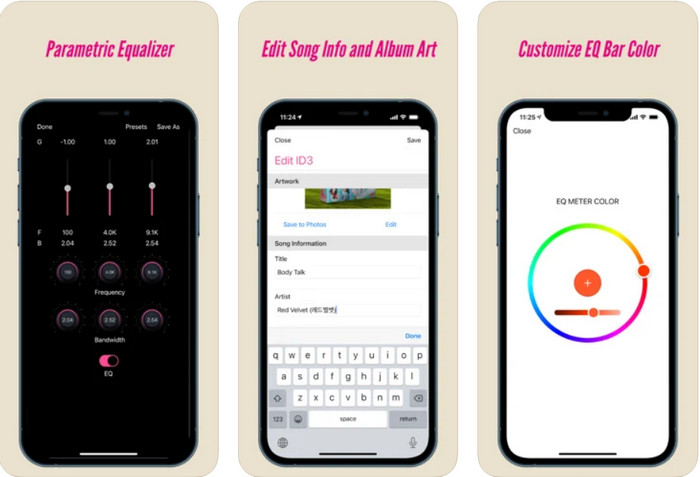
Dash- Infotainment App es otra herramienta que puedes descargar para editar etiquetas ID3 en iPhone cuando lo necesites. No tendrás que aprender mucho antes de usar la app gracias a su interfaz sencilla y bien organizada. Puedes usar esta herramienta para cambiar fácilmente los parámetros de tus archivos FLAC y ALAC con su ecualizador fácil de usar. Además, puedes ver la velocidad y el compás de la canción que subas aquí. Igual que con el primer editor de etiquetas para iPhone, aquí solo puedes añadir título, artista y carátula del álbum, pero recuerda que tu formato debe ser FLAC o ALAC; si no está en uno de estos formatos, no podrás subirlo.
Pros
- La curva de aprendizaje no es tan rígida.
- Un ecualizador de audio multitudinario está disponible.
- GUI no es mucho, y no es menos.
Contras
- Solo admite formato FLAC y ALAC.
- No hay mucho que ofrecer con respecto a la edición de metadatos.
Parte 4. Preguntas frecuentes sobre el editor de etiquetas ID3
¿Cuál es el mejor editor de etiquetas ID3 de línea de comandos que puedo usar?
Si estás buscando un editor de etiquetas ID3 por línea de comandos, debes saber que FFmpeg es un editor de este tipo. Con esta herramienta, puedes convertir, rotar, cortar, recortar y editar tus etiquetas de metadatos. Si quieres saber más sobre FFmpeg, quizá quieras leer cómo usarlo haciendo clic en el enlace para editar metadatos con FFmpeg fácilmente.
¿Cuáles son los otros tipos de metadatos?
Existen seis tipos de metadatos: descriptivos, administrativos, de referencia o explicativos, estadísticos, legales y estructurales. Si quieres saber más sobre estos tipos y su información, puedes hacer clic en este enlace y leer más al respecto.
¿Es posible ver las etiquetas sin una aplicación?
Sí, en lugar de descargar software, puedes usar una herramienta en línea para ver las etiquetas de tu archivo. Haz clic en este enlace para ver metadatos en tu escritorio en línea, pero también te presentaremos algunas herramientas que te encantará descargar.
Conclusión
Con la información que enumeramos anteriormente, fue posible editar las etiquetas ID3 utilizando los editores que presentamos anteriormente, sin importar qué dispositivo esté utilizando actualmente. Además, la aplicación y el software son perfectos para los usuarios que necesitan editar sus metadatos. Aunque las herramientas abren una excelente oportunidad para que los usuarios editen los metadatos, no hay duda de que la última herramienta presenta una forma efectiva de editar etiquetas ID3 en cualquier archivo de música. Si desea tener el mejor editor de etiquetas ID3 en Windows y Mac, puede descargarlo haciendo clic en el botón de descarga que se presenta arriba y luego disfrutar de su grandeza.
-
 Las 2 mejores formas de editar metadatos OGG que deberías probar gratis
 ¿Necesitas editar los metadatos de OGG? Bueno, puede manejar fácilmente la edición de las etiquetas usando el software correcto. Si no tiene uno, lea este artículo.
-
 Una visión general absoluta sobre Pentaho Metadata Editor [Actualizado en 2022]
 ¿No encuentra un artículo confiable sobre Pentaho Metadata Editor? Afortunadamente, revisamos la herramienta nosotros mismos para brindarle los datos que conocerá sobre la herramienta.
-
 Consejos y trucos sobre el editor de metadatos de VLC que debe conocer en 2022
 ¿Quieres usar el VLC como editor de metadatos? En este caso, puede leer este artículo, ya que proporcionamos una revisión imparcial del editor de metadatos de VLC.
