


 Video Converter Ultimate
 Grabador de pantalla
 Reparación de vídeo
 Descarga segura
Métodos incuestionables sobre cómo eliminar el logotipo de iSkysoft de un video
iSkysoft es una excelente aplicación con muchas funciones magníficas, lo que hace que destaque frente a otros competidores. Es una aplicación sencilla que te permite convertir un formato de vídeo a otro y hacer algunas ediciones de vídeo básicas. Sin embargo, la parte más decepcionante de este software es que, después de utilizar esta aplicación, obtienes una gran marca de agua de iSkysoft en tus vídeos. Tener una marca de agua/logotipo grande en tu vídeo no resulta nada agradable de ver. Afortunadamente, hay aplicaciones fiables que puedes usar para eliminar objetos molestos como el logotipo/marca de agua de iSkysoft. Debes leer esta publicación si tienes ganas de descubrir los mejores métodos para eliminar el logotipo de iSkysoft de tu vídeo.

Parte 1: eliminar el logotipo de iSkysoft del video en el escritorio
El logotipo de iSkysoft en la pantalla resulta realmente irritante, especialmente si estás viendo tus vídeos favoritos. Pero ya no tienes que preocuparte. Puedes deshacerte de ese logotipo usando Video Converter Ultimate. Este software fiable puede ayudarte a eliminar el logotipo de iSkysoft de tus vídeos de dos maneras sencillas: con la herramienta Removedor de Marca de Agua de Vídeo y con la herramienta Recortador de Vídeo. Con estas herramientas, puedes eliminar fácilmente el logotipo de iSkysoft de tu vídeo. Si el logotipo de iSkysoft está en una esquina del vídeo, se recomienda usar la herramienta Recortador de Vídeo. Pero, si el logotipo está colocado en la parte central, puedes utilizar la herramienta Removedor de Marca de Agua de Vídeo. De este modo podrás ver tus películas o vídeos favoritos sin que el logotipo te irrite.
Además, además de eliminar las marcas de agua de tus videos, Video Converter Ultimate tiene más funciones. Tiene un mejorador de video, fusión de video, recortador, recortador, rotador, convertidor y más. Además, una de las funciones principales de esta aplicación es convertir varios formatos de archivos de video. Los usuarios no profesionales también pueden utilizar esta aplicación porque tiene una interfaz simple. Si desea aprender cómo eliminar el logotipo de iSkysoft de su video, le mostraremos las dos formas sencillas que ofrece esta aplicación.
Uso del eliminador de marcas de agua de video
Paso 1: Primero debes descargar Video Converter Ultimate en tu ordenador de sobremesa para usar este magnífico software. Después de descargarlo, sigue el proceso de instalación y ejecuta la aplicación.
Descarga gratuitaPara Windows 7 o posteriorDescarga segura
Descarga gratuitaPara macOS 10.7 o posteriorDescarga segura
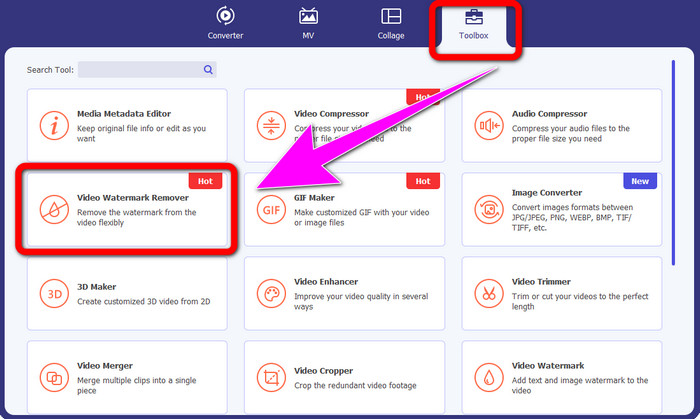
Paso 2: Cuando ya hayas abierto el software, ve al panel Caja de Herramientas y selecciona la herramienta Removedor de Marca de Agua de Vídeo. Verás que aparece otra interfaz en tu pantalla.
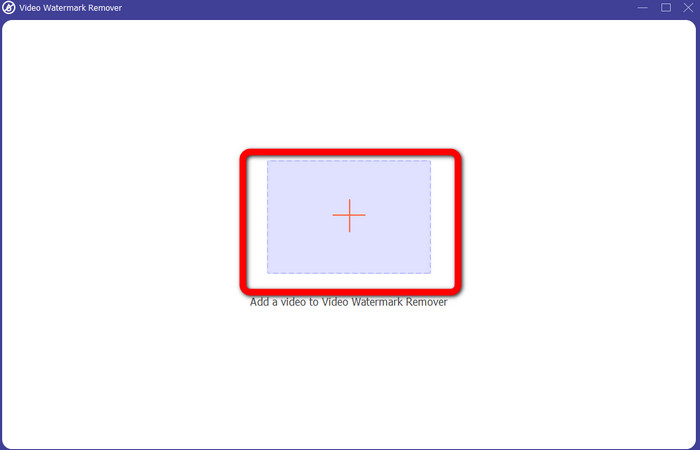
Paso 3: Cuando ya veas la nueva interfaz, haz clic en el icono de suma y adjunta tu vídeo con el logotipo de iSkysoft que quieres eliminar.
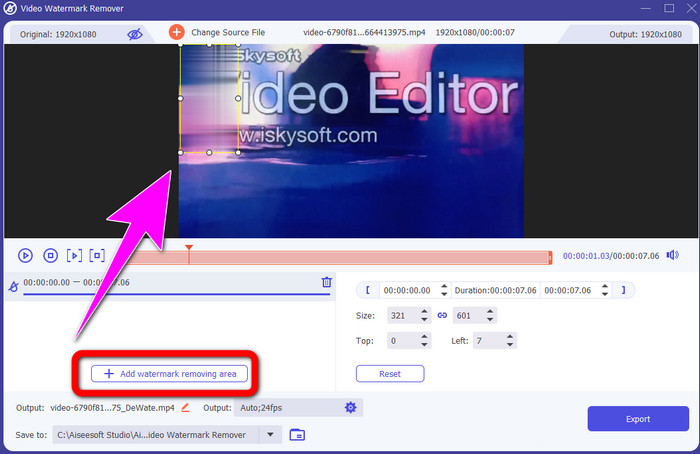
Paso 4: A continuación, haz clic en el botón Añadir Área de Eliminación de Marca de Agua. Mueve el cuadro sobre tu vídeo y cubre el logotipo de iSkysoft.
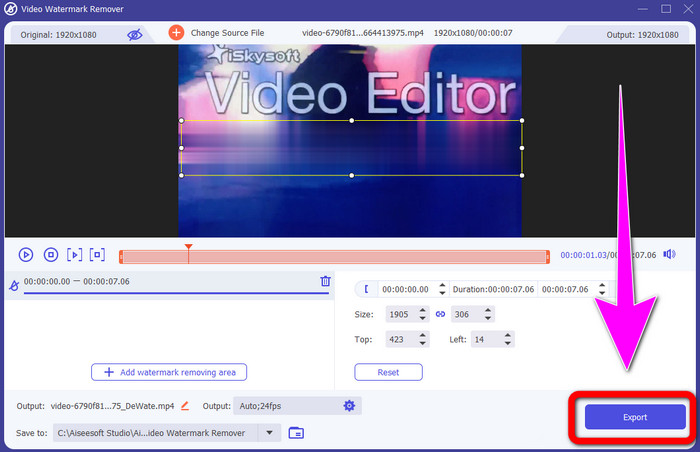
Paso 5: Por último, haz clic en el botón Exportar para guardar tu vídeo final.
Usando el recortador de video
En esta parte, le mostraremos cómo eliminar el logotipo de iSkysoft de su video usando la herramienta Video Cropper.
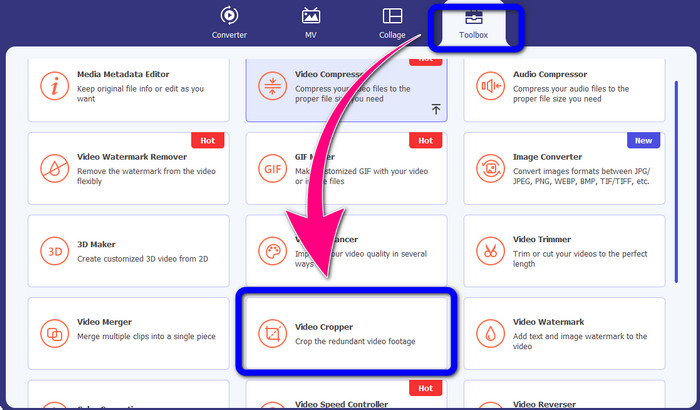
Paso 1: Ejecuta la aplicación en tu ordenador de sobremesa. En el panel Caja de Herramientas, debes hacer clic en la herramienta Recortador de Vídeo. Al igual que con la otra herramienta anterior, aparecerá otra interfaz en tu pantalla.
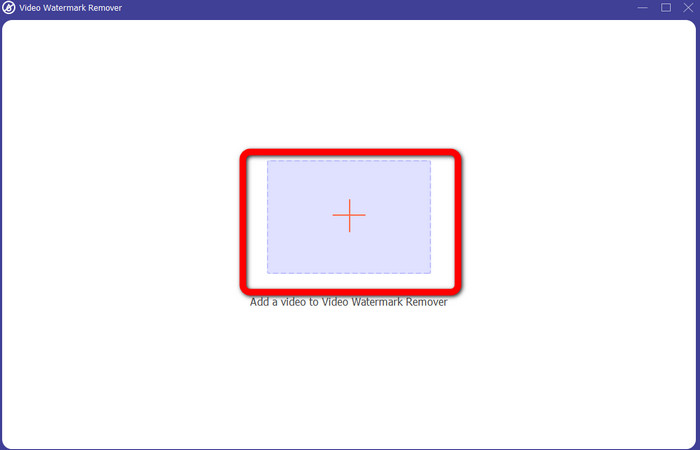
Paso 2: Haz clic en el botón con el signo Más para importar tu vídeo con el logotipo de iSkysoft.
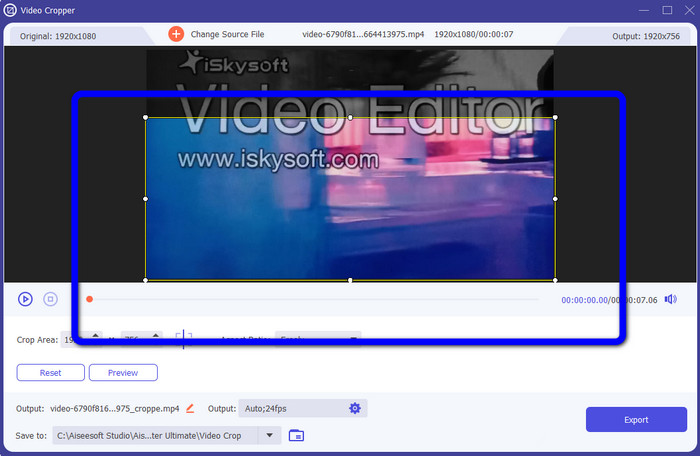
Paso 3: En esta parte, ya puedes recortar el vídeo para eliminar el logotipo de iSkysoft de tu vídeo. Usa el ratón para mover el borde de tu vídeo.
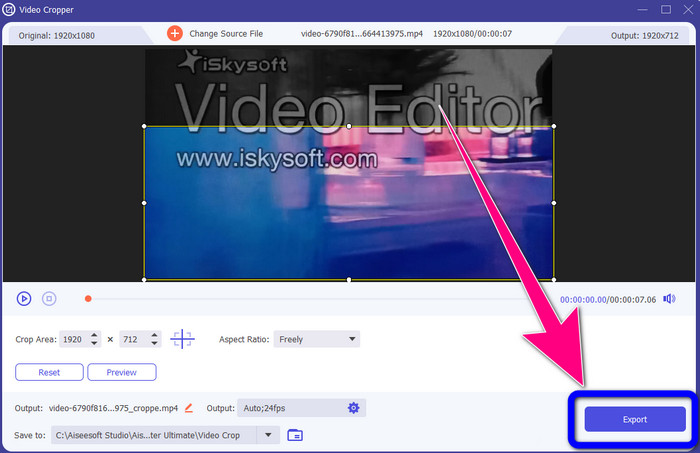
Paso 4: Para el paso final, haz clic en el botón Exportar y guarda tu resultado en tu ordenador.
Parte 2: Cómo eliminar el logotipo de iSkysoft de un video en línea
Usando HitPaw
También puedes eliminar el logotipo de iSkysoft en línea. Una de las mejores herramientas que puedes usar es HitPaw. Esta aplicación en línea puede eliminar fácilmente el logotipo de tu vídeo. Puedes usarla tanto en el ordenador de sobremesa como en línea, lo cual es práctico para cualquiera. Además, HitPaw es segura de usar. Garantiza que los vídeos puedan editarse y verse solo por ti. Asimismo, no tienes que preocuparte por las limitaciones de este software. No tiene límites a la hora de eliminar logotipos de tus vídeos. No necesitas comprar esta aplicación porque es gratuita. Sin embargo, si eliminas el logotipo o cualquier
elementos innecesarios de su video, debe esperar un poco más. Esta aplicación tiene un procedimiento de eliminación lento, que consume mucho tiempo para los usuarios. Además, depende de tu conexión a Internet. Funcionará bien si tiene una conexión rápida. Pero, si tiene una conexión lenta, espere un poco de retraso. Siga los sencillos pasos a continuación para eliminar el logotipo de iSkysoft de sus videos.
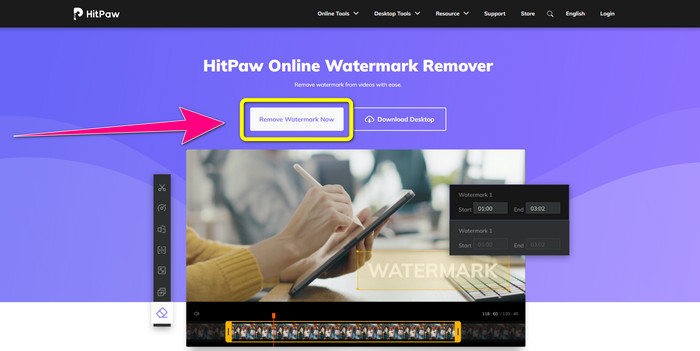
Paso 1: Visita el sitio web de HitPaw. Haz clic en el botón Remove Watermark Now - Choose File para insertar tu vídeo con el logotipo de iSkysoft que quieres eliminar.
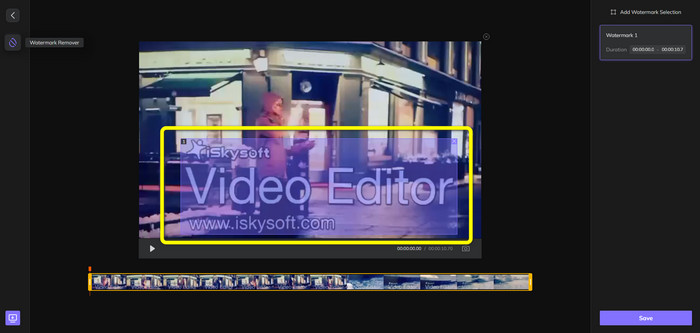
Paso 2: Cuando ya hayas adjuntado tu archivo de vídeo, aparecerá en tu pantalla un cuadro de color azul. Usa este cuadro para cubrir el logotipo de iSkysoft. Puedes cambiar el tamaño del cuadro.
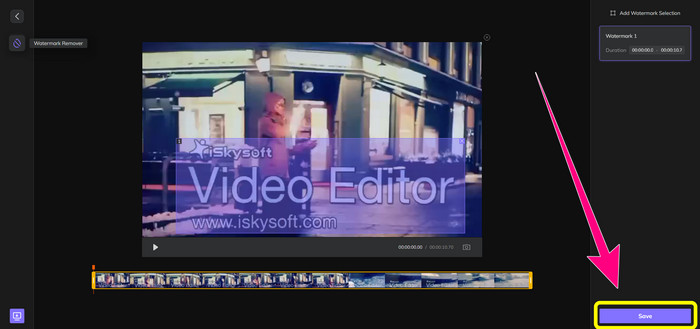
Paso 3: Cuando hayas terminado de cubrir el logotipo de iSkysoft de tu vídeo, haz clic en el botón Save. Espera al proceso de eliminación y guarda tu vídeo.
Uso de Video Watermark Remover en línea
Otra herramienta en línea que puedes usar es Video Watermark Remover Online. Con esta aplicación, puedes eliminar el logotipo de iSkysoft de tus vídeos. También es un software fácil de usar, adecuado para usuarios no profesionales. Puedes eliminar cualquier elemento molesto de tus vídeos sin perder la calidad de los mismos. Sin embargo, al usar la versión gratuita, hay una limitación para eliminar logotipos de tus vídeos: solo puedes eliminar logotipos o marcas de agua de 5 vídeos. Debes comprar la suscripción si quieres añadir más vídeos con Video Watermark Remover Online. Además, no puedes guardar tu resultado en otro formato. Solo puedes guardarlo en el mismo formato, lo cual no es ideal. Por último, tiene un procesamiento de archivos lento. Sigue las sencillas instrucciones que aparecen a continuación para eliminar el logotipo de iSkysoft de tus vídeos.
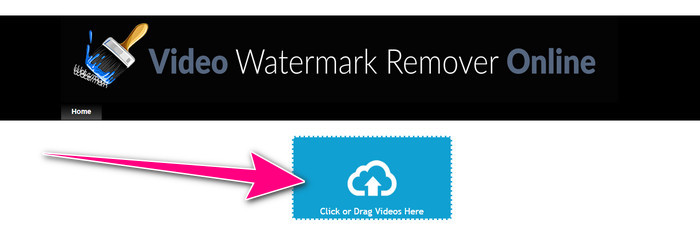
Paso 1: Ve al sitio web de Video Watermark Remover Online. Selecciona el botón Click or Drag Videos Here para importar tu archivo de vídeo con el logotipo de iSkysoft que quieres borrar.
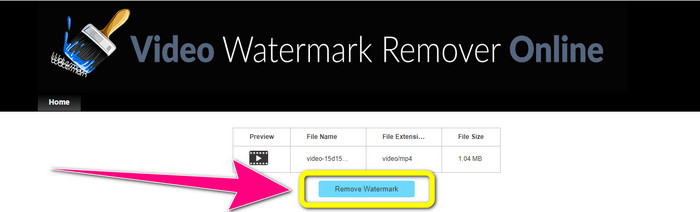
Paso 2: A continuación, haz clic en el botón Remove Watermark y espera al proceso de eliminación.
Relacionado con:
Forma más rápida de eliminar un logotipo de un vídeo en Adobe Premiere Pro
Cómo eliminar un logotipo de un vídeo con Windows Movie Maker
Parte 3: Preguntas frecuentes sobre la eliminación del logotipo de iSkysoft
¿Se puede quitar un logo de una imagen?
Sí, puedes usar FVC Free Watermark Remover para borrar el logotipo de tu imagen de forma fácil y rápida.
¿Es ilegal quitar la marca de agua?
De acuerdo con la Ley de derechos de autor de EE. UU., sección 1202, eliminar marcas de agua sin el permiso del propietario es ilegal.
¿Cómo elimino el logo gratis?
Puede usar la versión de prueba gratuita de Video Converter Ultimate para eliminar un logotipo de su video de forma gratuita.
Conclusión
Este artículo ha proporcionado excelentes métodos para eliminar el logotipo de iSkysoft de tu vídeo usando herramientas para tu ordenador y en línea. Pero si quieres buscar un excelente eliminador de logotipos que puedas usar, entonces puedes descargar Video Converter Ultimate. Esta aplicación ofrece un proceso de eliminación rápido. También es accesible para todo tipo de usuarios.
-
 8 removedores de marcas de agua de video sobresalientes en línea y fuera de línea
 Si está buscando el mejor software gratuito de eliminación de marcas de agua de video que puede usar en sus teléfonos Windows, Mac, iPhone y Android, este artículo es para usted
-
 Los mejores métodos sobre cómo eliminar la marca de agua mordible del video
 Este artículo le mostrará el removedor de marcas de agua mordible más confiable y fantástico. Estas maravillosas aplicaciones te ayudarán a solucionar este tipo de problemas
-
 Procedimientos fáciles de aprender para eliminar el logotipo de un video
 ¿Está buscando el mejor y más fácil removedor de logotipos de video? Entonces, este artículo es bueno para ti. Aproveche la oportunidad de obtener información sobre cómo eliminar un logotipo de un video.
