


 Video Converter Ultimate
 Grabador de pantalla
 Reparación de vídeo
 Descarga segura
Cómo eliminar la marca de agua de los videos exportados de Renderforest en última instancia
Renderforest es un pacto completo de excelentes plantillas animadas para intros, outros, títulos, anuncios, etc. Puede comenzar desde cero o usar las plantillas disponibles aquí. Aunque no seas un experto en la edición de videos, aún puedes superarlo usando esta plataforma web. Debido a su uso y ventaja óptima, muchos usuarios eligieron esta plataforma para crear un diseño de alta calidad, eficiente, compatible y confiable si se suscribe.
Así, puedes descargar aquí gratis el vídeo que editas si te registras, pero con una marca de agua. La marca de agua supone un problema para muchos de nosotros que ya exportamos el vídeo aquí y para quienes no pueden permitirse la cuota de suscripción de esta herramienta. A continuación, enumeraremos tutoriales sobre cómo eliminar la marca de agua de Renderforest usando las herramientas más útiles que hemos reunido durante nuestra investigación. Podemos compartirlos contigo si sigues leyendo la siguiente parte de este artículo.

Parte 1. 3 Maneras Efectivas de Cómo Eliminar Marcas de Agua de Video de Renderforest
FVC Video Converter Ultimate
FVC Video Converter Ultimate es un extraordinario eliminador de marcas de agua de vídeo que puede guiarte paso a paso sobre cómo quitar la marca de agua de Renderforest. Puedes confiar en esta herramienta para eliminar la marca de agua de tu vídeo sin complicaciones. Si comparamos esta herramienta definitiva con otras, esta tiene la capacidad de eliminar la marca de agua de tu vídeo con el respaldo de la tecnología de IA. Aun así, es la mejor herramienta para quitar la marca de agua de tu vídeo sea cual sea el formato que subas. ¿Qué hace excelente a esta herramienta? No necesitas ser experto en tecnología para usarla; con la sencilla guía y los pasos que verás a continuación, podrás eliminar la marca de agua que Renderforest añade al vídeo.
Paso 1. Descarga el software en tu ordenador haciendo clic en el botón de descarga adecuado. Haz clic en el archivo descargado, instálalo y pulsa Start Now para iniciar el software de inmediato.
Descarga gratuitaPara Windows 7 o posteriorDescarga segura
Descarga gratuitaPara macOS 10.7 o posteriorDescarga segura
Paso 2. Después de iniciar el software, abre la Toolbox y luego haz clic en Video Watermark Remover que aparece debajo.
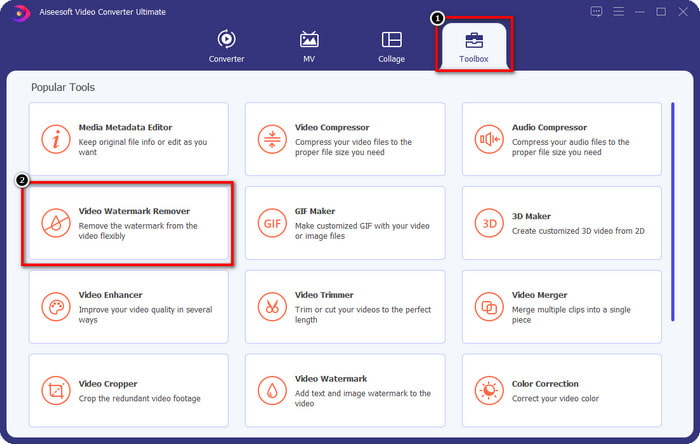
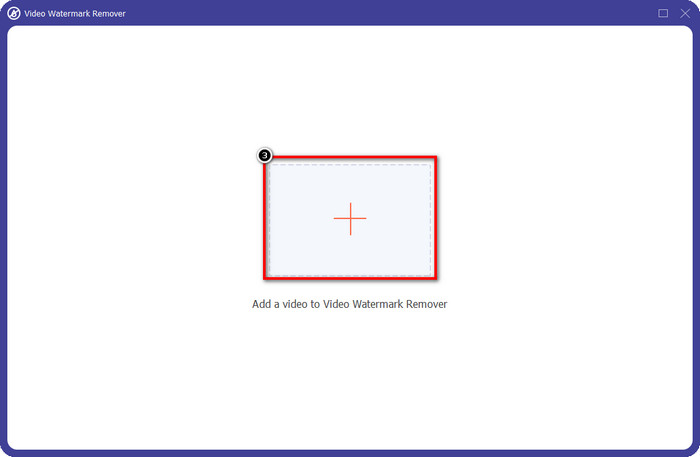
Paso 3. Haz clic en el icono + en tu pantalla para subir el vídeo de Renderforest que has exportado con marca de agua.
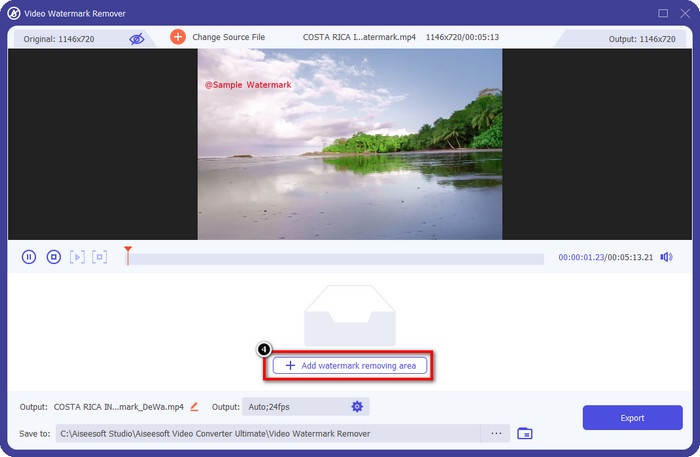
Paso 4. Pulsa Add Removing Watermark Area para empezar a eliminar la marca de agua de Renderforest.
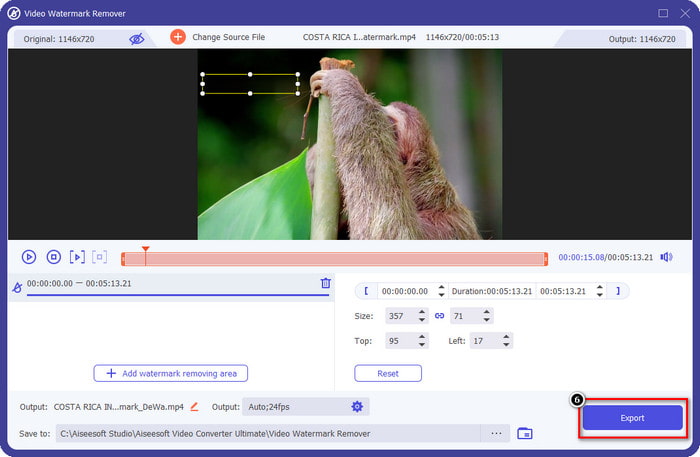
Paso 5. En la nueva ventana de tu pantalla, arrastra el cuadro de selección y ajústalo para que encaje con la marca de agua. Puedes ajustar libremente el cuadro de selección si lo necesitas.
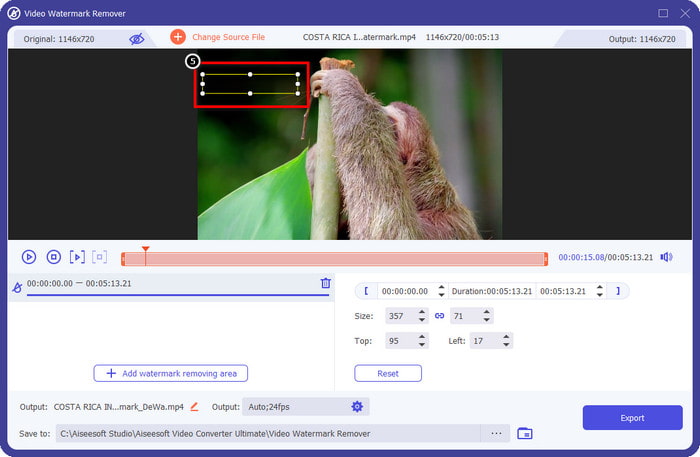
Paso 6. Ahora que el cuadro de selección detecta la marca de agua en tu vídeo, haz clic en Export para comenzar a eliminarla y guardar el vídeo sin marca de agua. Procesará el vídeo rápidamente en muy poco tiempo y ya podrás usar el vídeo sin la molesta marca de agua.
Relacionado:
Eliminar marca de agua de DeviantArt
Eliminar marca de agua de Video Helper
Eliminar logotipo ahora
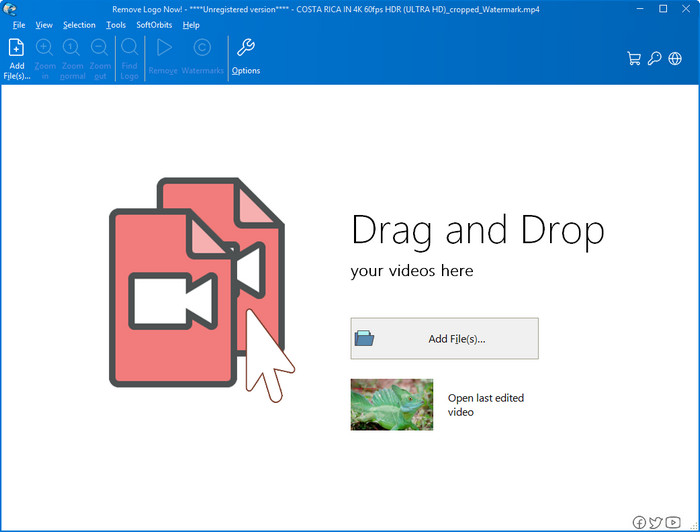
El siguiente en nuestra lista, Remove Logo Now, se ha ganado una excelente reputación por eliminar marcas de agua superpuestas en Windows. Con esta herramienta, no necesitarás conocimientos avanzados para saber cómo quitar la marca de agua de Renderforest en un PC. Después de eliminar la marca de agua, quedan rastros del residuo donde se originó si miras con detenimiento. Pero si no lo miras muy de cerca, no notarás la marca de agua ni el residuo en el vídeo exportado. El siguiente tutorial te enseñará cómo eliminar la marca de agua de tu vídeo en tus dispositivos Windows.
Paso 1. Descarga e instala Remove Logo Now en tu ordenador, luego sigue el proceso de instalación.
Paso 2. Inicia el software y haz clic en Add Files para subir aquí el vídeo. Puedes arrastrar y soltar el vídeo para cargar el archivo de forma más eficiente.
Paso 3. Elige qué herramienta quieres usar para marcar la marca de agua. Tras seleccionar una, resalta la marca de agua y haz clic en Remove.
Paso 4. Haz clic en Start para comenzar el proceso de eliminación de la marca de agua que ofrece esta herramienta.
Eliminador de marcas de agua de video en línea

Si no te gusta descargar software en tu ordenador pero aun así quieres saber cómo eliminar la marca de agua de Renderforest, entonces prueba a usar Video Watermark Remover Online. Puedes usar este eliminador de marcas de agua totalmente automatizado para quitar la marca de agua de tu vídeo gratis sin descargarlo en tu equipo. Al igual que con la herramienta mencionada aquí, aunque seas principiante en edición de vídeo o en eliminación de marcas de agua, podrás dominar el uso de esta herramienta en pocos minutos. Puedes seguir el siguiente tutorial para aprender a usarla.
Paso 1. Abre el eliminador de marcas de agua en línea buscándolo en tu navegador web favorito.
Paso 2. Haz clic en el icono de nube de carga en la página principal para insertar el vídeo que exportaste en Renderforest.
Paso 3. Espera a que termine el proceso de carga, ya que elimina automáticamente la marca de agua de tu vídeo y luego haz clic en Download para obtener el vídeo sin la marca de agua.
Parte 2. Preguntas frecuentes sobre cómo eliminar la marca de agua de Renderforst
¿Cuánto es la cuota de suscripción de Renderforest?
Renderforest admite tres tipos diferentes de precios que puede aprovechar; $ 14.99 para Lite, $24.99 para Pro y $29.99 para Business cada mes. Este precio tiene un propósito diferente entre sí; puede ir a su sitio web principal para ver cuáles son los alistados disponibles en la suscripción que desea aprovechar.
¿Es posible eliminar la marca de agua de Renderforest Video sin una herramienta?
Sí, puede eliminar la marca de agua en su Renderforest sin usar una herramienta, y de esa manera es comprando una tarifa mensual o anual en el software. De modo que cuando exporte el archivo de video, no se le agregará ninguna marca de agua.
Cuál es el mejor plan para Renderforest; ¿Mensual o Anual?
La suscripción mensual es una buena opción si desea usar la herramienta varias veces, pero si decide usar el software durante mucho tiempo, es mejor aprovechar un plan anual porque le costará menos que la renovación de cada mes. Pero antes de aprovecharlo, puede usar Renderforest de forma gratuita iniciando sesión en su cuenta aquí, luego intente usar las otras plantillas que proporciona de forma gratuita.
Conclusión
De hecho, este artículo proporciona pruebas sólidas para eliminar la marca de agua de Renderforest de forma gratuita utilizando los tres eliminadores de marcas de agua más útiles que puede utilizar. Si es un usuario de Windows y desea eliminar la marca de agua en su escritorio, debe intentar usar Remove Logo Now. Pero si no le gusta descargar software, debe intentar usar Video Watermark Remover Online porque puede usar esta herramienta para eliminar marcas de agua de manera efectiva.
Pero si usted es un usuario de Windows o Mac que desea un eliminador de marcas de agua efectivo, entonces, sin duda, el mejor eliminador de marcas de agua que puede usar es FVC Video Converter Ultimate. Es el mejor eliminador de marcas de agua que puede usar para eliminar las marcas de agua que molestan a su video de Renderforest de manera eficiente y profesional.
-
 2 formas de eliminar la marca de agua VSDC en Windows y Mac rápidamente
 ¿Está buscando una manera de eliminar la marca de agua VSDC en sus videos? Con este artículo, proporcionamos herramientas que puede utilizar para deshacerse de la marca de agua.
-
 Elimine la marca de agua Animoto en videos de manera fácil y efectiva
 ¿Cómo quitar la marca de agua de Animoto en el video? Siga leyendo este artículo ya que proporcionamos un tutorial completo sobre cómo hacerlo.
-
 Cómo quitar una marca de agua de un video usando Final Cut Pro [Guía completa]
 ¿Tienes algún problema con la marca de agua en los videos? No dijo más, porque proporcionamos un tutorial sobre cómo eliminar la marca de agua de un video usando Final Cut Pro.
