


 Video Converter Ultimate
 Grabador de pantalla
 Reparación de vídeo
 Descarga segura
Tutorial completo sobre cómo eliminar la marca de agua de Weibo que necesitará saber
Weibo es una plataforma de redes sociales conocida que se utiliza para compartir, difundir y obtener información como Twitter que se puede usar con frecuencia en China. También puede publicar y descargar miniaturas, fotos y videos aquí. Sin embargo, habrá una marca de agua una vez que la exportes. Muchos usuarios quieren eliminarlo porque perturba las imágenes del contenido.
A pesar de los miles de eliminadores de marcas de agua disponibles, pocas herramientas pueden eliminar marcas de agua de forma realmente eficaz. Así que, si no te gusta la marca de agua en los contenidos visuales que descargas, este artículo reúne las mejores herramientas que puedes utilizar. Las hemos probado para demostrar que son funcionales y prácticas a la hora de eliminar marcas de agua. Para enseñarte cómo quitar la marca de agua de Weibo, debes seguir leyendo este artículo.

Parte 1. Cómo eliminar una marca de agua de un video de Weibo con Ultimate Watermark Remover
La marca de agua de Weibo puede ser un problema con otras herramientas, porque la mayoría dejan un manchón donde estaba la marca. Sin embargo, si utilizas FVC Video Converter Ultimate, no quedará ningún rastro de la marca de agua. No importa si la marca de agua es grande o pequeña, esta herramienta puede borrarla de forma eficaz sin dejar huellas. Así podrás disfrutar del vídeo que exportes desde Weibo. En otras palabras, eliminar la marca de agua con la ayuda de esta herramienta es pan comido.
Además, también puede usar esta herramienta para otras cosas, como cortar, fusionar, comprimir, recortar, crear GIF y más. Y si desea agregar una marca de agua en su video para que nadie pueda robárselo, puede usar este software para hacerlo. Es el software todo en uno necesario en su escritorio. ¿Quieres saber cómo quitar la marca de agua del video de Weibo? Puede seguir los pasos siguientes mientras explicamos cómo hacerlo paso a paso.
Descarga gratuitaPara Windows 7 o posteriorDescarga segura
Descarga gratuitaPara macOS 10.7 o posteriorDescarga segura
': Antes de seguir los pasos siguientes, asegúrese de haber exportado el video de Weibo del que desea eliminar la marca de agua para que pueda encontrarlo fácilmente en la carpeta.
Paso 1. En primer lugar, debes descargar el software en tu ordenador y elegir la versión según el sistema operativo. Después de instalar el software, sigue el proceso de configuración de WinRAR que aparecerá en tu pantalla, haz clic en Start Now para iniciarlo y continúa.
Paso 2. Ve a la sección Toolbox y busca Video Watermark Remover; haz clic en ella.
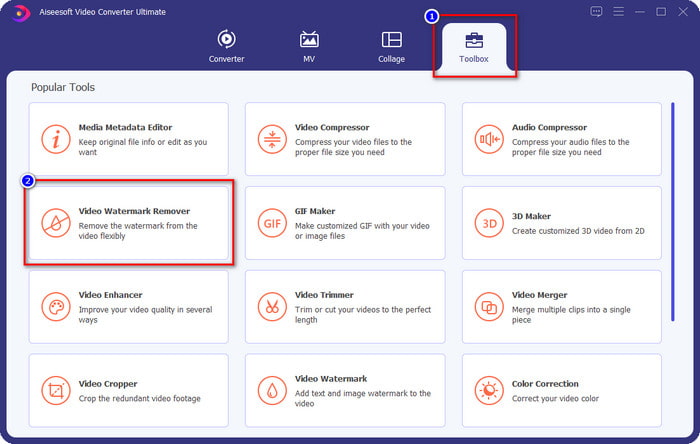
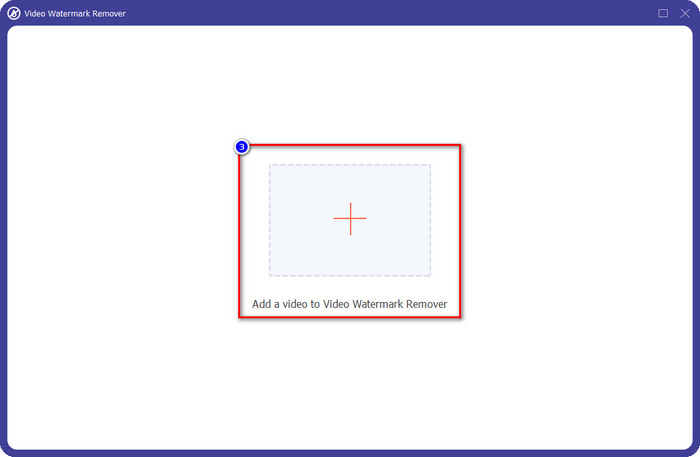
Paso 3. Haz clic en el botón +, localiza en la carpeta el vídeo de Weibo con marca de agua que descargaste antes, haz clic en el archivo y pulsa Open para subirlo.
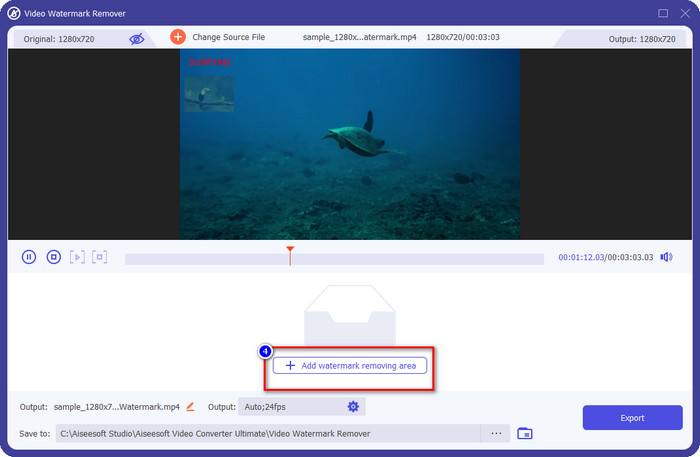
Paso 4. En la nueva ventana que aparecerá, haz clic en Add Watermark Removing Area para proceder a eliminar la marca de agua.
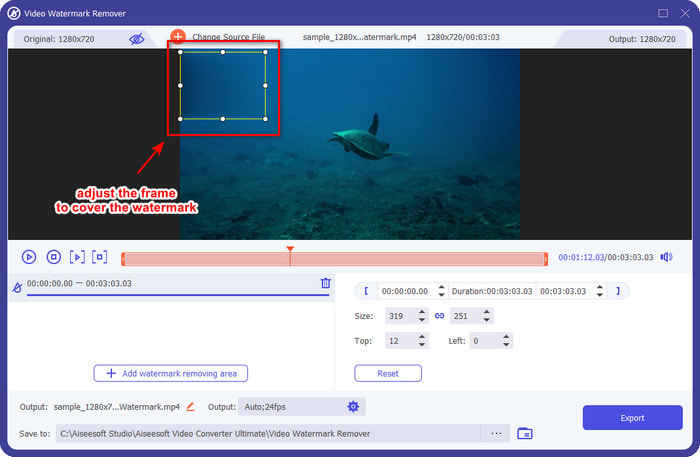
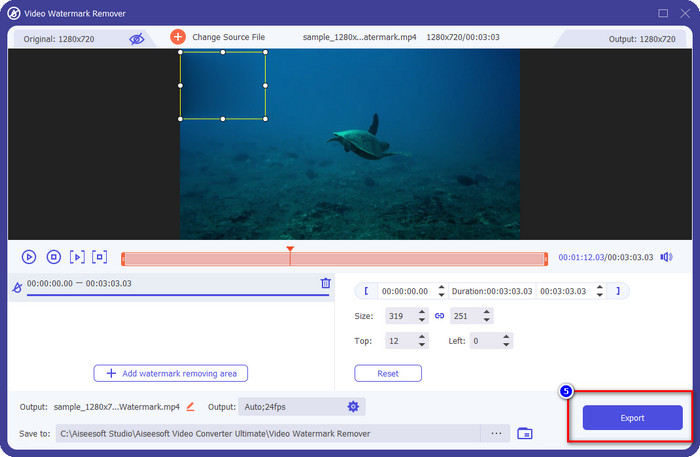
Paso 5. Arrastra y mantén pulsado el cuadro de selección para cubrir la marca de agua; también puedes ampliarlo o reducirlo según tus necesidades y cubrirla por completo antes de exportar.
Paso 6. Después de colocar el cuadro de selección sobre la marca de agua, haz clic en Export para eliminar la marca de agua del vídeo que has subido. No tendrás que esperar, porque es compatible con un proceso ultrarrápido; en pocos segundos tendrás el vídeo de Weibo sin marca de agua.
Parte 2. Cómo quitar la marca de agua de una foto de Weibo usando la versión gratuita en la Web
¿Cómo guardar fotos de Weibo sin marca de agua? No puedes guardar una imagen sin marca de agua si se exporta desde Weibo. Pero puedes usar FVC Free Watermark Remover para borrar la marca de agua en las imágenes. Es tu eliminador de marcas de agua completo para imágenes con marca de agua. En cuanto a funcionalidad, podemos decir que esta herramienta es muy superior a otros eliminadores de marcas de agua que puedes encontrar en la web. Así que, si quieres eliminar la marca de agua de una imagen, esta es la primera opción que deberías probar. Aunque puede eliminar la marca de agua de una imagen, no es capaz de quitarla de vídeos como sí puede hacerlo la herramienta definitiva.
No obstante, es de uso gratuito y su interfaz web es limpia, por lo que ni siquiera verá anuncios que puedan molestarlo. ¿Quieres saber cómo utilizar esta herramienta web? Luego siga los pasos indicados a continuación para probarlo usted mismo.
Nota: Al igual que el video, asegúrese de descargar la imagen de Weibo que desea tener y asegúrese de colocarla en una carpeta visible y de fácil acceso.
Paso 1. Para acceder al eliminador de marcas de agua en la web, haz clic en este enlace para abrirlo.
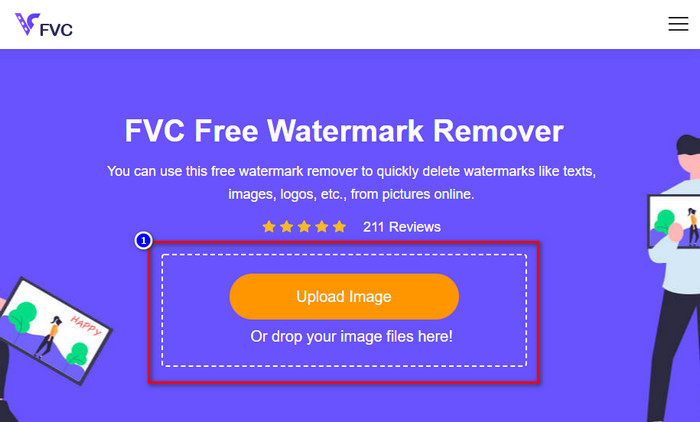
Paso 2. En la interfaz web, haz clic en Upload Image; se abrirá una carpeta en tu pantalla, busca la imagen y pulsa Open para subirla.
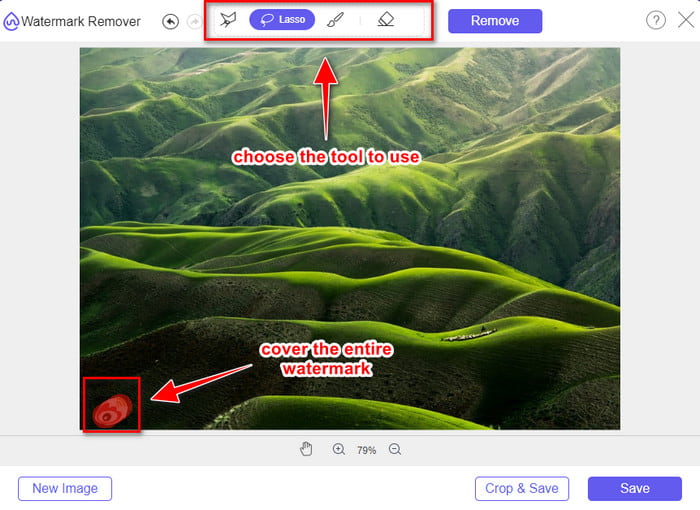
Paso 3. Aquí puedes trazar la marca de agua para eliminarla y asegurarte de que cada parte de la marca de agua queda dentro del área que has trazado.
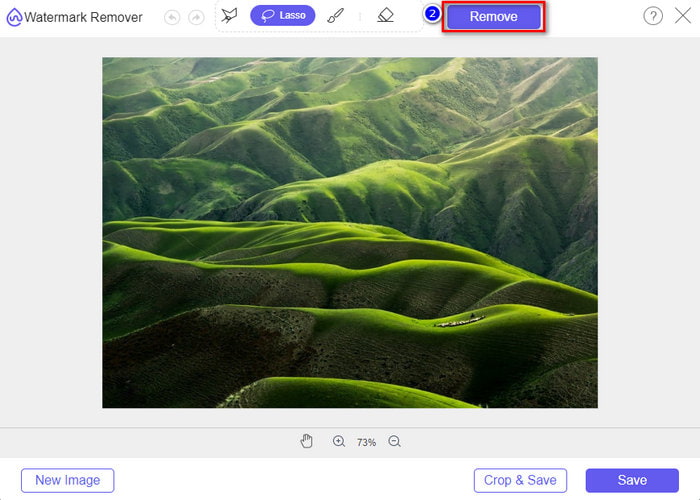
Paso 4. Pulsa Remove para borrar la marca de agua de tu imagen.
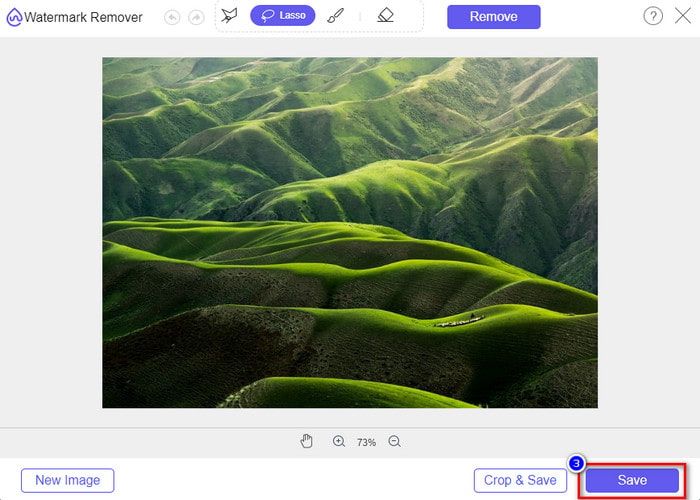
Paso 5. Después de eliminar la marca de agua de la imagen de Weibo, haz clic en Save para descargar la imagen de Weibo sin marca de agua.
Relacionado:
Cómo quitar la marca de agua de TikTok
Cómo añadir una marca de agua a un vídeo
Parte 3. Preguntas frecuentes sobre cómo eliminar la marca de agua de Weibo
¿Por qué la marca de agua de Weibo se volvió borrosa después de exportarla?
Algunas herramientas desenfocan la marca de agua para que no se pueda ver en los medios visuales que han exportado a Weibo. Pero no todas las herramientas borran las marcas de agua; algunos eliminan la marca de agua en los medios visuales sin dejar rastro. Entonces, si desea eliminar la marca de agua en Weibo sin difuminarla, debe conocer la herramienta que mencionamos anteriormente para ayudarlo a eliminarla.
¿Puedo ocultar el logotipo de Weibo en el archivo exportado?
Sí tu puedes. De esta forma, no verás la marca de agua de Weibo en el archivo. Sin embargo, manipularlo cubriría algunas partes del archivo, por lo que en lugar de ayudarlo, podría empeorar el archivo. Por lo tanto, se necesita un eliminador de marcas de agua para borrar la marca de agua del archivo.
¿Todos los archivos exportados en Weibo tienen una marca de agua?
Exportar cualquier tipo de archivo en esta plataforma de microblogging dejará huella. No importa lo que sea, las marcas de agua se agregan al archivo. Aún así, puede eliminarlo con la herramienta que mencionamos anteriormente en este artículo.
Conclusión
Increíble, ¿verdad? FVC tiene las herramientas que necesitas para eliminar al instante la marca de agua de Weibo en vídeos e imágenes. Aunque no tengas experiencia ni seas profesional en este tipo de edición, con la herramienta mencionada es posible editar. Así que, si quieres quitar una marca de agua de una imagen, haya sido exportada desde Weibo o no, FVC Free Watermark Remover es la única herramienta que necesitarás. Pero para vídeos y GIF, debes usar un software profesional que sea fácil de usar y asequible, como FVC Video Converter Ultimate. ¿A qué esperas? Elimina la marca de agua de tu contenido visual para disfrutarlo sin ningún rastro de esa marca.
-
 La mejor manera de agregar una marca de agua a un video en Photoshop en Windows y Mac
 ¿Quieres saber cómo agregar una marca de agua a un video en Photoshop? En ese caso, este artículo le proporcionará una o dos cosas que necesitará saber.
-
 Las 3 mejores soluciones sobre cómo eliminar fácilmente la marca de agua de los videos
 ¿Quieres eliminar la molesta marca de agua en el video? Con este blog, puede aprender las diferentes ideas sobre cómo eliminar la marca de agua en un video.
-
 Las 4 mejores formas de eliminar la marca de agua de un GIF [en línea y fuera de línea]
 ¿Necesitas eliminar la marca de agua de un GIF? Con la herramienta de este artículo, aprenderá los diferentes estilos con los diferentes eliminadores de marcas de agua disponibles en su plataforma.
