


 Video Converter Ultimate
 Grabador de pantalla
 Reparación de vídeo
 Descarga segura
Cómo quitar la marca de agua de WeVideo en un video editado como un profesional
¿No desea descargar o aprovechar ningún editor de video mensual en su escritorio porque no tiene suficiente presupuesto para ello? WeVideo es una herramienta que debe probar si desea un editor de video gratuito que no le robe dinero. Esta herramienta web le permite hacer una increíble salida de video a su alcance y de una manera más hermosa siguiendo unos simples pasos. Debido a su popularidad, la herramienta se ha convertido en uno de los editores de video más visitados a los que puede acceder en la web.
A partir de hoy, aumentarán las probabilidades de que los usuarios visiten la página web por su editor de vídeo. Pero los usuarios tienen algunas dudas sobre este editor de vídeo online y, muy a menudo, preguntan si WeVideo tiene marca de agua aplicada en el vídeo editado. Para responder a la pregunta, debes leer todo el artículo para averiguar si deja o no una marca de agua en el vídeo que has editado aquí.

Parte 1. ¿WeVideo tiene una marca de agua?
Sí, agrega la marca de agua de WeVideo una vez que exportas el video que editas aquí. Existen diferentes métodos para eliminar la marca de agua de WeVideo, pero no todos los eliminadores de marcas de agua que puedes ver en el mercado son tan efectivos como los otros eliminadores de marcas de agua. En lugar de probar todas las herramientas para ver cuál le conviene, aquí se consideran las mejores cosas, ya que le brindamos el eliminador de marcas de agua de nuestra elección que proporciona el mejor resultado para eliminar la marca de agua. Aunque sea un profesional o no, puede usar este eliminador de marcas de agua para eliminar fácilmente la marca de agua en su video.
Parte 2. Cómo deshacerse de la marca de agua de WeVideo
FVC Video Converter Ultimate
FVC Video Converter Ultimate ofrece la mejor salida de vídeo tanto para principiantes como para profesionales. Gracias a su capacidad para eliminar la marca de agua del vídeo, se ha hecho popular entre muchos usuarios y se ha convertido en su primera opción para quitar la marca de agua de sus vídeos. Es compatible con Windows y macOS, por lo que admite múltiples plataformas, desde las más antiguas hasta las más recientes. Aunque la herramienta no es gratuita, seguirás obteniendo el mejor resultado una vez que utilices este software por tu cuenta. Para los usuarios que quieran usarlo y para quienes ya lo han probado pero desean saber cómo eliminar la marca de agua de WeVideo, la guía paso a paso de abajo te llevará por el camino para eliminar eficazmente la marca de agua que está en tu vídeo.
Paso 1. Puedes descargar este software haciendo clic en el botón de descarga que se presenta abajo, eligiendo qué sistema operativo estás utilizando actualmente y asegurándote de pulsar el botón correcto. Después, instala el software de inmediato, sigue las instrucciones para configurarlo y luego ábrelo.
Descarga gratuitaPara Windows 7 o posteriorDescarga segura
Descarga gratuitaPara macOS 10.7 o posteriorDescarga segura
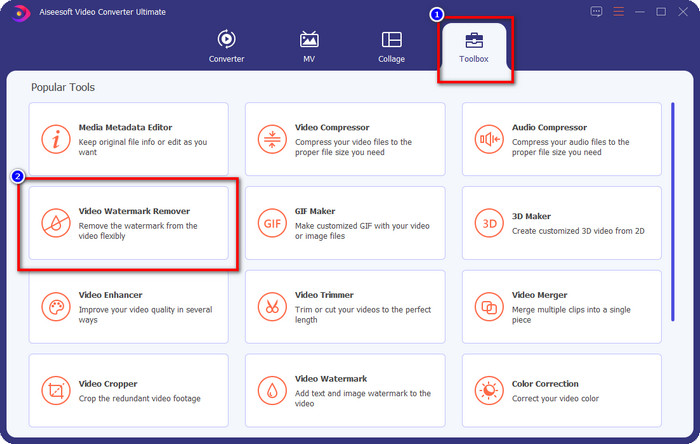
Paso 2. En la Caja de herramientas, localiza el Quitador de marca de agua de vídeo que incluye esta herramienta y haz clic en él para continuar.
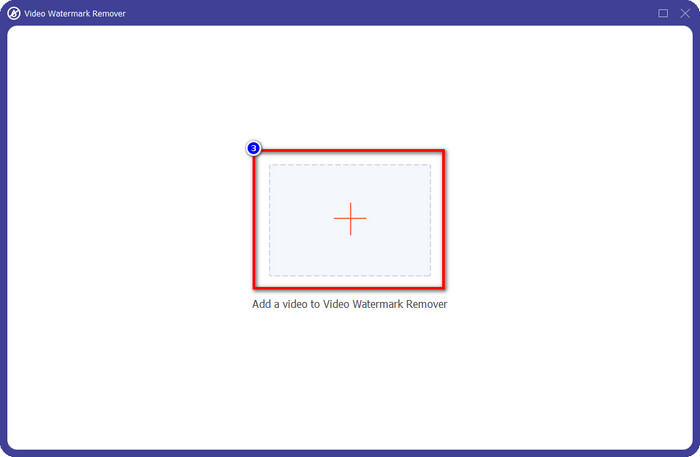
Paso 3. Al hacer clic en el icono +, subes el vídeo que contiene una marca de agua. Búscalo en la carpeta que se mostrará en la pantalla, haz clic una vez en el archivo y después pulsa Abrir para subirlo.
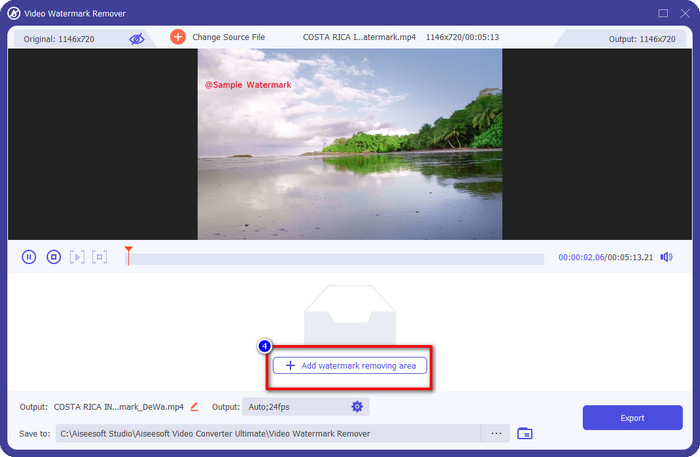
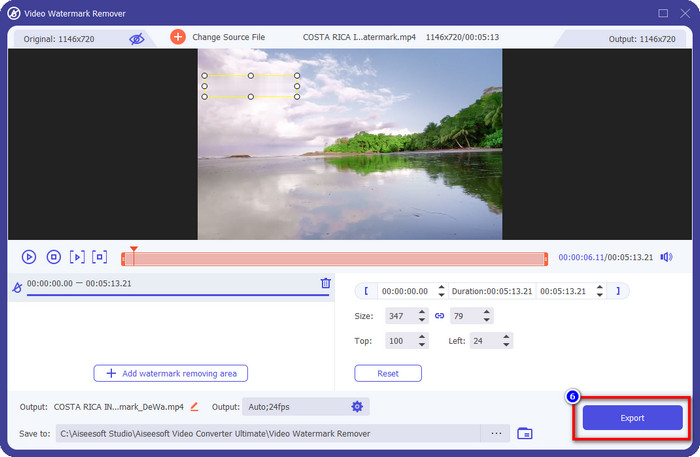
Paso 4. Tras subir el vídeo con marca de agua, pulsa Añadir área para quitar marca de agua y espera el breve proceso de carga.
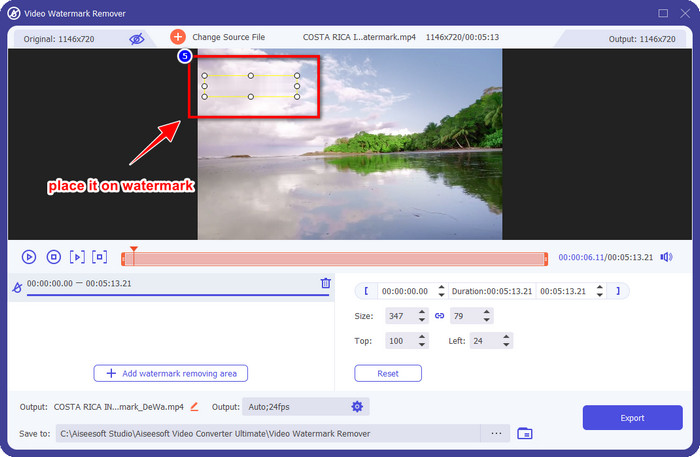
Paso 5. Coloca el cuadro de selección sobre la marca de agua de WeVideo y cúbrela por completo para que, cuando exportes el vídeo, no veas ningún rastro de la marca de agua al final del vídeo.
Paso 6. Ya puedes guardar el vídeo; aquí habrás eliminado la marca de agua haciendo clic en el botón Exportar. El proceso de guardado no llevará mucho tiempo porque admite procesos ultrarrápidos y aceleración por hardware.
iMyFone Marca Ir
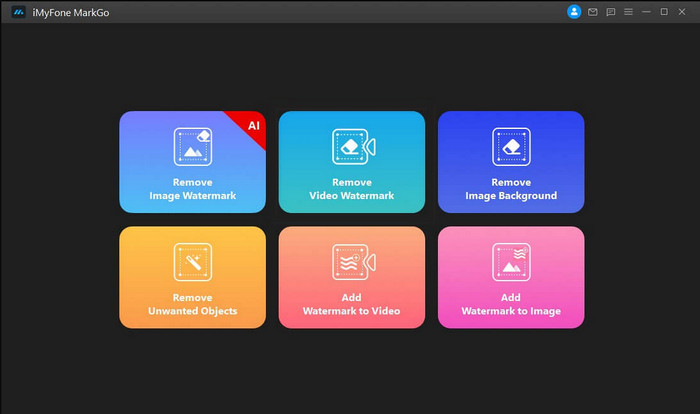
iMyFone Mark Go es otro eliminador de marcas de agua que puedes descargar en tu Windows y Mac para ayudarte a quitar la marca de agua de WeVideo. Esta herramienta elimina eficazmente la marca de agua de tu vídeo, de forma similar a lo que puede ofrecer la herramienta definitiva. Como cualquier otro software de escritorio que puedes descargar, tendrás que adquirir la herramienta para eliminar la marca de agua y aprovechar la versión premium para quitar la marca de agua de tu vídeo. Aunque tiene un coste, no es tan caro en comparación con otros quitadores de marcas de agua que puedes descargar. Así que, si quieres eliminar la marca de agua de tu vídeo de forma fácil y eficaz, puedes seguir los pasos indicados a continuación mientras te enseñamos cómo hacerlo paso a paso.
Paso 1. Descarga el software en tu ordenador de sobremesa accediendo a su página web oficial.
Paso 2. Después de iniciar el software, haz clic en Remove Video Watermark.
Paso 3. Añade el archivo de vídeo haciendo clic en Add the Video. Elige el archivo de vídeo que tiene una marca de agua.
Paso 4. Mueve la forma rectangular que aparecerá y colócala sobre la marca de agua para cubrirla. Aunque hay otras tres opciones para eliminar la marca de agua, no puedes acceder a ellas porque son opciones para usuarios premium.
Paso 5. Haz clic en el botón Export para guardar el vídeo al que le has quitado la marca de agua.
Cortador de video en línea: elimine el logotipo del video
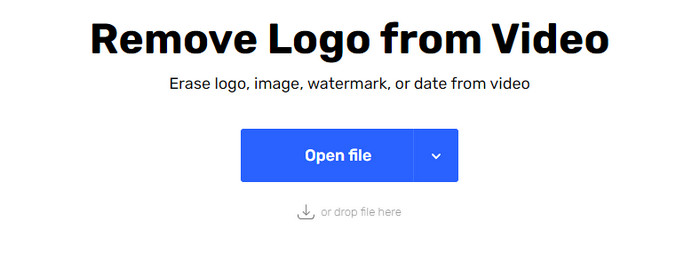
¿Cómo eliminar gratis la marca de agua de WeVideo? Usa Online Video Cutter – Remove Logo From Video. Este software es una herramienta web gratuita que puedes utilizar para quitar la marca de agua de tu vídeo en la web sin descargar ni pagar nada. Esta herramienta es tan efectiva como otros quitadores de marcas de agua del mercado si comparamos, aunque no tan buena como el software definitivo. Puede cubrir la marca de agua de tu vídeo para mejorar el aspecto visual del vídeo. Sin embargo, si no tienes conexión a internet, esta herramienta no será la mejor opción para eliminar la marca de agua de tu vídeo. Pero si sí la tienes, entonces puedes seguir los pasos de abajo para empezar a usar esta herramienta y eliminar la marca de agua de tu vídeo.
Paso 1. Abre una nueva pestaña y busca el nombre de la herramienta para empezar a eliminar la marca de agua del vídeo.
Paso 2. Haz clic en Open File para subir aquí el vídeo de WeVideo y que genere la vista previa del vídeo que has subido.
Paso 3. Haz clic sobre la marca de agua para aplicar el área de eliminación que ofrece esta herramienta. Una vez que hagas clic en cualquier parte del vídeo, aparecerá un cuadro de selección.
Paso 4. Pulsa Save para obtener el vídeo sin la marca de agua.
Relacionado:
Cómo eliminar la marca de agua de Movavi
Cómo eliminar la marca de agua de Weibo
Parte 3. Preguntas frecuentes sobre la eliminación de la marca de agua de WeVideo
¿Qué herramienta es la mejor para eliminar WeVideo Watermark?
Sin duda, se trata del FVC Video Converter Ultimate; esta herramienta proporciona el mejor resultado para eliminar la marca de agua en su video. Entre los eliminadores de marcas de agua seleccionados, no podemos negar que la herramienta definitiva es superior a los otros eliminadores de marcas de agua.
¿Puedo recortar la marca de agua de WeVideo?
Sí, puede recortar la marca de agua que WeVideo deja en su video. Pero la dimensión del video se reducirá y existe la posibilidad de que su calidad se reduzca porque recorta la relación de aspecto.
¿Qué hace que WeVideo sea el mejor editor de video en la web?
Con sus completas funciones fundamentales de edición de video a las que puede acostumbrarse y lo fácil que es usar la herramienta. Estos son los conocimientos más comunes sobre lo que hace de WeVideo uno de los mejores editores de video que puede usar en la web. Pero no es tan bueno como el otro editor de video Adobe Premiere Pro, Final Cut Pro, etc.
Conclusión
Por fin, con los métodos que proporcionamos anteriormente, ahora tiene una idea de cómo deshacerse de la marca de agua de WeVideo. Pero, ¿qué opinas sobre la herramienta que alistamos? Si aún no tiene idea de qué usar, debe probar FVC Video Converter Ultimate en nuestra opinión. Proporciona lo mejor de lo mejor para eliminar la marca de agua y también es fácil de usar. ¿Entonces, Qué esperas? Haga clic en el botón de descarga para tener el eliminador de marcas de agua y usarlo inmediatamente.
-
 Eliminadores de marcas de agua 123rf: revisión exhaustiva de las herramientas definitivas
 Si quieres saber cuáles son los eliminadores de marcas de agua 123rf más destacados, lee detenidamente este artículo. Este artículo proporciona una revisión detallada de las herramientas.
-
 Cómo quitar la marca de agua de DeviantArt en Windows y Mac
 ¿Quieres aprender a eliminar la marca de agua de DeviantArt en tus imágenes? Usando los removedores de marcas de agua más destacados de DeviantArt, puede eliminar fácilmente esas molestas marcas de agua.
-
 Ultimate Softwares para eliminar la marca de agua de Video Helper en videos exportados [2022]
 ¿Quieres saber cómo eliminar la marca de agua en el video que descargas en Video Helper? Si es así, lea este artículo para saberlo.
