


 Video Converter Ultimate
 Grabador de pantalla
 Reparación de vídeo
Comprensión profunda sobre los 5 editores de video en cámara lenta disponibles
Do you love watching high-speed striking sports like racing, boxing, baseball, volleyball and more? All of the mentioned sports need a high-speed camera just to make a motion analysis. If you do so want to analyze every movement of each athlete then try to read the best slow motion video maker you can use. Also, with the help of the tool below, you will not need any extra equipment other than your desktop, internet, or phones. As we proceed, read the tools carefully and choose which one is the best for you to go with.

Parte 1. Los 3 mejores creadores de videos en cámara lenta para PC con Windows, Mac y en línea
1. Video Converter Ultimate
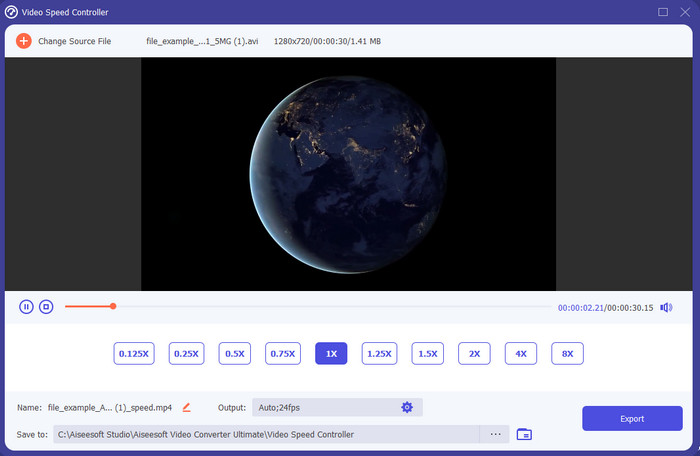
Do you want to know which of the slow-motion video editors is the best to use to make your playback into slow motion? Then try to use Video Converter Ultimate because this tool is not just the best, it is phenomenal. This tool already obtained a lot of advanced features you would like to use even if you are not pro on editing. Even though you are a pro this software is the best choice no matter what level your editing skills are on. Moreover, you can quickly add slow motion effects on your video without reading a manual or watching videos on how to do it. Because the tool presents a much simpler instruction other than the tool below. Although the tool needed to be paid before you can access it still it is not that high in price. If you want to know more about this tool then read the key features below.
Características clave de Video Converter Ultimate:
◆ Advanced slow motion video maker app with basic instructions.
◆ Interfaz de herramienta fácil de usar.
◆ Ajuste la velocidad del video fácilmente en el controlador de velocidad de video.
◆ Admite más de 200 formatos de video y audio.
◆ Se puede descargar y acceder a los sistemas operativos PC y Mac.
Descarga gratuitaPara Windows 7 o posteriorDescarga segura
Descarga gratuitaPara macOS 10.7 o posteriorDescarga segura
2. Unidad de tiempo continuo de Boris
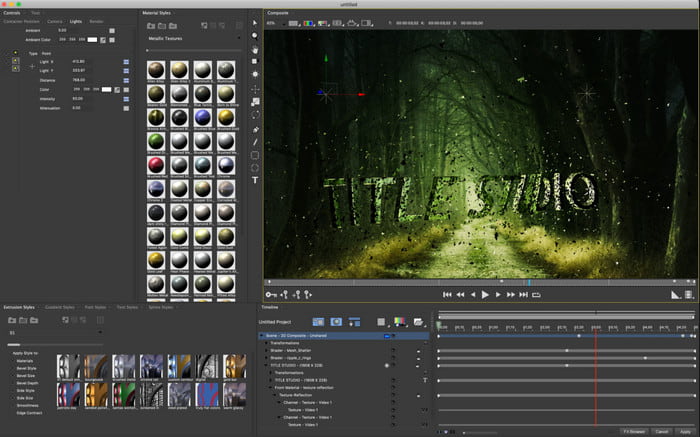
Boris Continuum Time Unit is the best choice if you want to have a heavy-duty slow motion video maker app. There is no other tool that can do anything like this tool provides to have a professional output. Furthermore, this tool has the best detailed editing features you would like to try. Although the tool is greater than the other tools, it is still literally super expensive. Also, if you want to try using this tool then you must have a high-grade desktop system unit because you won't be able to use this on old version desktops.
Pros
- La mejor herramienta para usar para hacer ediciones pesadas.
- Es compatible con todas las plataformas.
- La interfaz de la herramienta se parece más a una herramienta profesional.
Contras
- Este software es el más caro en este artículo.
- Necesitaba una unidad de sistema de alto grado.
- No es la mejor opción para un principiante que no tiene experiencia en edición.
3. VEED.IO
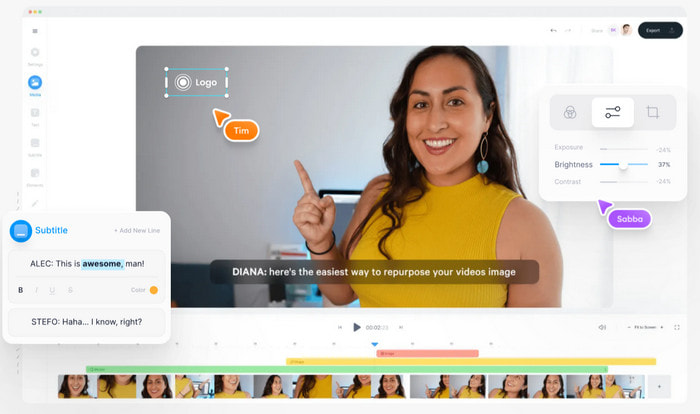
So, if you don't want to spend a penny and have an internet connection then try to access the VEED.IO. This is the best software to make slow motion video online because it is simple and easy to access. The overall interface of the tool is very neat with straightforward instruction so it is very convenient for everyone. However, you can only upload files with less than 50 mb and if you want to add a bigger file size then this tool will demand you to upgrade. Also, if you didn't buy the tool expect the final output to have a watermark.
Pros
- Puede ser accedido fácilmente por cualquier persona con conexión a Internet.
- No hay anuncios molestos en el sitio web.
- Fácil de manejar por los novatos en la edición.
Contras
- Las características de la herramienta son muy limitadas en la versión gratuita de la herramienta.
- Dependiente de Internet. Por lo tanto, si su Internet es lento, espere una carga, descarga y edición lentas. Además, no puede acceder a esta herramienta si no tiene una conexión a Internet.
Parte 2. 2 de la mejor aplicación de video en cámara lenta en Android e iOS
1 SloPro
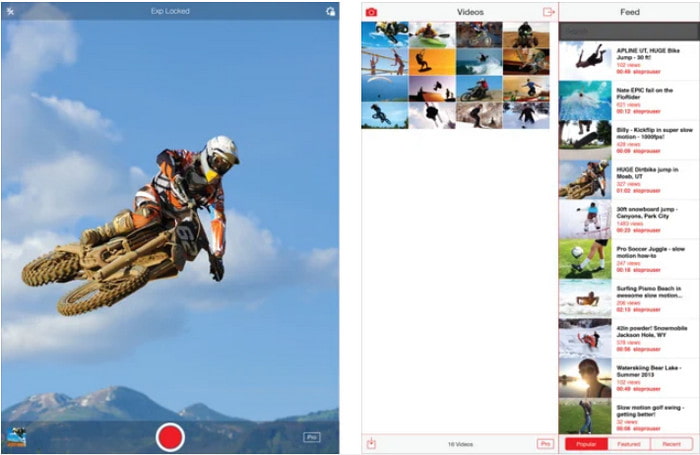
SloPro is the best slow motion video app you can download for free on iOS. The app can do the playback slow motion up to 500 to 1000 fps. Another, you can manipulate the video from fast to slow motion playback or vice versa. Although the tool might be a great option, there are still a lot of drawbacks on the app. Like, the video output will be saved on the gallery of the app and not on the camera roll. Also, if you try to use the 1000 fps the video becomes buggy according to the user who has already tried it. Furthermore, this tool is still great because it is free to use and slowing it down can be easily done here.
Pros
- La mejor reproducción en cámara lenta que puedes usar en iOS de forma gratuita.
- Ya recibe una calificación justa y una estrella de 3.3.
- Simple y fácil de usar.
Contras
- El resultado final no se guarda directamente en la galería.
- Todos los videos guardados en la galería SloPro son aleatorios y no están categorizados correctamente.
- Si está utilizando 1000 fps, espere una salida de video con errores.
2. Creador de videos en cámara lenta
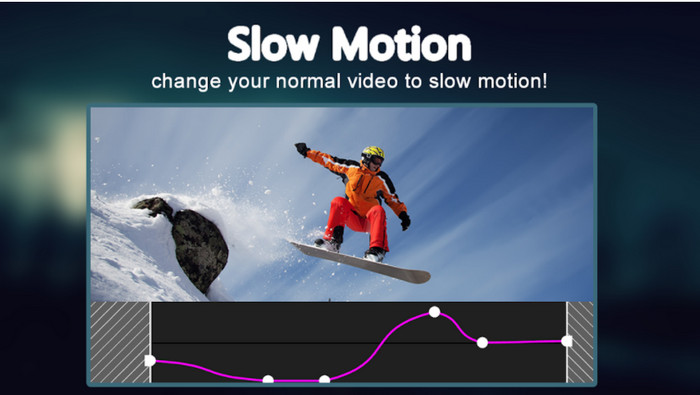
One of the best slow motion video makers you can download for free on your Android phone is the Slow Motion Video Maker. With the help of this app, you can perform fast forward and slow-motion playback easily on your videos. However, the app has a lot of annoying ads popping out of nowhere. Also, the slow-motion playback you can do by 0.5 only. But overall, it is great to be used for slowing down a video on Android but the ads hurt the app badly.
Pros
- La aplicación se puede descargar gratis en Play Store.
- Es genial usarlo para ralentizar el video sin problemas.
- La aplicación es fácil de administrar.
Contras
- Tiene muchos anuncios molestos que aparecen de la nada.
- La descarga del video puede llevar mucho tiempo porque no tiene un procesamiento acelerado.
Parte 3. Preguntas frecuentes sobre Slow Motion Video Maker
¿Cuál es el papel de FPS?
Se utiliza para calcular la serie consecutiva de fotogramas que se muestran en el panel de visualización. Esto se ve más comúnmente en cada captura de movimiento como en videojuegos, cámaras, películas e incluso nuestro ojo puede ver de 30 a 60 fps.
¿Cuál es la mejor tasa de FPS en cámara lenta?
El FPS ideal que puede usar para ver videos en reproducción a cámara lenta es entre 120 o 240 fps. Por lo tanto, si desea tener una reproducción en cámara lenta más detallada, aumente el FPS.
¿Cómo reproducir un video en reproducción de cámara rápida?
To have an idea on how to play a video in a fast motion then try to click this link. Learn what are the 5 best tools you can use to speed up a video.
Conclusión
To conclude, all of the tools presented in here are the best slow motion makers you can search on the web. Also, this article already helped you out and make your searching easier than ever. However, there is one specific tool you might want to use to make your video better with the help of Video Converter Ultimate. All of the advanced features you can use here are phenomenal and yet easy to use. Moreover, if you are still not believing then try to download the tool first and try it for yourself.
-
 La mejor aplicación de Android para reproducir archivos MOV en sus teléfonos móviles
 ¿Tiene dificultades porque su grabación MOV no se pudo reproducir en su Android? Entonces, en este caso, estás buscando cuál es el mejor reproductor MOV para Android.
-
 5 potentes reproductores AVI para ver y reproducir archivos AVI [Web y escritorio]
 Aprenda qué reproductores AVI puede usar para reproducir y ver los archivos .avi. Continúe leyendo a continuación y elija cuál es el mejor reproductor multimedia que el otro.
-
 Maneras efectivas sobre cómo archivos MKV en Xbox One S 2021
 Descubra formas que pueden ayudarlo a reproducir archivos MKV en su Xbox One S utilizando algunos de los mejores convertidores.
