


 Video Converter Ultimate
 Grabador de pantalla
 Reparación de vídeo
¿Cuáles son los mejores editores de etiquetas WMV para editar metadatos WMV? [A prueba de tontos]
WMV es un formato de archivo nativo con el que te encontrarás si eres usuario de Windows. Con este archivo puedes almacenar animaciones, clips de vídeo y episodios de series de televisión en alta definición utilizando uno o varios sistemas de compresión de vídeo de Microsoft. Aunque puede conservar todo esto, algunas etiquetas de los WMV necesitan correcciones. Aunque puedes ver los metadatos del archivo WMV en Windows Media Player, no puedes ajustarlos para corregirlos. Entonces, ¿qué herramienta deberías usar en Windows? En este caso, presentaremos un análisis imparcial de cuatro editores de etiquetas WMV que puedes utilizar.

Parte 1. Fenomenal editor de etiquetas WMV para Windows y Mac [Recomendado]
FVC Video Converter Ultimate es un software fiable que te ofrece las mejores funciones que necesitarás para editar cómodamente los metadatos de WMV. Este programa está disponible en todos los sistemas operativos Windows y Mac. Al usar esta herramienta, experimentarás un nuevo nivel a la hora de eliminar, editar y actualizar etiquetas de forma fluida en más de 1000 formatos que el software admite. Para principiantes, esta herramienta presenta una interfaz intuitiva para que comprendan todas sus funciones. Pero también es ideal para que los profesionales la utilicen en la edición avanzada de sus vídeos. ¿No es increíble? Tanto si no tienes experiencia editando etiquetas como si la tienes, puedes confiar en esta herramienta. ¿Quieres hacer una edición excelente de metadatos con el software? Si es así, los siguientes detalles se centrarán en cómo usar este fantástico editor de etiquetas WMV, pero primero descárgalo en tu Windows o Mac y luego instálalo.
Ventajas de usar Ultimate WMV Tag Editor
- 1. Puede editar rápidamente las etiquetas para WMV, AVI, MP4, MKV, MOV y los otros más de 1000 formatos disponibles.
- 2. Admite una caja de herramientas todo en uno en la que puede recortar, cortar, fusionar, cortar, invertir video y más.
- 3. Es la mejor opción para principiantes y profesionales que necesitan una herramienta multipropósito.
- 4. Descargue la última herramienta en su Windows y Mac mientras disfruta de las mismas funciones avanzadas.
Descarga gratuitaPara Windows 7 o posteriorDescarga segura
Descarga gratuitaPara macOS 10.7 o posteriorDescarga segura
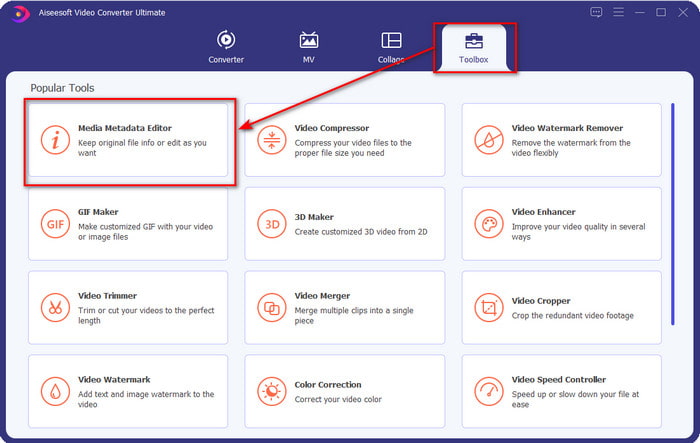
Paso 1. Una vez que hayas instalado correctamente la herramienta, ejecútala de inmediato. En la interfaz de la herramienta, accede a la sección Toolbox y busca Media Metadata Editor; haz clic para abrirlo.
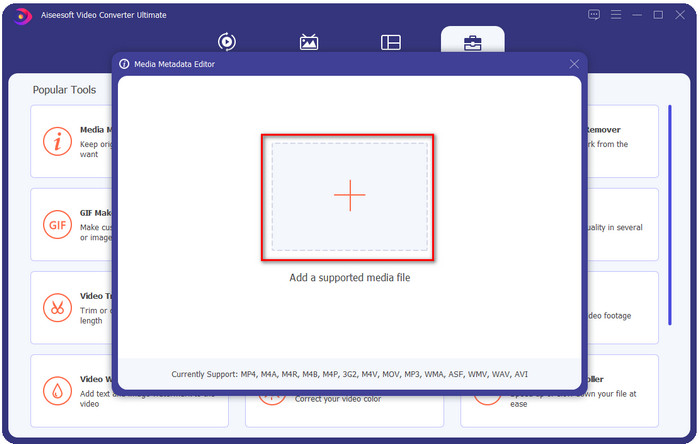
Paso 2. Pulsa el icono + después de haber hecho clic en el editor, selecciona el archivo WMV en la carpeta que aparecerá en tu pantalla. Pulsa Abrir cuando ya hayas decidido qué archivo usar.
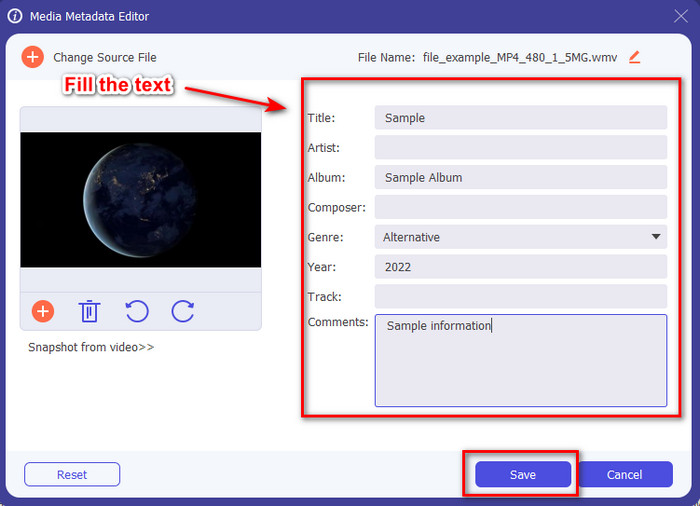
Paso 3. Rellena el cuadro de texto según tus necesidades y, a continuación, haz clic en Guardar para aplicar las etiquetas que has añadido al archivo.
Relacionado:
Parte 2. Otros 3 mejores editores de etiquetas en Windows
Machete Video Editor Lite
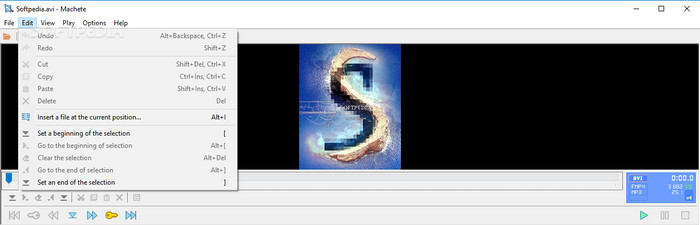
Machete Video Editor Lite es un editor de metadatos WMV para Windows que puedes descargar en tu PC. Con esta herramienta, puedes editar las etiquetas solo de AVI y MKV; aparte de estos dos formatos, no hay compatibilidad. Es un editor de metadatos dedicado para Windows, así que no es necesario preocuparse al probarlo, porque te ayudará con la tarea mencionada. A pesar de ser un buen editor de metadatos, su interfaz gráfica es anticuada y necesita un aspecto más moderno para competir con los editores de metadatos con mejor interfaz del mercado. Además, esta herramienta solo admite dos formatos, AVI y MKV; este puede ser su mayor inconveniente, ya que otros editores de etiquetas admiten una gran variedad de formatos para subir archivos fácilmente.
TigoTago
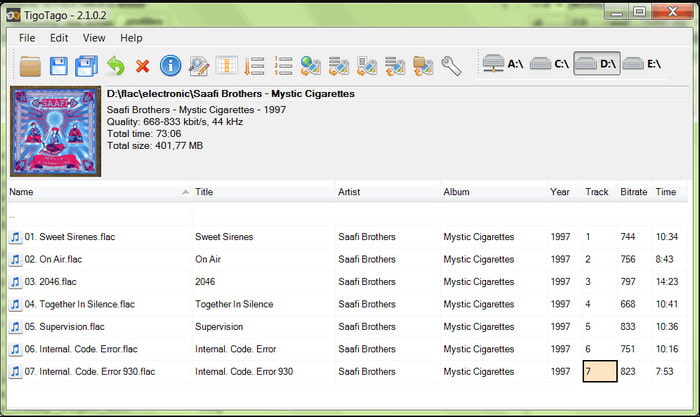
Otro editor de etiquetas WMV especializado disponible en Windows es TigoTago. A diferencia de Machete Video Editor Lite, esta herramienta admite tres formatos de vídeo, como MP4, WMV y AVI. Si quieres editar las etiquetas de audio, puedes subir cualquier MP3, WMA, WAV y muchos más. La interfaz de la herramienta es muy similar a una hoja de cálculo, donde puedes ver distintas columnas para las diferentes etiquetas de tu archivo. A pesar de su interfaz tipo hoja de cálculo, todavía necesita una actualización, porque parece que la herramienta no recibe mejoras desde hace mucho tiempo. Mientras utilizábamos la herramienta, nos encontramos con algunas funciones confusas que nos hicieron perder tiempo al editar las etiquetas, lo cual resulta algo engorroso. Aunque puedan surgir estos problemas, aún puedes descargarla de forma gratuita en Windows.
Propiedades en Windows
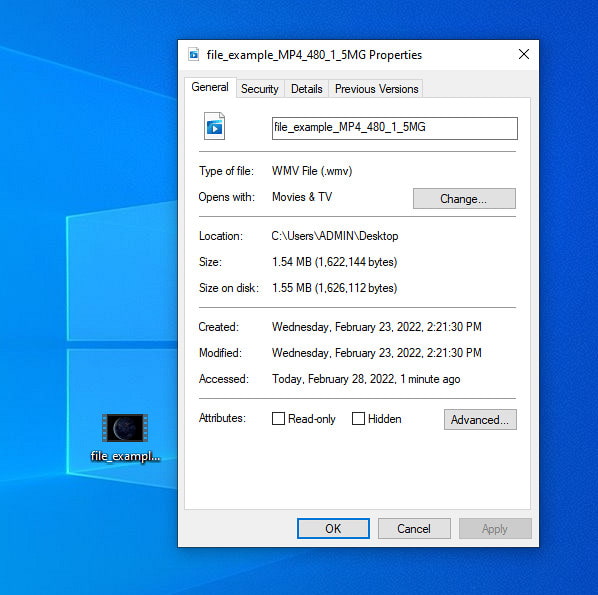
Propiedades en Windows es una función exclusiva que puedes usar gratuitamente en cualquier sistema operativo Windows. Esta función no se descarga ni se accede desde la web, lo cual es una gran ventaja para nosotros. Con esta función, puedes actualizar fácilmente las etiquetas de cualquier archivo multimedia, como los WMV, con unos pocos clics. Últimamente, algunos usuarios, incluidos nosotros, hemos encontrado incómodo utilizar esta función. Porque cuando intentamos actualizar los metadatos del archivo al archivo original, las etiquetas no se guardaron. Bueno, es de esperar, ya que no es un editor de metadatos profesional. Sin embargo, si quieres actualizar los metadatos de un WMV, aún puedes editarlos fácilmente.
Parte 3. Preguntas frecuentes sobre WMV Tag Editor
¿Puedo editar metadatos WMV en Mac?
Totalmente, sí, puedes. Con la ayuda de la última herramienta que presentamos arriba, este trabajo es fácil. Entonces, si es un usuario de Mac, descargue la herramienta en su dispositivo haciendo clic en el botón de descarga para Mac y siga el mismo procedimiento. Sin embargo, las imágenes pueden ser un poco diferentes en la función de Mac, pero la etiqueta que ha agregado se guarda correctamente sin esfuerzo.
¿Se mostrarán los metadatos WMV al mirar en Windows Media Player?
Mientras se reproduce en Windows Media Player, el reproductor multimedia nativo de Windows, las etiquetas no se mostrarán en la pantalla. Pero puede acceder a ellos haciendo clic con el botón derecho del mouse en el archivo, haciendo clic en Propiedades y aparecerá una miniventana donde puede ver las etiquetas en su archivo WMV. Recuerda, puedes verlos, pero no puedes editarlos según tus necesidades.
¿Transferir WMV en la web pierde los metadatos?
Este problema es muy natural en la mayoría de los archivos multimedia. Los metadatos se pierden en el camino porque el tipo de aplicación que usó necesita eliminar los metadatos para reducir el tamaño del archivo para una transferencia sin problemas. Entonces, es mejor copiar los metadatos y enviarlos por separado para evitar este problema.
Conclusión
Al final, todas las herramientas que hemos elegido son los editores de metadatos WMV más efectivos que puedes descargar o usar libremente en cualquier sistema Windows que permita subir WMV rápidamente. Aunque las herramientas pueden ayudarte, algunas también pueden perjudicarte; por eso elegir el editor de etiquetas perfecto es esencial para evitar más problemas o daños. Si todavía te preguntas de qué herramienta hablamos que tenga un editor de etiquetas ideal, una caja de herramientas multifuncional y que sea fácil de usar, declaramos con orgullo que todas estas necesidades las cubre FVC Video Converter Ultimate. A diferencia de su competencia en el mercado, esta herramienta está dedicada a ayudar a los usuarios con sus problemas diarios de vídeo, como convertir, editar etiquetas, editar, etc. Increíble, ¿verdad? Pues eso es lo que la herramienta definitiva puede ofrecerte.
-
 Qué son los metadatos: aprenda la información básica sobre los metadatos
 ¿Qué son los metadatos? ¿Es esto importante? ¿Cuáles son las partes de los metadatos? Tienes la misma pregunta? En este artículo, aprenderá la información básica sobre los metadatos.
-
 4 de los mejores visualizadores de metadatos online y offline [Actualizado en 2025]
 ¿Puedo consultar los metadatos de mi archivo? Sí, puede, con la ayuda de esta publicación, le presentaremos los diferentes visores de metadatos que puede usar.
-
 Consejos rápidos y fáciles para convertir WMV a MOV [Comprobado]
 ¿Quieres saber cuáles son los mejores y más fáciles de usar convertidores que convierten WMV a MOV? Continúe leyendo este artículo, ya que analiza todas las opciones posibles que debe considerar usar.
