


 Video Converter Ultimate
 Näytön tallennin
 Videon korjaus
 Suojattu lataus
Kuinka muuntaa MP4 WMV: ksi Macille / Windowsille
Ennen kuin esittelen suositellun listan MP4–WMV-muuntimista, kysyn sinulta ensin jotain videotiedostomuodoista.
Tallentaaksemme digitaalista videodataa tietokonejärjestelmään tarvitsemme videoille suunnitellun tiedostomuodon. Millaisia videotiedostomuotoja siis tunnet? MP4? WMV? FLV? AVI? Nämä ovatkin yleisesti käytettyjä videotiedostomuotoja digitaalisen videodatan tallennuksessa. Mutta oletko koskaan miettinyt, miksi videotiedostomuotoja on niin monta? Mikä ero on MP4:n ja WMV:n välillä?
Yleensä MP4 on yhteensopiva melkein kaiken tyyppisten markkinoilla olevien laitteiden kanssa, mikä tarkoittaa, että voit toistaa MP4: ää kaikkialla, jopa tietokoneen tai puhelimen oletusvideosoittimessa. Jos kuitenkin käytät Windows-laitteita, uskon, että WMV voi palvella sinua paremmin. Ei vain siksi, että sen on kehittänyt Microsoft, vaan koska se voi tallentaa HQ-videon pieneen levytilaan.
Tänään opit, miten muuttaa MP4-tiedosto WMV-muotoon käyttämällä parhaita videomuuntimia, joita suosittelemme.

Osa 1. Kuinka muuntaa MP4 WMV Online -palveluksi ilmaiseksi
Klassisen työpöytäohjelmiston asentamisen lisäksi verkkopohjaisten muuntimien käyttö on myös nykyään vaihtoehto. Vaikka yksinkertaisetkin, monet online-muuntimet ovat hieman hitaita muunnoksen aikana. Jotkut jopa rajoittavat lataamiesi tiedostojen kokoa ja määrää eivätkä voi taata lähtövideoiden laatua.
Siksi esittelemme nyt FVC Free Online Video Converter -palvelun, ilmaisen, nopean ja tehokkaan videomuuntimen, joka auttaa sinua muuntamaan joukon video- tai äänitiedostoja laadun heikkenemättä.
Monitoimisena ilmaisena verkossa toimivana MP4–WMV-muuntimena FVC Video Converter tukee lähes kaikkia videotiedostomuotoja. Voit muuntaa suuria MP4-tiedostoja muotoihin MKV, MOV, WMV, AVI, TS jne. ja niistä takaisin MP4:ään. Voit myös muokata videoitasi tarpeidesi mukaan. FVC:ssa on helppoa säätää videon bittinopeutta, näytteenottotaajuutta, kuvanopeutta, resoluutiota ja äänenvoimakkuutta. Lisäksi videossasi ei ole vesileimaa muuntamisen jälkeen.
Nyt saatat huolestua siitä, että kaikilla näillä ominaisuuksilla voi olla vaikea ymmärtää, miten tätä muunninta käytetään. Itse asiassa totuus on aivan päinvastainen. Tämän MP4 - WMV-muuntimen hallitseminen vie vain muutaman askeleen.
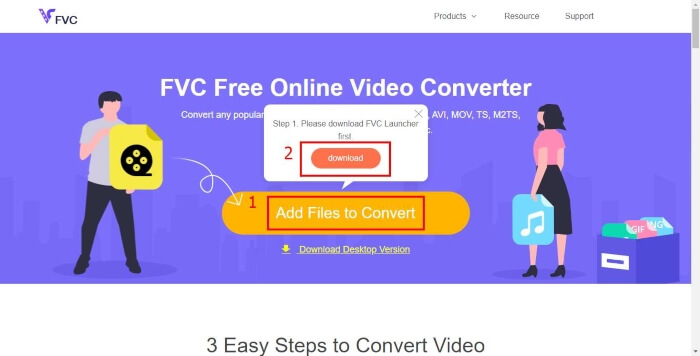
Vaihe 1. Napsauta tästä siirtyäksesi sivulle FVC Free Online Video Converter. Napsauta sitten Add Files to Convert ladataksesi ensin FVC Launcher -ohjelman.
Lataa työpöytäversio muuntaaksesi tiedostoja erissä.
Vaihe 2. Kun käynnistysohjelma on asennettu, Open File -ikkuna ponnahtaa esiin. Etsi vain MP4-tiedosto, jonka haluat muuntaa.
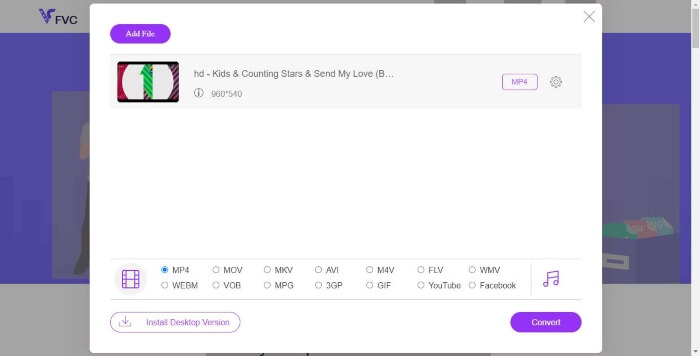
Vaihe 3. Valitse sitten muunnossivulla tulostiedostomuodoksi WMV. Jos haluat muuttaa videon parametreja, avaa Asetukset-ikkuna napsauttamalla Setting-kuvaketta. Napsauta Convert-painiketta ja valitse kohdekansio muunnetulle videolle.
Osa 2. Muunna MP4 WMV: ksi työpöytäohjelmistolla
1. RealPlayer
RealPlayer on ollut yksi suosituimmista mediasoittimista vuodesta 1995 lähtien. Sen avulla voit paitsi hallita helposti videoita, musiikkia ja kuvia, myös muuntaa videoita useisiin eri muotoihin ja siirtää niitä muihin mobiililaitteisiin.
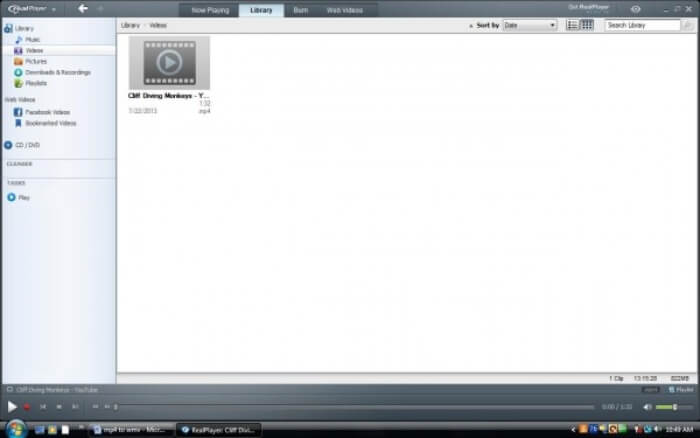
Vaihe 1. Jos RealPlayer on asennettu tietokoneellesi, tallenna MP4-tiedosto RealPlayerin kirjastoon. Valitse Library RealPlayerin käynnistämisen jälkeen. Etsi tiedostosi Video-luettelosta.
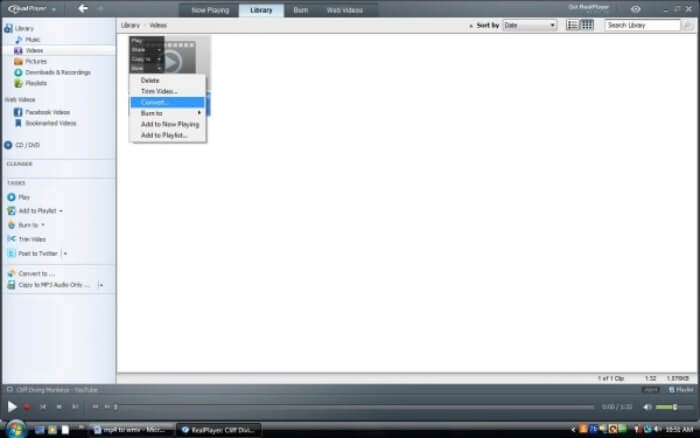
Vaihe 2. Napsauta tiedostoa ja valitse ponnahdusvalikosta More-vaihtoehto. Valitse sitten Convert-vaihtoehto.
Vaihe 3. Valitse WMV kohdasta Select a Device ja napsauta OK. Napsauta nyt Start-painiketta. Muutaman sekunnin kuluttua videosi löytyy RealPlayerin kirjastosta.
2. VLC-mediasoitin
VLC on avoimen lähdekoodin, monialustainen soitin, joka toistaa videoita eri muodoissa. Se tukee myös tiedostojen muuntamista moniin suosittuihin formaatteihin. Seuraa alla olevia ohjeita viedäksesi WMV-tiedoston MP4:stä.
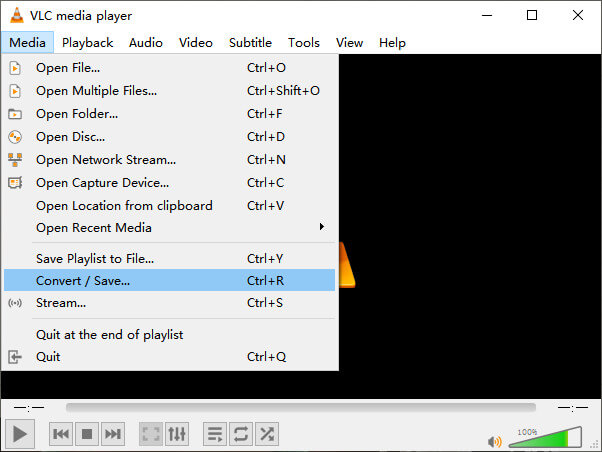
Vaihe 1. Avaa VLC Media Player ja napsauta Convert / Save Media-valikosta.
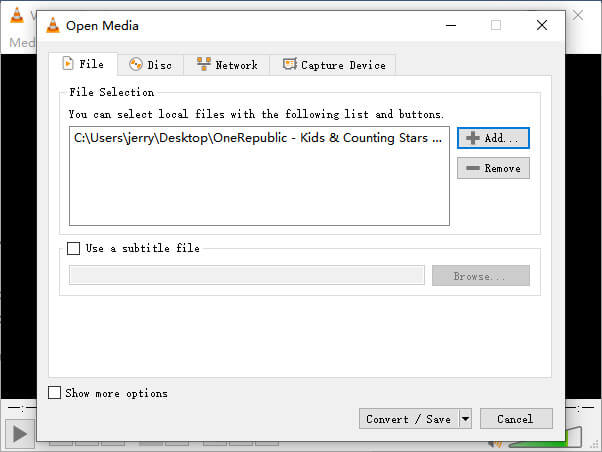
Vaihe 2. Lisää tiedosto VLC:hen. Napsauta sitten Convert / Save -painiketta.
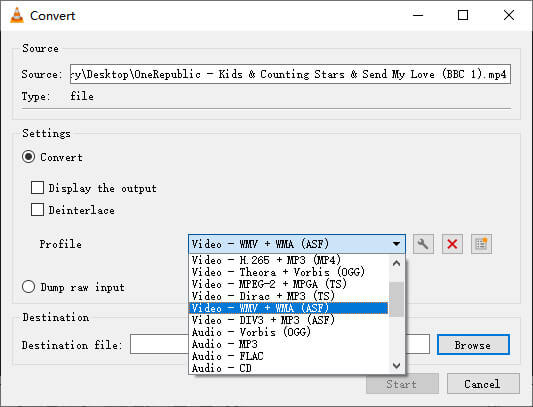
Vaihe 3. Valitse WMV kohdasta Profile ja valitse kansio tulostiedoston tallennuspaikaksi. Napsauta sitten Start.
MP4 vs. WMV
Moving Picture Experts Groupin (MPEG) vuonna 2001 julkaisema MP4-muoto voi auttaa sinua tallentamaan video-, ääni-, tekstitys- ja kuvatiedot eri raidoille. Se on lyhenne sanoista MPEG-4 Part 14. Lisäksi se on yksi suosituimmista videoiden suoratoistoon ja jakamiseen käytetyistä muodoista.
Microsoftin tuottama WMV oli yksi yleisimmistä videoformaateista 2000-luvulla. Se voidaan nähdä verkossa ja toistaa useilla Windowsin mediasoittimilla. Ja se on myös Windows Media Playerin oletusvideotiedostomuoto. Mutta sen ovat ottaneet muut muodot viime aikoina.
Osa 3. UKK MP4: stä WMV-muuntamiseen
1. Voiko käsijarru muuntaa MP4: n WMV: ksi?
Tutkimuksen jälkeen valitettavasti uusin Handbrake-versio ei voi muuntaa MP4:ää WMV:ksi. On totta, että Handbrake tukee useimpia yleisiä multimediatiedostoja, mutta se koskee vain tulolähteitä. Tulostemuotojen vaihtoehdot ovat MP4(.M4V) ja MKV.
2. Voinko muuntaa yli 100 Mt: n MP4-tiedoston WMV: ksi verkossa ilmaiseksi?
Se riippuu. Eri ilmaisilla verkkovideomuuntimilla on erilaiset rajoitukset. Jotkin muuntimet, kuten FVC Free Online Video Converter, sallivat yli 100 Mt:n tiedostojen muuntamisen. Toiset muuntimet saattavat periä siitä maksun.
3. Voiko Windows Media Player muuntaa MP4: n WMV: ksi?
Et voi muuntaa MP4-tiedostoa WMV-muotoon Windows Media Playerilla. Tämä johtuu siitä, että se on pelkkä soitin, ei muunnin. Jos haluat muuntaa MP4-tiedoston WMV-muotoon, sinun tulisi käyttää tehokasta videomuunninta.
4. Voinko toistaa WMV-tiedostoa Macissa?
Macissä sisäänrakennetut videot työkalut eivät voi toistaa WMV-tiedostoja. Mutta WMV-videoiden toistamiseen macOS:ssä on muita tapoja. Voit muuntaa WMV-tiedoston muotoon, jota Mac tukee, tai asentaa Windows Media Player for Mac -ohjelman WMV-tiedostojen toistamiseksi.
Johtopäätös
Vaikka MP4:llä ja WMV:llä on paljon yhtäläisyyksiä, niillä on myös omat erityispiirteensä. Siksi sinun tulisi tehdä valinta tilanteen mukaan. Toivottavasti tämän artikkelin lukemisen jälkeen MP4-tiedostojen muuntaminen WMV-muotoon ei enää tuota sinulle ongelmia. Seuraavalla kerralla, kun tarvitset WMV-tiedoston, seuraa vain yllä olevaa ohjetta ja muunna tiedosto vaivattomasti.
-
 Kuinka muuntaa MP4-videotiedostosi animoiduiksi GIF-kuviksi ilman laadun heikkenemistä
 Etsitkö parasta tapaa muuntaa MP4-videosi animoituiksi GIF-tiedostoiksi? Tässä on yksityiskohtainen opas sen tekemiseen Photoshopissa, Windows Movie Makerissa, online-videomuunnoksessa ja muissa.
-
 Kuinka muuntaa FLV-videotiedostosi MP4: ksi maksamatta penniäkään
 Tässä oppaassa jaetaan neljä ilmaista tapaa muuntaa FLV-videotiedostosi MP4-muotoon Windows 10/8/7 / XP: ssä ja Mac OS X: ssä, jotta voit nauttia videoista millä tahansa laitteella.
-
 Kuinka muuntaa MOV MP4: ksi menettämättä laatua
 Haluatko muuntaa MOV (Apple QuickTime Movie) -tiedostot MP4iksi? Tämä viesti jakaa 4 ilmaista tapaa muuntaa MOV-videotiedostosi MP4-muotoon Windows 10/8/7 / XP: ssä ja Mac OS X: ssä.

