


 Video Converter Ultimate
 Näytön tallennin
 Videon korjaus
Opi lisää viidestä parhaasta PC-videoeditorista ja vertaa
Nykyään monet ihmiset rakastavat kuvata videoita tallentaakseen muistettavia hetkiä, ja useimmat heistä käyttävät niitä myös rahan ansaitsemiseen. Esimerkiksi vloggaajat ja vaikuttajat kuvaavat jatkuvasti itseään ja sitä, mitä he tekevät faneilleen – sekä saadakseen enemmän suosiota kuin muut vaikuttajat tai vloggaajat. Jos siis olet aloitteleva vloggaaja tai vaikuttaja, joka rakastaa kuvata itseään, sinun kannattaa hankkia paras Windows 10 -videonmuokkausohjelma parantaaksesi ja luodaksesi vaikuttavia videoita, saadaksesi enemmän tykkäyksiä, katselukertoja, tilaajia ja pitkällä aikavälillä myös tuloja. Ennen kuin aloitamme, haluamme onnitella sinua, sillä olet jo ottanut ensimmäisen askeleen kohti menestyksekästä vloggaaja- tai vaikuttajauraa. Oikean työkalun valitseminen on kuitenkin yksi ratkaisevimmista vaiheista, johon tulet törmäämään. Siksi olemme koonneet alle useita erilaisia ja edelleen erittäin tehokkaita videonmuokkausohjelmia, joista voit valita.

Osa 1. 5 parasta Windowsin videoeditoria online- ja offline-tilassa
Top 1. Video Converter Ultimate
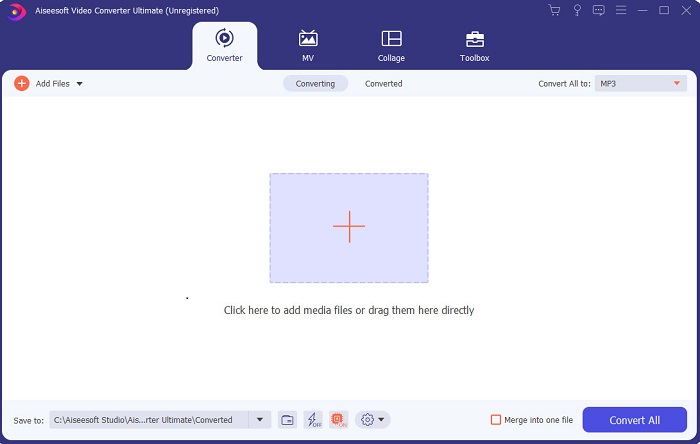
Jos haluat etulyöntiaseman ja yhtä laadukkaita videoita kuin esikuvillasi, käytä FVC Video Converter Ultimatea. Tämä muunnin ja Windows-videonmuokkausohjelma on jo auttanut monia käyttäjiään tulemaan kuuluisiksi ympäri maailmaa – ehkä sinä olet seuraava. Useimmat tunnetut vaikuttajat, vloggaajat ja videoeditoijat käyttävät tätä ohjelmaa editorina, parantajana, tehostimena ja muuhun. Jos siis haluat ammattimaisen lopputuloksen kuten esikuvillasi ja tienata sillä oikeaa rahaa, sinun kannattaa ladata tämä ohjelmisto heti ja ryhtyä netin seuraavaksi sensaatioksi – sekä parhaaksi versioksi itsestäsi. Olemme myös koonneet plussat ja miinukset, jotta ymmärrät tätä työkalua paremmin.
Ilmainen latausWindows 7 tai uudempiTurvallinen lataus
Ilmainen latausMacOS 10.7 tai uudempiTurvallinen lataus
Plussat
- Aloittelijoille tämä työkalu on oikea valinta. Koska se tarjoaa yksinkertaisia ohjeita, joita voit seurata ja jotka on helpompi ymmärtää. Periaatteessa se on paikallaan.
- Ammattilaisille, toisin kuin muille videoeditori PC:lle tällä työkalulla on paljon futuristisia ominaisuuksia. Jos esimerkiksi haluat parantaa äänenlaatuasi ja parantaa videota, voit käyttää tätä työkalua. Lisäksi, jos ääntä ei ole synkronoitu videon kanssa, siinä on äänen synkronointiominaisuus sen korjaamiseksi.
- Kaiken kaikkiaan tämä on ilmiömäinen muunnin ja editori, johon voit luottaa. Varsinkin jos haluat tehdä yllättävän sisäänkäynnin vloggaajien ja vaikuttajien maailmaan.
- Editointiohjelmisto on ladattavissa, eikä ole olemassa editorityökaluja, joilla olisi samat ominaisuudet kuin tämä.
Haittoja
- Tämä työkalu ei ole ilmainen, mutta sen hinta on alhainen. Toisin sanoen se on halpa ja tuottaa korkealaatuista tulosta.
Top 2. Windows Movie Maker
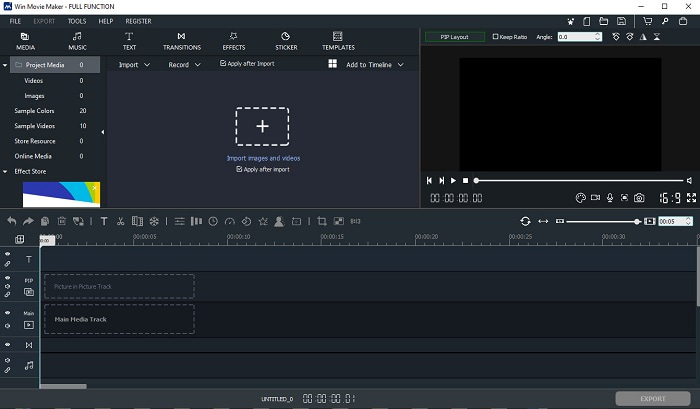
Tämä videonmuokkausohjelma Windows 7:lle, 8:lle, 10:lle ja XP:lle on yksi parhaista luomiseen ja editointiin. Windows Movie Maker on jo ladattu monien käyttäjien toimesta heidän omien videoidensa muokkaamiseen, sillä se tarjoaa monipuoliset ja edistyneet muokkausominaisuudet. Työkalu voi kuitenkin tuntua liian raskaalta ja monimutkaiselta niille, jotka ovat vasta aloittamassa videon tekemistä ja editointia. Jos taas olet ammattilainen tai sinulla on jo kokemusta editoinnista, tätä työkalua kannattaa kokeilla. Ohjelmasta on olemassa maksullinen versio, joka on hyvin samankaltainen kuin ilmaisversio, mutta siinä lopputuloksesta poistuu vesileima vientivaiheessa.
Plussat
- Aloittelijoille tämä työkalu ei ole ihanteellinen, mutta se on hienoa monimutkaisten muokkausten tekemiseen.
- Ammattilaisille tässä esitetyt ominaisuudet ovat toteutettavissa, jos sinulla on kokemusta.
- Se tarjoaa siirtymiä, tehosteita ja tarroja jne.
Haittoja
- Työkalu on hieman häiritsevä, koska työkalutoimintoja voit tehdä täällä. Lisäksi se on ylivoimainen, eikä siinä ole ohjeita sen käyttöön.
- Jos käytät tämän työkalun ilmaista versiota, odota, että videossa on vesileima sen viennin jälkeen.
Yläosa 3. OpenShot
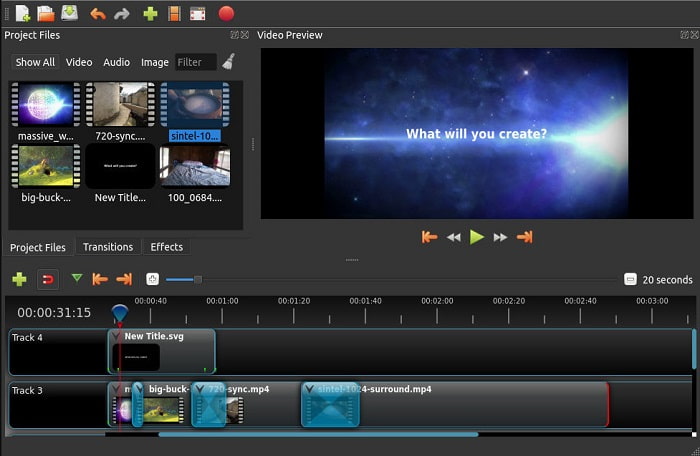
Toinen ilmainen videonmuokkausohjelma ilman vesileimaa on Openshot. Sen toiminnot ovat helpommin ymmärrettävät kuin Windows Movie Makerin. Lisäksi heti asennuksen jälkeen ohjelma tarjoaa lyhyen esittelykierroksen toiminnoista. Siinä kuitenkin käydään läpi vain perusominaisuudet. Tämä työkalu tarjoaa muutenkin vain perustoiminnot, mikä tarkoittaa, ettet voi olla kovin luova. Lisäksi käyttöliittymä näyttää hieman tylsältä yksivärisen teeman takia.
Plussat
- Aloittelijoille tämä on Windows Movie Makerin yksinkertaisempi versio. Voit lisätä tehosteita, siirtymiä ja paljon muuta.
- Ammattilaisten on hyvä käyttää sitä, mutta se ei ole paras.
- Ohjelmisto on kunnossa, jos sen mukana tulee yksinkertainen editointi.
Haittoja
- Sen tylsää käyttöliittymää ei voi muuttaa ja se on vähemmän interaktiivinen.
- Joitakin suuria ja pieniä bugeja on edelleen täällä päivityksen jälkeen.
Top 4. Lightworks
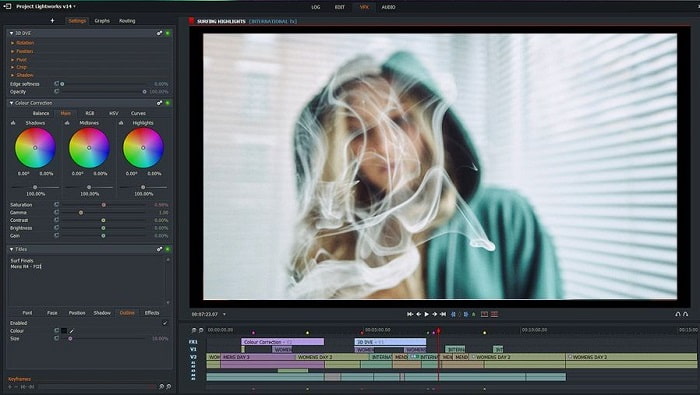
Lightworks on ilmainen videonmuokkausohjelma Windowsille, mutta siitä on myös maksullinen versio. Kun kuitenkin yritimme ladata ohjelman, järjestelmä ilmoitti, että .exe-tiedosto saattaa vahingoittaa tietokonettamme, joten emme asentaneet sitä ja teimme sen sijaan perusteellisen taustaselvityksen. Jos asennat ohjelman levyllesi, sinun täytyy ensin rekisteröityä ennen kuin voit käyttää sitä. Ohjelman tarjoamia editointiominaisuuksia on hyvin paljon, mikä voi olla alussa raskasta aloittelijalle, ja jopa kokeneelle käyttäjälle se voi tuntua hieman haastavalta. Huoleen ei silti ole syytä, sillä käyttöä voi opetella kokeilemalla.
Plussat
- Aloittelijoille työkalu on liian monimutkainen ja sitä voi olla liikaa käsitellä. Varsinkin jos haluat kokeilla yksinkertaista muokkausta.
- Ammattilaiset voivat käyttää tämän työkalun tarjoamia reaaliaikaisia muokkausominaisuuksia. Vaikka osa ominaisuuksista on uusia ja suurin osa niistä on maksullisia.
- Työkalun kokonaissuorituskyky on luokiteltu A-luokkaan editoinnissa ja videoiden tekemisessä.
Haittoja
- Jos haluat 1080 pikselin ulostulon, sinun on ostettava työkalu. Ja ennen kuin voit edes käyttää sitä, sinun on rekisteröidyttävä.
- Ohjelmistossa on haitallinen .exe-tiedosto, joten lataa se omalla vastuullasi.
Top 5. ClipChamp
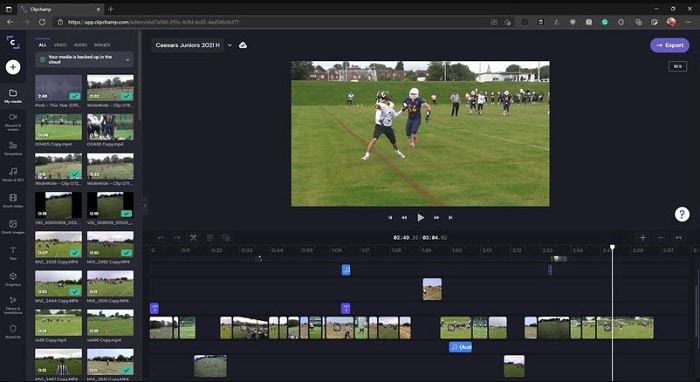
Tämä verkkotyökalu tarjoaa lisäominaisuuksia, jos päivität tilisi. Se on yksi helpoimmin käytettävistä työkaluista, joilla voit muokata videoita ilman erillisen ohjelmiston lataamista. Clipchamp on erinomainen työkalu, mutta sinun täytyy rekisteröityä ennen käyttöä. Tämä Windows 10 -videonmuokkausohjelma verkossa tarjoaa samankaltaisia ominaisuuksia kuin Lightworks, mutta toimii selaimessa. Jos kuitenkin tuot videoita muokattavaksi tänne, sinun on varauduttava hitaaseen tuontiprosessiin. Sen etuna on kuitenkin se, ettei ohjelmaa tarvitse ladata omalle koneelle.
Plussat
- Aloittelijoille tämä työkalu on pakollinen kokeilu, mutta videon muokkaaminen ja lisääminen tähän on hieman hitaampaa.
- Ammattilaisten on hyvä käyttää ja muokata yksinkertaisia videoita rajoitetuilla resursseilla.
- Kaiken kaikkiaan työkalu on helpompi ymmärtää kuin Windows Movie Maker.
Haittoja
- Internet-riippuvainen, mikä tarkoittaa, että jos sinulla on hidas internet, odota epävakaa prosessi.
- Tarvitset rekisteröintilomakkeen, ennen kuin voit edes käyttää verkkotyökalua.
Osa 2. Vertailukaavio 5 videoeditorille Windowsille
| Ominaisuudet | Video Converter Ultimate | Windows Movie Maker | OpenShot | Valotyöt | ClipChamp |
| Videon editointi, kuten leikkaaminen, leikkaaminen, yhdistäminen ja niin edelleen. |  | | | | |
| Videon tehostin | |  | | | |
| Vesileima | | | | | |
| Ohjelma tuettu | Työpöytäpohjainen työkalu | Työpöytäpohjainen työkalu | Työpöytäpohjainen työkalu | Web-pohjainen työkalu | Web-pohjainen työkalu |
| Hintaluokka | 1 kuukausi: $25.00 Vuodelle: $31.20 | $39.95 Kertamaksu | Ilmainen, mutta voit lahjoittaa | QScan Pro QScan Pro – kuukausittaiset tilausaktivoinnit $59.99 | Luoja - $9/kk Liike- $19 / kuukausi |
| Elinikäinen lisenssi: $55.20 | QScan Max QScan Max – kuukausittaiset tilausaktivoinnit $119.99 | Business Platinum – $39/kk |
Osa 3. Usein kysytyt kysymykset Windows Video Editorista
Mikä on paras Mac-videoeditori, jota voin käyttää?
Vaikka tässä esitellyt työkalut ovat kaikki Windows-editoreita lukuun ottamatta Video Converter Ultimatea, Mac-käyttäjille on tarjolla muita vaihtoehtoja. Jos haluat tietää, mitä muita Mac-videonmuokkausohjelmia on, klikkaa tätä linkkiä ja valitse listasta.
Miksi videoitani ei voi toistaa Androidilla?
On monia syitä siihen, miksi videot eivät toistu Android-laitteellasi. Jotta saat selville syyt ja korjattua ongelman, on tärkeää perehtyä niihin heti lukemalla artikkeli How to Repair Videos Not Playing on Android Phones.
Kuinka pakata pitkät videoni ja jakaa ne YouTubessa?
Tällä hetkellä voit ladata enintään 256 tiedostokokoa, joten paras tapa ratkaista tämä on pakata video. Jos haluat jakaa videosi YouTubessa, opitaan yhdessä kuinka pienentää tiedostokokoa ja julkaista se YouTubessa.
Johtopäätös
Ennen kuin sinusta tulee yksi niistä vloggaajista tai vaikuttajista, joita ihailet, sinun täytyy opetella editoimaan itse videosi. Juuri nyt sinulla on mahdollisuus käyttää ilmiömäistä editoria, joka tarjoaa Hollywood-tasoisen editoinnin ominaisuuksia ja laatua. Näin teet vaikutuksen katsojiisi, seuraajiisi ja jopa itseesi. Loista siis kirkkaasti kuin timantti ja anna valon säteiden raivata tiesi menestykseen FVC Video Converter Ultimaten avulla.
-
 Paras MP4-editori Windowsille ja Macille vuonna 2025
 Käytätpä tietokonettasi MP4-videon editointiin tai vain puhelimellasi, voit löytää täältä hienoja vaihtoehtoja, mukaan lukien parhaan MP4-editorin Windowsille ja Macille.
-
 Kuinka lisätä ääntä ja musiikkia videoihin ilmaiseksi tietokoneellasi / puhelimellasi
 Tässä artikkelissa on 4 helppoa tapaa lisätä ääntä videoihin ilmaiseksi. Riippumatta siitä, minkä ääniraidan haluat lisätä videoosi, voit saada tyydyttäviä tuloksia täältä.
-
 Kuinka leikata ja yhdistää kappaleita verkossa - 4 parasta tapaa, jotka sinun pitäisi tietää
 Kun haluat leikata ja yhdistää kappaleita verkossa luoda musiikkipala, voit oppia lisää 4 parhaasta online-työkalusta kappaleiden leikkaamiseen ja artikkelin tiedostojen yhdistämiseen.
