


 Video Converter Ultimate
 Näytön tallennin
 Videon korjaus
Yksityiskohtaisissa arvosteluissa viidestä parhaasta esteettömästä äänenvahvistinsovelluksesta
Kaikki ihmiset koko maailmankaikkeudessa rakastavat musiikkia, oli se sitten poppia, metallia, rockia, jazzia ja niin edelleen. Kaikki kaiuttimet eivät kuitenkaan tarjoa niin hyvää äänenlaatua, että saisivat ihon menemään kananlihalle. Myös vahvistimien ostaminen maksaa yli sata dollaria tai pahimmillaan jopa yli tuhat. Eikö olekin kallista? Voimme kuitenkin välttää rahan tuhlaamisen, jos yritämme käyttää näitä parhaita vahvistimia, jotka ovat saatavilla kaikilla alustoilla. Ja nyt, jos haluat käyttää äänivahvistinsovellusta, katso alla oleva lista: nämä vaihtoehdot maksavat vähemmän kuin edellä mainitut summat ja tarjoavat silti erinomaisen vahvistuksen.

Osa 1. Ilmiömäinen äänenvahvistin Saatavilla PC:lle ja Macille
Jos haluat saada 8D‑ tai 16D‑ääniefektin ilman, että käytät paljon rahaa äänivahvistinlaitteisiin, kokeile Video Converter Ultimatea. Toisin kuin fyysisten vahvistinlaitteiden kanssa, tämän työkalun avulla kulutat vähemmän etkä joudu tekemään monimutkaista käyttöönottoa tai lukemaan paksua käyttöopasta oppiaksesi sen käytön. Lisäksi tämä työpöytäohjelmisto on erinomainen videoiden, äänen, GIF-animaatioiden ja muun parantamisessa. Vaikka työkalu on maksullinen, sitä on silti helppo käyttää ilman monimutkaisuutta, ja se tarjoaa edistyneitä ominaisuuksia, joita voit vaivatta soveltaa videoihisi ja äänitiedostoihisi. Jos siis haluat oppia käyttämään ohjelmistoa, noudata alla annettuja ohjeita.
Vaiheet Video Converter Ultimaten äänenvoimakkuuden vahvistimen käyttämiseen:
Vaihe 1. Lataa ensin ohjelmisto tietokoneesi PC‑ tai Mac‑levylle. Asenna se sitten tietokoneellesi ja tee helppo käyttöönotto manuaalisesti.
Ilmainen latausWindows 7 tai uudempiTurvallinen lataus
Ilmainen latausMacOS 10.7 tai uudempiTurvallinen lataus
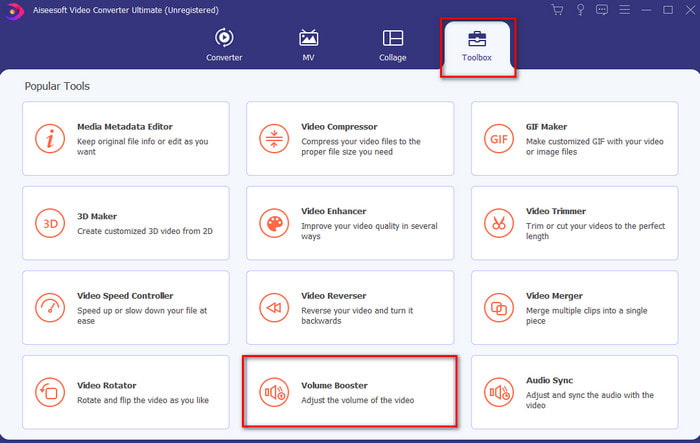
Vaihe 2. Napsauta Työkalupakki-osiossa Volume Booster -toimintoa.
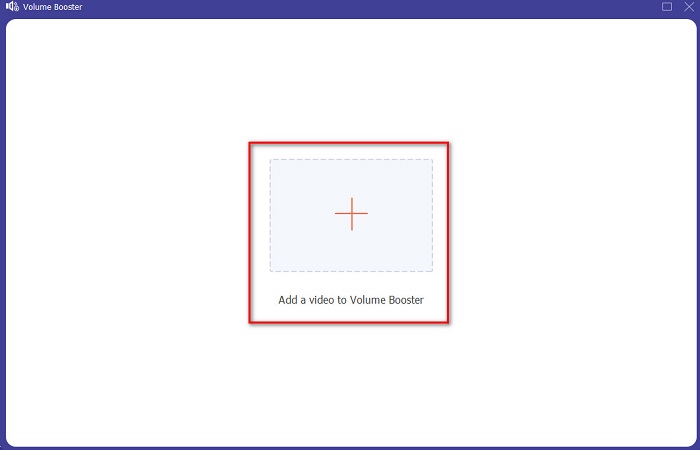
Vaihe 3. Napsauta +‑painiketta valitaksesi tiedoston, jonka ääntä haluat vahvistaa. Paina sitten Avaa jatkaaksesi.
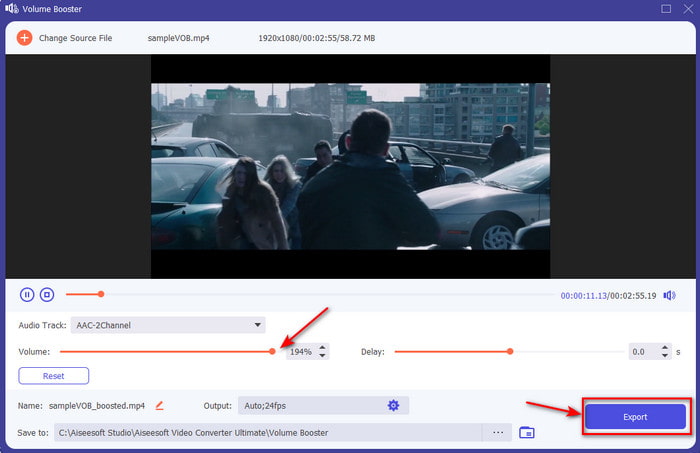
Vaihe 4. Käyttöliittymässä voit nyt vetää äänenvoimakkuusliukusäädintä tehdäksesi äänestä kovemman ja selkeämmän. Kun äänen säätö on valmis, napsauta Vie.
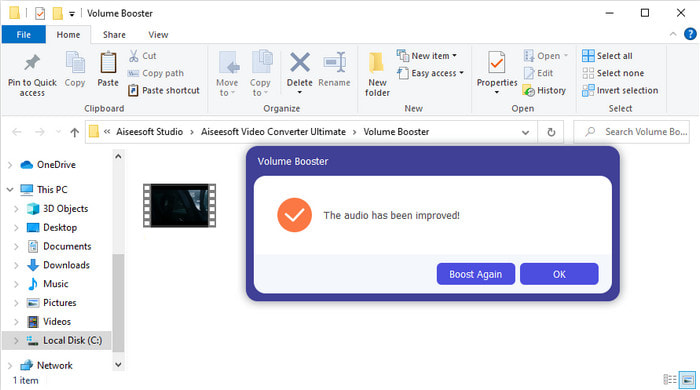
Vaihe 5. Odota hetki, kunnes prosessi valmistuu. Kun se on valmis, näytölle avautuu tiedostonhallintaikkuna, jossa näkyy vahvistamasi tiedosto. Napsauta tiedostoa kuunnellaksesi sitä.
Plussat
- Tämä ohjelmisto on helppokäyttöinen ja voi tehdä äänestäsi kuulostamaan ilmiömäiseltä.
- Sen asiakkaat arvostavat suuresti ohjelmiston suorituskykyä.
- Se on saatavilla ja helposti ladattavissa PC:lle ja Macille.
Haittoja
- Tämä ohjelmisto ei tue mobiililaitteita.
- Tämä työkalu on maksullinen, mutta se ei ole niin kallis verrattuna muihin työpöytätyökaluihin.
Aiheeseen liittyvää:
Kuinka lisätä MP4‑videon äänenvoimakkuutta
Kuinka korjata VLC‑soittimen ääniviive
Osa 2. 4 iOS- ja Android-matkapuhelimiin saatavasta parhaan äänenvahvistinsovelluksen sovelluksesta
1. Volume Boost – Sound Amplifier 4+ (iOS)
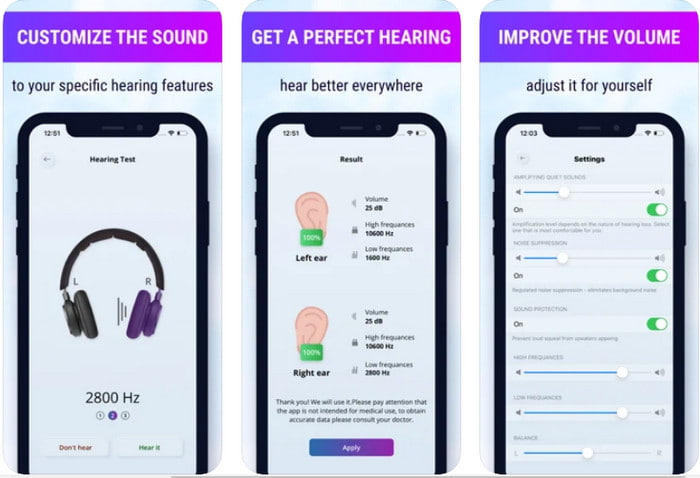
iOS‑käyttäjät voivat helposti ladata ilmaiseksi Volume Boost- Sound Amplifier 4+ -sovelluksen. Tällä sovelluksella äänen vahvistaminen käy vaivattomasti automaattisen säädön ansiosta, mutta voit myös ohittaa automatiikan ja säätää kaiken käsin. Sovellus toimii hyvin vahvistimena, mutta se ei kuitenkaan toimi Bluetooth‑kaiuttimien eikä langattomien nappi- tai sankakuulokkeiden kanssa. Lisäksi tulet todennäköisesti kohtaamaan sovelluksen kaatumisia ja väistämättömiä mainoksia sitä käyttäessäsi. Vaikka sovellus onkin ladattavissa ilmaiseksi, siinä on sovelluksen sisäisiä ostoja mainosten poistamiseen ja muiden toimintojen käyttöön.
Plussat
- Ladattavissa ilmaiseksi kaikille iOS-laitteille.
- Vahvista kaiuttimesi ääntä helposti jopa 30 db.
- Intuitiivinen käyttöliittymä ja asetukset.
Haittoja
- Tässä sovelluksessa on paljon kaatumisia, jäätymiä ja virheitä.
- Mainoksia on paljon vältettävä.
2. Extra Volume Booster - kovaääninen kaiutin (Android)
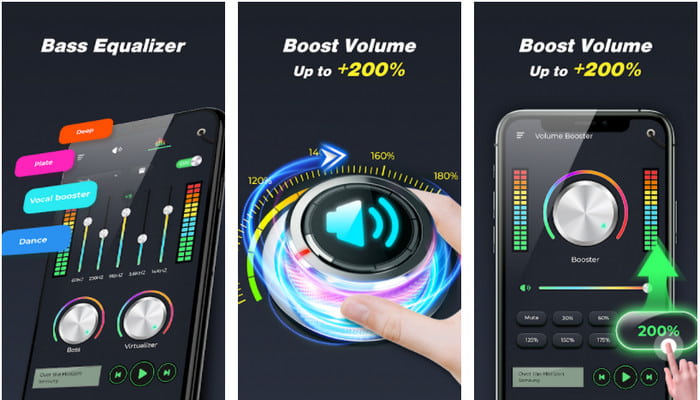
Jos iOS‑käyttäjillä on puhelimeensa äänivahvistin, myös Android‑käyttäjillä pitäisi olla jotakin vastaavaa, kuten Extra Volume Booster. Monet käyttäjät ovatkin jo olleet tyytyväisiä tämän sovelluksen suorituskykyyn, koska se on tehokas äänen vahvistamisessa ja tehostamisessa. Jos kuitenkin avaat tämän sovelluksen, kaikki puhelimesi äänet – kuten soittoäänet, herätykset, ilmoitukset ja muut – vahvistetaan samanaikaisesti. Tämä tarkoittaa, ettei näille ole erillisiä säätöjä. Vaikka työkalu on ilmainen, sitä voidaan silti pitää parempana kuin monia maksullisia Android‑ tai jopa iOS‑sovelluksia. Jos kuitenkin nostat äänenvoimakkuuden maksimiin, esimerkiksi 200%‑tasolle, varaudu siihen, että puhelimesi sisäiset kaiuttimet tai Bluetooth‑kaiuttimet voivat säröytyä, jos ne eivät kestä näin kovaa ääntä.
Plussat
- Yksinkertaistettu versio vahvistimesta, jonka voit ladata Android-laitteille.
- Vaikka sovelluksen käyttöliittymä ei ole paljon, se on hieno.
- Tässä sovelluksessa on saatavilla erilaisia vahvistuksia ja tehostuksia.
Haittoja
- Voit odottaa näkeväsi lukemattomia mainoksia sovellusta käyttäessäsi.
- Työkalua käytettäessä on mahdollista, että prosessori tai puhelin kuumenee.
3. Kaiuttimen tehostin: äänenvoimakkuuden tehostin ja äänenvahvistin 3D (Android)
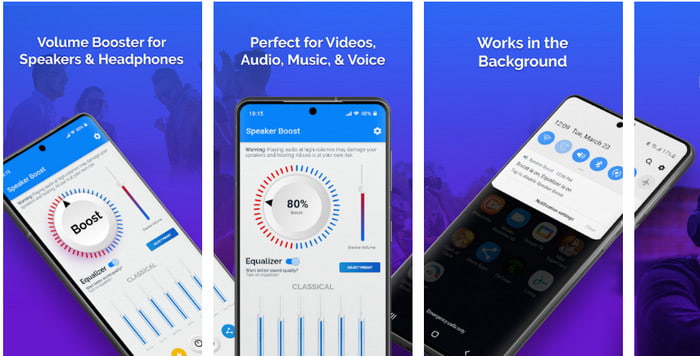
Toinen Android‑sovellus, jota voit käyttää ja joka tuottaa erinomaisen surround‑äänivahvistuksen, on Speaker Boost. Aivan kuten Extra Volume Booster, tämä sovellus on hyvin suoraviivainen ja paljon helpompi käyttää, vaikka sinulla ei olisi aiempaa kokemusta. Tämän työkalun voi myös ladata ilmaiseksi, mutta siinä on sovelluksen sisäisiä ostoksia, joista saatat olla kiinnostunut, kuten häiritsevien mainosten poistaminen ja muuta. Vaikka työkalu vaikuttaa kohtuulliselta käyttää, sen sisäiset ostot tulevat sinulle melko kalliiksi verrattuna muihin tässä luettelossa mainittuihin ohjelmistoihin. Toinen monia käyttäjiä huolestuttava seikka on, että sovellus toimii mainoseston taustalla, ja on mahdollista, että se toimii vakoiluohjelman tavoin.
Plussat
- Tarkoitettu tehostamaan ääntä helposti, mutta silti se on tehokas käyttää.
- Lataa työkalu ilmaiseksi ilman vaivaa äänten vahvistamisessa.
- Tee taajuuskorjaimen manuaalinen ohitus.
Haittoja
- Tämä työkalu on epätäydellinen, mikä tarkoittaa käytännössä sitä, että se on kokeellisena.
- Kun lisäät ääntä, kuulet vääristymiä.
4. Boom: Bass Booster & Equalizer 4+ (iOS)
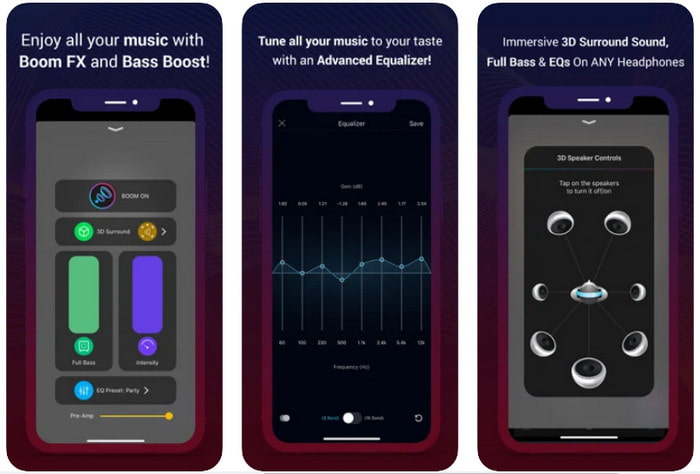
Jos etsit edistyksellistä äänivahvistinsovellusta, Boom: Bass Booster on hyvä valinta. Tämä sovellus on kuitenkin saatavilla vain iOS‑laitteille, etkä löydä sitä Android‑laitteillesi. Tähän mennessä työkalu on saanut paljon kiitosta käyttäjiltä, mutta kaikkia tiedostomuotoja ei tueta vahvistuksessa. Lisäksi, kun käytät sovellusta, varaudu bugeihin ja kaatumisiin. Sovellus voi olla myös harhaanjohtava uusille käyttäjille. Vaikka tämän sovelluksen suorituskyky vaikuttaa kohtuulliselta, sitä on silti parannettava, jotta siitä tulisi parempi.
Plussat
- Jotkut lisäominaisuuksista ovat saatavilla täältä.
- Kannettavat vahvistimet, joita voit käyttää helposti.
- Sovellus saa 4,1 tähden viidestä.
Haittoja
- Ei paras valinta aloittelijoille hämmentävän käyttöliittymärakenteen vuoksi.
- Useimpia äänimuotoja ei tueta vahvistamaan tällä sovelluksella.
- Sovelluksessa esiintyy edelleen virheitä ja viiveitä.
Osa 3. Äänivahvistimia koskevat usein kysytyt kysymykset
Mikä on db?
Db tarkoittaa desibeleitä ja tämä on mittayksikkö ilmaisemaan ääniaallon voimakkuutta tai voimaa. Desibelien avulla voimme myös helposti määrittää, minkä äänen olemme turvallisia kuulla pitkästä aikaa. Ja kaikki alla olevat 85 desibeliä ovat erittäin turvallisia kuulla.
Mitkä ovat kovan äänen haitat?
Meille on hyvin yleistä, että kun altistumme koville äänille, kuulo voi vaurioitua. Mutta tiesitkö, että tämä voi aiheuttaa pahoinvointia, päänsärkyä, stressiä, väsymystä ja paljon muuta? Joten jos aiot käyttää vahvistinta, käytä sitä oikein äläkä käytä sitä liikaa välttääksesi väistämättömät haitalliset vaikutukset.
Miksi kaiuttimistani kuuluu halkeamia?
Tämä ongelma on hyvin tavallinen kaiuttimille, joiden hertsejä voidaan käsitellä hyvin rajoitetusti. Joten jos lisäät ääntä, varmista, että kaiutin kestää sen. Ja jos kuulet halkeilua, sinun on vähennettävä ääntä välittömästi. Jos kuitenkin kuulet halkeamia, vaikka äänenvoimakkuutta pienennetään, on liian myöhäistä.
Johtopäätös
Kaikki tässä esitellyt sovellukset ja ohjelmistot toimivat hyvin äänivahvistimina. Vaikka edellä mainituilla ohjelmilla on joitakin eroja, niiden toiminnot ovat samankaltaisia. Jos kuitenkin etsit parasta äänivahvistinta PC:lle ja Macille, Video Converter Ultimate on todennäköisesti paras vaihtoehto. Se tarjoaa poikkeuksellisen kehittyneitä ominaisuuksia, joita voit käyttää helposti. Jos siis mietit, onko tämä oikea valinta, lataa se ensin tietokoneesi levylle ja seuraa yllä annettuja ohjeita.
Ilmainen latausWindows 7 tai uudempiTurvallinen lataus
Ilmainen latausMacOS 10.7 tai uudempiTurvallinen lataus
-
 [Helppo] Äänen ja videon synkronoinnin poistaminen
 Oletetaan, että aiot ajoittaa suoratoistosi huomiselle, mutta kun tarkistat asetukset, ääni ja video eivät ole synkronoituja. Lue tämä artikkeli saadaksesi lisätietoja tästä huolenaiheesta.
-
 7 helppoa vaihetta OBS-äänen viiveongelmien korjaamiseen [ratkaistu]
 Onko sinulla vaikeuksia katsoa videoleikettä tallennuksen jälkeen, koska ääniviive on OBS Studion käytössä? Lue alla olevasta artikkelista, kuinka voit korjata epäsynkronoidun äänen tehokkaasti.
-
 Kuinka lisätä ääntä ja musiikkia videoihin ilmaiseksi tietokoneellasi / puhelimellasi
 Tässä artikkelissa on 4 helppoa tapaa lisätä ääntä videoihin ilmaiseksi. Riippumatta siitä, minkä ääniraidan haluat lisätä videoosi, voit saada tyydyttäviä tuloksia täältä.
