


 Video Converter Ultimate
 Näytön tallennin
 Videon korjaus
Opi muuttamaan AMV MOV:ksi laatua heikentämättä
AMV on patentoitu videoformaatti, jota käytetään videoiden toistamiseen S1 MP3- ja MP4-mediasoittimissa. Tämä .amv-tiedostopääte on matalaresoluutioinen ja pakattu, jotta tiedosto mahtuu tähän kannettavaan mediasoittimeen. Vaikka formaatti on yhä olemassa, puhelimiin sopivan mediasoittimen löytäminen on vaikeaa, koska formaatti on vanha. Sen sijaan, että etsisit yhteensopivaa mediasoitinta, mikset muuntaisi AMV-tiedostot uudempaan formaattiin, joka saa paljon tukea, kuten MOV. Jos siis haluat tietää parhaan tavan muuntaa AMV MOV-muotoon, aloitetaan tarkastelu.

Osa 1. Lyhyt esittely AMV:stä ja MOV:sta
Action Media Videon tai AMV:n ideana on korvata MP4 yleismaailmallisena muotona, koska tämä muoto on parempi ja paljon pakatumpi. Tämä muoto on myös parempi versio AVI-muodosta. Mutta muoto on jätetty huomiotta tämän uuden aikakauden aikana, koska se ei saa päivitystä resoluution laadun parantamiseksi. Ja nyt, jos tallennat tämän muodon mobiililaitteihimme ja toistat sen, odota, että et voi toistaa sitä, koska muotoa ei tueta. Joten jos haluat toistaa videon tässä muodossa, sinun on ladattava kolmannen osapuolen mediasoitin AMV:tä varten. MOV-muodossa tämä muoto saa paljon tukea, koska se on QuickTimen kehittämä alkuperäinen tiedostomuoto.
Osa 2. Muunna AMV MOV:ksi Ultimate Desktop Softwarella
FVC Video Converter Ultimate
Muunna AMV MOV-muotoon tämän ammattimaisen videomuuntimen avulla, joka tuottaa ilmiömäisen lopputuloksen, jota kukaan ei pysty päihittämään: FVC Video Converter Ultimate. Tämä muunnin on saatavilla sekä PC:lle että Macille, ja molemmilla alustoilla on käytössä samat tämän työkalun tarjoamat edistyneet ominaisuudet. Lisäksi nopea muunnos ja laitteistokiihdytys, jotka ovat saatavilla PC:llä, ovat käytettävissä myös Macilla. Monet käyttäjät ovat jo valinneet tämän ohjelmiston ensisijaiseksi muuntajakseen ratkaistakseen ongelmansa. Ennen kuin voit käyttää tätä työkalua, sinun on kuitenkin ostettava se FVC:ltä. Vaikka se on maksullinen, sinun ei silti tarvitse kuluttaa satoja dollareita, ja hinta on hintansa arvoinen. Ilman enempää viivyttelyä, testataan tätä työkalua ja katsotaan, pystymmekö saavuttamaan ”ultimate”-tason muunnoksen, kuten nimi lupaa.
Vaiheet AMV:n muuntamiseksi MOV-muotoon FVC Video Converter Ultimatella:
Vaihe 1. Lataa FVC Video Converter Ultimate työpöydällesi napsauttamalla alla olevaa painiketta ja asenna ohjelmisto latauksen päätyttyä.
Ilmainen latausWindows 7 tai uudempiTurvallinen lataus
Ilmainen latausMacOS 10.7 tai uudempiTurvallinen lataus
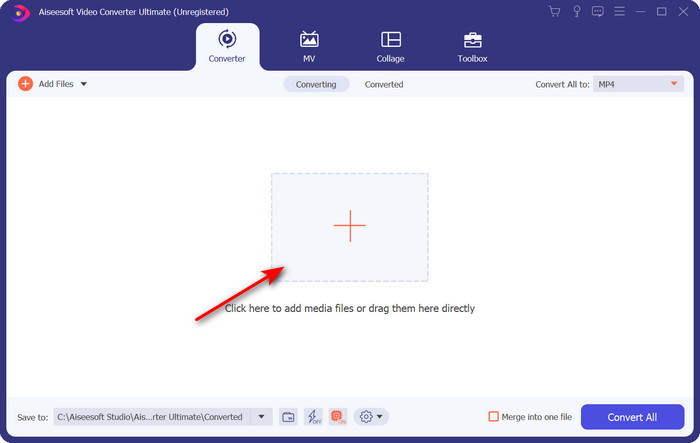
Vaihe 2. Avaa ohjelmisto, ja ladataksesi .amv-tiedoston napsauta + -merkkiä. Etsi tiedosto kansiosta ja paina Avaa lisätäksesi sen.
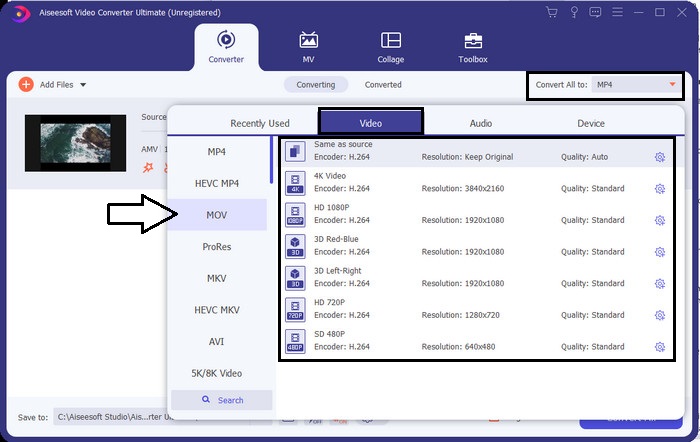
Vaihe 3. Vaihtaaksesi formaatin MOV-muotoon napsauta Convert All to: ja valitse MOV tai jokin muu haluamasi formaatti.
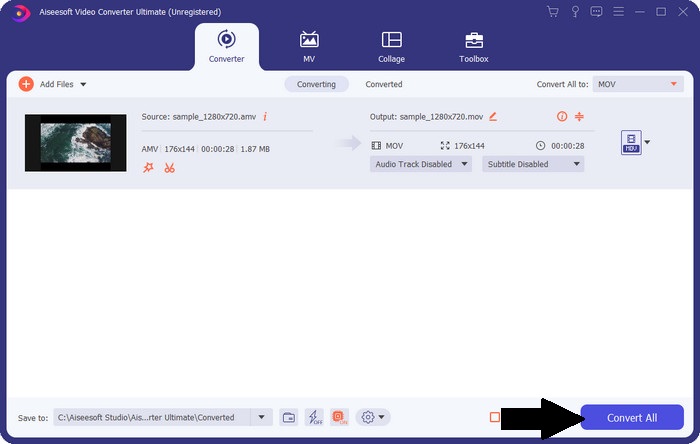
Vaihe 4. Muuntaaksesi AMV-tiedoston MOV-muotoon napsauta Convert All aloittaaksesi muunnosprosessin.
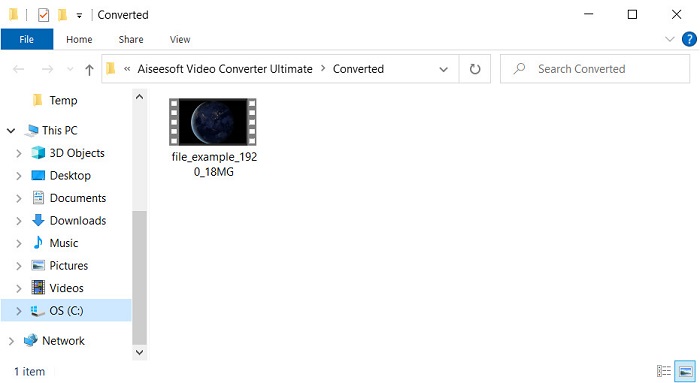
Vaihe 5. Tiedoston muuntaminen vie vain hetken. Odota sitten, että kansio avautuu tekemäsi .mov-tiedoston kanssa; napsauta tiedostoa katsoaksesi sen laitteesi oletusmediasoittimella.
Osa 3. Muunna AMV MOV:ksi 2 Online Service Converter -sovelluksella
1. Muunna tiedostot
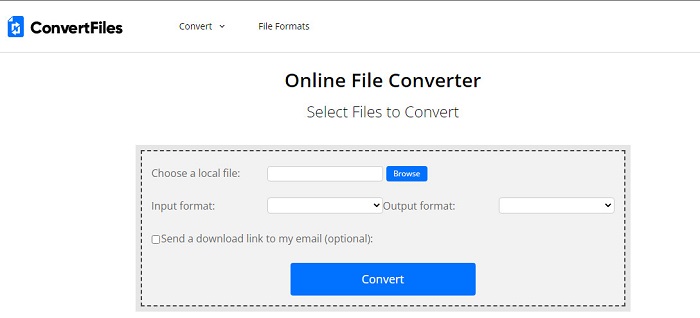
Yksi parhaista verkkomuuntimista, joihin pääset suosikkiselaimellasi, on ConvertFiles. Tämä verkkotyökalu voi muuntaa formaattisi uuteen muotoon ilman ongelmia. Työkalu tukee myös pientä valikoimaa formaatteja, joista voit valita. Täällä muunnetun tiedoston lataaminen vie kuitenkin paljon aikaa, koska työkalu ei tarjoa nopeaa muunnosta. Toinen huono puoli on mainokset: käyttöliittymässä on niitä runsaasti. Latausprosessin ja mainosten ongelmista huolimatta tämä työkalu toimii hyvin ilmaisena verkkotyökaluna.
Vaiheet AMV:n muuntamiseksi MOV-muotoon ConvertFiles-työkalulla:
Vaihe 1. Avaa suosikkiselaimesi ja etsi ConvertFiles.
Vaihe 2. Kun verkkosivusto on auki, napsauta Browse paikantaaksesi tiedoston kansiosta; kohdassa Output Format etsi MOV ja napsauta Convert.
Vaihe 3. Kun muuntaminen on valmis, napsauta sinisellä korostettua linkkiä ladataksesi tiedoston tietokoneellesi.
2. MConverter
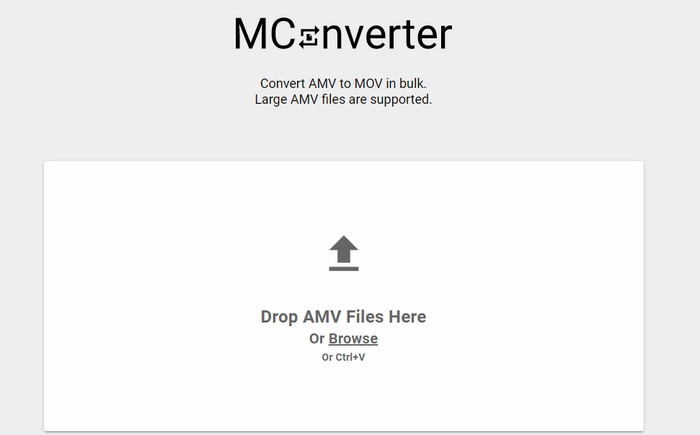
Et halua yhtään mainosta käyttöliittymässä ja haluat muuntaa AMV:n MOV-muotoon rauhassa? Kokeile silloin selaimessa toimivaa MConverter-työkalua. Tämä työkalu tukee myös erämuunnosta, jotta muuntamisesta tulee tehokkaampaa, kuten FVC Video Converter Ultimate. Tämän verkkotyökalun haittapuoli on kuitenkin se, että et voi ylittää 200 Mt:n tiedostokokoa. Jos siis haluat muuntaa pitkän videon ja tiedostokoko ylittää sallitun rajan, tämä ei ole sinulle sopiva vaihtoehto. Mutta jos haluat kokea muuntamisen parempana kuin ConvertFilesillä, seuraa alla olevia ohjeita.
Vaiheet AMV:n muuntamiseksi MOV-muotoon MConverterilla:
Vaihe 1. Etsi MConverter hakukoneellasi ja avaa se.
Vaihe 2. Napsauta Upload-painiketta lisätäksesi tiedoston, odota hetki, että verkkotyökalu latautuu, etsi MOV ja napsauta sitä. Tiedoston muuntaminen alkaa, kun napsautat MOV-muotoa.
Vaihe 3. Paina Download All tallentaaksesi tiedoston.
Osa 4. Usein kysyttyä AMV:stä ja MOV:sta
Voinko muuttaa MP4:ni AMV:ksi?
Voit muuntaa MP4-tiedostosi AMV-muotoon siirtääksesi tiedoston nopeasti verkossa. Etenkin jos video kestää tunnin, suosittelemme muuntamaan .mp4-tiedostot .amv-muotoon, koska sen tiedostokoko on paljon pienempi kuin MP4:ssä.
Tukeeko VLC AMV:tä?
Onneksi voit käyttää VLC Media Playeria toistaaksesi .amv-tiedostot tällä mediasoittimella, vaikka se onkin vanhentunut. Mutta tiesitkö, että on olemassa mediasoittimia, jotka päihittävät tämän soittimen? Jos siis haluat tietää, mitkä mediasoittimet ovat kyseessä, napsauta tätä linkkiä ja tutustu 5 VLC Media Playerin vaihtoehtoiseen mediasoittimeen.
Kuinka voin muuttaa AMV:ni AVI:ksi?
AMV on AVI:n paranneltu versio, mutta jos puhumme laadusta, AVI tuottaa huomattavasti paremman suorituskyvyn kuin tämä vanha formaatti. Lisäksi AVI on erittäin yhteensopiva kaikkien alustojen kanssa. Jos siis haluat katsoa AMV-videoitasi paremmassa muodossa ja kaikilla alustoilla, sinun kannattaa opetella, kuinka muuntaa AMV AVI-muotoon.
Johtopäätös
Keskustelun on päätyttävä tähän; vaikka haluamme tallentaa AMV-tiedoston levyllemme, yhteensopivuusongelma on yksi syy, miksi meidän on muutettava se. Loppujen lopuksi AMV:n sanotaan olleen suosittu ennen, koska tämä säilö pakkaa tiedoston. Tänään sinun on kuitenkin harkittava sen muuntamista uuteen muotoon käyttääksesi sitä edelleen. Lisäksi tässä tarjotut ratkaisut muuntavat tehokkaasti. Silti FVC Video Converter Ultimate toimii ilmiömäisesti verrattuna kahteen muuhun työkaluun. Joten jos haluat kokea parhaan työkalun, sinun on ladattava tämä tietokoneellesi ja kopioitava yllä olevat vaiheet.
-
 4 parasta tapaa muuntaa MOV MP3-tiedostoiksi Windowsissa ja Macissa helposti
 Kun haluat purkaa MP3-äänitiedostot MOV-tiedostoista, voit oppia lisää 4 tehokkaimmasta MOV-MP3-muuntimesta saadaksesi haluamasi tiedostot artikkelista.
-
 MKV MOV: ksi - Kuinka muuntaa MKV MOV: ksi
 Kuinka muuntaa MKV MOV: ksi Macissa? Voiko iMovie lukea MKV: tä? Mitä MOV-muoto tarkoittaa? Tämä viesti kertoo 2 yksinkertaista tapaa auttaa muuntaa MKV MOV: ksi ilmaisilla online- ja ammattimaisilla videomuuntimilla.
-
 FLV to MOV - Kuinka muuntaa FLV MOV: ksi Mac / PC / Online Free -sovelluksessa
 Miten muuntaa FLV MOV: ksi? Kuinka muuntaa FLV MOV: ksi Macissa? Onko olemassa mitään ilmaista tapaa muuntaa YouTube FLV MOV: ksi verkossa? Tämä viesti jakaa 3 FLV-MOV-muunninta vaihtamaan FLV-tiedostot MOV: ksi.
