


 Video Converter Ultimate
 Näytön tallennin
 Videon korjaus
2 parhaista M4V-FLV-muuntimista Windowsille/Macille/Online-käyttöjärjestelmille
M4V on pääasiassa Applen iTunesissa käytettävä video- ja äänikontti. Muoto on DRM‑tekijänoikeussuojattu, jotta tekijänoikeusongelmilta vältytään. Tämän takia tiedostoa on vaikea toistaa, jos sinulla ei ole iTunes‑tiliäsi tunnuksineen. Jos siis haluat katsoa videoita PC:llä tai Android‑puhelimella, ne täytyy muuntaa toistettaviksi FLV‑tiedostoiksi. Jos haluat tietää, miten muunnetaan M4V FLV:ksi, lue tämä artikkeli ja tutustu lyhyesti M4V- ja FLV‑muotoihin.

Osa 1. Ensimmäinen valinta M4V:n muuntamiseen FLV:ksi Macissa ja PC:ssä
Tämä on tehokkain muunnin, jota tulet mielelläsi käyttämään, etenkin kun muunnat M4V FLV:ksi Macilla tai PC:llä. FVC Video Converter Ultimate on monien käyttäjien ykkösvalinta. Jos etsit monitoimityökalua, joka tuottaa erinomaisen lopputuloksen, tämä on oikea valinta. Voit muuntaa täällä minkä tahansa mediatiedoston ja asettaa laadun SD:ksi, HD:ksi, 1080p:ksi tai jopa 4K‑videoksi. Työkalu ei tuota pettymyksiä, jos lataat sen laitteellesi – nimensä mukaisesti se on ultimate. Seuraa alta löytyvää ohjetta, jos haluat hyödyntää tämän työkalun täyden muunnoskapasiteetin.
Kuinka muuntaa M4V FLV:ksi FVC Video Converter Ultimate ‑ohjelman avulla:
Vaihe 1. Napsauta alla olevaa latauspainiketta ja valitse käyttämäsi käyttöjärjestelmä. Kun lataus on valmis, klikkaa Install (Asenna), jolloin tervetuloikkuna tulee näkyviin. Paina sitten Start Now.
Ilmainen latausWindows 7 tai uudempiTurvallinen lataus
Ilmainen latausMacOS 10.7 tai uudempiTurvallinen lataus
Vaihe 2. Käynnistä työkalu, klikkaa käyttöliittymän keskellä olevaa +‑merkkiä ja valitse avautuvasta kansiosta .m4v‑tiedosto, klikkaa sitä ja paina Open.
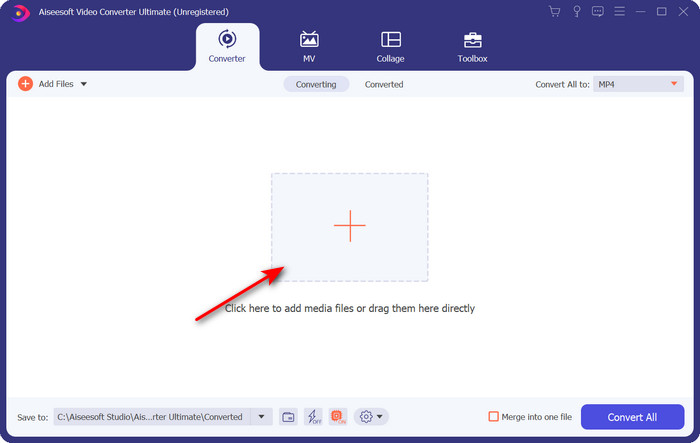
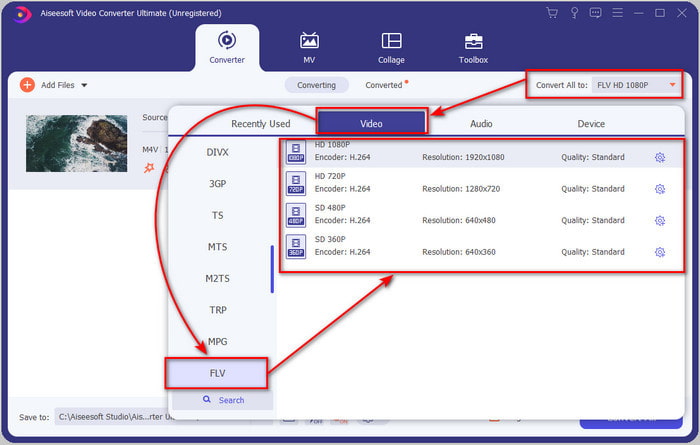
Vaihe 3. Kun .m4v‑tiedosto näkyy käyttöliittymässä, klikkaa Convert All to ja etsi muodoksi FLV.
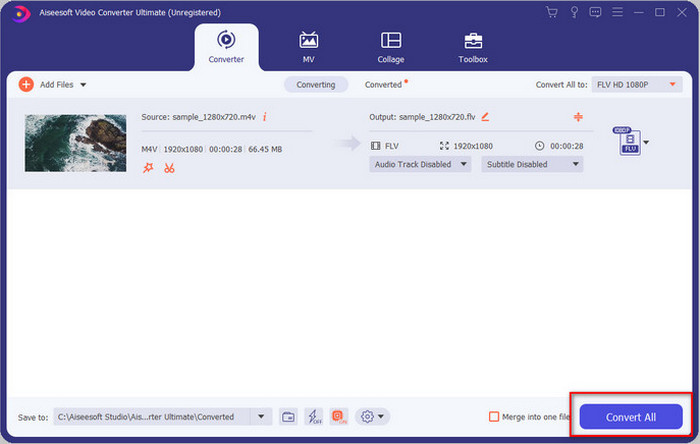
Vaihe 4. Klikkaa sitten Convert All käynnistääksesi M4V‑tiedoston muuntamisen FLV‑muotoon.
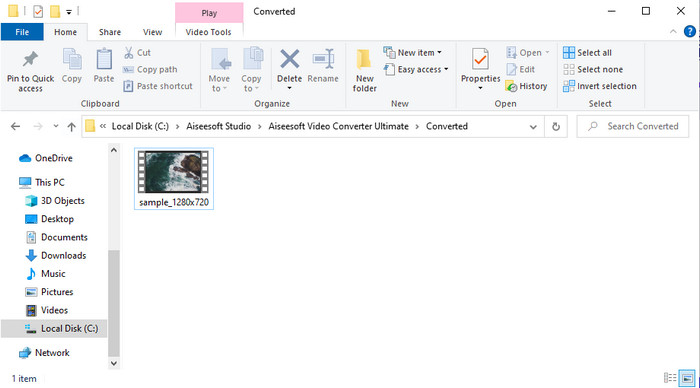
Vaihe 5. Muuntaminen kestää alle minuutin tämän työkalun nopean konversion ansiosta. Valmis kansio, jossa muunnettu tiedosto on, avautuu näytölle; klikkaa tiedostoa katsoaksesi sen tai jakaaksesi sen verkossa.
Plussat
- Nopea muunnos ja laitteistokiihdytys ovat saatavilla parhaan kokemuksen saavuttamiseksi.
- Saatavilla kaikilla alustoilla, kuten PC tai Mac.
- Videoiden muokkaaminen erinomaisten videoiden tekemiseksi on parempi kuin tässä.
Haittoja
- Maksu ennen käyttöä, mutta hinta on edullinen.
- Lataa ohjelmisto ennen käyttöä.
Osa 2. Toinen vaihtoehto M4V:n muuntamiseksi FLV:ksi ilmaiseksi verkossa
Tiedostojen muuntaminen verkossa onnistuu tehokkaasti, kun käytät sopivaa M4V–FLV‑verkkokonvertteria, kuten FVC Free Video Converter Onlinea. Tämä verkkotyökalu on paras selainpohjainen muunnin, jota voit käyttää kaikilla verkkoselaimilla, kunhan sinulla on internet‑yhteys. Lisäksi voit muuntaa täällä ilman kokorajoituksia, mutta erämuunnos ei ole mahdollinen. Vaikka verkkosovellus on erinomainen, se vaatii jatkuvan internet‑yhteyden, joten jos sitä ei ole, tämä ei ole vaihtoehto – aivan kuten monet muutkin verkkokonvertterit. Jos sinulla kuitenkin on verkkoyhteys ja haluat kokea hyvin toimivan ilmaisen verkkokonversion, seuraa alla olevia ohjeita.
Kuinka muuntaa M4V FLV:ksi FVC Free Video Converter Online ‑palvelun avulla:
Vaihe 1. Avaa tämä linkki siirtyäksesi FVC:n tarjoamaan ilmaiseen verkkokonvertteriin.
Vaihe 2. Verkkokäyttöliittymässä klikkaa Add Files to Convert ladataksesi pienen asennusohjelman. Kun asennus on valmis, klikkaa uudelleen Add Files to Convert, jolloin kansio avautuu, ja valitse M4V‑tiedosto.
Lataa työpöytäversio muuntaaksesi tiedostoja erissä.
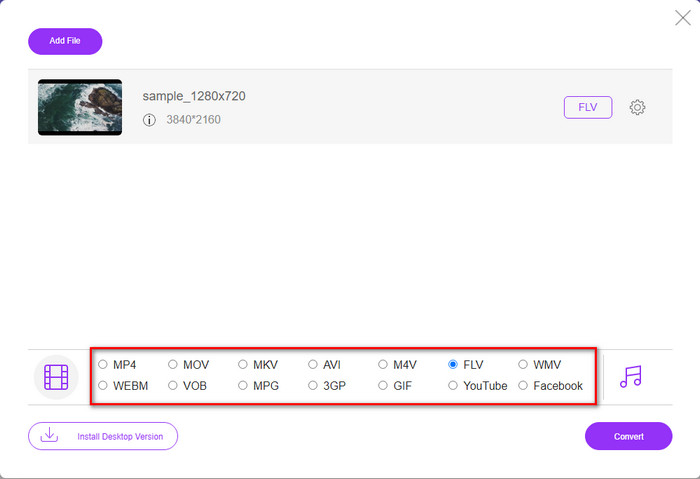
Vaihe 3. Uusi verkkosivu avautuu; alareunasta valitse FLV‑muoto klikkaamalla sitä.
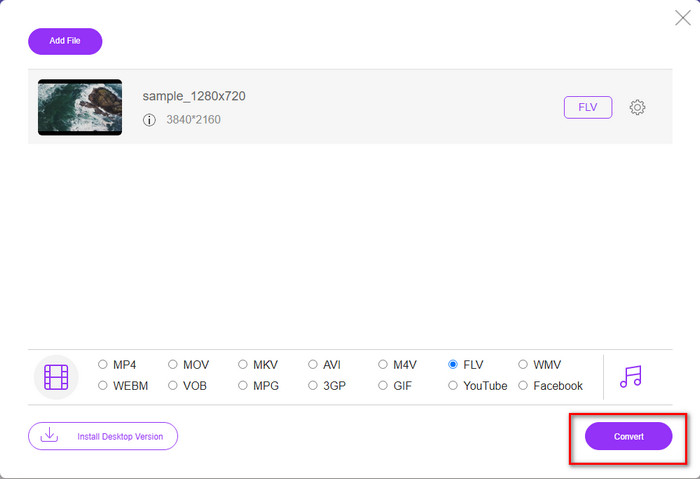
Vaihe 4. Aloittaaksesi M4V–FLV‑muunnoksen ilmaiseksi, klikkaa Convert.
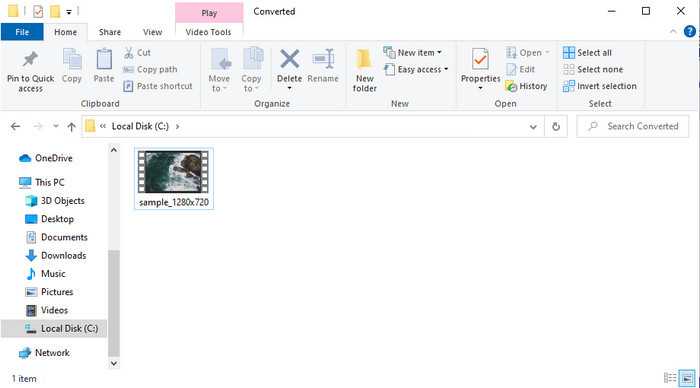
Vaihe 5. Muunnoksen jälkeen käyttöliittymään ilmestyy kansio; klikkaa tiedostoa toistaaksesi sen paikallisella mediasoittimellasi.
Plussat
- Ilmainen ja yhteensopiva kaikissa selaimissa.
- Rajoittamaton tiedostokoko ja muunnos.
- Turvallinen ja ei mainoksia ensisijaisessa verkkotyökalussa.
Haittoja
- Se tarvitsee Internet-yhteyden käyttääkseen työkalua.
- Vähemmän tuettu muoto ladattavaksi ja muunnettavaksi.
Osa 3. Erot M4V- ja FLV-muotojen välillä
M4V tallentaa korkeimman Apple iTunes Storesta ladatun videolaadun. Tämä muoto on samanlainen kuin MP4, koska ne käyttävät MPEG-4-koodekkia kompressorina. Mutta M4V-videot on suojattu Apple FairPlay DRM -tekijänoikeussuojalla. Joten videoiden toistaminen tässä muodossa on hankalaa, koska se ei toistu heti, jos asetat ne muuhun mediasoittimeen kuin iTunesiin tai Quicktime Playeriin. Suojaamattomia M4V-tiedostoja voi käyttää mediasoittimellasi vaihtamalla tiedostotunniste .mp4.
Sitä vastoin FLV:tä käytetään video- ja äänidatan siirtämiseen verkon yli mahdollisimman nopeasti. Flash Video on suotuisin muoto jokaisella HTML 5 -sivustolla. Tämä muoto kuitenkin lopetettiin, koska Adobe Flash oli jo poistunut käytöstä. Voit silti toistaa sen mediasoittimen laajennuksilla, joita tarvitaan lataamisen tai muuntamisen jälkeen.
M4V vs. FLV
M4V:n on kehittänyt Apple, joka käyttää myös MPEG 4:ää. M4V-tiedostoja käytetään usein Apple iTunes Storesta ladattujen videoiden, kuten musiikkivideoiden, TV-jaksojen jne. tallentamiseen. Jotkin M4V-tiedostot saattavat olla kopiosuojattuja, koska se käyttää Applen FairPlay DRM -tekijänoikeussuoja.
Adobe Flash Player käytti FLV:tä videosisällön, kuten elokuvien ja TV-ohjelmien, toimittamiseen. Nykyään Adobe ei enää kehitä soitinta ja suosittelee käyttäjiä poistamaan sen asennuksen turvallisuussyistä. Voit kuitenkin käyttää FLV-muotoa monissa muissa kuin Adobe-/Macromedia-ohjelmissa.
Osa 4. Usein kysytyt kysymykset M4V:n muuntamisesta FLV:ksi
Kumpi on parempi; MP4 vai M4V?
Jos haluat suojata tiedostosi, sinun on käytettävä M4V-muotoa, koska se on saatavilla vain omenoissa ja se on suojattu. Mutta oletetaan, että haluat muodon, joka on yhteensopiva kaikkien mediasoittimien, editorin ja muiden kanssa. Siinä tapauksessa MP4 on universaali mediamuoto, jota haluaisit käyttää.
Voinko pelata M4V:tä VLC:llä?
VLC on ilmainen ja yhteensopiva kaikkien alustojen kanssa, ja se pystyy toistamaan lähes kaikki mediamuodot. Suojattua M4V‑tiedostoa ei kuitenkaan voi toistaa, koska se on DRM‑suojattu. Jos siis haluat katsoa .m4v‑tiedostoa VLC:llä, sinun täytyy muuntaa M4V‑tiedosto MP4:ksi tai AVI:ksi.
Menetänkö laadun M4V:n muuntamisen jälkeen?
M4V:n muuntamisen jälkeen sen laadun tulee säilyttää alkuperäisen M4V-laadun vakionopeus. Jotkut muuntimet eivät kuitenkaan tue videon muuntamista HD-, 1080- tai 4k-laatuiseksi. Joten sinun on parempi valita täydellinen työkalu, ei okei työkalu, joka riittää tarpeisiisi muuntamiseen menettämättä laatuaan.
Johtopäätös
Kaiken kaikkiaan nämä kaksi esiteltyä verkko- ja offline‑työkalua ovat erinomaisia apuvälineitä, kun haluat muuntaa M4V:n FLV:ksi. Lisäksi opimme lisää kahdesta muodosta, M4V:stä ja FLV:stä. Vaikka M4V:n muuntaminen onkin välttämätöntä suojatun tiedoston katsomiseksi, oikean työkalun valinta ei aina ole helppoa. Siksi esittelemme kaksi työkalua, joilla voit muuntaa formaatin ilmaiseksi: käytä FVC Free Video Converter Onlinea tai koe aivan uudenlainen muunnostaso käyttämällä FVC Video Converter Ultimatea. Mitä siis enää odotat, jos haluat katsoa M4V‑tiedostosi ilmaiseksi? Valitse jokin yllä olevista työkaluista, seuraa helppoja ja nopeita vaiheita ja nauti videosta.
-
 [Opas] Kuinka muuntaa M4V-videoita animoiduiksi GIF-tiedostoiksi Windowsissa/Macissa
 Jos haluat tehdä animoituja GIF -tiedostoja suosikki M4V -videoistasi, voit oppia kahdesta helposta ja tehokkaasta tavasta muuntaa M4V -videot GIF -tiedostoiksi mukautetuilla asetuksilla.
-
 3 Video Converter -ohjelma, jota käytetään muuttamaan iTunes M4V AVI:ksi Macissa
 Eikö sinulla ole aavistustakaan kuinka MKV muunnetaan AVI-muotoon? Kun jatkamme tämän artikkelin lukemista, tiedämme kolme työkalua, jotka voivat auttaa sinua muuttamaan tämän tiedostomuodon.
-
 Ilmainen M4V to MOV Converter – Kuinka muuntaa M4V MOV:ksi
 Jos mediasoittimesi ei tue M4V:tä, onko sinulla koskaan ollut vaikeuksia katsoa elokuvaa iPhonellasi? Tämän artikkelin pääaihe on sen muuntaminen MOV-videotiedostoksi.

