


 Video Converter Ultimate
 Näytön tallennin
 Videon korjaus
Opi tapoja muuntaa MTV-tiedostot MOV-muotoon ilman laadun heikkenemistä
MTV on kiinalaisilla kannettavilla mediasoittimilla käytetty formaatti, joka korvaa MP4:n. Vaikka tämä formaatti on käytännössä samanlainen kuin .amv, kun aiot siirtää tiedoston laitteellesi, kuten iOS‑puhelimeen, iPodiin, iPadiin tai Maciin, .mtv‑tiedosto kyllä siirtyy, mutta ei avaudu oletusmediasoittimessasi. Haluatko tietää, miten tämän voi korjata? Lue tämä artikkeli, jossa esitellään muuntimet, joilla voit muuntaa MTV:n MOV:ksi ja toistaa sen iOS‑laitteellasi, iPodilla, iPadilla tai Macilla.

Osa 1. Johdatus MTV:lle ja MOV:lle
MTV-formaatteja voi toistaa Kiinassa luoduilla MP4-soittimilla. Tämä tiedostomuoto tukee videon toistoa edullisella kiinalaisen MP4-soittimella. Vaikka se on MP4-soitin, joka toistaa edelleen videoita .mp4-tiedostotunnisteella, sitä ei tueta täällä. Varsinkin jos siirrät tiedoston joissakin Applen tuotteissa, muotoa ei voi toistaa yhteensopivuuden vuoksi. Lisäksi se valtuuttaa valmistajan luomaan lisää pelaajia pienemmillä lisenssimaksuilla.
MOV on yksi Applen kehittämistä oletusmediaformaateista. Tämä mediamuoto on yksi parhaista vaihtoehdoista, jos haluat muokata videoita yksityiskohtaisesti. Lisäksi tämä muoto käyttää MPEG-4-enkooderia pienentämään tiedostoa laatua heikentämättä. Laadun, yhteensopivuuden ja pakkauksen suhteen MOV on parempi kuin MTV kaikissa mainituissa ominaisuuksissa.
MTV ja MOV ovat mediatiedostojen tai datan, kuten videon, äänen ja tekstin, säilytysastioita. Mutta MOV:ta tuetaan paljon kaikissa Apple-laitteissa. Joten jos haluat siirtää MP4-mediasoittimellasi olevat MTV-tiedostot Maciin, iOS:ään, iPadiin tai iPodiin, sinun on muunnettava tiedosto ensin. Haluatko tietää, kuinka MTV-tiedostot muunnetaan MOV-muotoon? Jatketaan ilman enempää viiveitä MTV-muuntimiin, joita voit käyttää PC:ssä, Macissa ja verkossa.
Osa 2. Nopea ja helppo tapa muuntaa MTV MOV:ksi Macissa
FVC Video Converter Ultimate on ilmiömäinen muunnin, jota miljoonat käyttäjät hyödyntävät muuttaakseen tiedostomuotonsa yhteensopivaksi. Tämä kevyt ja intuitiivinen ohjelmisto tekee muunnoksesta uskomattoman nopeaa ilman, että yksittäisiä tiedostoja katoaa. Lisäksi se tukee laitteistokiihdytystä muunnoksen nopeuttamiseksi ja suorituskyvyn parantamiseksi tietokoneellasi. Ohjelmassa on myös monitoiminen työkalupakki, jolla voi muun muassa muokata ja yhdistää videoita, tehostaa ääntä sekä luoda 3D‑materiaalia ja GIF‑animaatioita. Haluatko tietää, mitä ominaisuuksia tästä työkalusta löytyy? Lue tämä luettelo avainominaisuuksista, jotka saat käyttöösi ladattuasi ohjelman.

FVC Video Converter Ultimate
5 689 200+ latausta- Muunna MKV MOV-, AVI-, MP4-, MKV- ja 200+ -muotoihin menettämättä laatua.
- Muunna samanaikaisesti useita tiedostoja eri muodossa.
- Edistyneet ominaisuudet muokkaamiseen, yhdistämiseen, rajaamiseen, tehostamiseen ja moniin muihin.
- Muunna muotosi 30 kertaa nopeammin laitteistokiihdytystekniikan avulla.
- Saatavilla kaikissa käyttöjärjestelmissä, kuten Windows tai macOS.
Ilmainen latausWindows 7 tai uudempiTurvallinen lataus
Ilmainen latausMacOS 10.7 tai uudempiTurvallinen lataus
Ja nyt kun tiedämme MKTV-muuntimen tärkeimmät ominaisuudet, siirrytään nyt MKV:n muuntamiseen MOV:ksi lukemalla ja noudattamalla ohjeita. Ei tarvitse huolehtia, sillä kaikki tässä kirjoitetut vaiheet takaavat onnistumisen muuntamisessa.
Vaihe 1. Napsauta Lataa‑painiketta ja aloita lataus Macille. Kun lataus on valmis, klikkaa tiedostoa asentaaksesi ohjelman ja valitse lopuksi Start Now käynnistääksesi sen.
Ilmainen latausWindows 7 tai uudempiTurvallinen lataus
Ilmainen latausMacOS 10.7 tai uudempiTurvallinen lataus
Vaihe 2. Kun työkalu on käynnissä, on aika lisätä tiedosto napsauttamalla +‑painiketta. Etsi .mtv‑tiedosto näytölle avautuvasta kansiosta ja klikkaa sitten Open.
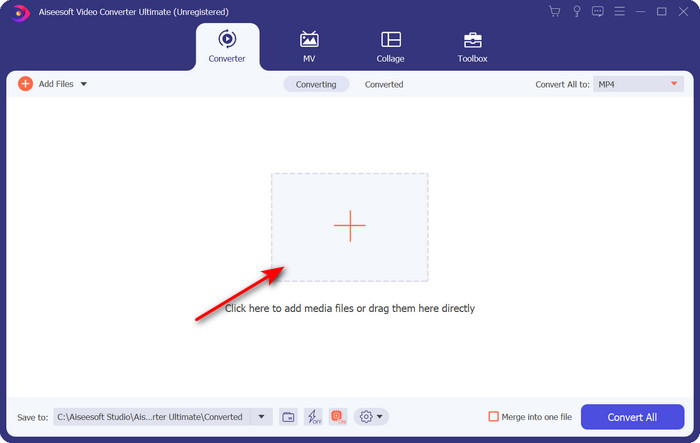
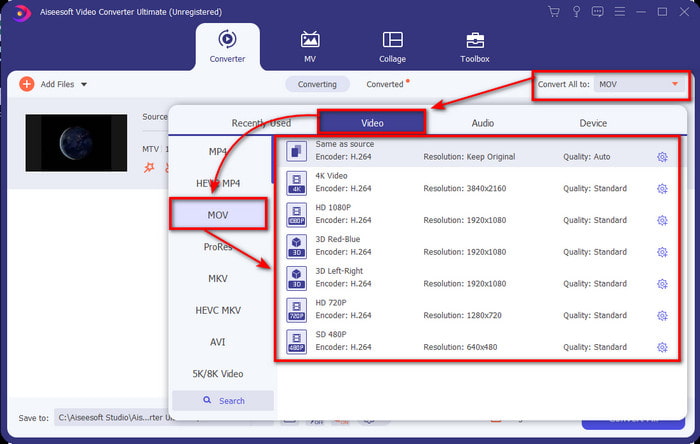
Vaihe 3. Napsauttamalla Convert All to ‑kohtaa voit nyt etsiä ja valita MOV‑muodon.
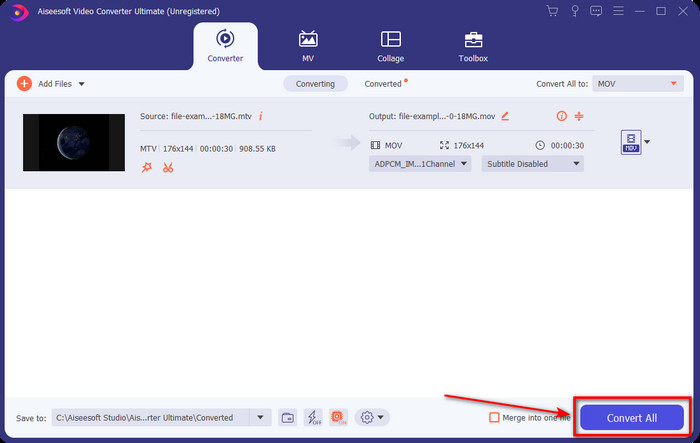
Vaihe 4. Napsauta Convert All aloittaaksesi MTV‑tiedostojesi muunnosprosessin MOV‑muotoon.
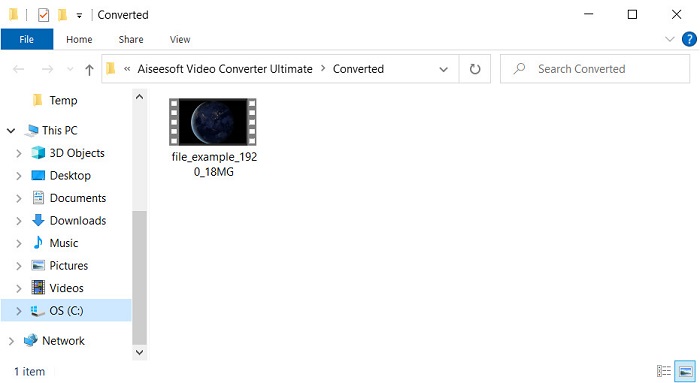
Vaihe 5. Muuntaminen vie jonkin verran aikaa; kun se on valmis, näytölle avautuu kansio, jossa on vastamuunnettu .mov‑tiedosto. Jos haluat katsoa tiedoston, napsauta sitä.
Osa 3. Online ja ilmainen tapa muuntaa MTV MOV:ksi
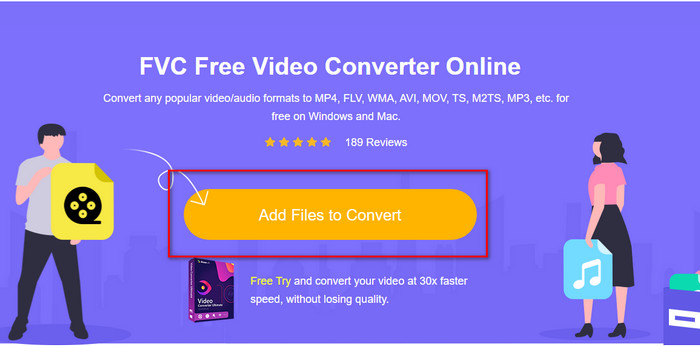
Et halua ladata MTV‑muunninta laitteellesi, koska haluat ratkaista ongelman verkossa? Siinä tapauksessa käytä työkalua FVC Free Video Converter Online. Toisin kuin ensimmäisenä mainittua ohjelmistoa, tätä työkalua voi käyttää suosikkiselaimessasi ilman latausta. Voit myös muuntaa täällä ilman kokorajoitusta, milloin ja missä päin maailmaa tahansa. Yksi työkalun haitoista on, että se on internetriippuvainen – siitä ei ole hyötyä, jos sinulla ei ole verkkoyhteyttä. Mutta jos alueellasi on internetyhteys etkä ehdi ladata yllä mainittua ohjelmistoa, seuraa sitten näitä ohjeita siitä, miten MKV‑tiedostot muunnetaan MOV‑muotoon.
Vaihe 1. Jos haluat käyttää tätä verkkotyökalua, napsauta annettua linkkiä.
Vaihe 2. Linkkiä napsautettuasi sivusto avautuu; klikkaa Add Files to Convert, jolloin näytölle avautuu tiedostokansio. Etsi tiedosto kansiosta ja paina Open ladataksesi sen.
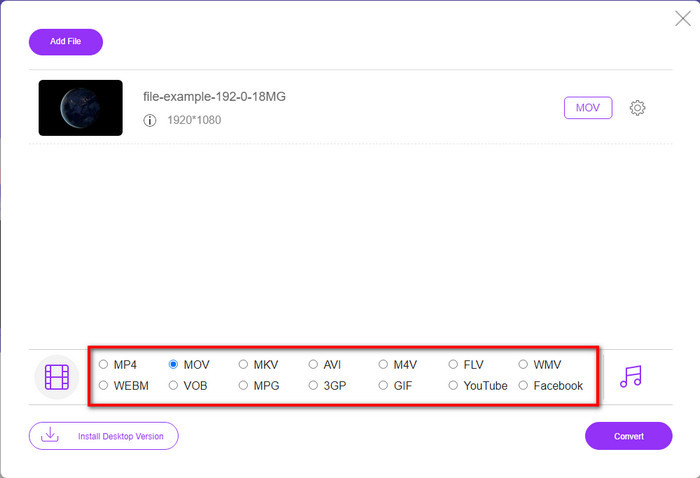
Vaihe 3. Kun tiedosto on ladattu, valitse listasta alhaalta MOV‑muoto.
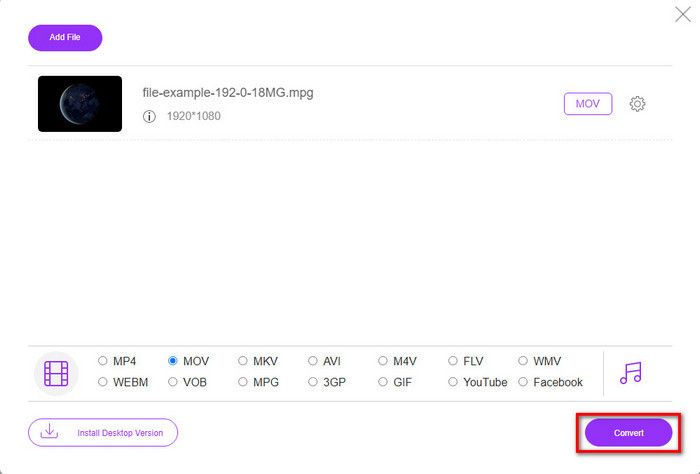
Vaihe 4. Paina Convert, jotta muunnosprosessi käynnistyy.
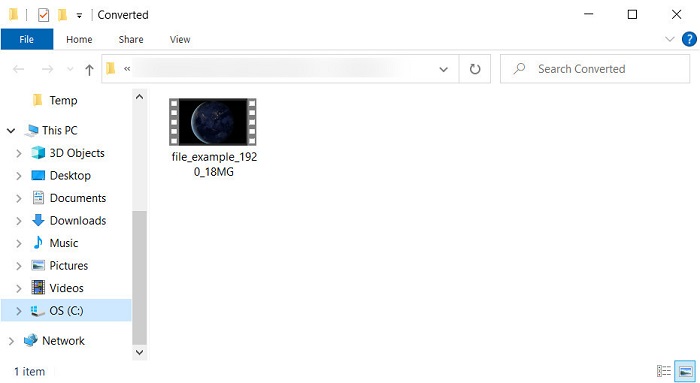
Vaihe 5. Näytölle avautuu kansio, johon MOV‑tiedosto on tallennettu.
Plussat
- Käytettävissä kaikissa selaimissa.
- Käyttäjäystävällinen muunnin ja käyttöliittymä.
- Ei ärsyttäviä mainoksia tai sisäänkirjautumista käytettäväksi.
Haittoja
- Tarvittiin Internet käyttääkseen sitä.
- Keskikokoinen muuntaja saatavilla
Osa 4. MTV- ja MOV-muunnoksia koskevat usein kysytyt kysymykset
Voinko muuntaa MTV-tiedostoja AVI:ksi?
Totta kai voit muuntaa MTV‑tiedostosi myös AVI‑muotoon – haluatko tietää, miten se tehdään? Siinä tapauksessa tutustutaan kolmeen menetelmään, joilla voit muuntaa MTV:n AVI:ksi.
Tukeeko Quicktime Player .mtv-tiedostoa?
QuickTime on Applen laitteiden oletusmediasoitin, mutta tämä soitin ei tue .mtv‑tiedostoja. Voit kuitenkin lukea tämän artikkelin ja tutustua QuickTime‑vaihtoehtoihin, joilla voit toistaa .mtv‑tiedostoja.
Miksi MTV-videot ovat sumeita?
Yksi syy siihen, miksi tämän muodon videot ovat sumeita, on se, että se tukee alhaista resoluutiota. Voit säästää tilaa ja ladata monia mediatiedostoja kiinalaisiin kannettaviin MP4-soittimiin ja vähentää sen käsittelystä aiheutuvaa taakkaa.
Johtopäätös
Nyt kun tiedämme, miten .mtv‑tiedosto muunnetaan ja lähetetään eteenpäin Apple‑laitteellemme, on aika tehdä valinta. Mitä tahansa vaihtoehtoa aiotkin käyttää, se sopii erinomaisesti tiedostojen muuntamiseen verkossa tai offline‑tilassa. Jos haluat asiantuntijatason muuntimen, joka tarjoaa erinomaista laatua ja tehokkuutta, valitse FVC Video Converter Ultimate. Mutta jos et halua ladata ohjelmistoa laitteellesi ja kaipaat kätevää ja tehokasta verkkotyökalua, silloin FVC Free Video Converter Online on oikea valinta.
-
 [Verkossa ja ilmaiseksi] 3 tapaa muuntaa MTV vaivattomasti AVI:ksi
 Oletko koskaan kuullut MTV:n kaltaisesta videoformaatista? Koska et tiedä kaikkea tästä muodosta ja haluat muuntaa MTV-videon AVI:ksi, lue tämä artikkeli huolellisesti saadaksesi lisätietoja tästä ongelmasta.
-
 Paras GIF-muunnin animoidun GIF:n muuntamiseksi MOV-muotoon [2025]
 Muunna GIF-tiedostosi MOV-muotoon vaivattomasti vaikuttamatta videotiedoston laatuun. Samoin portailla ja erilaisilla työkaluilla.
-
 Kuinka muuntaa AVI MOV: ksi helppojen vaiheiden ja työkalujen avulla
 Haluatko tietää kuinka muuntaa AVI toistettavaksi MOV:ksi? Sinun on noudatettava tätä artikkelia, jotta tiedät, miten se tehdään, ja vinkkejä onnistuneen muuntamisen saavuttamiseksi.
