


 Video Converter Ultimate
 Näytön tallennin
 Videon korjaus
5 nopeaa ja vaivatonta tapaa muuttaa MKV FLV:ksi ilmaiseksi [Online & Offline]
Etkö voi jakaa MKV‑tiedostojasi internetissä, koska niiden koko on liian suuri? Mikset muuntaisi tiedostoa sen sijaan, että pakkaisit sitä ja menettäisit laatua? Tämä ongelma ratkeaa, jos luet alla olevat tiedot ennen lähettämistä. Sinun ei tarvitse käyttää tuntia tämän artikkelin lukemiseen, joten mennään suoraan asiaan ja tutustutaan kuuteen muuntimeen, joilla voit muuntaa MKV:n FLV:ksi.

Osa 1. Huippuluokan paras MKV-FLV-muunnin ladattavaksi
FVC Video Converter Ultimate voi auttaa sinua muuttamaan MKV:n FLV:ksi helposti ja tehokkaasti ilman vaivaa. Tämä ilmiömäinen muunnin on hyvin erilainen kuin tämän listan muut muuntimet tai ne, joita olet jo käyttänyt tai et. Se on huippuluokan kooderi ja dekooderi, jonka voit ladata PC:lle tai Macille, ja se toimii moitteettomasti offline-tilassa, vaikka sinulla ei olisi tehokasta pöytäkonekokoonpanoa.

FVC Video Converter Ultimate
4 987 355+ latausta- Muunna MKV FLV:ksi, AVI:ksi, MP4:ksi, MOV:ksi tai yli 200 Windows- ja Mac-käyttöjärjestelmän muotoon.
- Tee MKV-formaatistasi yhteensopiva kaikkien työasemien ja laitteiden kanssa.
- Se voi suorittaa erämuunnoksen MKV-muodoille tai muille muodoille.
- Hullunkestävä muuntaja kenen tahansa käytettäväksi.
- Tukee teräväpiirtolähtöä ja jopa 4k videon laatua.
Ilmainen latausWindows 7 tai uudempiTurvallinen lataus
Ilmainen latausMacOS 10.7 tai uudempiTurvallinen lataus
Vaiheet MKV:n muuntamiseen FLV:ksi FVC Video Converter Ultimatella
Vaihe 1. Lataa sovellus levyllesi ja seuraa asennusohjetta.
Ilmainen latausWindows 7 tai uudempiTurvallinen lataus
Ilmainen latausMacOS 10.7 tai uudempiTurvallinen lataus
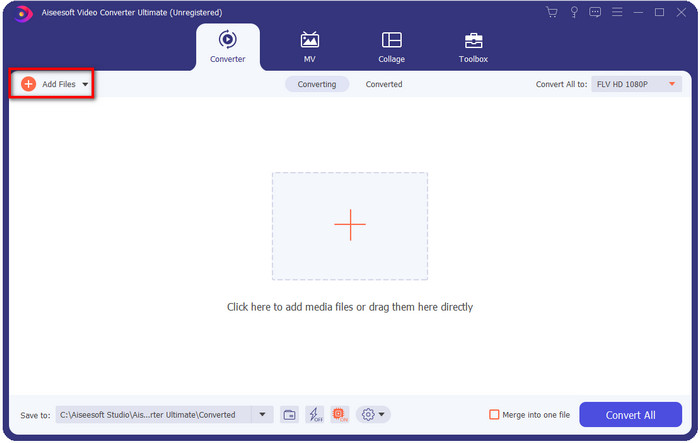
Vaihe 2. Avaa asennuksen jälkeen sovellus ja lisää MKV‑tiedostot; voit raahata ja pudottaa tiedoston käyttöliittymään tai napsauttaa Add Files-painiketta.
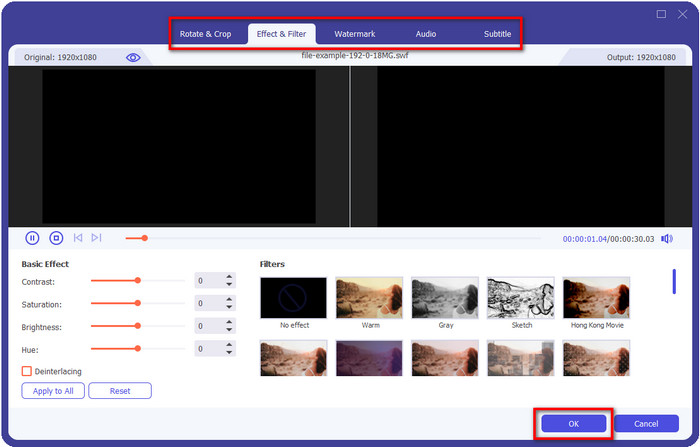
Jos haluat muokata MKV‑tiedostojasi ennen muuntamista, voit napsauttaa taikasauva-painiketta lisätäksesi taikaa lopputulokseen, kuten Efektit, Rajaus, Tekstitykset ja paljon muuta. Tallenna videoon lisäämäsi taika napsauttamalla OK.
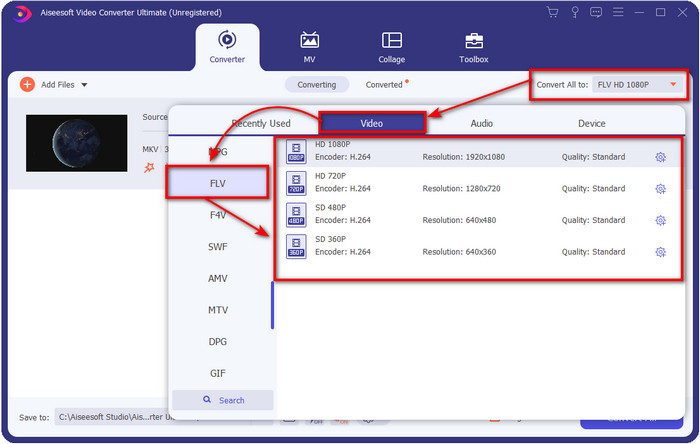
Vaihe 3. Napsauta pudotusvalikkoa ja valitse FLV-muoto luettelosta.
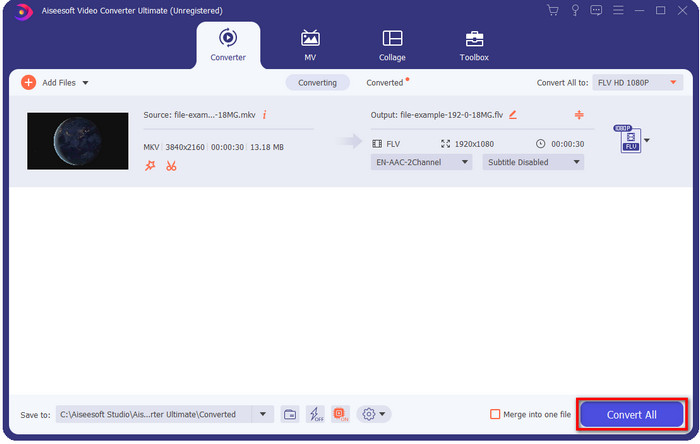
Vaihe 4. Napsauta Convert All -painiketta aloittaaksesi MKV:n muuntamisen FLV:ksi ilmaiseksi. Prosessin jälkeen avautuu kansio, jossa on uusi FLV‑tiedosto.
Osa 2. 4 Paras Web-pohjainen MKV-FLV-muunnin
1. FVC Free Video Converter Online
FVC Free Video Converter Online tarjoaa yksinkertaisen mutta vaikuttavan ilmaisen MKV–FLV‑verkkomuuntimen, joka toimii kaikissa selaimissa. Se tukee myös keskisuuren mittakaavan formaattivalikoimaa, joihin voit muuntaa ja joihin voit ladata. Vaikka työkalu on internetistä riippuvainen, tänne muuntaminen ja tiedoston lataaminen on helpompaa ja nopeampaa. Haluatko tietää, miten sitä käytetään? Seuraa sitten alla olevia vaiheita.
Plussat
- Se on kaikkien Internetin omistajien käytettävissä.
- Käyttäjäystävällinen ja helposti ymmärrettävä käyttöliittymä.
- Ei rajoituksia tiedostokoon.
- Videon ja äänen lisäasetukset.
Haittoja
- Keskikokoinen muoto.
Vaihe 1. Avaa verkkomuunnin napsauttamalla tätä linkkiä.
Vaihe 2. Paina Add Files to Convert -painiketta lisätäksesi tiedoston tietokoneesi kansiosta ja napsauta sitten Open.
Lataa työpöytäversio muuntaaksesi tiedostoja erissä.
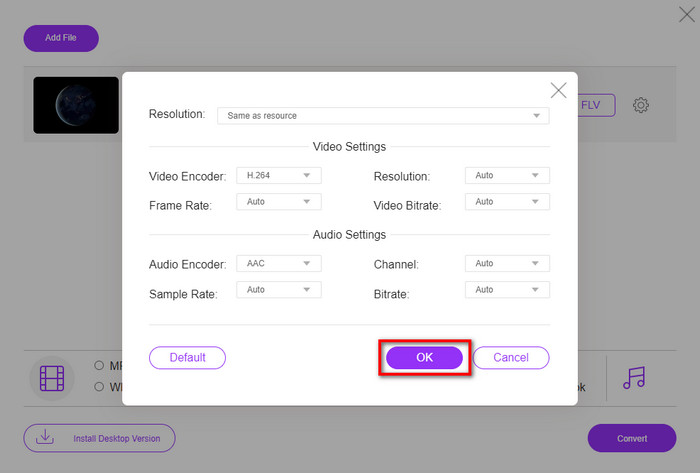
Vaikka et voi muokata videoita täällä, voit muuttaa video- ja ääniasetuksia napsauttamalla hammasratas-painiketta.
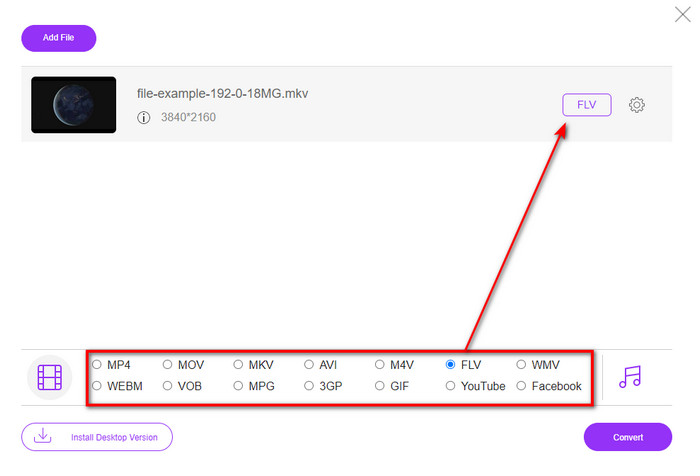
Vaihe 3. Valitse FLV-muoto luettelosta.
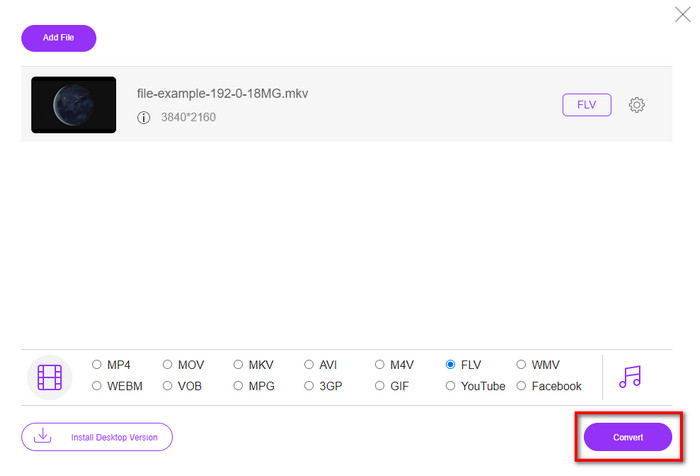
Vaihe 4. Napsauta Convert aloittaaksesi muunnosprosessin.
2. Mconverter
Yksi turvallisimmista MKV–FLV‑verkkotyökaluista, joita voit käyttää, on Mconverter. Videon ja äänen formaattien muuntamisen lisäksi voit muuntaa myös kuvia, arkistoja, asiakirjoja ja monia muita mediamuotoja. Vaikka tätä muunninta voi käyttää ilmaiseksi, jokaiselle tiedostolle on kokorajoitus.
Plussat
- Muunna videoita, ääntä, asiakirjoja ja muuta verkossa.
- Se tukee useita muunnoksia.
- Helppokäyttöinen.
Haittoja
- Tiedoston koko ei saa ylittää 200 Mt.
- Jotkut mainokset tiedostoa muunnettaessa.
Vaihe 1. Avaa Mconverter selaimessasi, raahaa .mkv‑tiedosto ja pudota se laatikkoon.
Vaihe 2. Napsauta FLV-muotoa, jolloin prosessi alkaa automaattisesti.
Vaihe 3. Kun muunto on valmis, tiedosto ladataan automaattisesti levyillesi.
3. Freeconvert.com
Freeconvert.com auttaa sinua muuntamaan MKV:n FLV:ksi verkossa ilmaiseksi. Tällä verkkotyökalulla on helppokäyttöinen käyttöliittymä, jota kuka tahansa osaa käyttää. Huomaa kuitenkin, että tämä verkkotyökalu tukee vain pientä valikoimaa formaatteja, joista voit valita, ja käyttöliittymässä on paljon mainoksia.
Vaihe 1. Etsi Freeconvert.com hakukoneellasi.
Vaihe 2. Napsauta Choose File ladataksesi .mkv‑tiedoston tietokoneesi kansiosta, paina pudotusvalikkoa ja valitse FLV-muoto.
Vaihe 3. Napsauta Convert FLV aloittaaksesi muunnoksen ja lataa tiedosto napsauttamalla Download FLV.
Plussat
- Ilmainen online-muunnin, jota voit käyttää.
- Suojattu ja yksinkertainen verkkomuunnin.
- Se tukee muunnettavaa 1 Gt:n tiedostoa.
Haittoja
- Se tukee pienimuotoista muotoa.
- Muuntaminen ja lataaminen vie paljon aikaasi.
4. Movavi Online Video Converter
Movavi Online Video Converter on yksi suositelluista työkaluista, joilla sinun kannattaa muuntaa MKV FLV:ksi verkossa. Se on Movavi Video Converterin ilmainen verkkoversio, jota monet käyttäjät käyttävät koko verkossa tämän työkalun tarjoaman tehokkuuden ja ammattimaisen ulkoasun vuoksi.
Vaihe 1. Avaa suosikkiselaimesi ja etsi Movavin verkkosivusto.
Vaihe 2. Napsauta +Add Your Media lisätäksesi tiedoston, jonka haluat muuntaa. Napsauta pudotusvalikkoa ja paina Video; etsi FLV-muoto ja napsauta sitä.
Vaihe 3. Paina Convert aloittaaksesi muunnosprosessin.
Plussat
- Ei mainoksia verkkokäyttöliittymä.
- Suoraviivainen muunnin, jota kuka tahansa voi käyttää.
- Se tukee keskikokoista muotoa.
Haittoja
- Muotoilun muuntaminen vie enemmän aikaa.
- Internet-riippuvainen, kuten muutkin verkkomuuntimet.
Osa 3. Vertailukaavio
| Ominaisuudet | FVC Video Converter Ultimate | FVC ilmainen videomuunnin verkossa | Mconverter | Freeconvert.com | Movavi Online Video Converter |
| Muotoiluominaisuuksien muuntaminen |  | | | | |
| Internetistä riippuvainen |  | | | | |
| Erämuunnos | | | | | |
| Edistyneet muokkausominaisuudet | | | | | |
| Käytettävissä olevat alustat | Työpöytäpohjainen työkalu | Web-pohjainen työkalu | Web-pohjainen työkalu | Web-pohjainen työkalu | Web-pohjainen työkalu |
MKV vs. FLV
Vuonna 2002 julkaistu Matroska-multimediakonttiformaatti on avoimen lähdekoodin muoto, joka voi sisältää useita video-, ääni-, kuva- ja tekstitysraitoja. Joten voit käyttää sitä lyhyiden videoleikkeiden, TV-ohjelmien ja elokuvien tallentamiseen helposti. Se on melko suosittu anime-fanien tilaajissa.
Adobe Flash Player käytti FLV:tä videosisällön, kuten elokuvien ja TV-ohjelmien, toimittamiseen. Nykyään Adobe ei enää kehitä soitinta ja suosittelee käyttäjiä poistamaan sen asennuksen turvallisuussyistä. Voit kuitenkin käyttää FLV-muotoa monissa muissa kuin Adobe-/Macromedia-ohjelmissa.
Osa 4. UKK:ta MKV:sta FLV:ksi muuntamisesta
Miksi MKV-tiedostot ovat liian suuria?
MKV‑tiedostot ovat liian suuria kahdesta pääsyystä. Ensinnäkin tämä formaatti voi sisältää rajattomasti sisältöjä ja elementtejä videoille, äänille ja metatiedoille yhdessä tiedostossa. Toiseksi, jos videosi on pitkä, voit odottaa, että myös tiedostokoko kasvaa. Voit kuitenkin pakata MKV‑tiedoston tämän käytettävissä olevan MKV‑pakkaimen avulla. Jos kuitenkin haluat helpomman tavan, sinun kannattaa harkita MKV‑tiedostojen muuntamista MP4-, AVI-, MOV-, FLV- ym. formaatteihin.
Onko MKV parempi kuin AVI?
MKV ja AVI ovat lähes samanlaisia formaatteja, koska ne voivat sisältää teräväpiirtovideota ja suuria tiedostokokoja. Näillä säiliöillä on kuitenkin erilaiset käyttötarkoitukset ja rakenteet, jotka tekevät niistä ainutlaatuisia. Esimerkiksi AVI on pakkaamaton formaatti, joka voi sisältää raakavideosisältöä ja sopii parhaiten toistotarkoituksiin. Se on myös MKV‑tiedoston kehityksen lähtökohta. Vaikka MKV‑tiedostoissa on pakkaus, niiden sisältöä ja elementtejä on paljon enemmän kuin AVI kykenee pitämään. Jos siis haluat säilyttää videosi korkealaatuisina, valitse MKV‑formaatti. Mutta jos haluat parempaa yhteensopivuutta, valitse AVI. Jos haluat tietää, miten muuntaa MKV AVI:ksi, napsauta tätä linkkiä.
Muuttaako käsijarru MKV:n FLV:ksi?
Käsijarru pystyy käsittelemään tätä työtä, mutta tämä muunnin ei tue macOS- ja Windows-ohjelmia, jotka eivät ole 10 uudempia.
Johtopäätös
Lopuksi tiedät nyt, kuinka muuntaa MKV FLV:ksi sekä verkossa että offline-tilassa. Näitä työkaluja ei ole valittu sattumanvaraisesti, vaan valitsimme ne käyttäjien mieltymysten perusteella. Tutkimuksemme ja selvityksemme mukaan nämä kuusi työkalua suoriutuvat parhaiten muuntimen tehtävässään. Mutta FVC Video Converter Ultimate ylitti odotuksemme muuntimena. Haluatko tietää tämän ilmiömäisen muuntimen muut kyvyt? Mitä siis vielä odotat? Sinun kannattaa ladata se heti.
-
 MKV MOV: ksi - Kuinka muuntaa MKV MOV: ksi
 Kuinka muuntaa MKV MOV: ksi Macissa? Voiko iMovie lukea MKV: tä? Mitä MOV-muoto tarkoittaa? Tämä viesti kertoo 2 yksinkertaista tapaa auttaa muuntaa MKV MOV: ksi ilmaisilla online- ja ammattimaisilla videomuuntimilla.
-
 Kuinka muuntaa MKV -videot animoiduiksi GIF -tiedostoiksi ilman Photoshop/FFmpeg -tiedostoa
 Kun olet ladannut ja katsellut MKV -elokuvia tietokoneellasi, saatat haluta jakaa upeita hetkiä ystävien kanssa tai Internetissä GIF -tiedostoina. Tässä artikkelissa voit oppia kahdesta helpoimmasta tavasta muuntaa MKV GIF -muotoon.
-
 Vinkkejä ja temppuja MKV-tiedostojen muuntamiseen MP3-muotoon [2025]
 Onko sinulla vaikeuksia valita oikean muuntimen MKV-MP3:ksi? Jatka sitten tämän viestin lukemista, kun esitimme erilaisia ratkaisuja yhteen ongelmaan.

