


 Video Converter Ultimate
 Näytön tallennin
 Videon korjaus


2 helppoa tapaa muuntaa M4V WMV:ksi vaivattomasti ja häviöttömästi
Joillakin yrityksillä on videopakkausformaatteja. Apple ja Microsoft ovat kehittäneet videotiedostoja yksinoikeudella mediasoittimilleen. Joten kun ladattiin tai ostettiin M4V-tiedostoja Apple iTunes Storesta ja haluttiin jakaa ne ystävien tai perheen kanssa tietokoneella, M4V:n muuntaminen WMV:ksi saattaa olla parasta tehdä ennen niin. Siksi tarjoamme sinulle ainutlaatuisen muuntimen, joka tekee tämän työn nopeasti, tehokkaasti ja poikkeuksellisen vaivattomasti.

Osa 1. Kuinka muuntaa M4V WMV:ksi helposti Macissa ja Windowsissa
Free Video Converter Ultimate on yksinkertainen mutta tehokas videomuunnin FVC Studion kehittämänä. Sen avulla voit muuntaa video- ja äänitiedostoja Windows- tai Mac‑tietokoneellasi. Lisäksi tämän videomuuntimen tukemat videoformaatit ovat monipuolisia ja sisältävät yleisimmät käytössä olevat muodot – se tukee suosittuja MP4-, FLV-, M4V-, WMV-, TS-, M2TS- sekä iPhone/Android‑tiedostoja. Ohjelmisto käyttää HEVC‑tekniikkaa, joten sinun ei tarvitse huolehtia laadusta edes korkealaatuisessa muunnoksessa. Laadusta puheen ollen, se tukee myös 4K UHD -tarkkuutta. Tämän käyttämiseksi toimi seuraavien yksinkertaisten vaiheiden mukaan:
Vaihe 1: Lataa .exe‑tiedosto painamalla alla olevaa Free Download ‑painiketta käyttöjärjestelmäsi mukaan, Windowsille tai Macille. Kun lataus on valmis, avaa tiedosto ja asenna ohjelma. Sen jälkeen käynnistä ohjelma.
Ilmainen latausWindows 7 tai uudempiTurvallinen lataus
Ilmainen latausMacOS 10.7 tai uudempiTurvallinen lataus
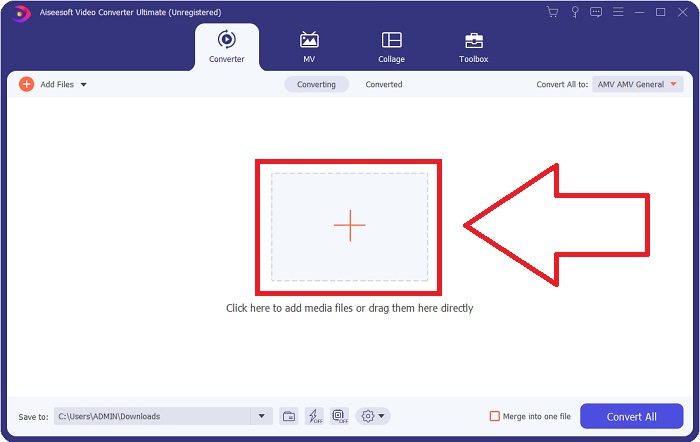
Vaihe 2: Ikkuna avautuu, ja näet käyttöliittymän, jonka keskellä on +‑painike. Napsauta sitä tuodaksesi sen videon, jonka haluat muuntaa. Voit myös vetää ja pudottaa tiedoston helposti.
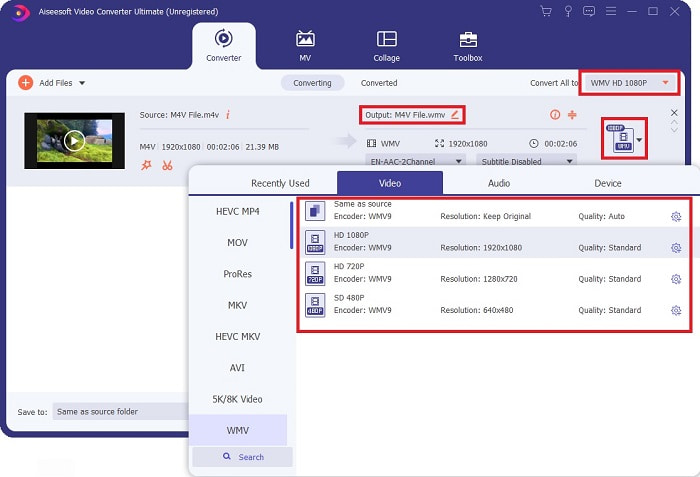
Vaihe 3: Näet tuomasi tiedoston käyttöliittymässä. Sen oikealla puolella näkyy videon nykyinen formaatti. Napsauta sitä, niin näet kaikki käytettävissä olevat formaatit, joista voit valita. Tässä tapauksessa selaa alaspäin ja etsi WMV tai kirjoita se hakupalkkiin nopeampaa löytämistä varten. Lisäksi kaikki videolaatuvaihtoehdot ovat valittavissa välilehden oikeasta reunasta. Voit valita minkä tahansa haluamasi.
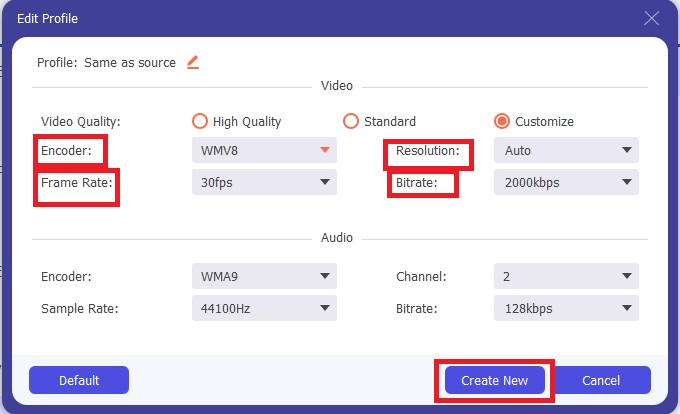
Vaihe 4: Mainitun laatukorjauksen lisäksi voit muokata videosi lopputulosta tarkemmin napsauttamalla hammasratas-kuvaketta valitsemasi videolaadun oikealla puolella. Näet kaikki mahdolliset säädöt, kuten kuvanopeuden, resoluution, bittinopeuden, näytteenottotaajuuden, kooderin ja paljon muuta. Tallenna tekemäsi muutokset napsauttamalla Create New ‑painiketta.
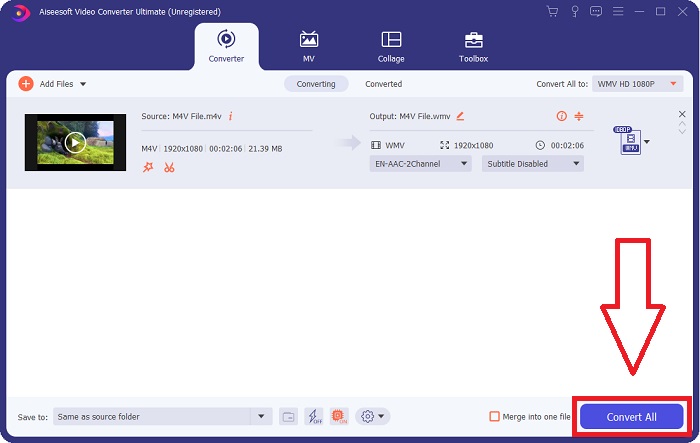
Vaihe 5: Viimeistele muunnosprosessi napsauttamalla välilehden oikeassa alakulmassa olevaa Convert All ‑painiketta. Odota, että muunnos valmistuu, ja sen jälkeen saat muunnetun tiedoston.
Osa 2. Kuinka muuntaa M4V WMV:ksi käsijarrulla
Käsijarru on suosittu ilmainen muunnosohjelma, joka toimii Windows-, Mac- ja Linux-alustoilla. Käyttäjät voivat ladata videoita missä tahansa muodossa DVD- ja Blu-ray-lähteistä tähän avoimen lähdekoodin transkooderiin WMV-muotoon muuntamista varten. Muuntaminen on nopeaa ja helppoa käyttäjäystävällisen käyttöliittymän ansiosta. Noudata näitä helppoja ohjeita muuntaaksesi M4V:n WMV:ksi käsijarrulla.
Vaihe 1: Käynnistä Handbrake‑ohjelma tietokoneellasi. Napsauta pääruudussa Open Source ‑painiketta selataksesi ja lisätäksesi muunnetut WMV‑tiedostot. Voit myös vetää ja pudottaa videot suoraan käyttöliittymään.
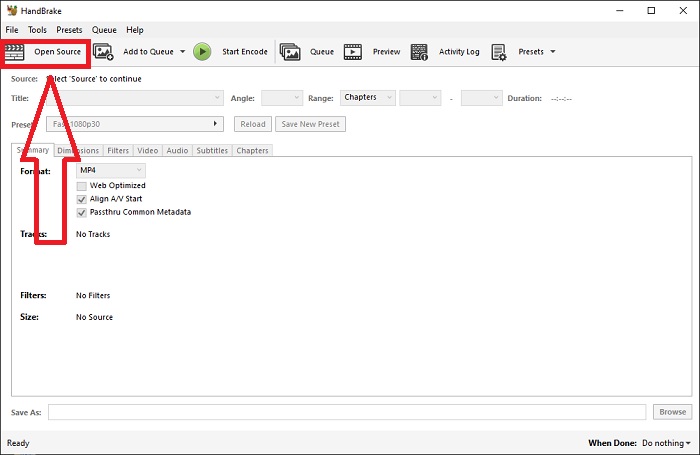
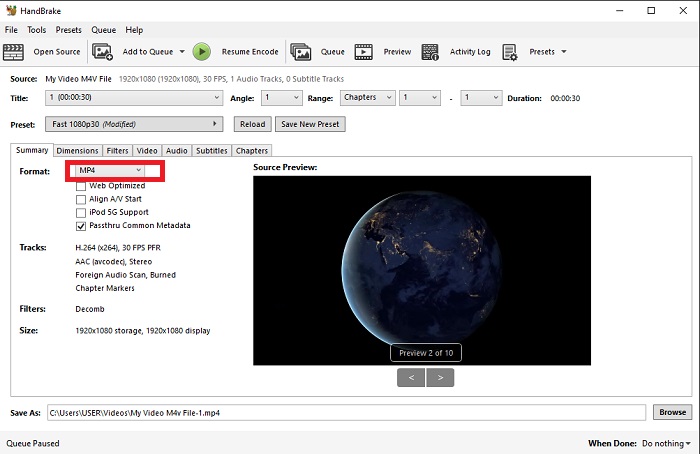
Vaihe 2: Äskettäin lisätty tiedosto näkyy Source‑alueella. Valitse sitten WMV halutuksi tulostusmuodoksi Format‑pudotusvalikosta Summary‑välilehdellä. Tarvittaessa voit säätää suodattimia, videokoodekkeja ja muita tiedosto-ominaisuuksia.
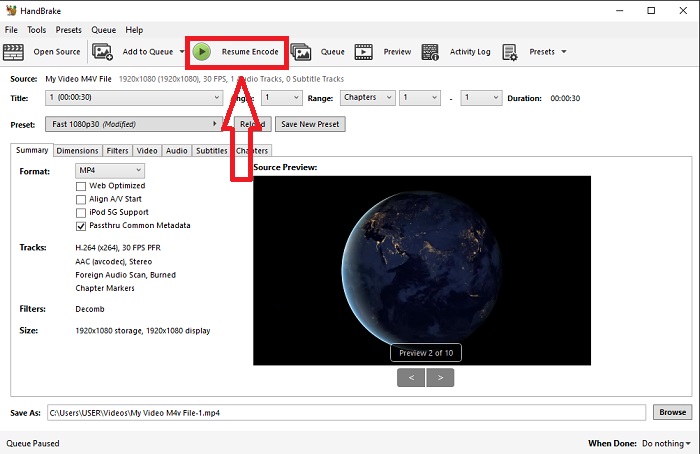
Vaihe 3: Valitse Destination‑osiossa tulostiedoston nimi ja sijainti tietokoneellasi. Napsauta lopuksi Start Encode ‑painiketta muuntaaksesi M4V‑tiedoston WMV‑muotoon.
Osa 3. Toinen hyödyllinen työkalu M4V:n muuntamiseen WMV Online -muotoon
Ilmaisena Internet-työkaluna FVC Free Video Converter on kätevä. YouTuben ja Facebookin hyväksymiä videomuotoja ovat MP4, MOV, MKV, AVI, M4V, FLV, WMV, WEBM, VOB, MPG, 3GP, GIF ja videomuodot. Lisäksi tämä ilmainen online-videomuunnin voi myös muuntaa äänitiedostoja, jolloin voit muuntaa videosi tai musiikkisi MP3-, AAC-, AC3-, WMA-, WAF-, FLAC- ja muihin muotoihin. FVC Free Video Converter antaa sinun myös määrittää tiedostot ennen muuntamisen aloittamista. Voit muuttaa videon resoluutiota, kuvanopeutta ja videon bittinopeutta sekä äänen kanavaa, näytetaajuutta ja bittinopeutta.
Vaihe 1: Napsauta tätä linkkiä siirtyäksesi itse verkkotyökaluun. Ensin sinun täytyy nopeasti ladata käynnistysohjelma. Voit tehdä tämän napsauttamalla sivun keskellä olevaa Add Files to Convert ‑painiketta. Tämä vaihe mahdollistaa tiedostojesi tuonnin.
Vaihe 2: Napsauta samaa painiketta uudelleen ladataksesi videon lopullisesti. Tiedät, että lataus on onnistunut, kun kaikki tarjolla olevat formaatit näkyvät käyttöliittymässä. Valitse niistä WMV.
Vaihe 3: Löydät hammasratas-kuvakkeen oikealta puolelta ohjelman lisäasetuksia varten. Napsauta sitä, niin voit tehdä muutoksia video- ja ääniasetuksiin, kuten resoluutioon, kuvanopeuteen ja vastaaviin. Kun olet valmis, napsauta OK ja sitten Convert ‑painiketta viimeistelläksesi muunnosprosessin.
Aiheeseen liittyvää:
Osa 4. Laajennetut tiedot M4V:stä ja WMV:stä
Saat lisätietoja näistä kahdesta muodosta lukemalla alla olevat tiedot:
M4V on Applen luoma tiedostomuoto. Se on erittäin samanlainen kuin MP4-tiedostomuoto, paitsi että M4V-tiedostoilla voi olla Applen Fairplay DRM -suojaus. M4V-muoto löytyy iTunes Storesta hankitusta videomateriaalista. Jos M4V-tiedostossa on DRM käytössä, tiedoston ostamiseen käytetyn iTunes-tilin on oltava valtuutettu sitä toistavassa koneessa.
Toisaalta WMV-tiedostot ovat Microsoftin luomia videotiedostoja, jotka sisältävät yleensä ääntä. Sekä Mac- että PC-alustoilla käyttäjät voivat toistaa näitä tiedostoja useilla videosoittimilla. Tietyt WMV-tiedostot voivat sisältää digitaalisen oikeuksien hallinnan (DRM) suojauksen, mikä estää käyttäjiä tekemästä laittomia kopioita online-jälleenmyyjiltä ostetuista tiedostoista.
| M4V | WMV | |
| Tiedostopääte | .m4v | .wmv |
| Kehittäjä | Apple Inc. | Microsoft |
| Tukiohjelmat | ◆ Media Player Classic ◆ VLC Media Player ◆ KMPlayer ◆ Zoom Player | ◆ VLC Media Player ◆ MPlayer ◆ Media Player Classic ◆ Windows Media Player |
Osa 5. UKK M4V:n ja WMV:n muuntamisesta
Onko M4V laadukkaampi kuin MP4?
Tiedämme nyt, että MP4:n ja M4V:n välillä ei ole perustavanlaatuista eroa, kun on tehty rinnakkainen M4V MP4 -vertailu. Kun DRM-suojaus on poistettu M4V-videotiedostosta, MP4- ja M4V-videotiedostot ovat identtisiä.
Poistaako käsijarru DRM:n?
Se on kirjasto, jossa voit katsella DVD-levyjä, jotka on salattu Content Scramble System -järjestelmällä (CSS), menetelmällä, jota ilmaiset soitinohjelmistot käyttävät laajasti suojattujen levyjen salauksen purkamiseen. Se on yhteensopiva Windowsin, macOS:n, Linuxin ja useiden käyttöjärjestelmien kanssa. HandBrake pystyy poistamaan tehokkaasti DRM:n DVD-levyiltä ja kopioimaan ne.
Mikä on paras WMV:n käyttö?
Microsoft loi WMV-videomuodon, jota käytetään laajasti Windows-mediasoittimissa. WMV-tiedostot ovat pienempiä ja pakattuja kuin MP4-tiedostot. Siksi se on suosittu Internet-videoiden suoratoistossa.
Johtopäätös
On kiistatta monia tapoja muuntaa M4V WMV:ksi, mutta vain harvat voivat tehdä niin tehdessään muutoksia muutamaan spesifikaatioon. Siksi suosittelemme Video Converter Ultimatea, koska se on rinnallasi aina, kun tarvitset muuntimen. Jos aika ei salli ohjelmiston asentamista, sen online-vastine on aina käytettävissä. Joten auta meitä tarjoamaan paras videoeditointikokemus käyttämällä FVC Video Converter Ultimatea.
-
 Ilmainen | 3 parasta tapaa muuntaa MP4 WMV: ksi menettämättä laatua
 Tämä viesti jakaa miten MP4-video voidaan muuntaa WMV-muotoon Macissa tai Windowsissa. Tarjoamme sinulle myös useita vaihtoehtoja, mukaan lukien sekä työpöytäohjelmistot että verkkopohjaiset verkkomuuntimet. Oletko valmis tuntemaan parhaat MP4 - WMV -muunnostyökalut?
-
 Kolme parasta tapaa muuntaa FLV WMV: ksi Windowsissa ja Macissa
 Etsitkö parasta tapaa muuntaa FLV WMV: ksi menettämättä laatua PC: llä tai Macilla? Olet onnekas, koska täällä jaamme kolme tapaa tehdä työ helposti.
-
 Yksinkertainen opas GIF -tiedoston muuttamisesta WMV -muotoon Windows/Mac -tietokoneessa
 Haluatko tietää kuinka muuntaa GIF WMV-muotoon? Seuraa sitten tätä artikkelia, sillä se esittelee erilaisia ratkaisuja, joita voit valita.

