


 Video Converter Ultimate
 Näytön tallennin
 Videon korjaus
3 tehokasta tapaa muuttaa M4V MKV:ksi Macissa/Windowsissa/Linuxissa ilman laadun heikkenemistä
Minun on käännettävä iTunesista lataamani M4V-videot. Onko sinulla ideaa kuinka muuntaa M4V MKV:ksi Macissa ja käyttää sitä myöhemmin televisiossani?
This problem is widespread, especially on M4V videos downloaded on iTunes because this format is under Apple's Fair Play Policy, and it is protected. Therefore, you can't play the .m4v videos instantly on other devices without converting them. This article will provide facts about the converters you can use and succeed in converting the M4V format. Without any more delays, let's start to learn the efficient method of changing M4V to MKV on Mac or Windows.

Osa 1. Muunna iTunes M4V MKV:ksi Macissa ja Windowsissa [Valituimmat]
There are many free M4V to MKV converters on the market that you can download, and one of them is the FVC Video Converter Ultimate. But this ultimate tool provides a more effective conversion than the other converters due to its lightning speed conversion, unlimited upload to convert, and intuitive interface. Are you amazed at the ultimate converters? Or do you want to know more about the converter? In that case, here below are the key features you will see if you attain this converter.

FVC Video Converter Ultimate
2 999 368+ latausta- Se voi muuntaa useita iTunes M4V:itä MKV:ksi tai yli 200 mediamuotoon, kuten MOV, AVI, MP4 jne.
- Äärimmäisen nopean muunnoksen avulla prosessisi muuntaa M4V hetkessä
- Saatavilla on edistyneitä muokkausominaisuuksia, jotka tekevät videostasi entistä paremman.
- Aseta upeita ominaisuuksia pakkaamiseen, koon muuttamiseen, GIF-muodostukseen jne. Toolboxissa.
Ilmainen latausWindows 7 tai uudempiTurvallinen lataus
Ilmainen latausMacOS 10.7 tai uudempiTurvallinen lataus
Eikö olekin hämmästyttävää, kuinka kaikki nämä ominaisuudet voivat olla yhdessä työkalussa? Älkäämme tuhlaako enempää aikaa ja määritämme, kuinka tämä työkalu muuntaa iTunes M4V:n tehokkaasti MKV:ksi seuraamalla alla olevia ohjeita.
Step 1. First, download the ultimate converter on your drive by clicking the download button below. Choose the platform you are currently using, follow the installation process, press Start Now to proceed. Remember, you will need to be more familiarized with the tool's interface to avoid difficulties.
Ilmainen latausWindows 7 tai uudempiTurvallinen lataus
Ilmainen latausMacOS 10.7 tai uudempiTurvallinen lataus
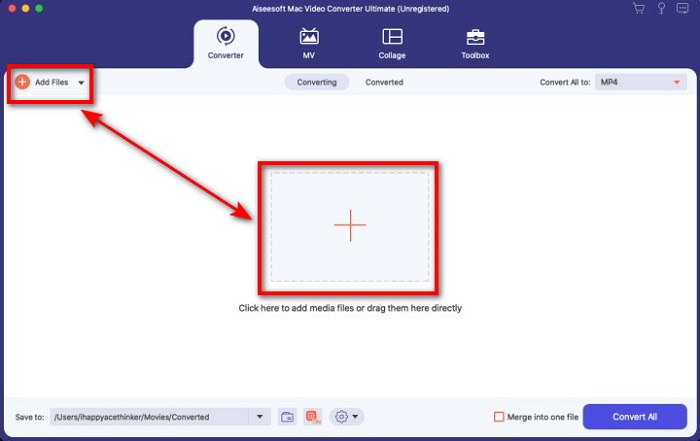
Step 2. Upload the M4V File on the interface by clicking the Add Files or the + button. After that, a computer folder will open on your screen, browse the .m4v File, and press Open.
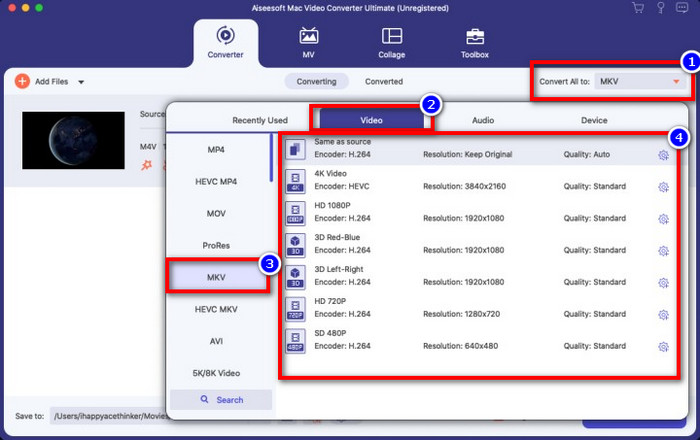
Step 3. Pick out the MKV format under the Convert All to and click it.
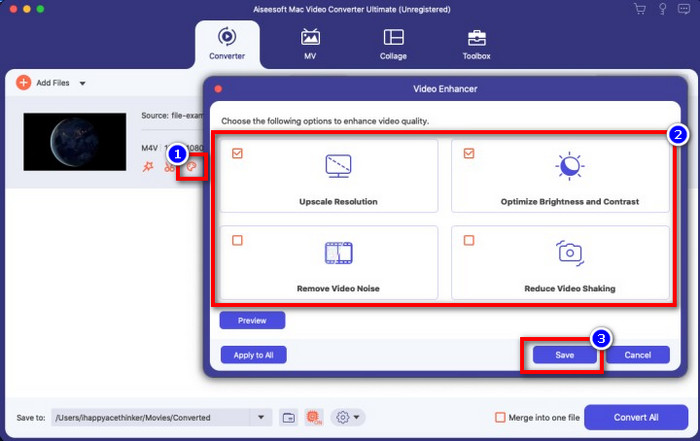
Optional. The effectiveness of this is, without a doubt doing great so far. But did you know that this tool also offers video enhancers? If you click the enhance video option, a dialog box will display; tick the box you want to improve on your video, and to apply it click Save.
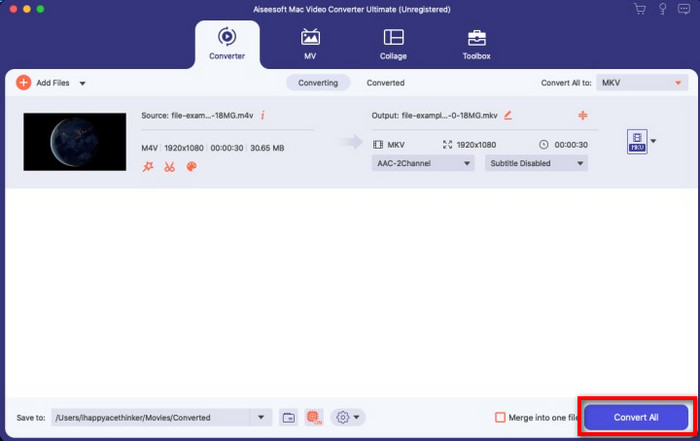
Step 4. By clicking the Convert All button, converting will begin within a short period. Here it is; with that, the file extension of your video is now .mkv.
Osa 2. Muunna M4V MKV Online -muotoon
Doesn't want to pay to convert M4V files; instead, want to convert M4V to MKV online? If that is the case, FVC Free Video Converter Online is an online converter that guarantees your converting process efficiency even on the web. A converter can finish the job without purchasing the converter itself or even downloading it. Also, there are no ads or even registration needed to use this. Even though the converter is free, the features presented here only focus on converting. Unlike the ultimate tool, it provides wide-scale and amazing features. Furthermore, if you need to convert your M4V files online, use this converter and copy the steps below.
Step 1. Kindly click this link to open the FVC Free Video Converter Online.
Step 2. Press Add Files to Convert option to launch and upload the M4V File you need to convert.
Download the Desktop Version to convert files in batch.
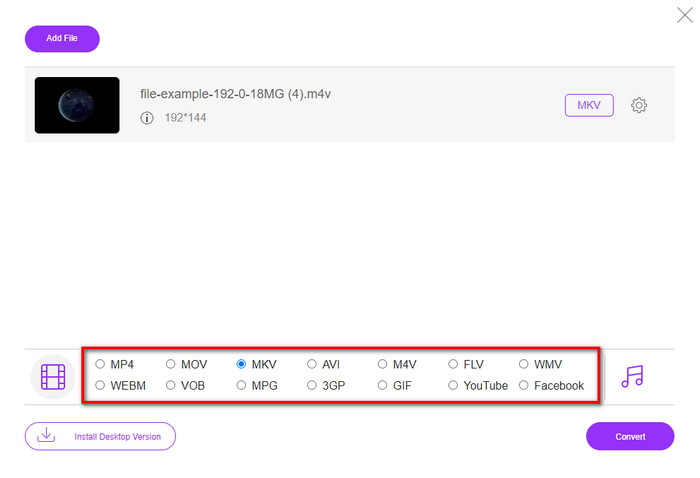
Step 3. Select the MKV format below or the other format you want to have.
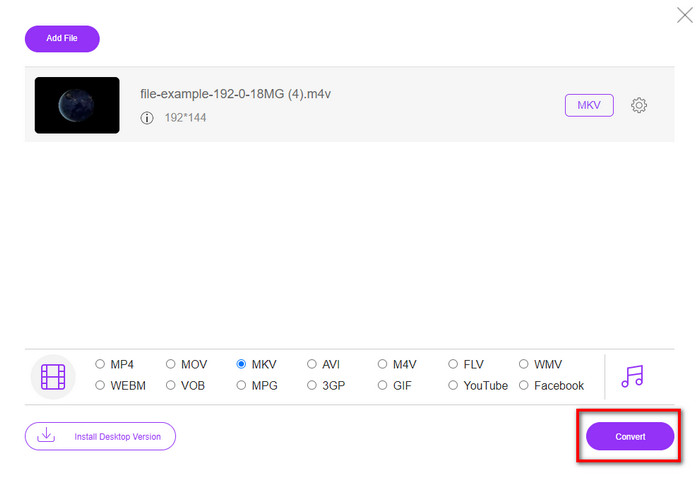
Step 4. Hit Convert for the process to begin.
Osa 3. Muunna M4V MKV:ksi ilmaiseksi
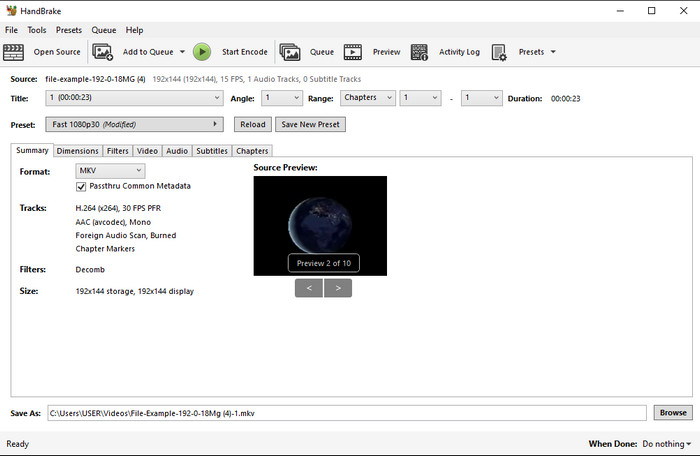
Handbrake provides a swift and efficient converting process like the other converter presented here. However, the format this tool supports is limited, which means you have no less choice option of choosing which format you want it to be. But if you want to use and convert M4V to MKV in Handbrake, apply the steps below.
Step 1. Download the Handbrake on your desktop. Upload the .m4v file by dragging and dropping it on the interface. You can also click File, locate the file on the computer folder, and press Open.
Step 2. Click Format and choose MKV.
Step 3. Click Start Encode for converting the process to begin.
Osa 4. Mitkä ovat yhtäläisyydet ja erot M4V:n ja MKV:n välillä?
Ennen kuin vertaamme M4V:tä ja MKV:ta, selvitetään näiden kahden muodon yhtäläisyydet. M4V ja MKV ovat molemmat mediasisällön ja -elementtien säiliöitä. Lisäksi näiden kahden muodon tiedetään tallentavan yhtä parhaista videolaaduista, kuten HD-videot tai 4k. Ja ne ovat myös suuria elementtejä, kuten metatietoja, varten. Lisäksi seuraavat tiedot alla ovat ero näiden kahden muodon välillä.
M4V on hyvin samanlainen kuin MP4-muoto; Tämä muoto on kuitenkin DRM-kopiosuojauksen alainen, mikä tarkoittaa, että et voi käyttää sitä vapaasti. Kaikilla M4V-tiedostoilla ei kuitenkaan ole Apple-suojausta, koska joillakin ladattavilla M4V-tiedostoilla on luvaton lisenssi, joten varmista, että lataat .m4v-tiedoston iTunesista välttääksesi haitalliset virukset, jotka saastuttavat järjestelmääsi. Vaikka formaatilla on rajoituksia, voit silti käyttää tätä muotoa useissa mediasoittimissa katsoaksesi iTunesista lataamaasi videota. Lisäksi, jos tarvitset suojatun mallin Macissa, tämä muoto on paras valinta.
Päinvastoin, MKV on erityinen sisältämään useita mediasisältöjä ja elementtejä yhdessä tiedostossa. Tämä ominaisuus on käytettävissä vain MKV:ssa, koska tämä muoto on vapaasti käytettävissä, ja se on joustavampi kuin M4V. Lisäksi on monia syitä muuttaa M4V MKV:ksi Macissa tai Windowsissa, ja yksi niistä on tehdä videotiedostosta rajoittamaton.
M4V vs. MKV
M4V:n on kehittänyt Apple, joka käyttää myös MPEG 4:ää. M4V-tiedostoja käytetään usein Apple iTunes Storesta ladattujen videoiden, kuten musiikkivideoiden, TV-jaksojen jne. tallentamiseen. Jotkin M4V-tiedostot saattavat olla kopiosuojattuja, koska se käyttää Applen FairPlay DRM -tekijänoikeussuoja.
Vuonna 2002 julkaistu Matroska-multimediakonttiformaatti on avoimen lähdekoodin muoto, joka voi sisältää useita video-, ääni-, kuva- ja tekstitysraitoja. Joten voit käyttää sitä lyhyiden videoleikkeiden, TV-ohjelmien ja elokuvien tallentamiseen helposti. Se on melko suosittu anime-fanien tilaajissa.
Osa 5. Usein kysyttyä M4V:n muuntamisesta MKV:ksi
Kumpi on parempi editointiin, M4V vai MOV?
The two said format is one of the Apple formats, so you will notice that there is no significant gap between M4V and MOV. However, MOV is much better at editing because this format often contains a series of video playback that is the best choice for professional editing. Maybe you think you should make your M4V into a MOV for editing purposes. If so, click this link to know more about converting M4V to MOV with a comprehensive understanding of it.
Ovatko M4V ja MP4 samat?
M4V ja MP4 ovat rakenteeltaan ja videolaadultaan hyvin identtisiä. Mutta Apple Plays -suojauksen ansiosta M4V:llä on pieni tukialue, etkä voi vain toistaa videota tai muokata .m4v-laajennuksella.
Mitkä ovat M4V:tä tukevat mediasoittimet?
Not many media players support this type of format because of the DRM protection. So if you are looking for an MKV player, you will spend a lot of time and test it out, which consumes a lot of time. But if you read this article, you can download or use the top 5 MKV media players available on all platforms.
Johtopäätös
The three tools presented in this article will surely give you the effective conversion you want to have by following the steps. Although the converters have a lot in common, they still have a lot of differences as well. If you read the details we presented above, you will know many about the three tools. Suppose you want to have an excellent conversion in a one-go and still achieve the efficiency of the conversion, we would recommend the FVC Video Converter Ultimate. Sounds unbelievable? Indeed it is, so download it on your desktop to try it yourself.
-
 M4V to MP3 Converter - 4 parasta tapaa purkaa MP3 M4V-tiedostoista
 Kun haluat purkaa MP3-äänen M4V-videoista helposti, voit oppia lisää 4 parhaasta M4V-MP3-muuntimesta saadaksesi haluamasi äänitiedostot artikkelista.
-
 [Opas] Kuinka muuntaa M4V-videoita animoiduiksi GIF-tiedostoiksi Windowsissa/Macissa
 Jos haluat tehdä animoituja GIF -tiedostoja suosikki M4V -videoistasi, voit oppia kahdesta helposta ja tehokkaasta tavasta muuntaa M4V -videot GIF -tiedostoiksi mukautetuilla asetuksilla.
-
 3 Video Converter -ohjelma, jota käytetään muuttamaan iTunes M4V AVI:ksi Macissa
 Eikö sinulla ole aavistustakaan kuinka MKV muunnetaan AVI-muotoon? Kun jatkamme tämän artikkelin lukemista, tiedämme kolme työkalua, jotka voivat auttaa sinua muuttamaan tämän tiedostomuodon.

