


 Video Converter Ultimate
 Näytön tallennin
 Videon korjaus
 Suojattu lataus
Kuinka muuntaa mikä tahansa video MP4: ksi ilmaiseksi
Videomuodoista puhuttaessa MP4 on epäilemättä yksi yleisimmistä nykyään käyttämistämme formaateista. Se voi sisältää videon lisäksi myös äänen ja tekstitykset. Nykyään monet ihmiset käyttävät MP4:ää videoidensa ja elokuviensa varmuuskopiointiin. Siksi on hyvin tavallista muuntaa video MP4-tiedostoksi ja tallentaa se. Lisäksi lähes jokainen soitin ja laite pystyy toistamaan MP4-videoita, mikä antaa meille vielä yhden syyn muuntaa video MP4-muotoon.
Tässä artikkelissa selvitämme siis, miten muuttaa muut videotiedostomuodot MP4:ksi. Lisäksi opimme, miten ladata verkkovideoita tietokoneellesi.

Osa 1. Kuinka muuntaa paikalliset videotiedostot MP4: ksi
Joku voi leikata kulmia muuttamalla tiedostotyypin MP4-tiedostotunnisteeksi. Tämä voi kuitenkin aiheuttaa ongelmia - laite ei tunnista muutettua tiedostoa. Joten sinun on parempi käyttää ammattimaista videomuunninta tiedostotyypin vaihtamiseen.
1. Online MP4 Video Converter
Jos sinun täytyy muuntaa tietokoneellesi tallennetut videot MP4-muotoon verkossa, voit helposti käyttää kätevää muunnostyökalua nimeltä FVC Free Online Video Converter.
Tämä videomuunnin hoitaa videomuunnoksen vaivattomasti. Voit helposti muuntaa mitkä tahansa videot ja elokuvat MP4-muotoon alkuperäisellä laadulla. Voit jopa muokata videosi tarkkuutta, kuvanopeutta ja bittinopeutta tai muuntaa videoita, kuten WMV MP3:ksi, tarpeidesi mukaan.
Vaihe 1. Siirry sen viralliselle verkkosivustolle. Napsauta Add Files to Convert ja sitten Download. Käynnistysohjelma ladataan tietokoneellesi. Asenna se.
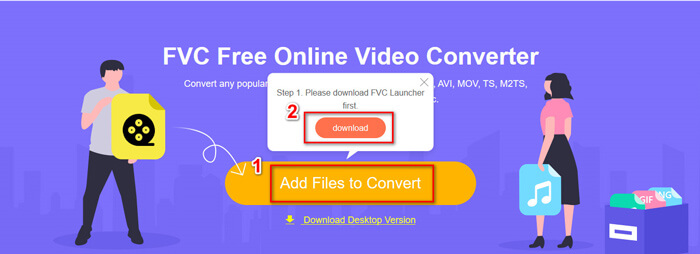
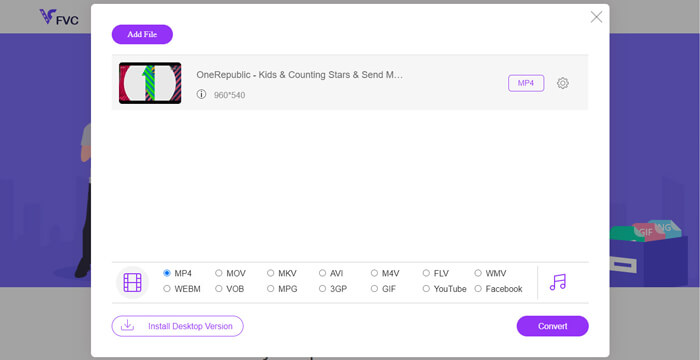
Vaihe 2. Asennuksen jälkeen näet Open Window -ikkunan, jossa voit valita muunnettavat videot.
Vaihe 3. Sen jälkeen voit valita muodoksi MP4 ennen muunnoksen käynnistämistä. Napsauta Convert ja valitse tallennuskohde. Tämän jälkeen saat pian valmiin MP4-videosi.
2. VLC-mediasoitin
Saatat olla yllättynyt siitä, että VLC Media Player voi muuntaa myös videoita. Mutta tämä on totta, että sitä voidaan käyttää MP4-videomuuntimena. Jos sinulla on jo VLC tietokoneellasi, voit kokeilla sitä.
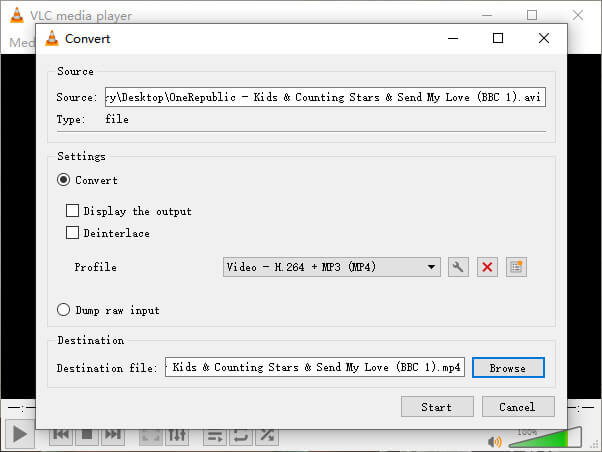
Vaihe 1. Avaa VLC Media Player. Siirry valikkoon Media ja sitten kohtaan Convert/Save…
Vaihe 2. Lisää video VLC:hen ja napsauta alhaalla olevaa Convert / Save -painiketta.
Vaihe 3. Varmista sitten, että lähtöformaatti on MP4. Valitse tallennuskohde ja Start muunnos.
Osa 2. Streaming-videon lataaminen MP4: ään
Nykyään ihmiset ympäri maailmaa nauttivat verkkovideoiden katselemisesta. Katsellessasi näitä videoita saatat löytää niistä mielenkiintoisia ja haluat tallentaa ne tietokoneellesi myöhempää katselua varten. Suurinta osaa online-suoratoistovideoita ei kuitenkaan voi ladata suoraan, ja joillakin voi olla jopa omat muodot, joita valtavirran pelaajat ovat vaikea tunnistaa.
Joten miten ladata ja muuntaa online-video suositummaksi formaatiksi, kuten MP4, tietokoneellasi?
FVC Free Screen Recorder -ohjelman tallennustoiminto voi auttaa sinua tässä. Voit nauhoittaa mitä tahansa verkkovideoita YouTubesta, Vimeosta jne. haluamallasi laadulla. Ja se on täysin ilmainen käyttää. Noudata alla olevia ohjeita suoratoistovideoiden tallentamiseksi.
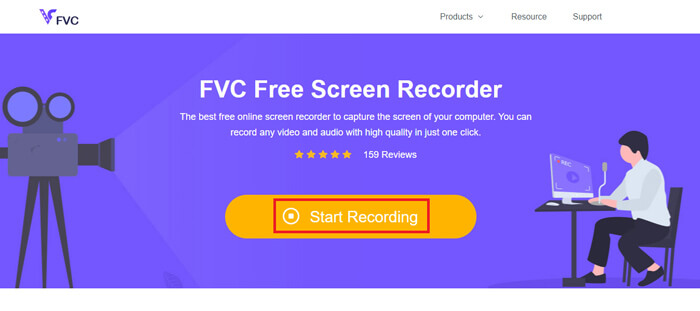
Vaihe 1. Napsauta yllä olevaa linkkiä ja valitse Start Recording. Sitten sinun täytyy ladata ja asentaa käynnistysohjelma tietokoneellesi, jos et ole vielä tehnyt niin.
Ilmainen latausWindows 7:lle tai uudemmalleTurvallinen lataus
Ilmainen latausmacOS 10.7:lle tai uudemmalleTurvallinen lataus
Vaihe 2. Säädä tallennusalue sopivan kokoiseksi. Avaa sitten Speaker. Voit myös avata Microphone, jos haluat lisätä selostuksen. Napsauta REC aloittaaksesi tallennuksen.
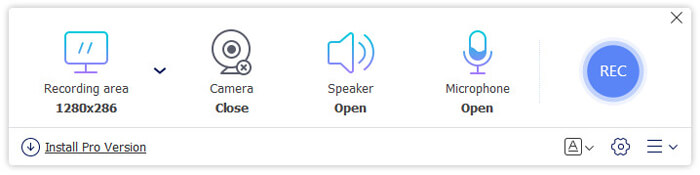
Vaihe 3. Kun olet lopettanut tallentamisen, napsauta Stop-kuvaketta lopettaaksesi. Video tallennetaan oletusarvoisesti tietokoneellesi.
Osa 3. Usein kysytyt kysymykset videon muuntamisesta MP4: ksi
1. Kuinka kauan kestää muuntaa videon MP4: ksi?
Yleensä videoiden muuntaminen MP4: ksi kestää vain muutaman minuutin. Mutta jos videon koko on liian suuri tai verkon nopeus on hidas, se saattaa tarvita enemmän aikaa muunnoksen suorittamiseen.
2. Entä jos muunnettu MP4-tiedosto on liian suuri jakamista varten?
Sen jälkeen sinun täytyy pakata tämä MP4-video pienempään kokoon. Itse asiassa FVC Free Online Video Converter -ohjelmalla voit pienentää tiedostokokoa helposti. Napsauta vain Asetukset-kuvaketta tiedostosi vieressä, kun olet käynnistänyt tallentimen, ja säädä tarkkuus matalammaksi. Muunnoksen jälkeen huomaat, että videosi on huomattavasti pienempi kuin alkuperäinen.
Toinen ratkaisu on käyttää tehokasta videopakkaajaa, kuten FVC Free Video Compressor, joka voi pienentää videosi kokoa hetkessä säilyttäen korkean laadun.
3. Onko mahdollista muuntaa YouTube- tai Facebook-video MP4: ksi?
Jos olet YouTube Premium -käyttäjä, voit ladata YouTube -videon ja muuntaa sen MP4 -muotoon videomuuntimen avulla.
Johtopäätös
Pidätkö enemmän verkkotyökaluista? Voit luottaa ohjelmaan FVC Free Online Video Converter. Onko VLC jo asennettuna tietokoneellesi? Voit kokeilla sen muunnostoimintoa.
Nyt tiedät kaiken siitä, miten muuttaa video MP4-muotoon. Toivottavasti olet löytänyt parhaiten tarpeisiisi sopivan muuntimen. Älä epäröi jättää meille kommenttiasi. Arvokas palautteesi auttaa meitä parantamaan palvelua.
-
 3 ilmaista tapaa muuttaa AVI MP4: ksi Windows / Macissa
 Joskus katsellessamme elokuvaa puhelimellamme, käyttämämme soitin kysyy, ettei videota voida toistaa, koska se ei tue AVI-muotoa. Joten miten voimme nopeasti muuttaa AVI: n MP4: ksi ilman laadun heikkenemistä? Tässä on useita ilmaisia menetelmiä, joita voit kokeilla.
-
 Kuinka muuntaa MKV MP4: ksi Windows / Macissa
 Etkö voi toistaa MKV-videoita? Haluatko katsella MKV-videoita laitteissa, jotka eivät tue MKV: tä? Tässä on 2 ilmaista tapaa muuntaa MKV MP4: ksi menettämättä laatua.
-
 Suosituimmat 4 tapaa muuntaa MP4 MOV: ksi
 Kuinka muuntaa MP4 MOV: ksi Macissa? Onko olemassa mitään ilmaista tapaa muuntaa MP4 MOV: ksi ilman laadun heikkenemistä? Tämä viesti jakaa 4 yksinkertaista tapaa auttaa sinua tekemään videon muunnos MP4: stä MOV: ksi Macissa, Windows PC: ssä ja verkossa.
