


 Video Converter Ultimate
 Näytön tallennin
 Videon korjaus
6 parasta videon nopeusohjainta Windowsille/Macille/Androidille/iOS:lle
Videon nopeuttaminen tai hidastaminen voi luoda uskomattoman illuusion, jos olet kyllästynyt käyttämään perinteisiä tehosteita. Tämä videonmuokkaustekniikka on yksinkertainen mutta tehokas. Kun etsit netistä, huomaat, että markkinoilla on monia erilaisia nopeudensäätimiä, ja tiedämme, että valinta on vaikea. Mutta jos luet tämän artikkelin, esittelemme nopeudensäätösovelluksia, joilla voit muuttaa toiston nopeutta. Kiinnostaako sinua parhaat videon nopeudensäätösovellukset? Siinä tapauksessa jatka lukemista, niin saat lisätietoa eri alustoillesi saatavilla olevista videon nopeudensäätimistä.

Osa 1. Kuusi parasta videonopeudensäädintä Windowsille, Macille, Chromelle, iOS:lle ja Androidille
Suosituin 1. Video Converter Ultimate (Windows ja Mac)
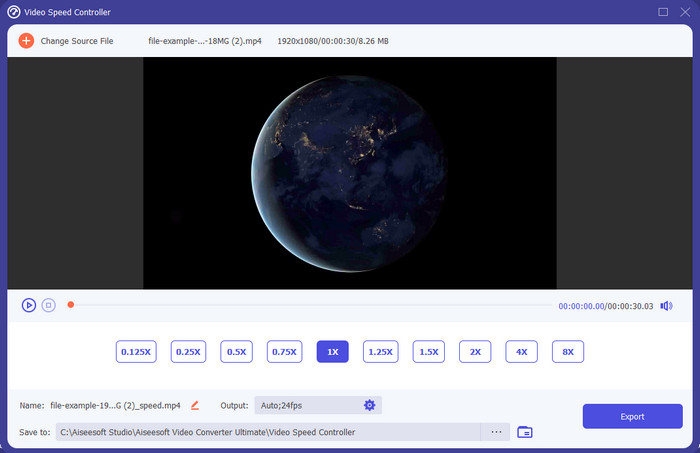
Tarvitsetko videon nopeudensäädintä, joka on erittäin tehokas ja kätevä videon nopeuttamisessa ja hidastamisessa? Siinä tapauksessa Video Converter Ultimate on apu tähän ongelmaan. Se on kaikista helpoin työkalu, jolla voit vaivattomasti muuttaa videon nopeutta, tarvitsetpa sitä sitten nopeutettuna tai hidastettuna slow motion -tehosteeksi. Vaikka muutat nopeutta, videon alkuperäinen laatu säilyy, mutta liike ei, koska muutat toistonopeutta.
Tämän lisäksi voit tehdä monia asioita, kuten muuntamalla, yhdistämällä, leikkaamalla ja paljon muuta; periaatteessa se on all-in-one-työkalu. Haluatko tietää muut tarjoukset, joita sinulla voi olla tämän nopeutetun videosovelluksen avulla? Jos näin on, lue työkalun ominaisuudet saadaksesi lisätietoja, tai voit ladata ohjelmiston työpöydällesi heti testataksesi sitä.

Video Converter Ultimate
5 689 200+ latausta- Se voi muuttaa videoruutuja tarkasti ylös tai alas nopeasti missä tahansa videomuodossa, kuten MP4.
- Saatavilla on runsaasti videoeditointiominaisuuksia ja tehosteita.
- Se on joustava kaikilla alustoilla, kuten Windows tai macOS.
- Äärimmäisen nopean prosessin ansiosta lataus- tai vientiprosessi sujuu silmänräpäyksessä.
- Muokatun videon viennissä tai lataamisessa ei ole vesileimaa.
Ilmainen latausWindows 7 tai uudempiTurvallinen lataus
Ilmainen latausMacOS 10.7 tai uudempiTurvallinen lataus
Plussat
- Vaihda ruutua videon ruutua kohti, vaikka olisit ammattilainen tai et.
- Helposti ymmärrettävät videon toistovaihtoehdot.
- Erinomainen sosiaalisen median jakamiskyky.
- Se on ladattavissa ilmaiseksi, mutta se tarjoaa sovelluksen sisäisiä ostoksia.
Haittoja
- Sinun on ostettava, jos haluat saada työkalun kaikki ominaisuudet.
Top 2. Clipchamp (Windows)
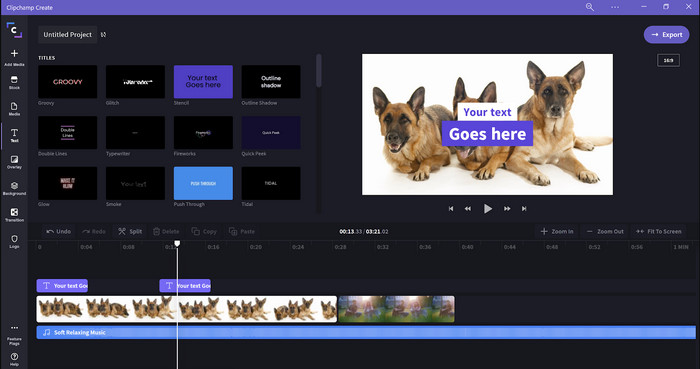
Clipchamp on videon nopeusmuokkain, jota voit käyttää Windowsissa. Tämän työkalun opettelu ei ole jyrkkä, joten jos olet aloittelija editoinnissa, tähän kannattaa tutustua. Se tukee myös useita ominaisuuksia, joita saatat haluta käyttää. Merkittävä haittapuoli on kuitenkin videon ulostulon laatu. Voit viedä tiedoston vain 480-laatuisena, mikä on heikko taso verrattuna muihin ilmaisohjelmiin. Jos haluat viedä videon 720- tai 1080-laatuisena, sinun täytyy tilata maksullinen versio. Kaiken kaikkiaan työkalu on hyvä, mutta ei silti yllä ensimmäisen editorin tasolle.
Plussat
- Yksinkertainen käyttöliittymä ja helppokäyttöinen.
- Se tarjoaa lisäominaisuuksia muokkausta varten.
- Ohjaa videon toistoa helposti.
Haittoja
- Ilmaisessa versiossa lopputulos on 480.
- Joskus työkalu muuttui joustamattomaksi tehtävän kanssa.
Suosituin 3. Videon nopeussäädin (Chrome)

Haluatko käyttää videon nopeudensäätöä Chromessa selainlaajennuksena? Silloin voit käyttää lisäosaa nimeltä Video Speed Controller. Se on saatavilla kaikkiin Chrome-selaimiin, ja sen avulla voit nopeuttaa tai hidastaa katsomaasi videota. Se on helppokäyttöinen kaikille, ja sen käyttäminen on myös turvallista, koska kyseessä on Chromen virallinen laajennus. Jos kuitenkin viet videon, toistonopeus pysyy samana, vaikka olisit sitä muuttanut. Tämä johtuu siitä, että työkalu toimii vain videolle, jota katsot parhaillaan Chromessa, ei sen ulkopuolella. Lisätietona: kun nopeutat videon tällä lisäosalla, kaikki Chromessa toistamasi videot pyörivät samalla nopeudella.
Plussat
- Nopeussäädin, jota voit käyttää Chromessa.
- Pystyy kelaamaan tai nollaamaan videon toistonopeutta helposti Chromessa.
- Se tukee pikanäppäinkomentoa.
Haittoja
- Näytönohjainpaneeli ei ole näkyvissä.
- Et voi muuttaa videon nopeutta Chromen ulkopuolella.
Suosituimmat 4. Accelerate for Safari (iOS ja Mac)
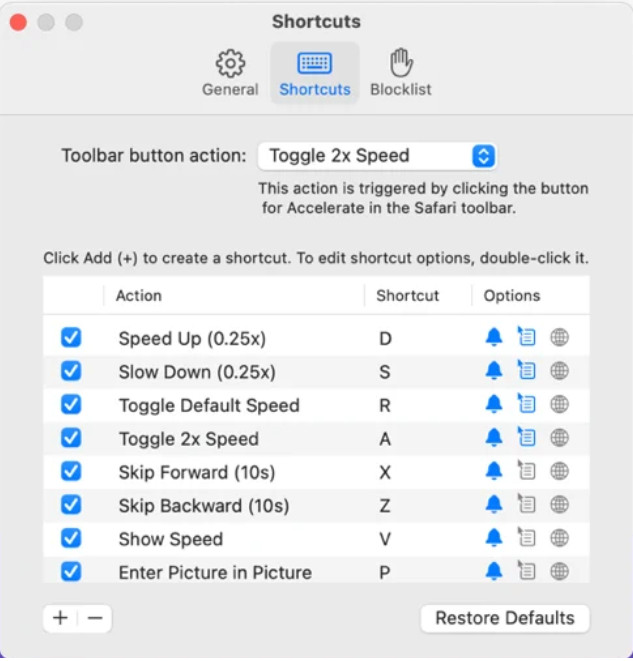
Tarvitsetko videon nopeudensäädintä Safarissa? Accelerate for Safari on saatavilla kaikkiin Applen laitteiden Safari-selaimiin. Tällä työkalulla voit muuttaa jokaisen Safarissa toistettavan HTML5-videon toistonopeutta. Kuten edellä mainittu Chrome-laajennus, myös tämä on rajoitettu Applen laitteisiin. Jos siis olet Applen käyttäjä, saatat haluta käyttää tätä nopeudensäätölaajennusta videon nopeuttamiseen tai hidastamiseen. Lisäksi voit käyttää näppäimistön pikanäppäimiä komentoina videon toistonopeuden muuttamiseen.
Plussat
- Sitä on turvallista käyttää kaikissa Safareissa.
- Se tukee myös kuva kuvassa ja AirPlayta.
- Pikanäppäimet ovat käytettävissä työkalun hallintaan.
Haittoja
- Se ei tue muita verkkoselaimia kuin Safaria.
- Rajoitettu HTML 5 -videoihin.
Top 5. Hidas Nopea Hidas - Säädä videoidesi nopeutta (iOS)
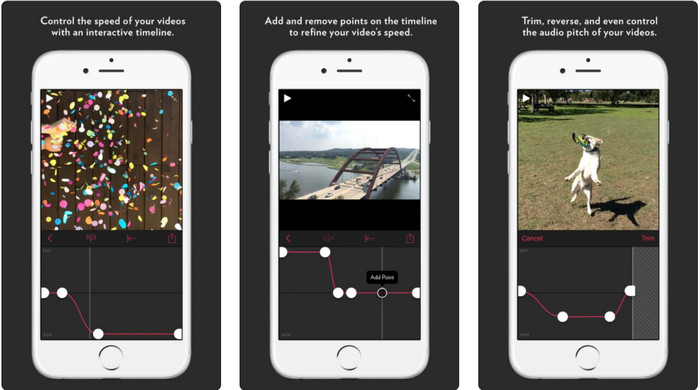
Jos tarvitset videon nopeudensäätimen iPhoneen, voit käyttää sovellusta Slow Fast Slow. Tämä työkalu auttaa iOS-käyttäjiä muokkaamaan videon toistonopeutta välittömästi, ja se soveltuu erityisen hyvin hidastuskuvaan. Siinä on myös erittäin interaktiivinen, sisäänrakennettu aikajana nopeuden säätämistä varten. Se tukee lisäksi muita ominaisuuksia, kuten äänen pitchen muuttamista ja klipin kääntämistä. Tämä työkalu vaatii kuitenkin iOS 10 -järjestelmän, joten et voi käyttää sitä, jos laitteessasi ei ole vähintään versiota 10.
Plussat
- Se tukee videosi muita ominaisuuksia.
- Käyttäjäystävällinen.
- Voi hidastaa videoita jopa 1/16 nopeudella.
Haittoja
- Se ei tue 4k-lähtöä ja FPS-valintaa.
- Se ei toimi joissakin uusissa iOS-laitteissa.
Top 6. Video Speed Controller Pro (Android)
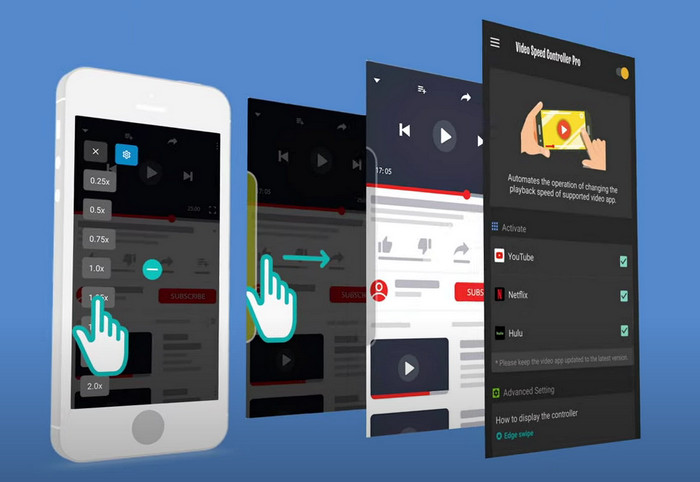
Jos tarvitset videon nopeudensäätimen Androidille, arvaa mitä? Voit käyttää sovellusta Video Speed Controller Pro asentamalla sen Play-kaupasta. Tämän työkalun avulla voit helposti nopeuttaa mitä tahansa Android-laitteellasi toistettavaa videota. Lisäksi tämä työkalu toimii ikään kuin nopeudensäätölaajennuksena Androidissa. Vaikka työkalu pystyy nopeuttamaan videota, suurin mahdollinen nopeus on vain 2x. Jos kuitenkin haluat nopeuttaa videoiden katselua, voit käyttää sitä esimerkiksi YouTubessa, Netflixissä ja muilla Androidin videosovellusalustoilla.
Plussat
- Se on helppokäyttöinen.
- Itse työkalu on paikallaan.
- Valikkorivi näyttää toiston vaihtoehdot.
Haittoja
- Toistonopeuden vaihtoehdot ovat rajalliset.
- Joskus se ei toimi hyvin.
Osa 2. Vertailukaavio
| Ominaisuudet | Video Converter Ultimate (Windows ja Mac) | Clipchamp (Windows) | Videon nopeuden säädin (Chrome) | Accelerate for Safari (iOS ja Mac) | Hidas Nopea Hidas – hallitse videoidesi nopeutta (iOS) | Video Speed Controller Pro (Android) |
| Nopeudensäätö |  | | | | | |
| Korkealaatuinen videolähtö | |  | | | | |
| Muokkausominaisuudet | | | | | | |
| Erittäin nopea vientiprosessi | | | | | | |
Osa 3. Usein kysytyt kysymykset videon nopeussäätimestä
Miksi minun täytyy käyttää nopeussäädintä?
Joissakin tapauksissa sinun on katsottava video suurella nopeudella tai hidastuen. Hyvä esimerkki nopeutetun videon katsomisesta on lopettaa katsomasi video välittömästi tai vastaavalla tavalla. Videoiden nopeuttaminen on suuri apu näille käyttäjille. Hidastettuna sitä käytetään yleensä nopeatempoisten urheilulajien, kuten kilpa-, koripallon, lentopallon ja muiden välittömässä toistossa. Joko näistä kahdesta, tarvitset tehokkaan nopeudensäätimen ohittaaksesi normaalin nopeuden tarpeidesi mukaan.
Voinko nopeuttaa videoita Tiktokissa?
Kyllä, voit kuvata nopeutettuja videoita Tiktokissa. Et kuitenkaan voi katsoa TikTok-videoita nopeutetulla toistolla. Jos siis tarvitset sopivaa työkaluapua nopeutusta varten, napsauta ja lue tämä artikkeli, josta selviää, miten videota voi nopeuttaa TikTokissa.
Kuinka hidastaa videoita?
Päinvastoin kuin videoiden nopeuttaminen, voit luoda hidastuksia videoihisi hyödyntämällä markkinoilla olevia editoreita. Mitä työkalua sinun pitäisi käyttää? Ei hätää, sillä esittelemme parhaat hidastusvideo-ohjelmat, joiden avulla saat luotua slow motion -efektin. Jos haluat tietää lisää, voit klikata tätä linkkiä.
Johtopäätös
Nyt sinulla on kattavasti tietoa maksullisista ja ilmaisista sovelluksista, joilla voi nopeuttaa videoita eri alustoilla. Nämä nopeudensäätimet tarjoavat ainutlaatuisen valikoiman ominaisuuksia, joiden avulla erilaiset käyttäjät voivat nopeuttaa videoitaan. Jos luemme artikkelin huolellisesti, huomaamme, että FVC Video Converter Ultimate tarjoaa kaiken, mitä käyttäjät tarvitsevat. Jos siis haluat ladata tämän monipuolisen työkalun tietokoneellesi, voit klikata latauspainiketta ja nauttia sen kattavista ominaisuuksista.
-
 Videon nopeuttaminen viiden parhaan saatavilla olevan ohjelmiston avulla [Windows/Mac/Linux]
 Haluatko tietää kuinka nopeuttaa videota helposti? Lue sitten tämä kirjoitus, kun selitämme kuinka nopeuttaa tehokkaasti Windowsissa, Macissa ja Linuxissa.
-
 Helpoimmat tavat videon nopeuttamiseen Android-laitteillasi [2021]
 Tiesitkö, että voit nopeuttaa videon katselua Android-laitteellasi? Joten jos haluat tietää, kuinka nopeuttaa videota Android-puhelimellasi, lue tämä kirjoitus.
-
 Erinomaisia vinkkejä vuodelle 2021: Videon nopeuttaminen iMoviessa
 Ystäväsi ehdottaa iMoviea auttamaan sinua ongelmaasi videon nopeuttamisessa iOS-käyttöjärjestelmällä, mutta et tiedä mitä tehdä? Katso lisää tästä, kun luet lisää tämän artikkelin kautta.
