


 Video Converter Ultimate
 Näytön tallennin
 Videon korjaus
 Suojattu lataus
Kuinka muuntaa MP4 M4A: ksi Windows / Macissa (ilmainen ja online)
MP4 on yleinen tiedostomuoto, jota käytetään useiden asemien ja videosoittimien kanssa. MP4-tiedostot voivat tallentaa videota, ääntä ja muuta sisältöä. Nyt monet ihmiset haluavat kuunnella MP4-videon ääniraitaa. Laadun säilyttämiseksi MP4: n muuntaminen M4A: ksi on hieno idea. M4A on lyhenne sanoista MPEG 4 Audio. Useimmat ohjelmat voivat toistaa M4A-tiedostoja, mukaan lukien iTunes, QuickTime, Windows Media Player ja paljon muuta.

Saatat miettiä, miten MP4-tiedostosta voi irrottaa äänen. On monia tapoja muuntaa MP4-tiedosto M4A-tiedostoksi. Lue tämä artikkeli selvittääksesi, miten voit muuntaa MP4:n M4A:ksi, jotta voit kuunnella sitä myöhemmin mobiililaitteillasi.
Osa 1. Paras ilmainen online-tapa muuntaa MP4 M4A: ksi ilman laadun heikkenemistä
FVC Free Online Video Converter on ilmainen MP4–M4A-muunnin, joka voi muuntaa MP4-muodon paitsi M4A:ksi, myös muiksi muodoiksi, kuten MP3, WAV, M4R, WMA, AIFF, AC3 jne. Se tukee erämuunnosta, joten voit muuntaa useita MP4-videoita M4A-muotoon yhdellä kertaa. Lisäksi tämä ilmainen verkkotyökalu antaa sinun myös muuntaa MP4-videon MOV:ksi, AVI:ksi, FLV:ksi ja muihin videoformaatteihin.
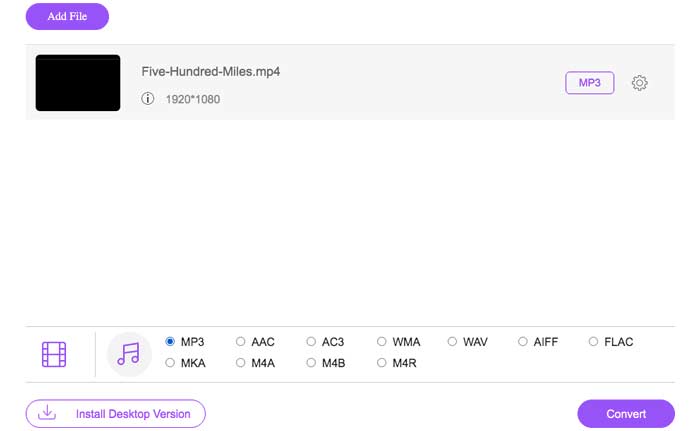
Vaihe 1. Avaa selaimessasi sivu https://www.free-videoconverter.net/free-online-video-converter/. Napsauta Add Files to Convert -painiketta, minkä jälkeen sinun tulee ladata ja asentaa käynnistysohjelma.

Vaihe 2. Lataa muunnettava MP4-video ja napsauta sitten Open jatkaaksesi.
Vaihe 3. Kun olet ladannut videotiedostosi tähän sovellukseen, napsauta Audio-kuvaketta ja valitse M4A tulostusmuodoksi.
Vaihe 4. Lopuksi napsauta oikeassa alakulmassa olevaa Convert-painiketta. Odota hetki, ja saat M4A-äänitiedoston MP4-videosta.
Osa 2. Kuinka muuntaa MP4 M4A: ksi ilmaisella äänimuuntimella
FVC Free Audio Converter on ilmainen ohjelma, jonka avulla voit muuntaa MP4 -tiedostot vaivattomasti M4A -muotoon. Se pystyy muuttamaan minkä tahansa video- tai äänitiedoston muotoon M4A, MP3, WAV jne. Voit ladata ja asentaa sen Windows -tietokoneellesi aloittaaksesi muuntamisen.
Lataa ilmaiseksiWindows 7 tai uudempiTurvallinen lataus
Lataa ilmaiseksiMacOS 10.7 tai uudempiTurvallinen lataus
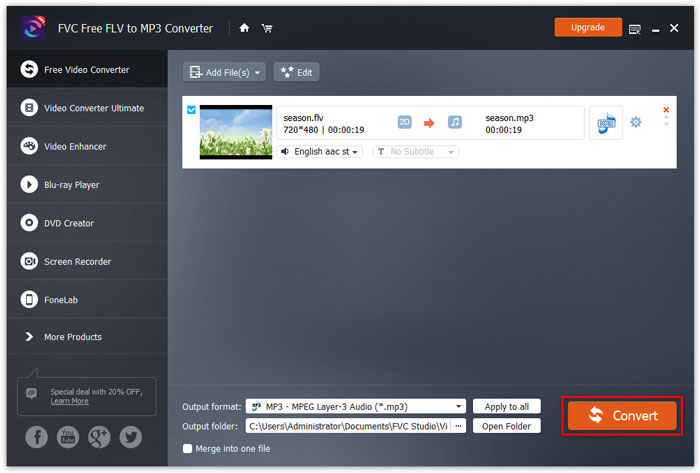
Vaihe 1. Käynnistä tämä äänimuunnin tietokoneellasi. Napsauta Add File(s) -painiketta ladataksesi MP4-tiedostot ohjelmaan.

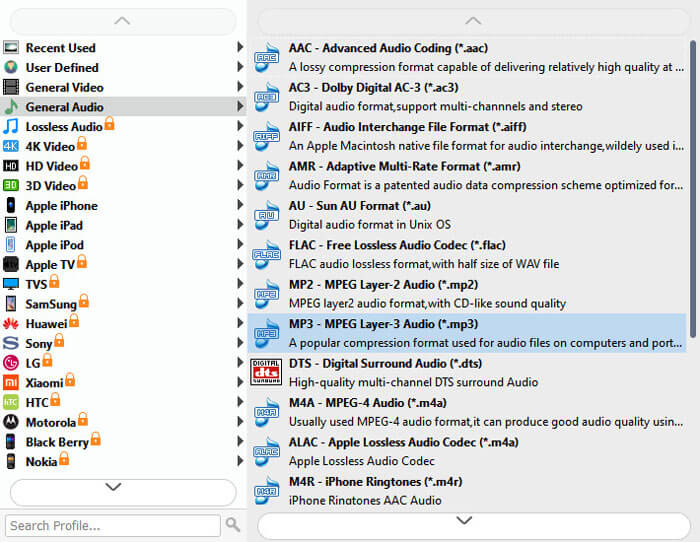
Vaihe 2. Etsi Output formats -vaihtoehto ja valitse avattavasta luettelosta M4A tulostusmuodoksi.
Vaihe 3. Napsauta Convert-painiketta aloittaaksesi MP4-tiedostojen muuntamisen M4A-muotoon.
M4A:n lisäksi voit käyttää sitä myös MP4:n muuntamiseen MP3-muotoon, AAC:ksi tai muihin ääniformaatteihin.
Osa 3. Kuinka muuntaa MP4 M4A: ksi iTunesin avulla
Jos haluat muuntaa MP4: n M4A: ksi iTunesilla Windows- tai Mac-käyttöjärjestelmässä, sinun on muutettava iTunesin tuontiasetuksia ja tehtävä sitten Muunna-valikkovaihtoehto M4A-kopion tekemiseen.
Vaihe 1. Avaa iTunes Windows-tietokoneellasi tai Macilla.
Vaihe 2. Valitse Edit ja napsauta sitten valikkopalkista Preferences. Siirry sen jälkeen General-välilehdelle ja napsauta Import Settings.
Vaihe 3. Etsi ja napsauta valikkoa Import Using -kohdan vierestä ja valitse sitten koodausmuoto, johon haluat muuntaa videon. Napsauta sen jälkeen OK.
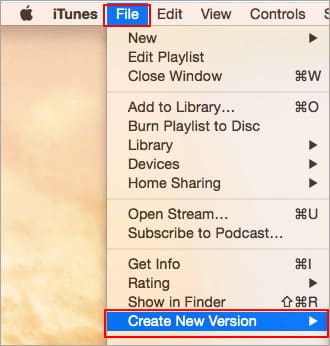
Vaihe 4. Valitse kirjastostasi kappaleet, jotka haluat muuntaa. Valitse sen jälkeen File, napsauta Create New Version ja luo M4A-versio.
Muunnetut äänitiedostot näkyvät kirjastossasi alkuperäisten tiedostojen vieressä.
Osa 4. UKK MP4: stä M4A-muunnokseen
1. Mikä on M4A-tiedosto?
M4A-tiedostotunnisteella varustettu tiedosto on MPEG-4-äänitiedosto. M4A löytyy usein Applen iTunes Storesta kappaleiden latausmuodossa.
2. Kuinka M4A-tiedostot avataan?
M4A-tiedostoja avaavia ohjelmia ovat iTunes, QuickTime, Windows Media Player jne. Android-tabletit ja -puhelimet, iPhone, iPad ja iPod touch tukevat myös M4A-tiedostojen toistamista.
3. Kuinka yhdistää MP4-tiedostot verkossa?
FVC Free Online Video Merger voi auttaa sinua yhdistämään tai liittämään useita MP4- tai muita videomuotoja, kuten MOV, AVI, FLV ja paljon muuta, verkossa.
4. Voiko Windows Media Player muuntaa MP4: n M4A: ksi?
Ei. Windows Media Player tukee vain videotiedostojen muuntamista MP3- tai WAV-tiedostoiksi.
Johtopäätös
Edellä mainitut kolme tapaa voivat auttaa sinua muuttamaan MP4: stä M4A: ksi ilmaiseksi ilman paljon vaivaa. Jos haluat tehdä muunnoksen verkossa, FVC Free Online Video Converterin pitäisi olla loistava valinta. Jos MP4-tiedostosi ovat suurikokoisia, FVC Free Audio Converter tai iTunes on luotettavampi muuntaa MP4-tiedostot M4A: ksi.
-
 Kuinka muuntaa MP4 WMV: ksi Macille / Windowsille
 Tämä viesti jakaa miten MP4-video voidaan muuntaa WMV-muotoon Macissa tai Windowsissa. Tarjoamme sinulle myös useita vaihtoehtoja, mukaan lukien sekä työpöytäohjelmistot että verkkopohjaiset verkkomuuntimet. Oletko valmis tuntemaan parhaat MP4 - WMV -muunnostyökalut?
-
 Kuinka muuntaa WMV MP3: ksi työpöydällä ja verkossa
 Löydät minkä tahansa ilmaisen videomuunninohjelmiston FVC studiosta. Kaikkia video- ja äänimuotoja tuetaan, mukaan lukien MP4, MOV, TS, AVI, WMV, FLAC, MP3 jne.
-
 Kuinka muuntaa AVCHD MP4-videoiksi ilmaiseksi Windows / Mac / Online
 On 5 helppoa tapaa muuntaa AVCHD MP4-videoiksi tietokoneellasi. Voit erän muuntaa AVCHD-videot MP4: ksi menettämättä laatua millään muuntimella täällä.
