


 Video Converter Ultimate
 Näytön tallennin
 Videon korjaus
Paras MKV-metadataeditori MKV:n metatietojen lisäämiseen/vaihtamiseen/poistamiseen
Markkinoilla ei ole kovin laajaa valikoimaa MKV-metatietojen muokkausohjelmia, koska MKV-muotoa ei tueta kovin laajasti. Tämä ei kuitenkaan tarkoita, etteikö MKV-tiedostojen tageja voisi muokata, joten ei syytä synkkyyteen. Jos haluat selvittää, mikä on paras MKV-formaattia tukeva metatietoeditori, lue tämä artikkeli kokonaan – käymme siinä läpi useita eri työkaluja. Mitä siis odotat? Pidä vauhtia yllä, sillä tämän lukemiseen ja sopivan tagimuokkaimen löytämiseen ei mene enempää kuin 7 minuuttia.

Osa 1. Paras MKV-tunnisteeditori, jota suositellaan Windowsille ja Macille: FVC Video Converter Ultimate
FVC Video Converter Ultimate on suosituin MKV-metatietojen muokkausohjelma Windowsille ja Macille. Työkalu on nimensä veroinen, joten ohjelman lataaminen metatietojen muokkausta varten on paras päätös, jonka voit tehdä. Sen tehokkaat ominaisuudet ja toiminnot hoitavat tehtävän helposti, kuin leikiten. Lisäksi työkalu tukee myös muita ladattavia formaatteja, kuten MP4, AVI, MOV, FLV, WMV ja yli 1000 muuta mediaformaattia ilman, että tiedosto täytyy pakata uudelleen – näin käyttö on mahdollisimman vaivatonta.
Lisäksi? Oletetaan, että lataat työkalun. Käytössäsi on nopein työkalu metatietojen lisäämiseen MKV:lle ja metatietoeditorin kaunein graafinen käyttöliittymä, jota toinen työkalu ei voi tarjota. Jos olet kiinnostunut editorin käytöstä, jatka lukemalla osa 2, kun selitämme kuinka muokata MKV-tiedostojen tietoja.
Osa 2. MKV-metatietojen muokkaaminen suositellulla MKV-metatietoeditorilla
Noudata ohjeita, alkaen työkalun lataamisesta ja niin edelleen. Joten aloitetaan käyttämällä parasta MKV-metatietoeditoria, jonka voit ladata Windows- tai macOS-käyttöjärjestelmääsi.
Vaihe 1. Napsauta alla olevaa latauspainiketta ja valitse käyttämäsi käyttöjärjestelmä. Asenna ohjelma heti, kun olet ladannut tiedoston, seuraa asennusohjeita huolellisesti ja avaa ohjelma. Ennen kuin aloitamme, tutustu työkaluun hieman, jotta MKV-tagieditorin käyttö sujuu mahdollisimman jouhevasti.
Ilmainen latausWindows 7 tai uudempiTurvallinen lataus
Ilmainen latausMacOS 10.7 tai uudempiTurvallinen lataus
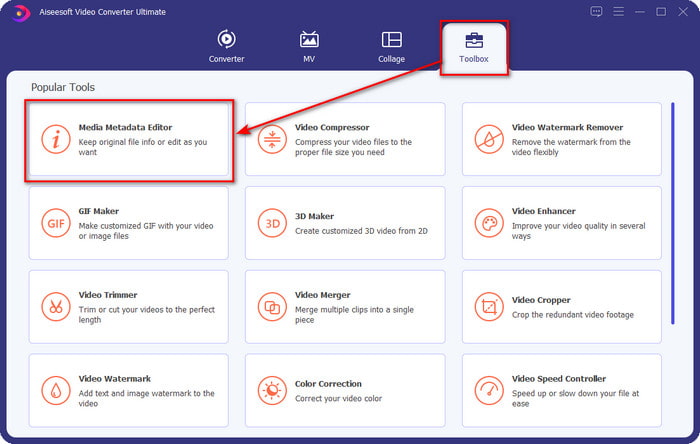
Vaihe 2. Avaa Toolbox-osio, etsi Media Metadata Editor ja napauta sitä avataksesi sen.
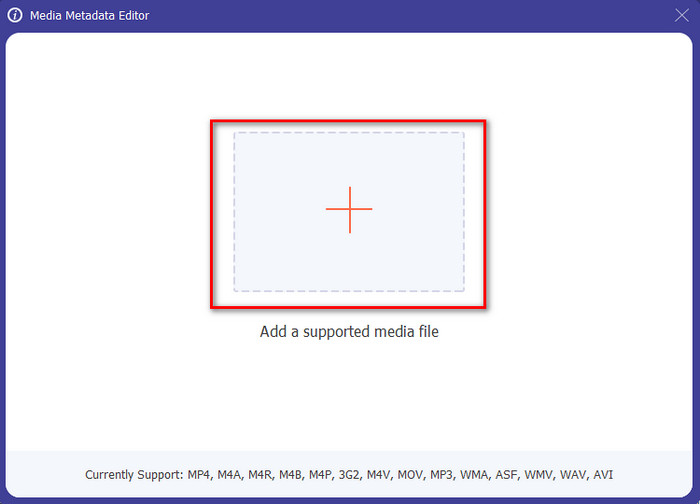
Vaihe 3. Lataa MKV-tiedostosi napsauttamalla +-kuvaketta. Tiedostoselain avautuu – valitse MKV-tiedosto ja paina Open.
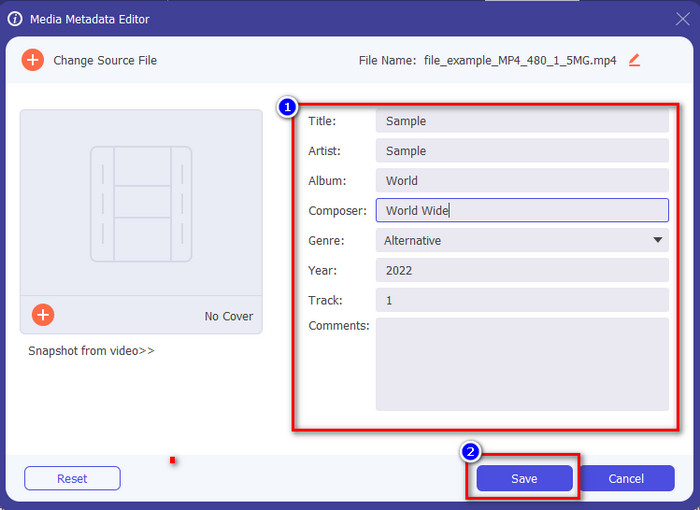
Vaihe 4. Muokkaa metatietojen tekstikenttää; voit joko täyttää kentät tai poistaa tietoja – tee metatiedoille juuri ne muutokset, jotka haluat. Kun olet valmis, napsauta Save tallentaaksesi tekemäsi muutokset. Näin olet nyt muokannut MKV-tiedostosi tageja.
Osa 3. 3 ilmaista MKV-tunnisteeditoria, jotka sinun pitäisi tietää, saatavilla Windowsissa, Macissa ja verkossa
GROUPDOCS.Metadata [ilmaiseksi verkossa]
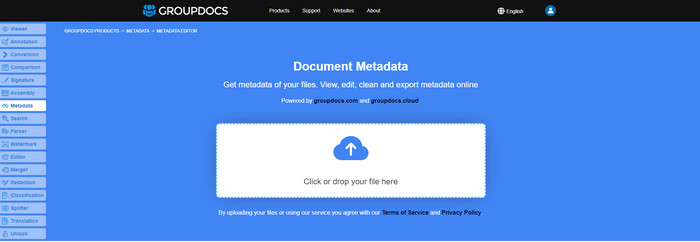
Jos haluat käyttää ilmaista MKV-metatietojen muokkausohjelmaa verkossa, suosittelemme lämpimästi kokeilemaan GROUPDOCS.Metadata-palvelua. Se on erinomainen valinta MKV-metatietojen tarkasteluun ja muokkaamiseen, sillä se toimii kaikilla alustoilla, eli on erittäin joustava ja monikäyttöinen. Lisäksi se pystyy helposti hakemaan ja päivittämään tageja tarvitsemasi ominaisuustietojen perusteella, ja jos jokin metatieto täytyy poistaa, työkalu hoitaa sen automaattisesti. Joidenkin tehtävien, kuten tiedoston tagien päivittämisen, hallinta voi kuitenkin olla haasteellista. Jotta oppisit käyttämään verkkotyökalua sujuvasti, sitä kannattaa käyttää säännöllisesti – näin opit paremmin palvelun toiminnot ja sen käsittely helpottuu.
Ominaisuudet Windowsissa [Sisäänrakennettu editori Windowsissa]
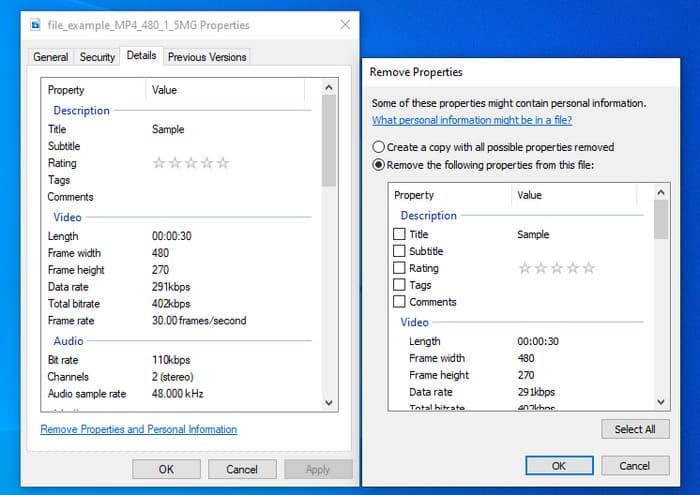
Etkö halua ladata työkalua MKV-metatietojen muuttamiseksi ja haluat käyttää Windowsin sisäänrakennettua toimintoa metatietojen muokkaamiseen? Silloin olisi parasta, jos käyttäisit Ominaisuudet Windowsissa. Tämä toiminto on käytettävissä kaikissa Windows-tietokoneissa, eikä sinun tarvitse ladata mitään työkalua tai Internetiä käyttääksesi sitä. Voit nopeasti tarkastella metatietoja ja muokata niitä onnistuneesti tällä ilmaisella ominaisuudella. On kuitenkin olemassa joitakin raportteja puuttuvista tunnisteista sen jälkeen, kun he yrittivät käyttää tätä ominaisuutta. Käyttäjien mukaan se voi automaattisesti poistaa tiedostosi tunnisteet. Tämän ominaisuuden käyttämisen sijaan he aikovat ladata oikean työkalun tuhlatakseen vaivaa MKV- tai mediatiedostoonsa lisättyihin tunnisteisiin. Mutta jos haluat nähdä, missä tämä ominaisuus on, paina vain hiiren kakkospainikkeella tiedostoa, pääasiassa alaosassa.
iFlicks [Macille]
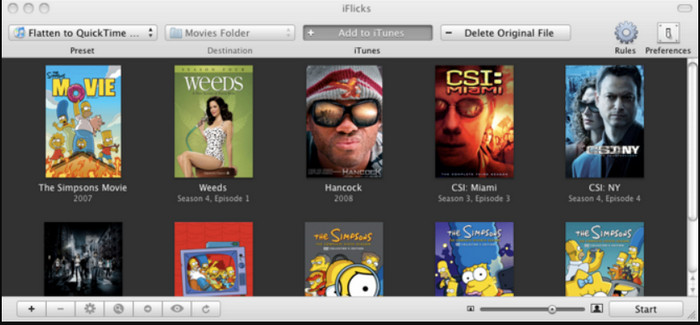
iFlicks voi auttaa sinua muuttamaan MKV:n toistettavaan muotoon tai opettaa sinua muokkaamaan MKV-metatietoja Macissa. Tämä työkalu toimii hyvin vuorovaikutuksessa iTunesin kanssa, koska se tarjoaa yksityiskohtaisia metatietoja jokaisesta mediatiedostosta. Tämän ohjelmiston avulla voit lisätä tiedostostasi erilaisia tietoja, kuten tunnuslauseen, genren, päivämäärän. luokitukset, päätökset ja muut haetaan tietokannoista verkossa. Lisäksi tämä ohjelmisto kokoaa metatiedot siitä, mistä voit ladata ne ja käyttää niitä automaattisesti tiedostoissa. Ilmaiset kokeilut voivat kuitenkin kestää vain seitsemän päivää, joten jos haluat käyttää työkalua uudelleen, sinun on maksettava sen tilausmaksu.
Osa 4. Usein kysytyt kysymykset MKV Metadata Editorista
Voiko MKV:ta pelata Macilla?
MKV-tiedostoja voi toistaa Macilla, kun käytät kolmannen osapuolen ohjelmaa, kuten Blu-ray-soitinta. Jos yrität toistaa videon tarkoituksella QuickTimella, se ei toimi, koska muotoa ei tueta. Jos siis haluat katsoa MKV-tiedostojasi Macilla, suosittelemme käyttämään kolmannen osapuolen Blu-ray-soitinta tai muuntamaan MKV-muodon MOV:ksi FVC Video Converter Ultimate -ohjelman avulla.
Pitääkö minun muuntaa MKV ennen metatietojen muokkaamista?
Jos työkalu, jota haluat käyttää, ei tue MKV-muodon latausta, suosittelemme muuntamaan muoto ensin yhteensopivaan muotoon. Mutta edellä mainitsemamme maksun ansiosta sinun ei tarvitse muuntaa tiedostoa tuettuun muotoon. MKV-tunnisteiden muokkaamiseen ei kuitenkaan ole monia vaihtoehtoja tai työkaluja, koska muotoa ei tunneta. Vaikka etsiminen on vaikeaa, teimme parhaamme etsiäksemme kaikki editorit, joilla voit päivittää tai muuttaa MKV-muotoa tukevia metatietoja.
Miksi MKV-tiedostot ovat liian suuria?
Syy siihen, että MKV-tiedostot ovat suuria, on se, että ne voivat sisältää useita videosisältöjä, ääniraitoja ja tekstityksiä eri koodekeilla ja elementeillä. Kun lisäät tiedostoon vielä metatietoja, sen koko kasvaa entisestään. Paras tapa säästää tilaa säilyttäessäsi MKV-tiedostoja levylläsi on pakata ne rikkomatta laatua tai menettämättä tiedoston sisältämiä tietoja. Napsauta tätä linkkiä saadaksesi lisätietoja videotiedostojen pakkaamisesta.
Johtopäätös
Vaikka markkinoilla on vain rajallisesti MKV-metatietojen muokkausohjelmia, tarjolla on silti tehokkaita työkaluja eri alustoille. Olemme tarkastelleet useita ohjelmistoja, joita voit käyttää, mutta lopullinen valinta on aina sinun käsissäsi: mitä niistä haluat käyttää MKV-tiedostojesi metatietojen muuttamiseen. Päätös ei ole helppo, sillä kaikki esitellyt työkalut ovat erinomaisia. Jos et ole vielä tehnyt valintaa, suosittelemme käyttämään FVC Video Converter Ultimate -ohjelmaa, koska se on joustavin ja siinä on eniten kehittyneitä ominaisuuksia, joita kuka tahansa voi hyödyntää. Kun painat latauspainiketta, saat käyttöösi parhaan mahdollisen tagieditorin sekä Windowsille että Macille!
-
 5 helpointa tapaa poistaa metatiedot kaikista mediatiedostoista
 Kuinka poistaa metatiedot? Onko vaikea tehdä se? Pitääkö minun ostaa tai käyttää ilmaista työkalua tunnisteiden poistamiseen? Kaikkiin näihin kysymyksiin löytyy vastaus tässä artikkelissa.
-
 5 parasta MP4-metadataeditoria [Päivitetty 2022]
 Kuinka voin muuttaa MP4-metatietojani? Paras tapa muuttaa MP4:n metatietoja on käyttää MP4-muotoa tukevaa tag-editoria, kuten alla lueteltu esimerkki.
-
 5 suosituinta käyttäjän valinnanvaraa AVI-videotagieditoria vuodelle 2022
 Mikä on paras AVI-tunnisteeditori, jota voin käyttää? AVI-tiedostojen tagieditorien markkinat ovat liian laajat. Joten tänään esittelemme viisi eniten valittua toimittajaa vuonna 2022.
