


 Video Converter Ultimate
 Näytön tallennin
 Videon korjaus
Kattava katsaus WAV-metatietoeditoriin Windowsissa, Macissa ja verkossa
Minulla on ongelma WAV-tiedostoni kanssa; Huomasin, että merkinnät ovat väärät. Yritin käyttää eri WAV-metatietojen muokkausohjelmia korjataksesi ongelman, mutta valitettavasti se ei korjannut sitä. Onko sinulla ideaa kuinka korjata se? Siitä olisi suuri apu. Kiitos.
Have the same problem? It is natural to have this problem because the demand for the best WAV metadata editor on Windows and Mac on the market is too much. Although there are many options, it is still a pain in the butt to know if they perform well regarding this problem. So, please take a deep breath because we can solve this problem quickly with the tools we picked carefully to help you edit the tags on your WAV files. With the help of deep research and this article, we rounded them up into three different choices, and we will help you pick the best WAV editor available online and offline.

Osa 1. Paras WAV-metatietoeditori Windowsille ja Macille [Users Choice]
FVC Video Converter Ultimate is one of the WAV tag editors that will surely help you in this task and finish it with a few clicks. With millions of downloads, this tool has already fulfilled its job of editing the users' metadata and other purposes such as converting, editing, etc. It became popular with the users. Unlike other tag editors that you can find on the market, this tool is far different regarding editing and many more aspects because it is a professional yet easy-to-handle tool—still wondering if it is the best choice to pick this metadata editor? In that case, we will list the features you can have if you attain this converter on your desktop.

FVC Video Converter Ultimate
5 689 200+ latausta- Se on nopein työkalu metatietojen lisäämiseen mediatiedostoosi muutamalla napsautuksella.
- Se tukee laajaa valikoimaa ääniformaatteja alkaen WAV, WMV, MP3 ja 1000+ saatavilla.
- Se on paras valinta jokaiselle aloittelijalle, joka tarvitsee kipeästi metatietoeditoria työpöydälle.
- Sillä ei ole tiedostokokorajoitusta ja se tarjoaa erämuunnosprosessin useille tiedostoille.
- Sen Toolboxissa on monia edistyneitä ominaisuuksia, joita haluaisit käyttää.
Ilmainen latausWindows 7 tai uudempiTurvallinen lataus
Ilmainen latausMacOS 10.7 tai uudempiTurvallinen lataus
Oletko hämmästynyt työkalun toiminnoista ja siitä, mihin se pystyy? Jos näin on, lue seuraavat tiedot, kun opetamme sinua muokkaamaan WAV-tageja äärimmäisellä työkalulla. Ennen kaikkea sinun on ladattava ohjelmisto järjestelmääsi ja valittava käyttämäsi käyttöjärjestelmä. Seuraa asennusprosessia ja aloita napsauttamalla Aloita nyt.
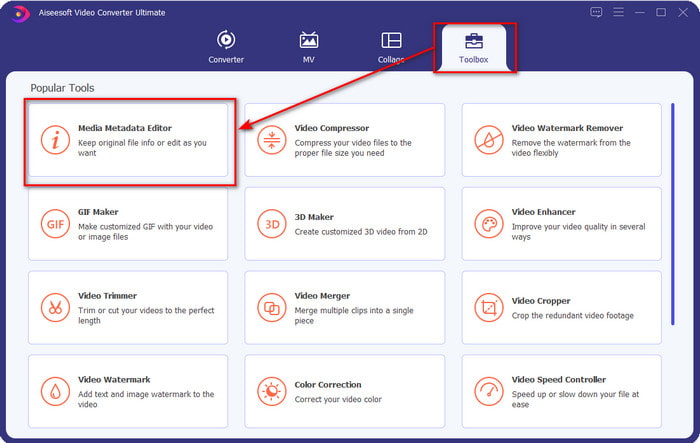
Step 1. After you've downloaded the software, you must click the Toolbox and locate the Media Metadata Editor.
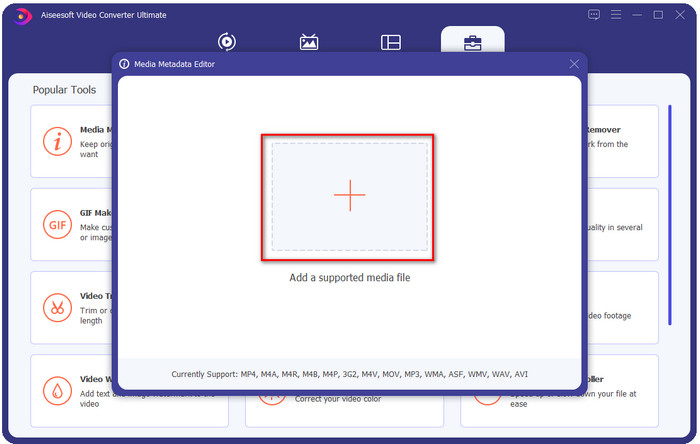
Step 2. Add the WMA file by pressing the + button, find the WMA file on your desktop folder, after you've found it click Open.
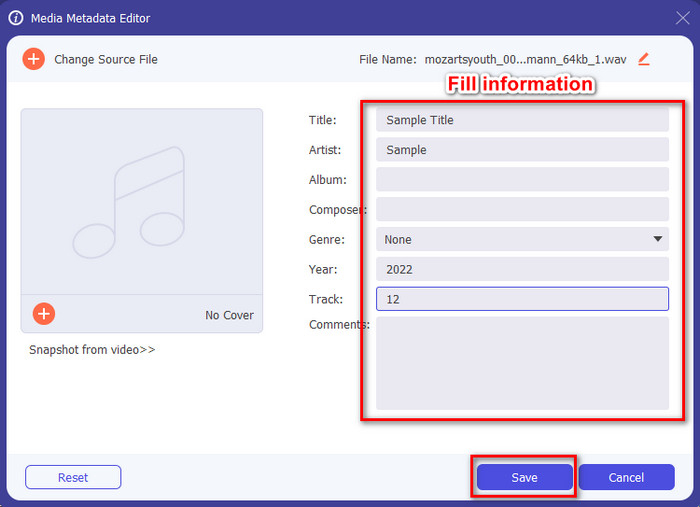
Step 3. Add the information you want to add, fill up the textboxes available and press the Save button if you've done. Easy isn't it? Well, success is the last name of our converter.
Aiheeseen liittyvää:
Osa 2. 2 suosituinta WAV-metatietojen katseluohjelmaa Internetissä
Oletetaan, että et voi tarkastella kaikkia tageja WAV:ssa; mitä sinun pitäisi tehdä? Tässä tapauksessa on ihanteellista käyttää tunnisteiden katseluohjelmaa WAV:ssa. Jos et halua ladata työkalua, voit käyttää tätä verkosta saatavaa metakatseluohjelmaa. Nämä kaksi työkalua eivät kuitenkaan voi muokata WAV-tiedoston metatietoja, koska ne aikovat tarkastella metatietoja.
Ilmainen online-EXIF- ja metatietojen katseluohjelma
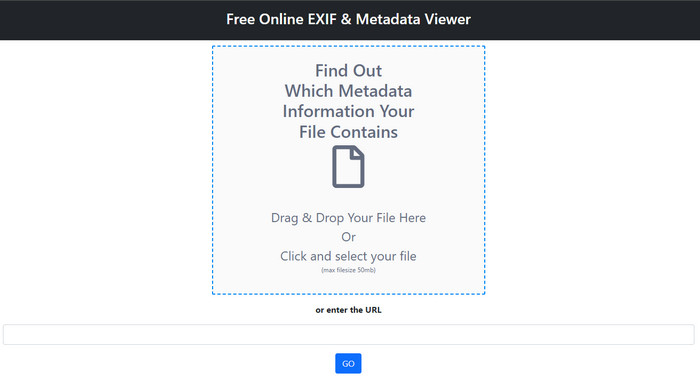
Free online EXIF & Metadata Viewer is a free online metadata viewer you can use to view the tags of the media file. With this web tool, you can see the different structures of the file you've uploaded, such as the RAW, FILE, RIFF, and COMPOSITE. This tool is one of the metadata viewers you can access that supports this much detail for free. Some tag viewers need to be purchased if you want to see so much detail on file. Although editing is impossible in the tool, it is still the best in-detailed meta viewer you can use and later add, remove or change WAV metadata with the ultimate tool we present above.
Metadata2Go
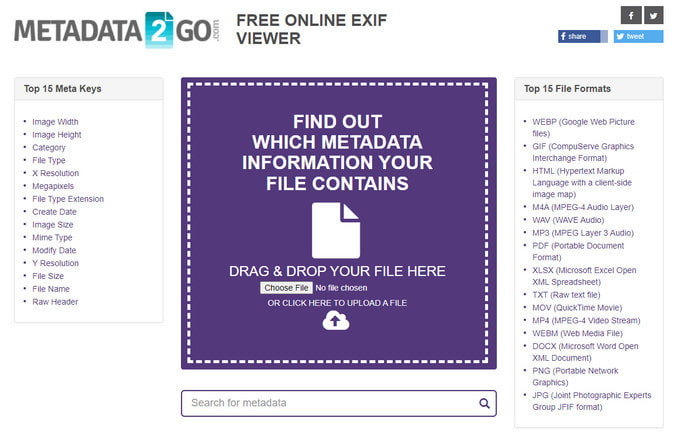
Like the first one, Metadata2Go is a free tag viewer and extractor for your files that you can access freely on the web. This tool allows you to see the hidden metadata you have never seen on your file. If you need to view the metadata on your media file, then this is your one-stop viewer available on the web. Unlike the first tool, this tool supports even image metadata for you to view, and it can extract the data from that file if needed. Depending on the file, it can showcase your file's information. Same as the first meta viewer above, it cannot edit the tags on your media file, even on WAV. So, if you feel that the first tag viewer doesn't supply your needs, then try to use this tool. Next, use the ultimate tool and learn how to add id3 tags to WAV files if you need to correct them.
Osa 3. Usein kysyttyä WAV-metatietoeditorista
Miksi en pääse WAV:n metatietoihin?
On monia syitä, ettet voi käyttää niitä, mutta havaitsemme kaksi suurta syytä, miksi et voi käyttää niitä. Ensimmäinen syy on, että tiedosto on vioittunut; luonnollisesti myös WAV:n metatiedot katoavat, jos tiedosto on vioittunut. Toinen on se, että tiedostolla ei alun perin ole metatietoja. Kaikilla mediatiedostoilla, kuten WAV, ei ole metatietoja. Jos olet ladannut tiedoston verkosta, on mahdollista, että kirjoittaja tai valmistaja poistaa metatiedot, jotta tiedot eivät paljastaisi.
Ovatko WAV-metatiedot samat kuin MP3:n?
Kyllä, tässä äänimuodossa näet tekijän nimen, otsikon, albumin kappaleen, genren, luokitukset ja paljon muuta. Mutta voit myös lisätä niitä käyttämällä metatietoeditoria, joka on saatavilla MP3- tai WAV-muodossa, kuten FVC Video Converter Ultimate.
Onko oikein ladata WAV-tiedostoja verkkoon?
Se ei johdu siitä, että muoto on pakkaamaton, ja tiedoston lataaminen verkkoon vie paljon aikaa. Vaikka voit muuntaa muodon Internet-ystävälliseksi jakamismuodoksi, sen laatu ei ole sama kuin WAV, varsinkin jos se on pakattu.
Johtopäätös
Finally, we have found the best WAV metadata editor you can download for free, and that is the FVC Video Converter Ultimate. With this tool, you can finish this task at any time, and even your file format is different; here, all of the 1000+ formats are supported. Want to download a tool on your Mac? Well, you shouldn't turn your back and look for it because you can use the ultimate tool even if you are a Mac user.
-
 Mikä on metadata: Opi perustiedot metatiedoista
 Mikä on metatiedot? Onko tämä tärkeää? Mitkä ovat metatietojen osat? Onko sinulla sama kysymys? Tässä artikkelissa opit perustiedot metatiedoista.
-
 4. Paras metatietojen katselu verkossa ja offline-tilassa [Päivitetty 2022]
 Voinko tarkistaa tiedostoni metatiedot? Kyllä, voit, tämän viestin avulla esittelemme sinulle erilaisia metatietojen katseluohjelmia, joita voit käyttää.
-
 6 suosikkivalintaa Snapchat-animoidut Snapchat-suodattimet Snapchatissa
 Haluatko tietää parhaat tavat lisätä suodattimia Snapchat-videoihin? No, voit napsauttaa tätä ja oppia erilaisia suodattimia, joita voit käyttää Snapchat-videoissa.
