


 Video Converter Ultimate
 Näytön tallennin
 Videon korjaus
 Suojattu lataus
Kuinka muuntaa MP4 3GP: ksi verkossa ja offline-tilassa
MP4 on suosittu videoformaatti, jota voidaan toistaa MP4-soittimilla, matkapuhelimilla ja tableteilla. Verkkosivustolta ladattavat elokuvat pysyvät yleensä MP4-muodossa. Jotkut matkapuhelimet tukevat kuitenkin vain 3GP-videoiden toistamista. Tässä artikkelissa näytetään 3 ilmaista MP4 - 3GP -muunninta, ja voit muuntaa MP4: n 3GP: ksi ilman vaivaa.

Osa 1. Kuinka muuntaa MP4 3GP: ksi Windowsissa ja Macissa
Jos haluat muuntaa MP4-tiedostoja 3GP-muotoon ilman verkkoyhteyttä, voit käyttää tietokoneelle asennettavaa MP4–3GP-muunninta. FVC Free FLV to 3GP Converter on ilmainen ja helppokäyttöinen videonmuunnosohjelma Windowsille ja Macille. Sillä voi muuntaa erilaisia videoita, kuten FLV, MP4, MOV, MKV, MTS, M2TS jne., vaivattomasti 3GP-muotoon. Lisäksi se tarjoaa muokkaustoimintoja, joilla voi lisätä teemoja sekä säätää tekijän, ajan ja tarjoajan tietoja videon alkuun tai loppuun.

- Muunna videot MP4, MKV, AVI, MOV, MP3, AAC, AIFF jne. 3GP: ksi.
- Vie 3GP-videot ja häviöttömät äänitiedostot MP4-tiedostosta yhdellä napsautuksella.
- Salli käyttäjien muokata palveluntarjoajaa, otsikkoa, tekijää, aikaa ja lisätä teemaa.
- Erä muuntaa MP4 3GP: ksi toistettavaksi joillakin matkapuhelimilla.
Ilmainen latausWindows 7 tai uudempiTurvallinen lataus
Ilmainen latausMacOS 10.7 tai uudempiTurvallinen lataus
Vaihe 1. Lataa, asenna ja käynnistä FVC Free FLV to 3GP Converter Windows- tai Mac-tietokoneellasi. Napsauta Add Files-painiketta ladataksesi MP4-tiedostot tietokoneeltasi. Voit muuntaa useita MP4-tiedostoja samanaikaisesti.
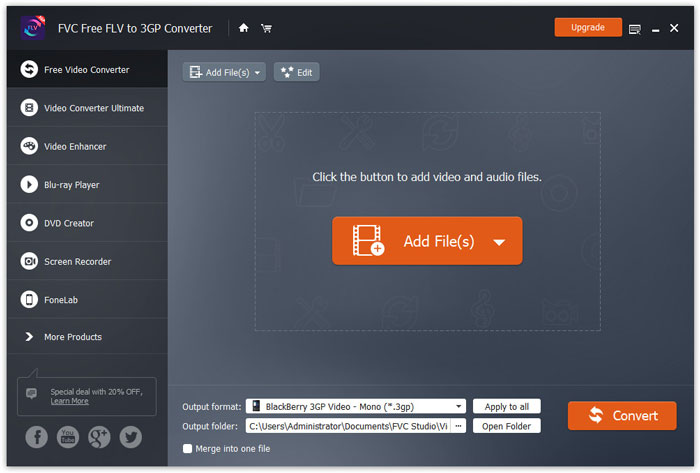
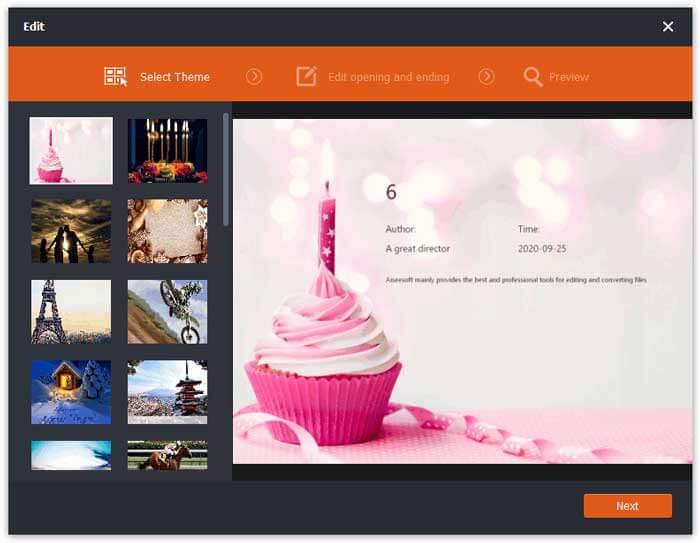
Vaihe 2. Napsauta MP4-tiedostoasi ja valitse Edit-painike. Voit lisätä teeman MP4-tiedostoosi sekä muokata aloitus- ja lopetussisältöä. Napsauta sitten Next esikatsellaksesi ja tallentaaksesi muutokset.
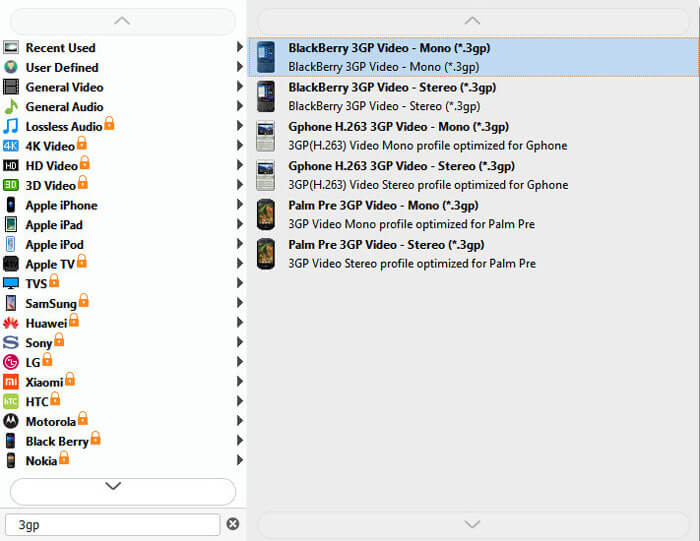
Vaihe 3. Valitse 3GP Output format -pudotusvalikosta alareunasta. Voit valita esimerkiksi BlackBerry 3GP Video - Mono (*.3gp) tai jonkin muun haluamasi vaihtoehdon.
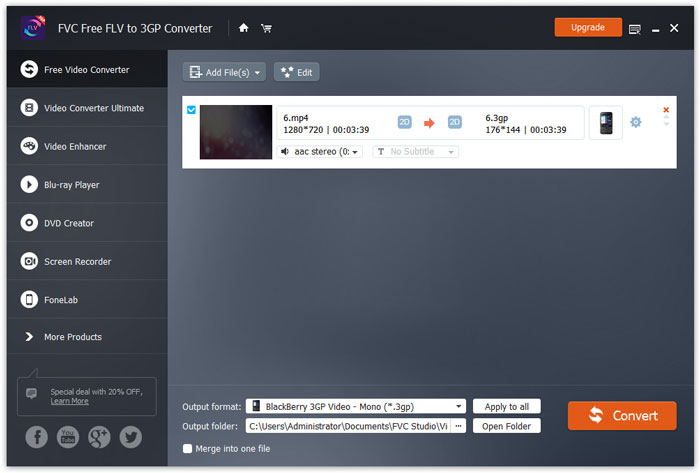
Vaihe 4. Selaa lopuksi tietokoneeltasi tulostuskansio ja napsauta Convert-painiketta aloittaaksesi MP4–3GP-muunnoksen.
Osa 2. Vie 3GP MP4: stä kahdella online-3GP-muuntimella
Verrattuna työpöydän 3GP-muuntimen asentamiseen verkkopohjaisen muuntimen käyttö on paljon yksinkertaisempaa ja helpompaa MP4: n muuntamiseksi 3GP: ksi. Tässä osassa jaamme 2 online-3GP-muunninta, joiden avulla voit muuntaa MP4: n 3GP: ksi ilman vaikeuksia.
1. FVC Free Online Video Converter
FVC Free Online Video Converter on tunnettu videonmuunnosalusta, jolla voit muuntaa yleisiä video- ja ääniformaatteja 3GP-, MKV-, MOV-, WMV-, AVI-, MP3- ja moniin muihin muotoihin.
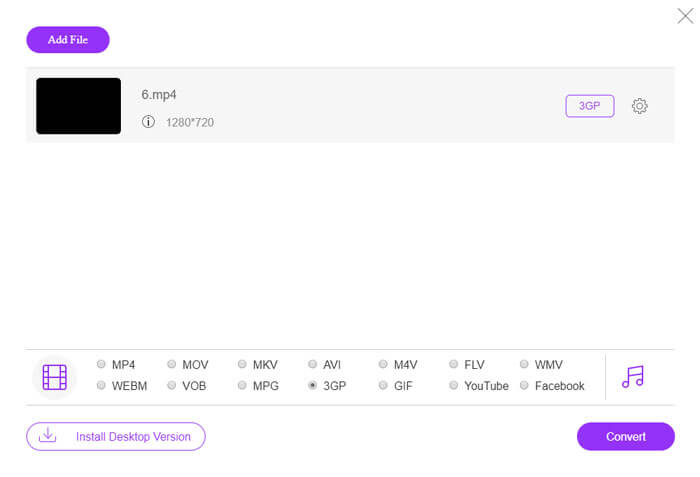
Vaihe 1. Siirry FVC Free Video Converterin viralliselle verkkosivustolle. Napsauta Add Files to Convert -painiketta ladataksesi ja asentaaksesi käynnistysohjelman.
Lataa työpöytäversio muuntaaksesi tiedostoja erissä.

Vaihe 2. Valitse MP4-tiedostot paikalliselta tietokoneelta. Voit napsauttaa hammasrataskuvaketta säätääksesi videon bittinopeutta, näytteenottotaajuutta, kuvanopeutta, resoluutiota ja äänenvoimakkuutta.

Vaihe 3. Aseta tulostusmuodoksi 3GP alareunasta. Napsauta sitten Convert-painiketta aloittaaksesi MP4–3GP-muunnoksen. Voit muuntaa erässä useita MP4-tiedostoja 3GP-muotoon samanaikaisesti.
2. Zamzar
Zamzar on online-videomuunnin, äänimuunnin, kuvamuunnin ja eBook-muunnin. MP4 on kätevä muuntaa useiksi muiksi muodoiksi Zamzarin avulla. Seuraavat ovat yksinkertaisia vaiheita MP4: n muuntamiseksi 3GP: ksi.
Vaihe 1. Mene osoitteeseen zamzar.com/convert/mp4-to-3gp/ ja napsauta Add Files -painiketta ladataksesi MP4-tiedostosi.
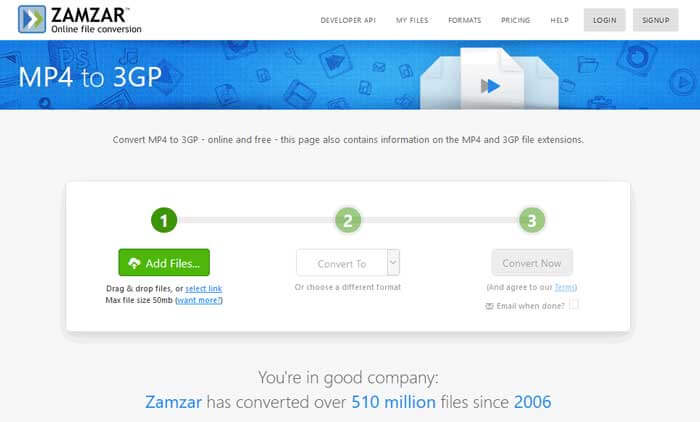
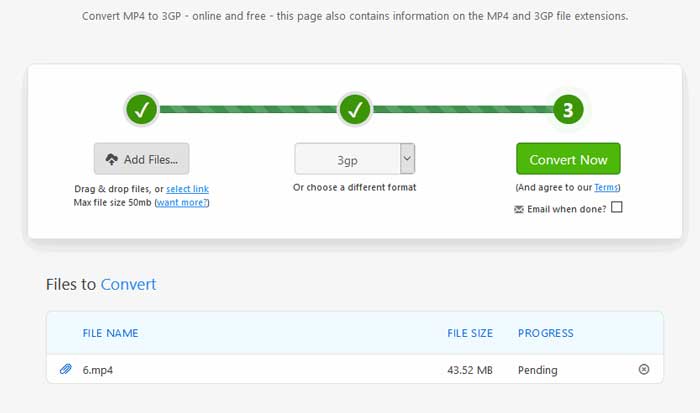
Vaihe 2. Voit valita toisen tulostusmuodon. Yleensä 3gp asetetaan oletuksena tulostusmuodoksi. Napsauta Convert Now -painiketta aloittaaksesi MP4–3GP-muunnoksen.
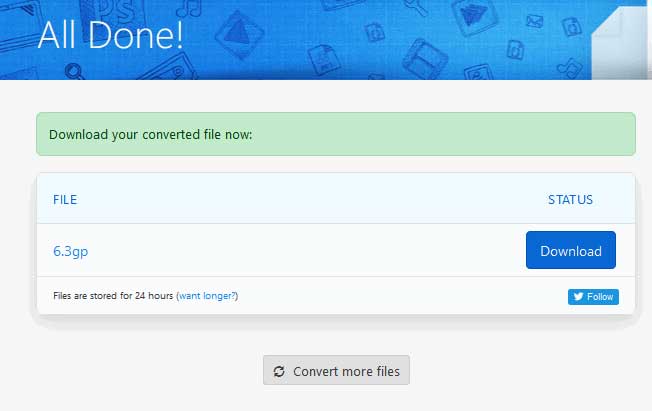
Vaihe 3. Sen jälkeen siirrytään toiselle sivulle. Voit napsauttaa Download-painiketta tallentaaksesi muunnetun 3GP-tiedoston tietokoneellesi.
Entä jos MP4-tiedostosi on erittäin suuri? Katso täältä, miten MP4-tiedostoja voi pakata.
MP4 vs. 3GP
Moving Picture Experts Groupin (MPEG) vuonna 2001 julkaisema MP4-muoto voi auttaa sinua tallentamaan video-, ääni-, tekstitys- ja kuvatiedot eri raidoille. Se on lyhenne sanoista MPEG-4 Part 14. Lisäksi se on yksi suosituimmista videoiden suoratoistoon ja jakamiseen käytetyistä muodoista.
3rd Generation Partnership Project (3GPP) tuotti 3GP/3GPP-muodon multimediasäilömuotona. Se perustuu itse asiassa ISO-mediatiedostomuotoon. Käytämme sitä usein tallentaaksemme video-/äänivirtoja, jotka välitetään 3G-matkapuhelinten välillä ja verkossa.
Osa 3. Usein kysytyt kysymykset MP4: n muuntamisesta 3GP: ksi
1. Onko 3GP parempi kuin MP4?
3GP on suunniteltu 3G-verkkoa käyttäviä matkapuhelimia varten. Voit toistaa 3GP-tiedostoja esimerkiksi QuickTime-, VLC- ja RealPlayer-soittimilla. MP4 on paljon yhteensopivampi kuin 3GP. Sitä tukevat yleisesti monet kannettavat mediasoittimet ja älypuhelimet.
2. Mikä on 3GP?
3GP on 3. sukupolven määrittelemä multimediasäiliömuoto. Se voi tallentaa videoita ja äänivirtoja, jotka toistetaan 3G-matkapuhelimilla, mutta voidaan toistaa myös joillakin 2G- tai 4G-puhelimilla.
3. Kuinka voin muuntaa MP4: n FLV: ksi?
FVC Free Online Video Converter -työkalun avulla voit helposti muuntaa MP4:n FLV-muotoon verkossa. Siirry tälle verkkosivulle ja napsauta Add Files to Convert -painiketta asentaaksesi käynnistysohjelman. Valitse sitten MP4-tiedostot tietokoneelta ja merkitse FLV tulostusmuodoksi. Napsauta Convert-painiketta muuntaaksesi MP4:n FLV:ksi.
Johtopäätös
Puhuimme pääasiassa kolmesta menetelmästä MP4: n muuntamiseksi 3GP: ksi Windowsissa ja Macissa. Jos haluat mieluummin online-ratkaisun, voit kokeilla FVC Free Online Video Converteria tai Zamzaria verkossa. Jos haluat muokata MP4-tiedostoa täydentämiseksi, voit käyttää sen sijaan Free FLV to 3GP Converter -ohjelmaa. Jos sinulla on parempia ratkaisuja, älä epäröi jättää kommenttia.
-
 Kolme parasta tapaa muuntaa MP4 nopeasti VOB: ksi
 Kuinka muuntaa MP4 VOB: ksi Windows PC: ssä ja Macissa? Tämän ongelman ratkaisemiseksi tämä viesti jakaa 3 parasta tapaa auttaa muuntamaan MP4 VOB: ksi ilmaiseksi.
-
 Ilmainen | 3 parasta tapaa muuntaa MP4 WMV: ksi menettämättä laatua
 Tämä viesti jakaa miten MP4-video voidaan muuntaa WMV-muotoon Macissa tai Windowsissa. Tarjoamme sinulle myös useita vaihtoehtoja, mukaan lukien sekä työpöytäohjelmistot että verkkopohjaiset verkkomuuntimet. Oletko valmis tuntemaan parhaat MP4 - WMV -muunnostyökalut?
-
 3 tapaa muuntaa MP3 MP4: ksi kuvan avulla
 Kuinka muuntaa MP3 MP4: ksi korkealaatuisena? Tämä viesti näyttää 3 tehokasta ja ilmaista tapaa vaihtaa MP3 MP4-kuviksi Windows- ja Mac-tiedostoilla.

