


 Video Converter Ultimate
 Näytön tallennin
 Videon korjaus
 Suojattu lataus
Tehokas videon nopeuden ohjain - DaVinci Resolve Speed Editor
If you want to use a powerful video speed editor, you probably want to use this tool. DaVinci Resolve Speed Editor is a video speed changer tool that uses a USB keyboard. This speed editor provides custom hardware control that allows you to edit your video speed easily. So, if you are wondering what this tool can do more, read this article to know more about the DaVinci Resolve Speed Editor.

Osa 1. DaVinci Resolve Speed Editorin perustiedot, ominaisuudet, toiminnot ja hinta
Many professional editors use DaVinci Resolve Speed Editor to change the speed of their video. And if you are new to using DaVinci Resolve Speed Editor, you probably want to know the information, functions, and price of this tool. In this part, you will know the basic information, functions, and the price of this speed editor.
Perustiedot
DaVinci Resolve on USB-tyyppinen näppäimistö, jonka avulla voit muokata tiedostoa. Jos haluat työkalun, joka voi muuttaa videosi nopeutta, tämä työkalu on sinulle paras. DaVinci Resolve tarjoaa nopeamman ja helpomman tavan muokata videoita. Se on enemmän kuin pelkkä näppäimistö, koska siinä on monia muokkausominaisuuksia, joita voit käyttää, mukaan lukien videon nopeuseditori, hakuvalintaohjaus, tehosteiden lisääminen/poistaminen, synkronointisäiliön usean kameran valinta ja paljon muuta. Tämän lisäksi tällä nopeuseditorilla on myös langaton versio.
Kun ostat DaVinci Resolve -näppäimistön, näet USB-kaapelin ja akun virran merkkivalon. Kun irrotat USB-kaapelin laitteen takaa, Bluetooth yrittää automaattisesti muodostaa laiteparin.
Lisäksi, jos pyydät tämän työkalun nopeuseditoria, voit käyttää näppäimistön jog-pyörän säätimiä, toistosäätimiä sekä muokkaus- ja trimmaussäätimiä.
Ominaisuudet ja toiminnot
Jos mietit, mitkä ovat DaVinci Resolven ominaisuudet ja toiminnot, esittelemme alla tämän työkalun yleisimmät ominaisuudet ja toiminnot.
Speed Editor
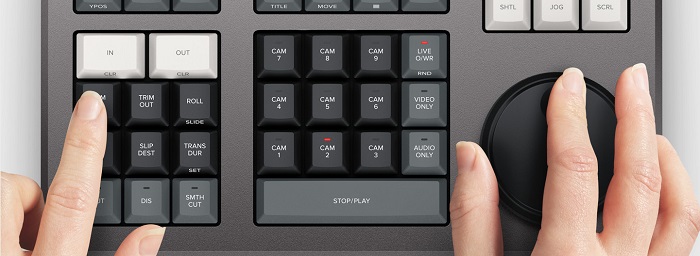
DaVinci Resolve Speed Editor is made for professional editors who want to better transition effects on their video. By using this video speed controller, you can slow down or speed up the fps of your video, highlighting the best scene of your video. There are many ways to use DaVinci Resolve to speed up a clip.
◆ Use the In and Out points by just scrolling on the search dial and placing the in and out points on your video timeline, then going to edit functions to edit your video.
◆ Use the Trim in and Trim out buttons by simply holding the trim buttons and rotating the search dial. The smart indicator on the timeline allows you to see which part you are trimming.
Add and Remove Effects
Using the DaVinci Resolve speed editor, you can also add and remove effects on your video. The smart indicator on the timeline is the determinator of which editing point you are working on. Press the CUT key to remove an effect on the edit point. And if you want to dissolve the edit point on your timeline, press the DIS (dissolve) key. In addition, if you want a smooth cut transition on the edit point, press the SMTH CUT (smooth cut).



Color
Tämän toiminnon avulla voit muuttaa kontrastia, lämpötilaa, keskisävyä, kylläisyyttä ja muita. Värisivu on yksi DaVinci Resolven suosituimmista toiminnoista, ja se on helppokäyttöinen aloittelijoille.
Sync Bin
The sync bin is a function where you can find videos or shots synced in on the editing timeline. And then, you can use the camera keys to select an alternative shot and edit it on your timeline.
Audio Level and Mark
DaVinci Resolve can also adjust the audio of your video. To set the audio levels on your clip, hold the key and adjust the audio level using the search dial. If you double press the audio level key, it will add a marker. And if you double press the key and hold it, it allows you to set the color of the markers.
Full-Screen Viewer and Review
Tällä näppäimellä voit muuttaa katsojan koko näytön tilaan. Siinä on punainen väri, joten löydät sen helposti. Jos painat tätä näppäintä kahdesti, se rukoilee viimeisimmästä muokkauksestasi.
Add Transitions
Using the Transition key will add a custom transition to your video. It is almost similar to the cut and smooth cut buttons.
Snapper and Viewer
Pressing the Snap key enables snapping on your timeline. And if you press and hold the Snap key, it will adjust the viewer size.
Ripple Delete
Ripple delete mahdollistaa leikkeen poistamisen toistokohdasta; se aaltoilee aikajanaa poistaakseen raon kahden leikkeen välillä. Ripple delete on hyvä tapa lyhentää videosi aikajanan kestoa.
Hinta
Voit ostaa DaVinci Resolve Speed Editorin $395:lle. Ja jos etsit tämän työkalun ohjelmistoversiota, voit ladata sen ilmaiseksi Windowsille, Macille ja Linuxille. Tämän työkalun ohjelmistoversio on kuitenkin monimutkainen käyttää.
Vaihtoehto DaVinci Resolve Video Speed Editorille
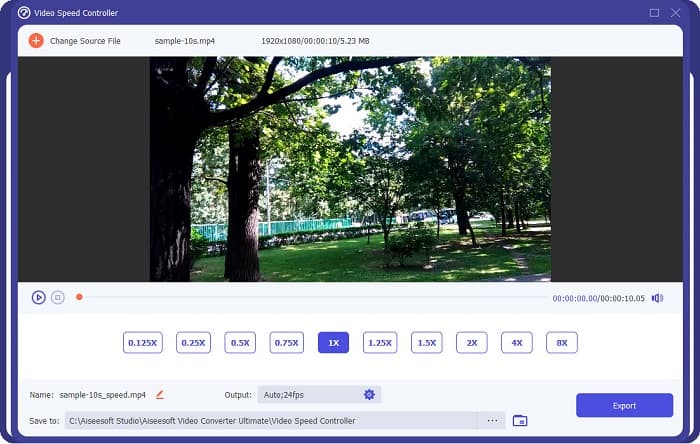
If you want an easier way to edit your video’s speed, use FVC Video Converter Ultimate. This software application allows you to speed up or slow down your video easily. With its fast operating process, you will not consume much time editing the speed of your video. In addition to that, there are many speed presets you can choose from for your video. And if you are wondering what else it can do, this tool has many editing features, including an audio compressor, video compressor, video metadata editor, and more. It also supports numerous file formats, like MP4, MKV, MOV, AVI, FLV, WMV, and 1000+ formats. To know more about this software application, read the descriptions below.
Advantages of using FVC Video Converter Ultimate:
1. Siinä on intuitiivinen käyttöliittymä.
2. Sen avulla voit muuttaa videon nopeutta esiasetuksista 0,125x, 0,50x, 0,75x, 1,25x, 1,5x, 2x, 4x ja 8x.
3. Siinä on monia edistyneitä muokkaustoimintoja, kuten videoleikkuri, videon yhdistäminen, 3D-valmistaja ja paljon muuta.
4. Saatavilla kaikilla media-alustoilla, mukaan lukien Windows, Mac ja Linux.
Osa 2. Usein kysyttyä DaVinci Resolve Video Speed Editorista
Onko DaVinci Resolve Video Speed Editor sen arvoinen?
Hintansa ansiosta tämä videon nopeuden muokkaustyökalu kannattaa käyttää, koska se voi tuottaa laadukkaita tuloksia ja siinä on paljon muokkausominaisuuksia käytettäväksi.
Onko DaVinci Video Speed Editor yhteensopiva minkään formaatin kanssa?
Se ei tue kaikkia tiedostomuotoja. Se voi kuitenkin tukea lukuisia tiedostomuotoja, mukaan lukien MOV, MXF, DNG, DCP, ARI, MTS jne.
Onko DaVinci Resolve Video Speed Editorilla ilmainen versio?
DaVinci Resolve Video Speed Editorilla on ilmainen kokeiluversio vain rajoitetun ajan. Jos haluat käyttää sitä koko eliniän, osta työkalu mallille $395.
Johtopäätös
All your queries about DaVinci Resolve Video Speed Editor are now answered. With the tool meant for video speed editor, you can easily slow down or speed up your video and create beautiful transitions with this tool. But, if you are searching for a more convenient tool and easier to use, try FVC Video Converter Ultimate for free!
-
 Videon kelaaminen eteenpäin iPhonessa – Säädä videon nopeutta
 Kuinka voin kelata videota eteenpäin iPhonessa? Kuinka kelata videota eteenpäin iPhonessa iMovien avulla? Opi kolme tapaa nopeuttaa videon katselua iPhone- ja iPad-laitteilla.
-
 Videon nopeuttaminen Premiere Prossa ja sen vaihtoehdoissa
 Haluatko tietää, kuinka käyttää Premiere Pro -ohjelmaa videon nopeuttamiseen? Sitten olet oikeassa artikkelissa, sillä tarjoamme vaiheita ja muita edullisia vaihtoehtoja.
-
 2 vaivatonta tapaa videon nopeuttamiseen TikTokissa
 Haluatko tietää salaisuuden videon nopeuttamisesta TikTokissa? Lue sitten tämä artikkeli, niin saat idean sen tekemiseen ja tiedä, mitkä ovat kaksi muuta työkalua, jotka auttavat sinua.
