


 Video Converter Ultimate
 Näytön tallennin
 Videon korjaus
 Suojattu lataus
Täydellinen opetusohjelma Weibo-vesileiman poistamisesta, joka sinun on tiedettävä
Weibo on tunnettu sosiaalisen median alusta, jota käytetään jakamaan, levittämään ja hankkimaan tietoa, kuten Twitter, jota voit usein käyttää Kiinassa. Voit myös lähettää ja ladata pikkukuvia, valokuvia ja videoita täältä. Siellä on kuitenkin vesileima, kun viet sen. Monet käyttäjät haluavat poistaa sen, koska se häiritsee sisällön visuaalista ilmettä.
Vaikka vesileiman poistamiseen on saatavilla tuhansia työkaluja, vain harvat niistä pystyvät poistamaan vesileiman todella tehokkaasti. Jos siis et pidä lataamiesi kuva‑ tai videotiedostojen vesileimasta, tämä artikkeli esittelee parhaat työkalut sen poistamiseen. Olemme testanneet ne käytännössä varmistaaksemme, että ne todella toimivat ja ovat käteviä vesileiman poistossa. Jos haluat oppia, miten poistat Weibo‑vesileiman, jatka tämän artikkelin lukemista vaihe vaiheelta.

Osa 1. Vesileiman poistaminen Weibo-videosta Ultimate Watermark Remover -sovelluksella
Weibo‑vesileima voi olla ongelma monille muille työkaluille, koska ne jättävät usein sumuisen jäljen alkuperäisen vesileiman kohdalle. Jos kuitenkin käytät FVC Video Converter Ultimate ‑ohjelmaa, vesileimasta ei jää mitään sumentumaa. Olipa vesileima suuri tai pieni, tämä työkalu pystyy pyyhkimään sen pois tehokkaasti ilman näkyviä jälkiä. Näin voit nauttia Weibossa julkaisemasi videon katselusta ilman häiritsevää vesileimaa. Toisin sanoen, vesileiman poistaminen tämän työkalun avulla on hyvin helppoa.
Lisäksi voit käyttää tätä työkalua myös muihin asioihin, kuten leikkaamiseen, yhdistämiseen, pakkaamiseen, leikkaamiseen, GIF-tiedostojen luomiseen ja muihin. Ja jos haluat lisätä vesileiman videoosi, jotta kukaan ei voi varastaa sitä sinulta, voit käyttää tätä ohjelmistoa tehdäksesi sen. Se on all-in-one-ohjelmisto, jota tarvitaan työpöydällesi. Haluatko tietää, kuinka vesileima poistetaan Weibo-videosta? Voit seurata seuraavia vaiheita, kun selitämme, kuinka se tehdään vaiheittain.
Ilmainen latausWindows 7 tai uudempiTurvallinen lataus
Ilmainen latausMacOS 10.7 tai uudempiTurvallinen lataus
': Ennen kuin seuraat seuraavia vaiheita, varmista, että vietit Weibo-videon, josta haluat poistaa vesileiman, jotta löydät sen kansiosta helposti.
Vaihe 1. Lataa ensin ohjelma tietokoneellesi ja valitse käyttöjärjestelmääsi vastaava versio. Kun ohjelma on asennettu, seuraa näytölle tulevia WinRAR‑asennusohjeita, napsauta Lopuksi Start Now (Aloita nyt) käynnistääksesi ohjelman ja jatka eteenpäin.
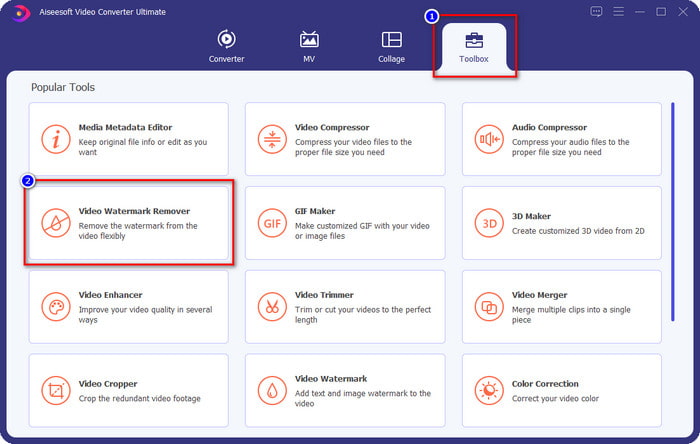
Vaihe 2. Siirry Toolbox‑osioon ja etsi Video Watermark Remover (videovesileiman poistaja); napsauta sitä.
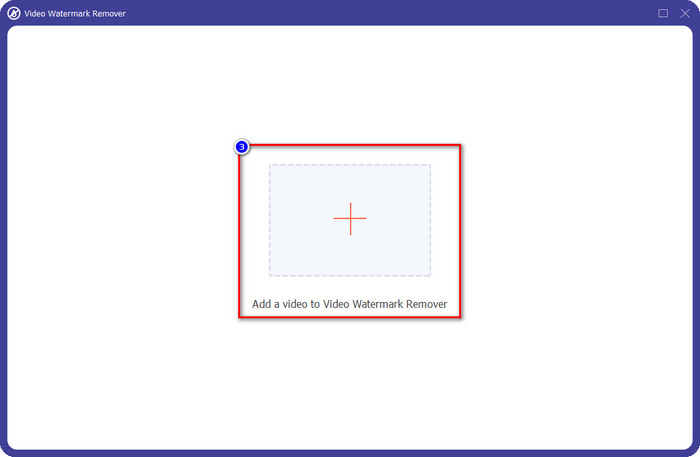
Vaihe 3. Napsauta +‑painiketta, etsi kansiosta aiemmin lataamasi Weibo‑video, jossa on vesileima, valitse tiedosto ja paina Open (Avaa) ladataksesi sen.
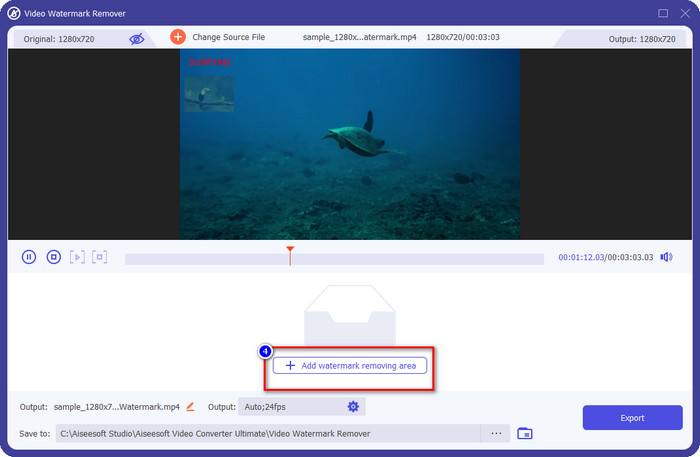
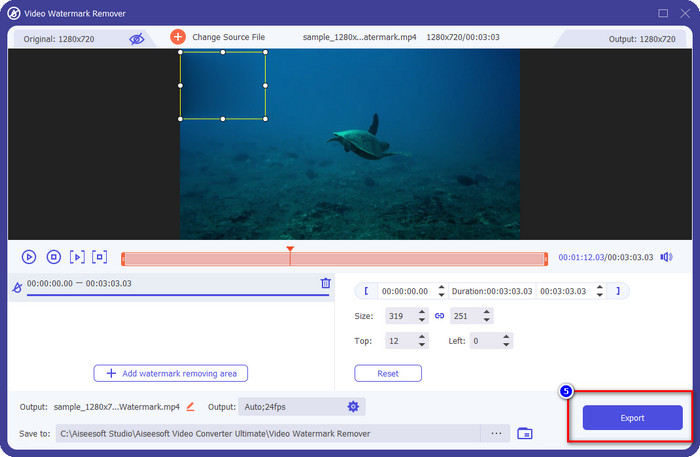
Vaihe 4. Uudessa avautuvassa ikkunassa napsauta Add Watermark Removing Area (lisää vesileiman poistamisalue) jatkaaksesi vesileiman poistamista.
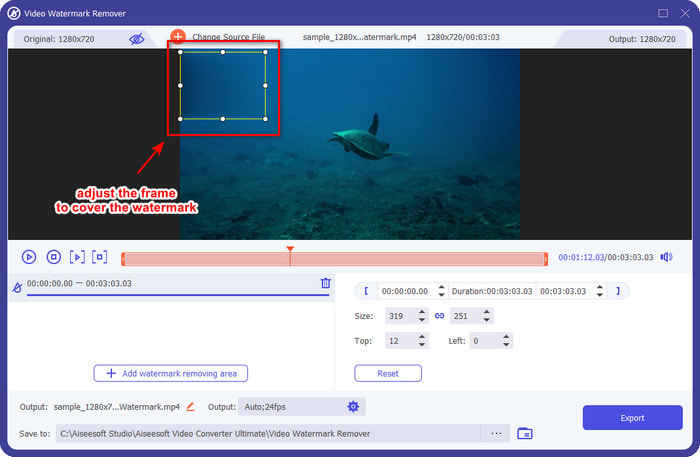
Vaihe 5. Vedä ja pidä valintaruutua niin, että se peittää vesileiman; voit myös suurentaa tai pienentää ruutua tarpeen mukaan ja varmistaa, että vesileima on kokonaan peitossa ennen vientiä.
Vaihe 6. Kun olet asettanut valintaruudun vesileiman päälle, napsauta Export (Vie) poistaaksesi vesileiman lataamastasi videosta. Sinun ei juuri tarvitse odottaa, sillä ohjelma tukee erittäin nopeaa käsittelyä; muutamassa sekunnissa saat Weibo‑videosi ilman vesileimaa.
Osa 2. Vesileiman poistaminen Weibo Photosta käyttämällä ilmaista versiota verkossa
Miten tallentaa Weibo‑kuvat ilman vesileimaa? Et voi tallentaa kuvaa ilman vesileimaa suoraan Weibosta vietynä. Voit kuitenkin käyttää työkalua FVC Free Watermark Remover vesileiman poistamiseen kuvista. Se on monipuolinen kuvien vesileiman poistaja. Toiminnallisuutensa puolesta voidaan sanoa, että tämä työkalu on huomattavasti parempi kuin monet muut verkossa saatavilla olevat vesileimanpoistajat. Jos siis haluat poistaa vesileiman kuvasta, tämä on ensisijainen työkalu, jota kannattaa kokeilla. Vaikka se pystyy poistamaan vesileiman kuvista, se ei kuitenkaan pysty poistamaan vesileimaa videoista samalla tavalla kuin ultimate‑versio.
Siitä huolimatta sen käyttö on ilmaista, ja sen verkkokäyttöliittymä on puhdas, joten et edes näe sinua häiritseviä mainoksia. Haluatko tietää kuinka tätä verkkotyökalua käytetään? Kokeile sitten alla olevia ohjeita ja kokeile sitä itse.
Huomautus: Sama kuin videossa, varmista, että lataat haluamasi Weibo-kuvan ja varmista, että asetat sen näkyvään ja helposti käytettävään kansioon.
Vaihe 1. Avaa verkkopohjainen vesileiman poistaja napsauttamalla tätä linkkiä.
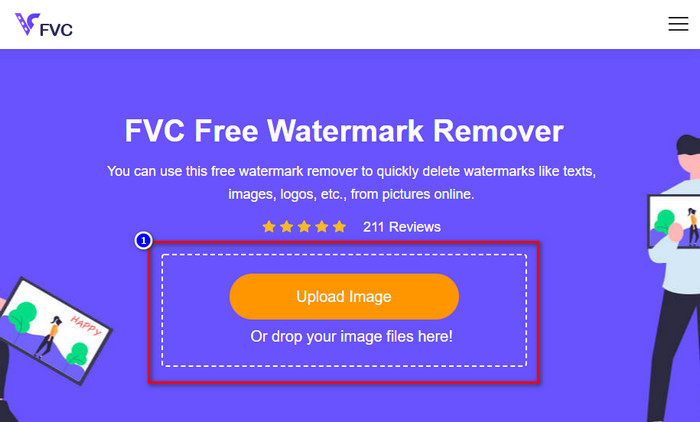
Vaihe 2. Verkkosivun käyttöliittymässä napsauta Upload Image (Lataa kuva); kansio avautuu näytölle, etsi kuva ja paina Open (Avaa) ladataksesi sen.
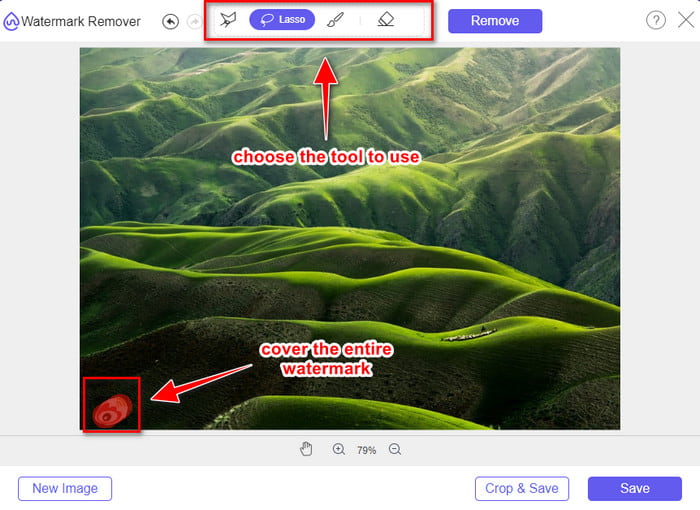
Vaihe 3. Voit rajata tai piirtää vesileiman alueen poistaaksesi sen; varmista, että jokainen vesileiman osa sisältyy merkitsemääsi alueeseen.
Vaihe 4. Paina Remove (Poista) poistaaksesi kuvassa olevan vesileiman.
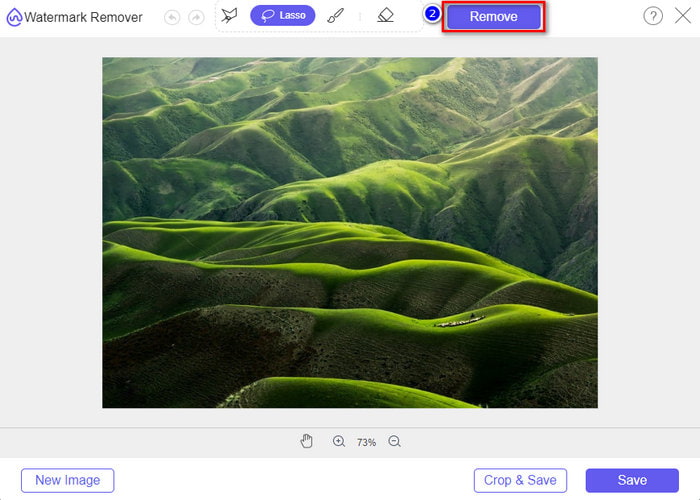
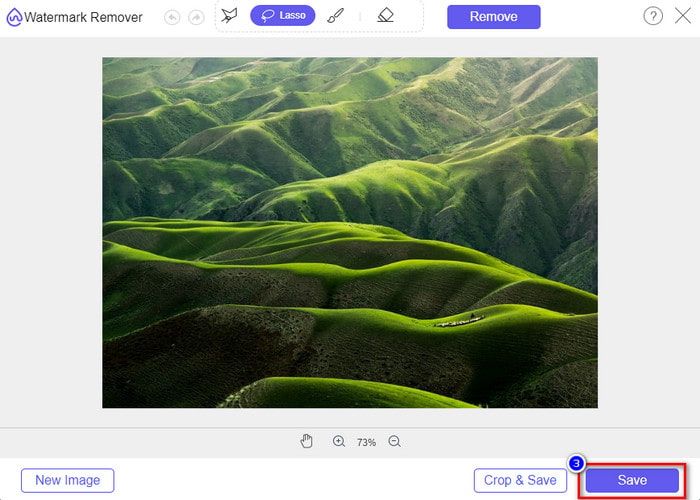
Vaihe 5. Kun olet poistanut vesileiman Weibo‑kuvasta, napsauta Save (Tallenna) ladataksesi Weibo‑kuvan ilman vesileimaa.
Aiheeseen liittyvää:
Miten poistaa TikTok‑vesileima
Miten lisätä vesileima videoon
Osa 3. Usein kysytyt kysymykset Weibo-vesileiman poistamisesta
Miksi Weibo-vesileima muuttui epäselväksi viemisen jälkeen?
Jotkut työkalut hämärtävät vesileiman niin, että sitä ei voi nähdä visuaalisessa mediassa, jonka ne ovat vieneet Weiboon. Mutta kaikki työkalut eivät sumenna vesileimoja; Jotkut poistavat visuaalisen median vesileiman ilman jälkiä. Joten jos haluat poistaa vesileiman Weibosta hämärtämättä sitä, sinun on tunnettava yllä mainitsemamme työkalu, jonka avulla voit poistaa sen.
Voinko peittää viedyn tiedoston Weibo-logon?
Kyllä sinä voit. Tällä tavalla et näe Weibon vesileimaa tiedostossa. Sen peukalointi kattaisi kuitenkin osan tiedoston osista, joten sen sijaan, että se auttaisi sinua, se voisi pahentaa tiedostoa. Joten vesileimanpoistoaine tarvitaan tiedoston vesileiman poistamiseen.
Onko kaikilla Weibon vietyillä tiedostoilla vesileima?
Minkä tahansa tyyppisten tiedostojen vieminen tälle microblogging-alustalle jättää jäljen. Riippumatta siitä, mikä se on, vesileimat lisätään tiedostoon. Voit kuitenkin poistaa sen työkalulla, jonka mainitsimme aiemmin tässä artikkelissa.
Johtopäätös
Vaikuttavaa, eikö? FVC tarjoaa työkalut, joiden avulla voit poistaa Weibo‑vesileiman sekä videoista että kuvista välittömästi. Vaikka sinulla ei olisi aiempaa kokemusta etkä olisi ammattilainen tällaisessa editoinnissa, muokkaus onnistuu edellä mainituilla työkaluilla. Jos siis haluat poistaa vesileiman kuvasta, oli se sitten Weibosta viety tai ei, FVC Free Watermark Remover on työkalu, jota tarvitset. Videoiden ja GIF‑animaatioiden kohdalla kannattaa kuitenkin käyttää helppokäyttöistä ja edullista ammattiohjelmistoa, kuten FVC Video Converter Ultimate. Mitä siis enää odotat? Poista vesileimat mediasisällöistäsi ja nauti niiden katselusta ilman häiritseviä merkintöjä.
-
 Paras tapa lisätä vesileima videoon Photoshopissa Windowsissa ja Macissa
 Haluatko tietää, kuinka voit lisätä vesileiman videoon Photoshopissa? Siinä tapauksessa tämä artikkeli tarjoaa sinulle asioita, jotka sinun on tiedettävä.
-
 3 parasta ratkaisua vesileiman poistamiseen videoista helposti
 Haluatko poistaa ärsyttävän vesileiman videosta? Tämän blogin avulla voit oppia erilaisia ideoita vesileiman poistamiseen videosta.
-
 4 parasta tapaa poistaa vesileima GIF:stä [Online & Offline]
 Haluatko poistaa vesileiman GIF-tiedostosta? Tämän artikkelin työkalulla opit eri tyylejä alustallasi saatavilla olevien vesileimanpoistoaineiden kanssa.
