


 Video Converter Ultimate
 Näytön tallennin
 Videon korjaus
 Suojattu lataus
Poista Dreamstimen vesileima neljällä tavalla, jotka sinun tarvitsee tietää
Jos tarvitset käyttövalmiita kuvia esitykseesi tai projektiisi, et voi koskaan mennä pieleen valitessasi Dreamstimen. Tämä sovellus voi antaa sinulle rojaltivapaita arkistokuvia, jotka ovat valmiita käytettäväksi milloin tahansa. Se auttaa jo tiettyä kuvaa etsiviä käyttäjiä korkealaatuisella tulosteella edulliseen hintaan. Vaikka voit ladata 15 kuvaa ilmaiseksi täältä, tämä tuote jättää vesileiman sovelluksen mainostamiseksi, kun käytät täältä lataamaasi kuvaa.
Emme voi kiistää, että sen käytettävyys on erinomainen ja kuvien hinnat ovat matalat, mutta kaikilla meistä ei ole varaa ostaa sinne krediittejä. Ei hätää! Olemme koonneet alle tietoa tavoista, joilla voit poistaa Dreamstime‑vesileiman, joka jää lopulliseen kuvaan.

Osa 1. Dreamstimen vesileiman poistaminen ostamalla krediittejä
Emme voi jättää ostovaihtoehtoa taaksemme, koska se on tehokkain Dreamstimen vesileimanpoistovaihtoehto, jota voit käyttää. Ennen kuin jatkamme, sinun on tiedettävä, että Dreamstime tarvitsee sinua, jotta voit ostaa kuvan ilman vesileimaa. Nimihyvitys on Dreamstime-valuutta; se käyttää oikeaa rahaa ja muuntaa sen digitaaliseksi, jonka Dreamstime hyväksyy. Oletetaan, että sinulla ei ole luottoa Dreamstimessa. Siinä tapauksessa voit noudattaa alla olevia ohjeita ostaaksesi saldon ladataksesi ja saada kuvan ilman tuotteiden logoa.
Vaihe 1. Avaa Dreamstimen virallinen verkkosivusto ja luo tili ennen kuin ostat krediittejä Dreamstimestä. Jos sinulla on jo tili, kirjaudu ensin sisään, jotta voit käyttää palvelua oikein.
Vaihe 2. Kun olet kirjautunut sisään Dreamstime‑tilillesi, napsauta Price and Download Plans ‑kohtaa ja siirry sitten osioon Credit Package nähdäksesi, mitä hintavaihtoehtoja on tarjolla.
Vaihe 3. Täytä pyydetyt tiedot kokonaan ja napsauta sitten Complete Checkout käsitelläksesi palveluun tekemäsi maksun. Näin helposti olet nyt ostanut krediittejä valuuttana Dreamstimen kuvien ostamista varten.
Osa 2. Dreamstimen vesileiman poistaminen ilmaiseksi verkosta
FVC ilmainen vesileimanpoistoaine verkossa
Yksi tunnetuimmista Dreamstime-vesileimanpoistajista verkossa, jota voit käyttää, ei ole mikään muu kuin FVC Free Watermark Remover Online. Voit hyödyntää tätä työkalua poistaaksesi kuvassasi olevan vesileiman. Suorituskyvyn kannalta tämä verkkotyökalu pystyy paremmin siihen, mitä ajattelet, erityisesti poistamalla kuvasta logon, vesileiman, leimat, päivämäärät, esineet jne. Etkö edelleenkään epäile tätä työkalua? Siinä tapauksessa lue alla lisäämämme vaiheet, ja voit noudattaa niitä myös poistaaksesi Dreamstimen lisäämän vesileiman.
Vaihe 1. Kun napsautat tätä linkkiä, selaimeesi avautuu uusi välilehti.
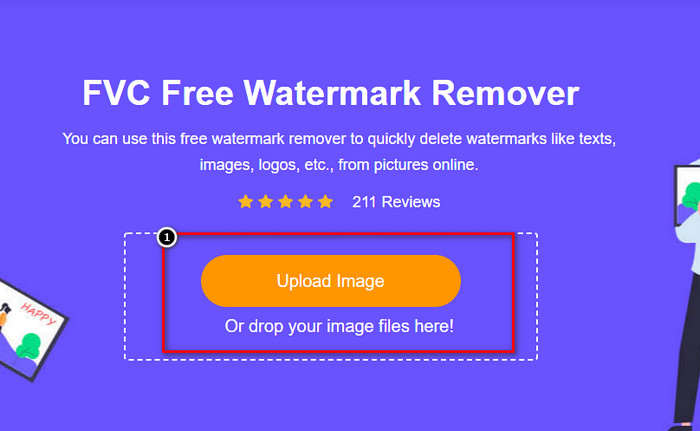
Vaihe 2. Napsauta Upload Image tuodaksesi Dreamstimestä viemäsi, vesileimalla varustetut kuvat.
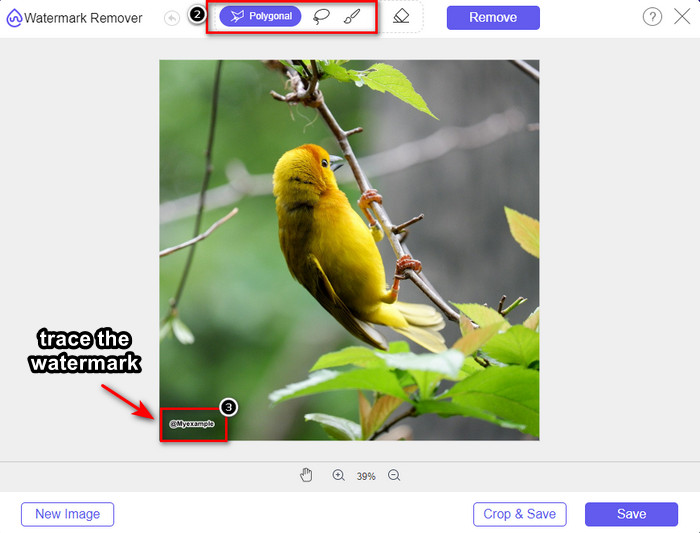
Vaihe 3. Voit käyttää työkaluja vesileiman rajaamiseen, valitse jokin niistä ja piirrä vesileiman alue sen avulla.
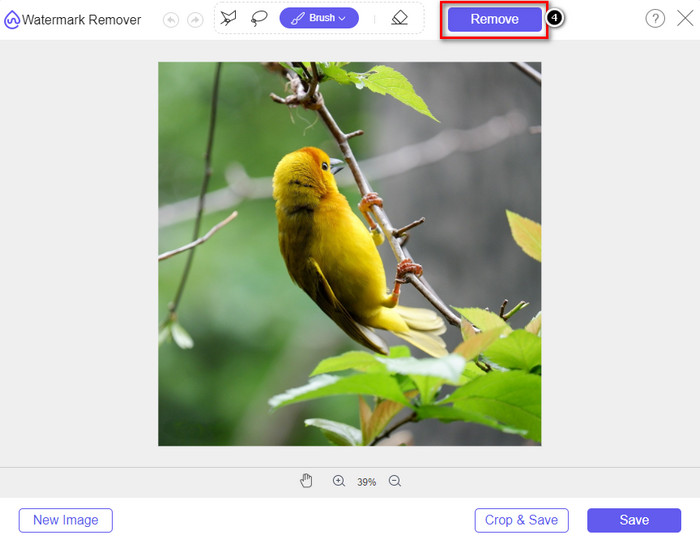
Vaihe 4. Napsauta ensin Remove ‑kuvaketta ennen kuin jatkat kuvan viemistä.
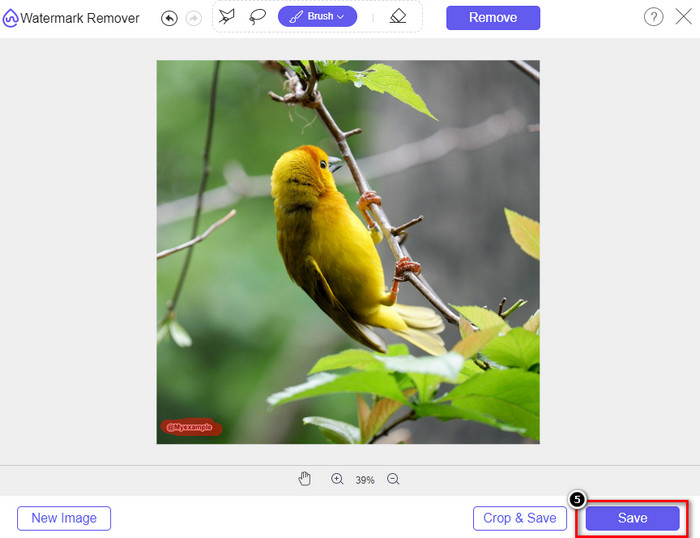
Vaihe 5. Lopuksi napsauta Download tallentaaksesi kuvan ilman vesileimaa, jonka äsken merkkasit.
WatermarkRemover.IO
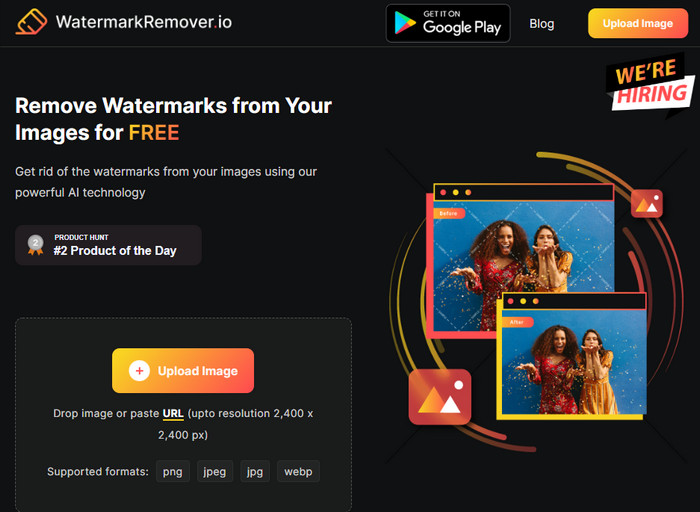
WatermarkRemover.io on Dreamstime‑kuvien vesileimanpoistotyökalu, jota voit käyttää verkossa ja joka voi auttaa sinua tässä. Työkalu on ilmainen, kuten aiemmin mainittu vesileimanpoistopalvelu. Sinun ei tarvitse huolehtia kirjautumisesta, koska sitä voi käyttää millä tahansa selaimella. Se hyödyntää myös tekoälytekniikkaa vesileimojen poistamiseen kuvistasi. Jotta onnistuisit, jatka lukemista alla olevista ohjeista.
Vaihe 1. Avaa tämän vesileimanpoistajan virallinen sivusto etsimällä se selaimestasi.
Vaihe 2. Napsauta Upload Image ‑kuvaketta ladataksesi kuvan, josta haluat poistaa vesileiman.
Vaihe 3. Kun olet ladannut vesileimalla varustetun kuvan, napsauta Download Image, sillä työkalu poistaa vesileiman kuvastasi automaattisesti.
Osa 3. Dreamstimen vesileiman poistaminen videoista Ultimate Solution -ratkaisulla
Voit ladata Dreamstime‑vesileimanpoistajan videoille, kuten FVC Video Converter Ultimate ‑ohjelman. Se on erittäin joustava työkalu, valmis käyttöön koska tahansa ja hoitamaan työn loppuun. Tällä työkalulla voit ratkaista erilaisia videoihin liittyviä ongelmia, kuten heikkolaatuinen ääni, resoluutio, ei tuettu formaatti tai häiritsevä vesileima. Verrattuna muihin ohjelmistoihin, joilla voi poistaa vesileimoja, tämän suorituskyky, käsittelynopeus ja käytettävyys ovat poikkeuksellisen erinomaiset. Pysy mukana, sillä näytämme sinulle kohta yksityiskohtaisesti, miten poistat vesileiman videoistasi.
Vaihe 1. Ennen kaikkea sinun on ladattava ohjelma tietokoneellesi napsauttamalla alla olevaa latauspainiketta. Valitse oikea versio asennettavaksi, käy läpi nopea asennus ja käynnistä ohjelma.
Ilmainen latausWindows 7 tai uudempiTurvallinen lataus
Ilmainen latausMacOS 10.7 tai uudempiTurvallinen lataus
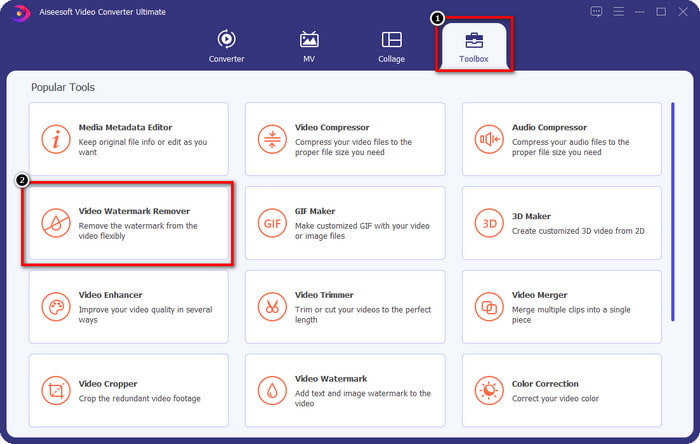
Vaihe 2. Avaa ohjelman monitoiminen Toolbox‑osio ja valitse sieltä Video Watermark Remover.
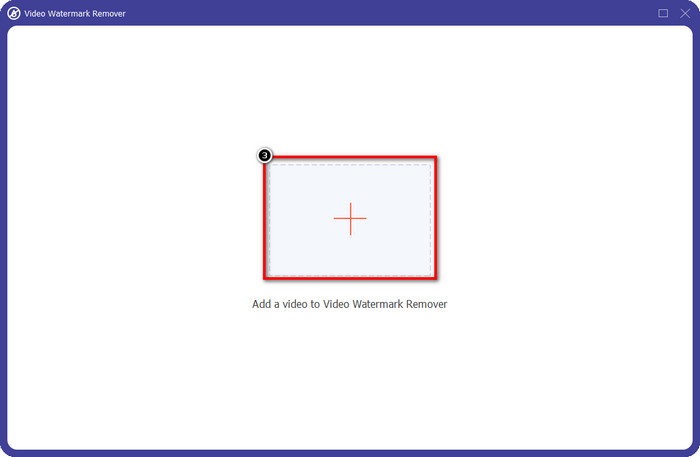
Vaihe 3. Sen jälkeen napsauta +‑kuvaketta ladataksesi videon, jonka olet ladannut, ja aloittaaksesi Dreamstime‑vesileiman poistamisen.
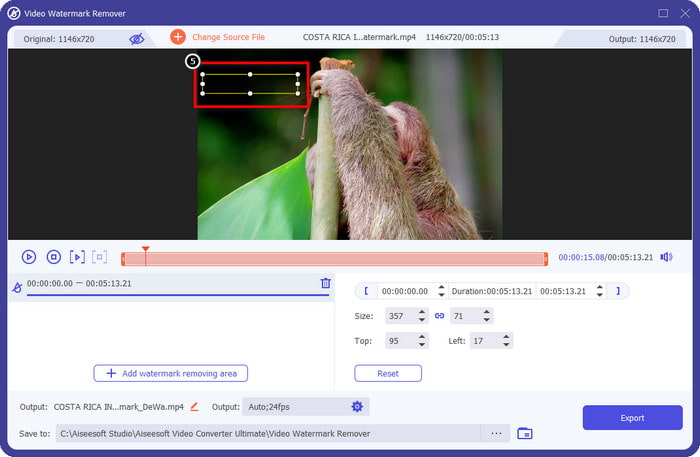
Vaihe 4. Napsauta sitten Add Watermark Removing Area asettaaksesi valintalaatikon vesileiman päälle.
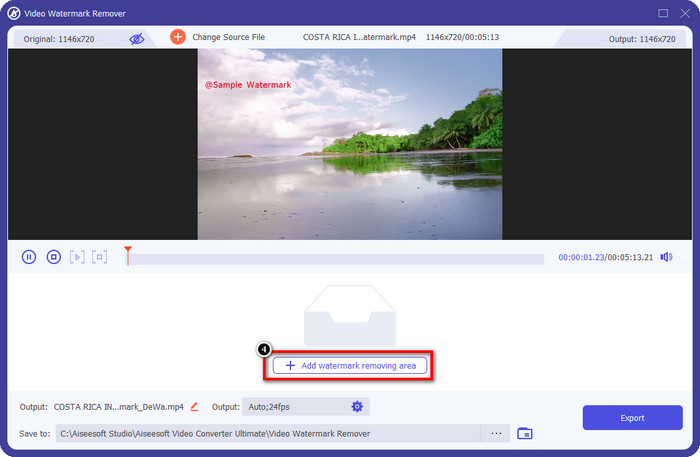
Vaihe 5. Kun olet napsauttanut Add Watermark Removing Area, näytölle ilmestyy suorakulmio; sijoita se vesileiman päälle poistaaksesi sen.
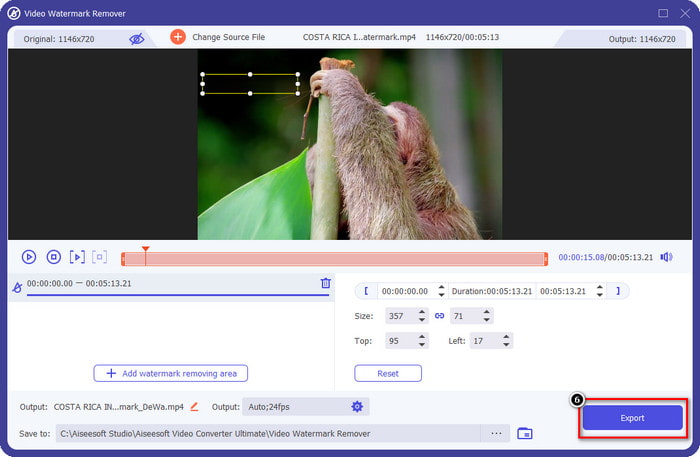
Vaihe 6. Napsauta Export‑painiketta ladataksesi videon ilman Dreamstimen vesileimaa.
Aiheeseen liittyvää:
Poista vesileima PDF‑tiedostosta
Osa 4. Usein kysytyt kysymykset Dreamtime-vesileiman poistamisesta
Voinko poistaa Dreamtime-vesileiman rajoittamattomasti sen ostamisen jälkeen?
Et voi, jos ostit luottoa, mutta voit jatkaa ja selata hieman alaspäin, niin näet, että sinulla on rajoittamaton pääsy kuviin, jos käytät tätä säännöllisesti. Sen hinta ei ole sama eri alueilla tai paikoissa maailmanlaajuisesti.
Millaista korttia Dreamstime tukee?
Nyt kun olet päättänyt ostaa luotto- tai tilausmaksun täältä, voit käyttää Master Card-, Visa-, AMEX- ja muita yleisimpiä luottokorttejasi. voit tarkistaa sen viralliselta verkkosivustolta tietääksesi muut.
Voinko käyttää Dreamstimen krediittejä ostaakseni videoita ilman vesileimaa?
Voit käyttää luottoa ostaaksesi videon tai minkä tahansa tuotteen tällä alustalla. Luotto ei ole tarkoitettu vain kuville ja videoille; voit käyttää sitä myös äänen ostamiseen täältä.
Johtopäätös
Kuinka poistaa Dreamstimen vesileima? Tiedät jo, kuinka käsitellä kuvissasi olevaa vesileimaa kahdella käyttämämme työkalulla ja videolla äärimmäisellä vesileimanpoistoaineella, jota voit käyttää. Joten jos sinulla on vesileima-ongelma videoissa tai kuvissa, voit vapaasti käyttää yllä olevaa ohjelmistoa ja seurata lisäämäämme opetusohjelmaa. Älä sano hyvästit ongelmalle, koska se on ratkaistu!
-
 2 tapaa poistaa VSDC-vesileima Windowsissa ja Macissa nopeasti
 Etsitkö tapaa poistaa VSDC-vesileiman videoistasi? Tämän artikkelin avulla tarjoamme työkaluja, joiden avulla voit poistaa vesileiman.
-
 Poista Animoto-vesileima videoista helposti ja tehokkaasti
 Kuinka Animoto-vesileima poistetaan videosta? Jatka tämän artikkelin lukemista, sillä toimitimme täydellisen opetusohjelman sen tekemiseen.
-
 Vesileiman poistaminen videosta Final Cut Pron avulla [Täydellinen opas]
 Onko sinulla ongelmia videoiden vesileiman kanssa? Ei sanonut enempää, sillä tarjosimme opetusohjelman vesileiman poistamiseen videosta Final Cut Prolla.
