


 Video Converter Ultimate
 Näytön tallennin
 Videon korjaus
 Suojattu lataus
Poista ammattimaisesti ammunkestävä vesileima näillä upeilla työkaluilla
Shootproof on asiakasvalokuvagalleria ja portfoliosivusto. Jos etsit upeita kuvia verkosta, Shootproof voi auttaa sinua siinä. Tällä sivustolla on runsaasti kauniita kuvia, joita myyjät tuottavat. Shootproof on tunnettu valokuvaajille suunnattu galleriansharing‑palvelu. Lisäksi se antaa valokuvaajille mahdollisuuden luoda valokuvilleen verkkokaupan. Monet myyjät kuitenkin lisäävät kuviinsa vesileiman, jotta muut eivät voisi omia kuvaa liian helposti. Jos siis olet yksi käyttäjistä, joka etsii tapaa poistaa Shootproof‑vesileima, jatka tämän artikkelin lukemista.

Osa 1. 2 menetelmää ampumisenkestävän vesileiman poistamiseksi vaivattomasti
Shootproof-vesileiman poistaminen ei ole vaikeaa, jos sinulla on sopiva vesileimanpoistoaine. Ja auttaaksemme sinua valitsemaan parhaan vesileimanpoistoaineen, etsimme verkosta eniten käytettyä ilmaista vesileimanpoistoainetta. Jos haluat tietää tämän työkalun, lue tämä osa kokonaisuudessaan.
FVC-vapaa vesileimanpoistoaine
FVC Free Watermark Remover on yksi tunnetuista verkkopohjaisista vesileimanpoistotyökaluista. Tämä verkkosovellus on ilmainen ja turvallinen käyttää. Lisäksi siihen pääsee kaikilla verkkoselaimilla, kuten Google Chromella, Firefoxilla ja Safarilla. Se tukee tavallisia kuvatiedostomuotoja, kuten PNG, JPEG, JPG, BMP ja muita. Vesileimanpoistotoiminnossa voit valita useista valintatyökaluista vesileiman poistamiseksi kuvastasi.
Lisäksi monet aloittelijat voivat käyttää tätä vesileimanpoistoainetta, koska se on helppokäyttöinen. Lisäksi kun viet kuvan, sillä on alkuperäinen tiedostomuoto. Tämä työkalu ei myöskään vaadi sinun kirjautumista tai rekisteröitymistä.
Shootproof-vesileiman poistaminen FVC Free Watermark Remover -vesileimanpoistoaineella:
Vaihe 1. Avaa ensin selaimesi ja etsi hakukentästä FVC Free Watermark Remover.
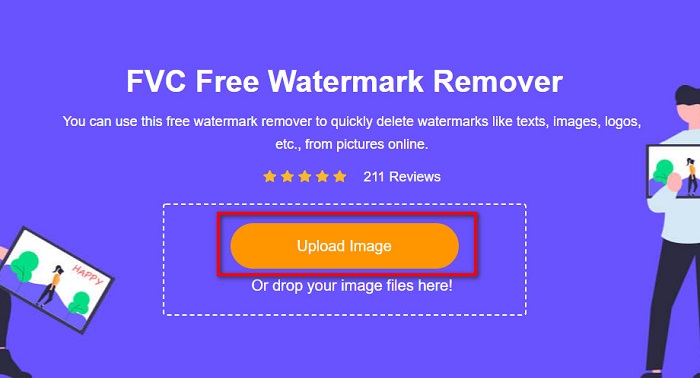
Vaihe 2. Napsauta sitten pääkäyttöliittymässä olevaa Upload Image ‑painiketta ladataksesi kuvan, josta haluat poistaa vesileiman.
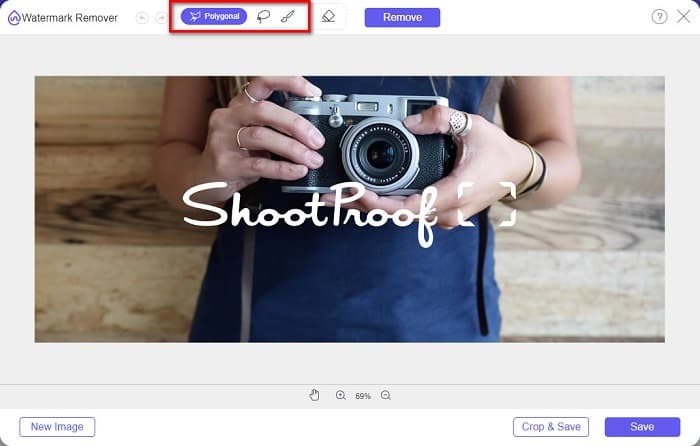
Vaihe 3. Valitse seuraavaksi valintatyökalu, jota haluat käyttää vesileiman poistamiseen kuvastasi. Voit valita työkalun Polygonal, Lasso tai Brush.
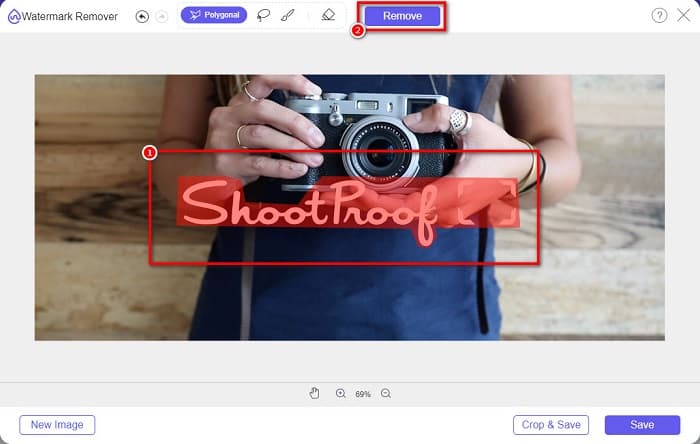
Vaihe 4. Rajaa sitten vesileiman alue kuvassasi. Kun alue on valittu, napsauta Remove‑painiketta. Näet, että vesileima on nyt poissa.
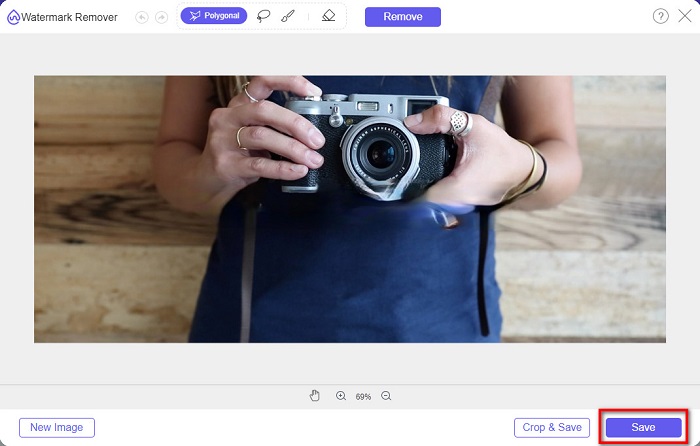
Vaihe 5. Lopuksi napsauta Save‑painiketta tallentaaksesi tuloksen laitteellesi. Siinä kaikki! Näillä yksinkertaisilla vaiheilla saat Shootproof‑kuvan ilman vesileimaa.
Apowersoft Online Watermark Remover
Apowersoft Online Watermark Remover on tunnettu verkkosovellus, jolla voi poistaa vesileimoja kuvista. Se on käyttäjäystävällinen verkkotyökalu, koska sen käyttöliittymä on selkeä. Lisäksi se tukee yleisimpiä kuvatiedostomuotoja, kuten PNG ja JPG. Sinun ei myöskään tarvitse olla huolissasi tiedostojesi turvallisuudesta, sillä tämä verkkotyökalu on turvallinen käyttää. Siinä on myös toiminto, jolla voit poistaa vesileimoja videoista. Jos internet‑yhteytesi on kuitenkin hidas, kuvan lataus‑ ja vientiprosessi saattaa olla hidas.
Shootproof-vesileiman poistaminen Apowersoft Online Watermark Remover -ohjelmalla:
Vaihe 1. Etsi selaimestasi Apowersoft Online Watermark Remover ja siirry sen etusivulle. Pääkäyttöliittymässä napsauta Remove Watermark From Image ‑vaihtoehtoa.
Vaihe 2. Seuraavalla sivulla näet watermark remover box ‑ruudun ja sijoitat sen vesileiman päälle.

Vaihe 3. Poistaaksesi vesileiman kuvastasi napsauta Erase‑painiketta.
Osa 2. Vinkkejä Shootproof Watermark -ominaisuuden käyttämiseen
Shootproofin vesileimaominaisuuden avulla voit lisätä ja poistaa vesileimoja kuvaasi. Jos haluat estää muita käyttäjiä omistamasta valokuvaasi, voit lisätä kuvaasi tekstiä, joka toimii vesileimana.
Vesileiman lisääminen Shootproofiin:
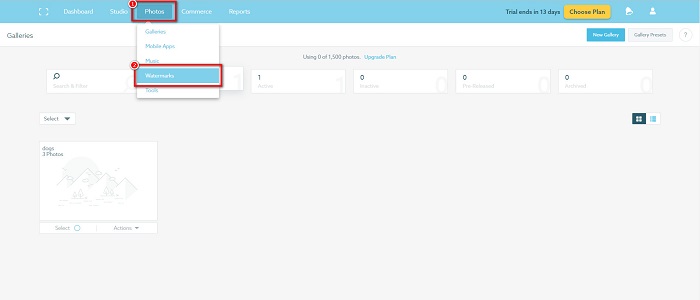
Vaihe 1. Siirry kohtaan Photos ja napsauta sitten Watermarks‑vaihtoehtoa.
Vaihe 2. Valitse sitten, käytätkö teksti‑ vai kuvavesileimaa.
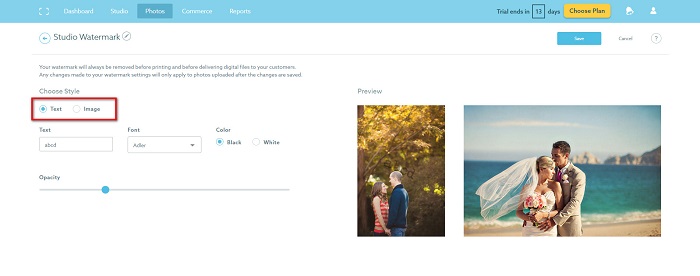
Jos haluat käyttää kuvan vesileimaa, on suositeltavaa ladata korkearesoluutioinen PNG-tiedosto läpinäkyvällä taustalla. Voit myös käyttää JPG-tiedostoja.
Vaihe 3. Säädä seuraavaksi Watermark Settings ‑asetuksia. Watermark Settings ‑kohdassa voit valita vesileiman sijainnin kuvassa. Voit myös säätää vesileiman kokoa ja läpinäkyvyyttä.
Vaihe 4. Napsauta lopuksi Save‑painiketta tallentaaksesi tekemäsi asetusten muutokset.
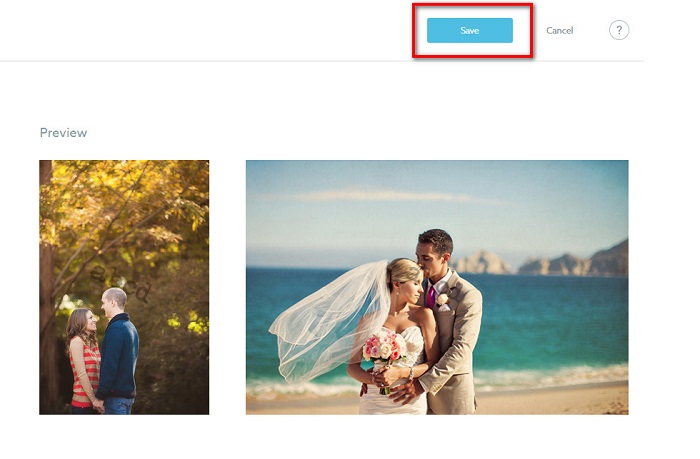
Lisää vesileima lataamiisi kuviin.
Vesileima-sivulla voit valita oletusvesileiman. Voit myös ottaa vesileimat käyttöön kaikissa tulevissa latauksissasi. Voit muuttaa tätä ennen uusien kuvien lataamista.
Ja kun lataat uusia kuvia galleriaasi verkkopohjaisen latausohjelman tai Desktop Uploaderin kautta, voit valita vesileiman, jota haluat käyttää latausnäytössä.
Kuinka poistaa vesileima Shootproofissa
Muista aina, että olemassa olevan vesileiman muokkaaminen tai lisääminen vaikuttaa vain tuleviin latauksiin. Tekemäsi muutokset eivät vaikuta galleriassasi oleviin kuviin. Mutta jos haluat muuttaa vesileiman tai poistaa Shootproof-vesileiman, voit päivittää vesileiman ja päivittää sen galleriassasi. Näin voit poistaa tai muuttaa Shootproof-vesileiman.
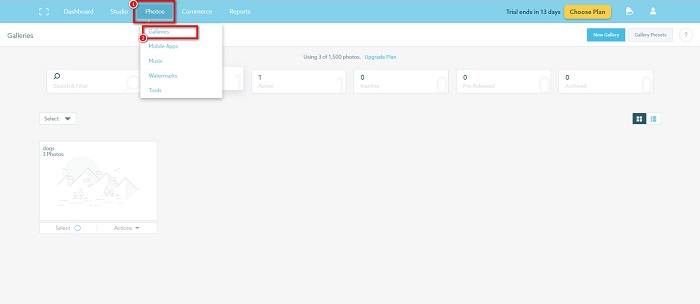
Vaihe 1. Siirry kohtaan Photos > Galleries ja napsauta sitten galleriaasi.
Vaihe 2. Galleriassa napsauta käyttöliittymän oikeassa yläkulmassa olevaa More Actions ‑painiketta.
Vaihe 3. Valitse sitten Refresh Watermark poistaaksesi vesileimat jokaisesta lataamastasi kuvasta.
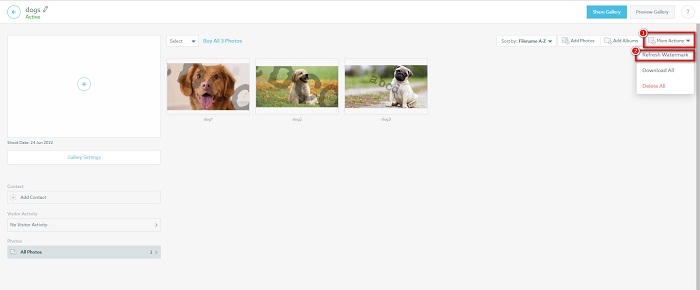
Vaihe 4. Poistaaksesi vesileiman käytöstä kytke liukusäädin pois päältä. Jos haluat vain vaihtaa vesileiman, valitse New Watermark.
Vaihe 5. Napsauta lopuksi Apply Change tallentaaksesi tekemäsi muutokset.
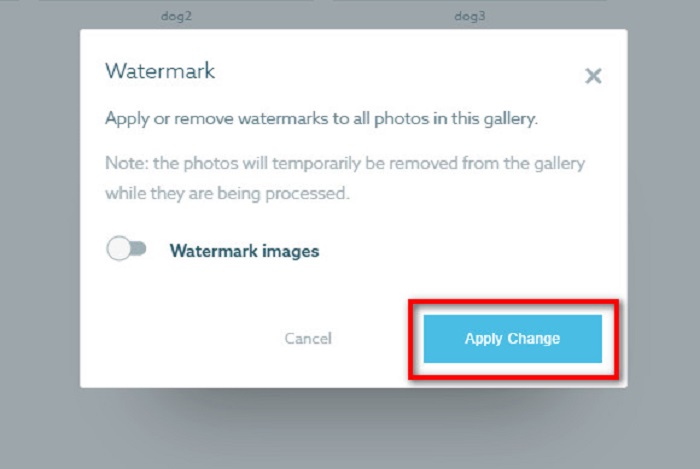
Näet, että valokuvat näkyvät automaattisesti käsiteltynä. Kun muutokset otetaan käyttöön, näet, että kuvat palaavat galleriaasi.
Liittyy aiheeseen:
Erinomaiset Arnold Maya ‑vesileimanpoistajat, joita et saa ohittaa
123rf‑vesileimanpoistajat – kattava katsaus parhaisiin työkaluihin
Osa 3. Usein kysytyt kysymykset Shootproof Poista vesileima
Voitko poistaa digitaaliset vesileimat?
Näkymättömien digitaalisten vesileimojen poistaminen on vaikeaa. Esimerkiksi Digimarc Photoshop -laajennuksen upotettuja on vaikea poistaa. Rajaus, koon muuttaminen, kohinan lisääminen ja kohtalainen sumennus eivät välttämättä toimi digitaalisten vesileimojen kanssa.
Voitko poistaa logon vesileiman videosta?
Joo. On mahdollista poistaa logovesileima videostasi. Monet vesileimanpoistoaineet mahdollistavat logojen poistamisen videoistasi. Jos haluat poistaa logon videostasi, käytä Video Converter Ultimatea.
Näyttääkö Shootproof, jos otat kuvakaappauksen?
Shootproof suojaa useita toimenpiteitä myyjän kuvien suojaamiseksi. Shootproof ei kuitenkaan voi estää ihmisiä ottamasta kuvakaappauksia kuvastasi galleriassasi.
Johtopäätös
Siinä kaikki! Kun noudatat yllä mainittuja menetelmiä, voit nyt poistaa Shootproof‑vesileiman kuvastasi. Vaikka Shootproof‑vesileiman poistaminen on ilmaista, itse prosessi voi olla melko hankala. Jos siis haluat poistaa Shootproof‑vesileiman kuvastasi mahdollisimman helposti, käytä työkalua FVC Free Watermark Remover.
-
 Erinomainen Photobucket Watermark Remover verkossa ja offline-tilassa
 Opi poistamaan Photobucket-vesileima valokuvistasi käyttämällä tätä hämmästyttävää Photobucket-vesileimanpoistoainetta. Lue tämä artikkeli oppiaksesi tapoja.
-
 Poista vesileima PDF-tiedostosta helposti yksinkertaisilla vaiheilla
 Poista vesileima PDF-tiedostosta noudattamalla näitä yksinkertaisia ohjeita. Opi poistamaan vesileimat helposti PDF-tiedostostasi näiden uskomattomien työkalujen avulla.
-
 Helppoja tapoja poistaa vesileima valmistumiskuvista
 Haluatko tietää parhaat tavat poistaa vesileimat valmistumiskuvista? Lukemalla tämän artikkelin voit tietää, kuinka voit poistaa vesileimat grad-kuvista helposti.
