


 Video Converter Ultimate
 Näytön tallennin
 Videon korjaus
 Suojattu lataus
Kuinka poistaa vesileima SmartDrawsta kahdella mahdollisella tavalla
Jos tarvitset helpon ja tehokkaan tavan luoda kaavioita, piirroksia ja karttoja sekä esittää ne yritystason laadulla, käytä SmartDraw-ohjelmaa. Voit käyttää mielikuvitustasi ja muuttaa ideasi todeksi SmartDrawin avulla. Onko työkalu ilmainen? Voit käyttää sitä ilmaiseksi seitsemän päivän kokeilujakson ajan, jolloin tuotoksiin lisätään vesileima. Vesileiman kanssa eläminen vietyjä tiedostoja käytettäessä voi kuitenkin olla hankalaa. Tässä blogikirjoituksessa esittelemme sinulle vain parhaat työkalut, joilla vesileiman voi poistaa tehokkaasti. Lue alta, miten poistat vesileiman SmartDrawista kahdella toimivalla tavalla.

Osa 1. Vesileiman poistaminen Smart Drawsta ostamalla lisenssiavain [virallinen versio]
Kuinka poistaa vesileima SmartDrawsta? Se on ensimmäinen tapa, jonka esittelemme sinulle, ja se on ostaa tämän työkalun lisenssiavain. Tämä alusta tarjoaa sinulle erilaisia suunnitelmia, jotka hyödyttävät sinua. Lisäksi et voi ostaa yhden kuukauden käyttöoikeutta tähän työkaluun, joten jos aiot ostaa sen lisenssiavaimen, sinua laskutetaan kuukausittain, mutta maksamasi kokonaissumma on sen vuosiversiossa. Jos arvostat tämän työkalun suorituskykyä ja haluat ostaa sen, voit seurata alla lisäämiämme vaiheita.
Vaiheet vesileiman poistamiseksi SmartDrawsta lisenssiavaimella:
Vaihe 1. Avaa SmartDrawin virallinen verkkosivusto ja varmista, että käyt oikealla sivustolla, jotta maksaminen on tietoturvallista.
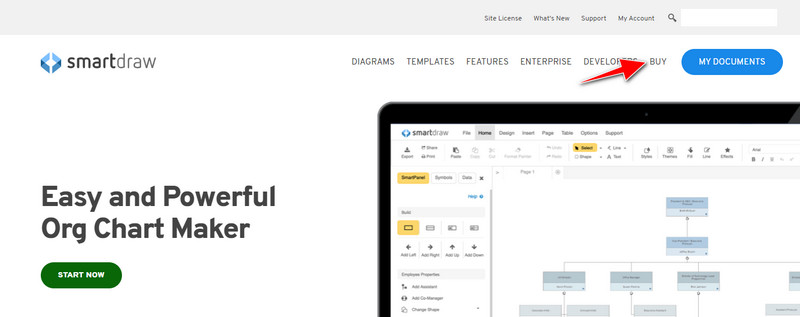
Vaihe 2. Napsauta sivustolla Buy-painiketta nähdäksesi saatavilla olevat tilausvaihtoehdot.
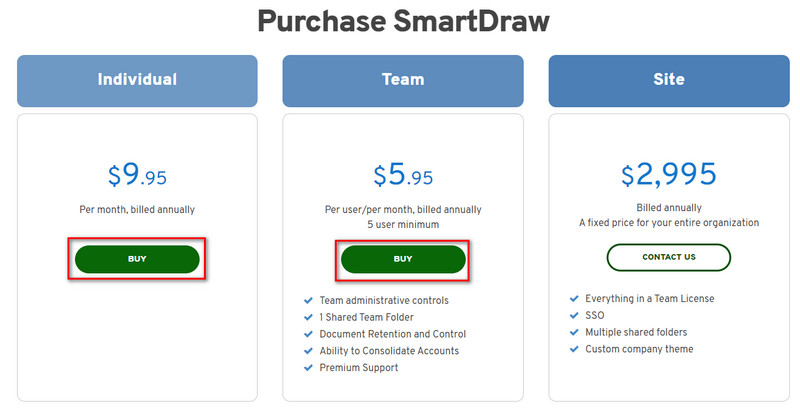
Vaihe 3. Voit ostaa SmartDrawin yksittäiskäyttäjälle, tiimille tai koko organisaatiolle (Site). Napsauta Buy Now, jos aiot ostaa Yksittäiskäyttäjä- tai Tiimi-version.
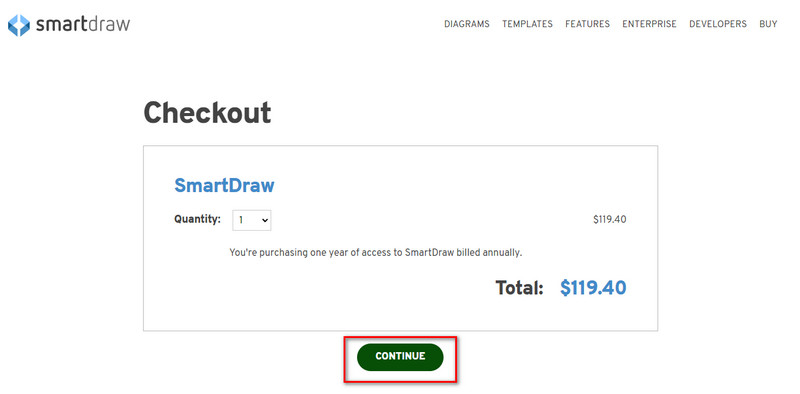
Vaihe 4. Oikealla puolella näet työkalun kokonaishinnan vuodessa; napsauta Continue jatkaaksesi.
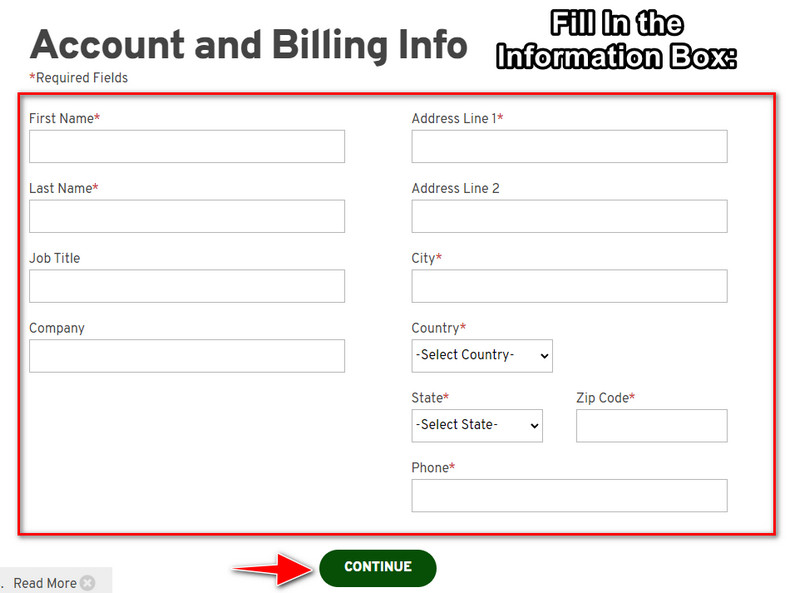
Vaihe 5. Lisää tarvittavat tili- ja laskutustietosi ja paina sitten Continue jatkaaksesi ja saadaksesi lisenssiavaimen.
Osa 2. Vesileiman poistaminen Smart Drawsta ilmaiseksi verkkopalvelun avulla [ilman kustannuksia]
Miten poistaa vesileima SmartDrawin kokeiluversiosta ostamatta lisenssiä? Siihen tarvitset työkalun nimeltä FVC Free Watermark Remover Online. Tämä vesileimanpoistaja on heti valmiina käyttöösi. Et tarvitse erityisosaamista poistaaksesi vesileiman kuvastasi, sillä työkalun käyttäminen on vaivatonta. Vaikka olisitkin jo taitava kuvankäsittelyssä, voit silti käyttää tätä ohjelmaa ei‑toivottujen vesileimojen tai objektien poistamiseen kuvistasi. Tämän vesileimanpoistajan avulla mikään jälki kuvassasi ei jää poistamatta. Haluatko kokeilla tätä ohjelmaa lisenssiavaimen ostamisen sijaan? Jos haluat, seuraa alla olevaa opastusta poistaaksesi vesileiman kuvista tehokkaasti.
Vaiheet SmartDraw-vesileiman poistamiseen kaaviosta tai kaaviosta ilmaiseksi:
Vaihe 1. Sen sijaan, että etsisit verkkotyökalua selaimesta, voit avata sen napsauttamalla tätä linkkiä; se avautuu selaimeesi uuteen välilehteen.
Vaihe 2. Käytä hiirtäsi ja vedä ja pudota SmartDrawissa luomasi kuva, kaavio tai diagrammi, jotta voit ladata sen palveluun.
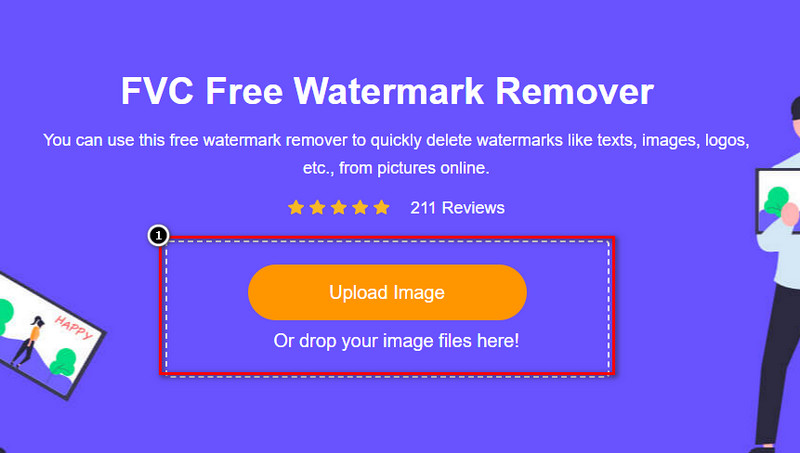
Vaihe 3. Kun vesileimanpoistotyökalu on avattu verkossa, valitse työkalu, jolla haluat rajata vesileiman kuvassa.
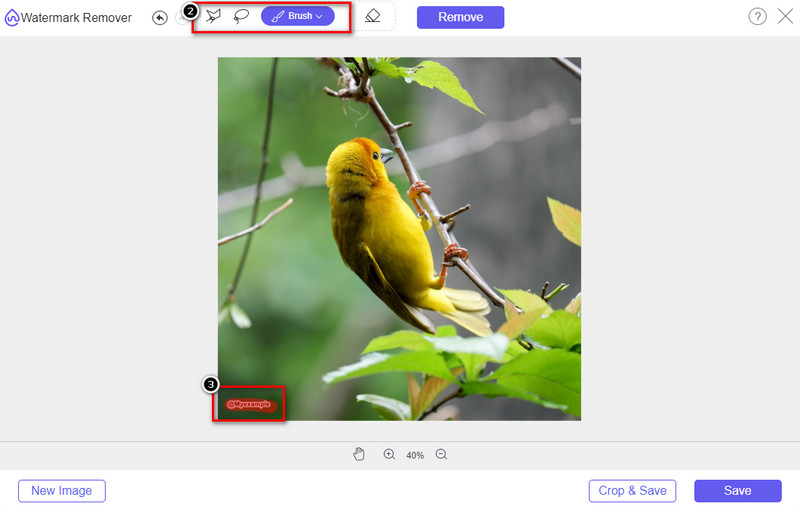
Vaihe 4. Kun olet rajannut vesileiman tai logon ladatussa kuvassa, paina Remove.
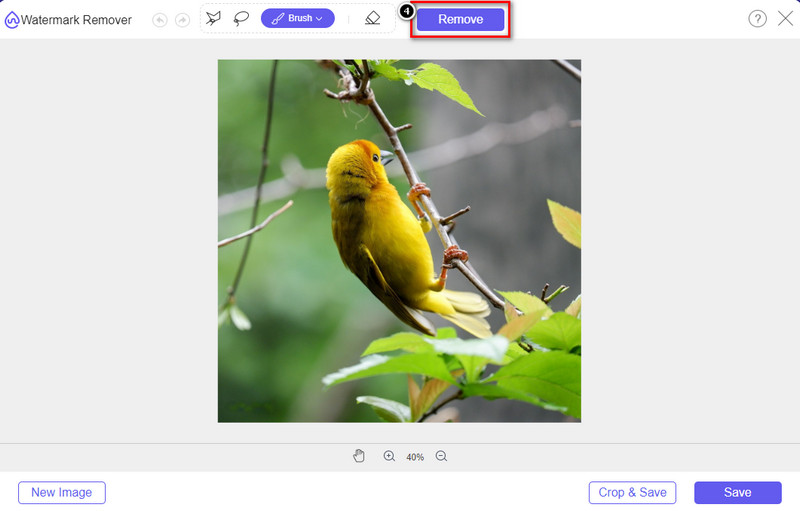
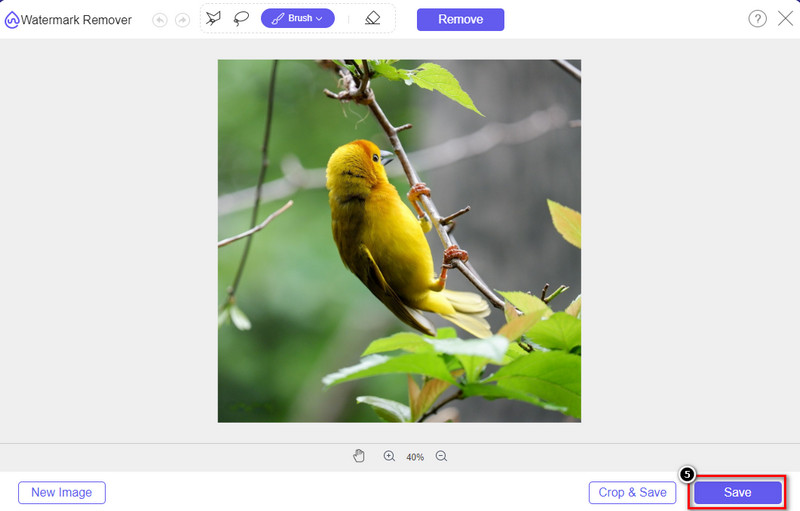
Vaihe 5. Odota, että vesileima poistetaan, ja napsauta sitten Save ladataksesi kaavion tai diagrammin. Näytölle avautuu kansio; tarkista siitä versio kaaviosta tai diagrammista, jonka loit nyt ilman vesileimaa.
FVC Free Watermark Remover Online ‑työkalun edut:
◆ Sovelluksen lataaminen ei ole välttämätöntä, koska se on saatavilla verkossa.
◆ Tukee laajaa valikoimaa kuvia, ja se voi poistaa vesileimat tehokkaasti.
◆ Se on erityinen vesileimanpoistoaine, joka tuottaa korkealaatuisia tuloksia.
◆ Lopulliseen tuotteeseen ei lisätä vesileimaa viennin jälkeen.
◆ Ei rajoituksia, kuinka monta kertaa ja tiedostokokoa käytetään.
Osa 3. Lisäosa – Kaavion, kaavion tai kaavion tekeminen SmartDrawissa yksityiskohtaisten vaiheiden avulla
Aiempi osa opettaa kuinka pääset eroon SmartDraw-vesileimasta. Tässä osassa opetamme sinua tekemään kaavion, kaavion ja kaavion SmartDraw'n avulla; voit seurata alla lisäämiämme vaiheita saadaksesi tietää, miten se tehdään.
Vaihe 1. Siirry sen viralliselle verkkosivustolle luodaksesi kaavion, diagrammin tai muun kuvion.
Vaihe 2. Kun olet avannut virallisen sivuston, napsauta Start Now ja kirjaudu sisään tilillesi tai luo tili.
Vaihe 3. Valitse vasemmalta, minkä tyyppisen mallipohjan haluat käyttää tai luoda.
Vaihe 4. Lisää tiedot jokaiseen vuokaavion osaan. Sivun vasemmassa reunassa on lisävalintoja, joita voit käyttää.
Vaihe 5. Napsauta Export-painiketta, valitse haluamasi vientimuoto ja käynnistä vienti napsauttamalla sitä. Jos käytät ilmaista versiota, kuvaan tulee vesileima; voit poistaa sen noudattamalla osan 2 ohjeita.
Lisälukemista:
Kuinka poistaa B612-vesileima kuvistasi
Kuinka poistaa WOW Slider -vesileima ilmaiseksi
Osa 4. Usein kysytyt kysymykset SmartDraw-vesileiman poistamisesta
Voiko SmartDraw viedä PNG-kuvia?
Kyllä, sinulla voi olla läpinäkyvä kaavio PNG-muodossa. Se kuitenkin lisää vesileiman, jos käytät ilmaista versiota. Voit ostaa virallisen version, joten viedyssä kuvassa on vesileima.
Paljonko SmartDraw maksaa?
Jos aiot ostaa suunnitelman SmartDrawsta, voit ostaa sen suunnitelman alkaen $ 5.95. Voit tarkistaa muut sen tarjoamat hinnat virallisella verkkosivustolla.
Mitä hyötyä on SmartDraw:n premium-version ostamisesta?
Voit saavuttaa tiimin järjestelmänvalvojan hallinnan, ryhmäkansion, premium-tuen ja viedä kuvia ilman vesileimaa yksittäisiin suunnitelmiin. Muita premium-etuja saat vierailemalla virallisella verkkosivustolla ja katsomaan, mitä ominaisuuksia ja toimintoja voit saada.
Johtopäätös
Nyt kun tiedät kuinka tallentaa SmartDraw ilman vesileimaa kahdella lisäämällämme tavalla. Joko ostat sen tai käytät työkalua vesileiman poistamiseen viedystä tiedostosta. Jos et halua ostaa työkalua, sinun on käytettävä sitä, koska se on tehokkain verkkotyökalu vesileiman poistamiseen. Jos uskot, että tämä artikkeli auttoi sinua ratkaisemaan ongelman, anna meille 5 tähteä.
-
 4 parasta tapaa poistaa vesileima GIF:stä [Online & Offline]
 Haluatko poistaa vesileiman GIF-tiedostosta? Tämän artikkelin työkalulla opit eri tyylejä alustallasi saatavilla olevien vesileimanpoistoaineiden kanssa.
-
 5 helpointa tapaa poistaa metatiedot kaikista mediatiedostoista
 Kuinka poistaa metatiedot? Onko vaikea tehdä se? Pitääkö minun ostaa tai käyttää ilmaista työkalua tunnisteiden poistamiseen? Kaikkiin näihin kysymyksiin löytyy vastaus tässä artikkelissa.
-
 Erinomainen Photobucket Watermark Remover verkossa ja offline-tilassa
 Opi poistamaan Photobucket-vesileima valokuvistasi käyttämällä tätä hämmästyttävää Photobucket-vesileimanpoistoainetta. Lue tämä artikkeli oppiaksesi tapoja.
