


 Video Converter Ultimate
 Näytön tallennin
 Videon korjaus
 Suojattu lataus
Vinkkejä ja temppuja Powtoon-vesileiman poistamiseen videoista tehokkaasti
Oletko koskaan tehnyt täydellistä animaatiota ja huomannut vientivaiheessa, että Powtoon lisäsi siihen vesileiman? Tällaisia tilanteita sattuu todennäköisimmin, jos käytät sovelluksen ilmaisversiota. Pilasiko vesileima videosi? Ei hätää! Täältä opit, kuinka poistaa Powtoon-vesileima käyttämällä eri menetelmiä, jotka olemme koonneet tähän.

Osa 1. Powtoon-vesileiman poistaminen ilman tilausta [Toimittajan valinta]
FVC Video Converter Ultimate on Windowsille ja Macille ladattava, enemmän kuin täydellinen ratkaisu Powtoon-vesileiman poistamiseen. Vaikka sinulla ei olisi kokemusta videoidesi vesileimojen poistamisesta, selviät siitä silti tällä työkalulla. Kätevä ja nopea – juuri sitä FVC haluaa sinun kokevan tätä ohjelmistoa käyttäessäsi, ja siinä se myös onnistuu erinomaisesti. Jos siis haluat käytännössä nähdä, kuinka vesileima poistetaan, voit seurata alta löytyviä vaiheita.
Vaiheet Powtoon-vesileiman poistamiseen FVC Video Converter Ultimate -ohjelmalla:
Vaihe 1. Saat käyttöösi vaikuttavan videoeditointiohjelman Windowsille ja Macille napsauttamalla alla olevaa latauspainiketta. Asenna sitten ohjelmisto, tee nopea käyttöönotto ja käynnistä ohjelma.
Ilmainen latausWindows 7 tai uudempiTurvallinen lataus
Ilmainen latausMacOS 10.7 tai uudempiTurvallinen lataus
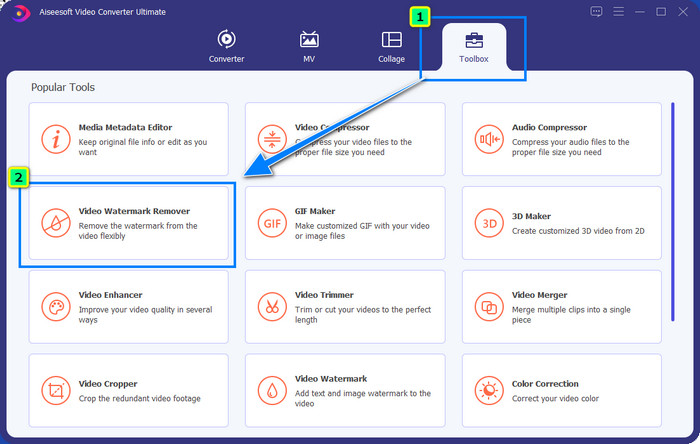
Vaihe 2. Napsauta Työkalupakissa kohtaa Video Watermark Remover poistaaksesi vesileiman, jonka Powtoon on lisännyt editoituun videoosi.
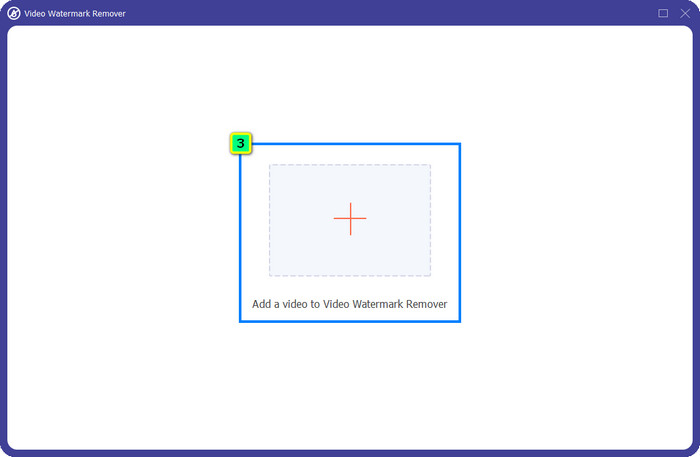
Vaihe 3. Paina sen jälkeen +-kuvaketta ladataksesi videon, jota haluat muokata, valitse kansion avautuvasta ikkunasta videotiedosto ja paina Avaa.
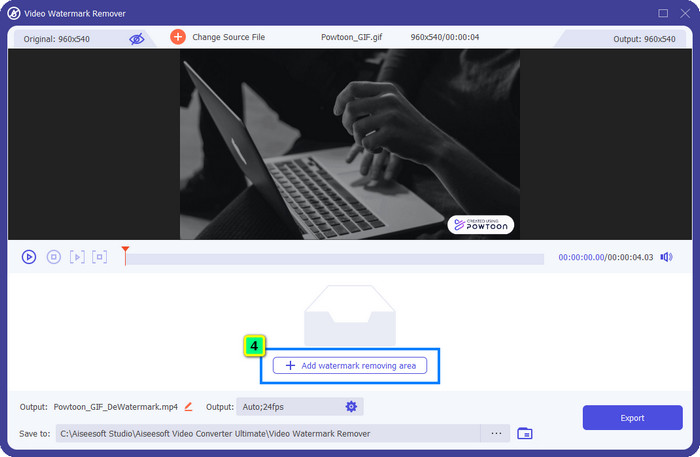
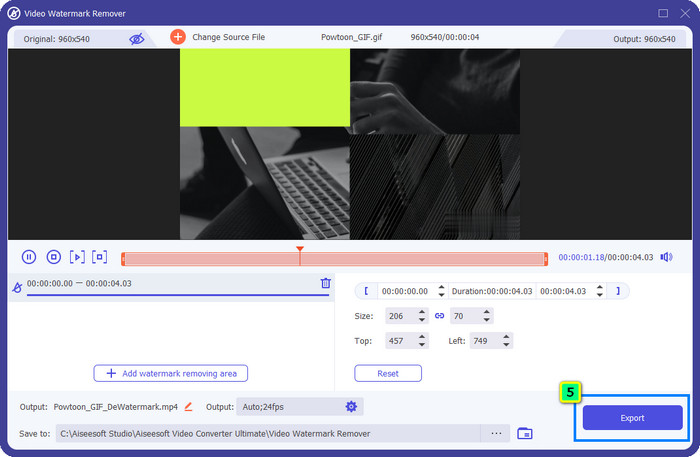
Vaihe 4. Paina Add Watermark Removing Area ja siirrä valintaruutu vesileiman kohdalle; voit säätää sitä tarpeen mukaan.
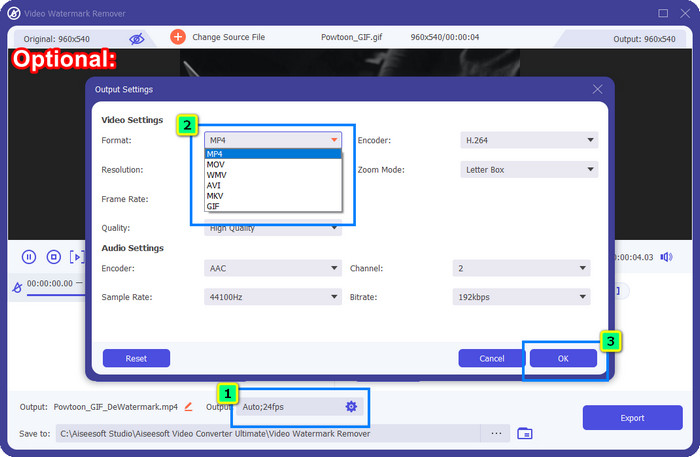
Valinnainen: Haluatko tallentaa lopullisen videon uuteen formaattiin? Napsauta Output-kohdassa Format ja valitse haluamasi uusi videoformaatti. Voit säätää myös muita video- ja ääniasetuksia ja napsauttaa OK tallentaaksesi muutokset.
Vaihe 5. Paina Export-painiketta ladataksesi videon, josta olet poistanut vesileiman.
Osa 2. Powtoon-vesileiman poistaminen tilauksella [suunnitelmaan perustuva]
Onko Powtoonissa vesileima? Kyllä, se lisää vesileiman, kun käytät ilmaista versiota. Mutta jos ostat Pron tai Pro+:n, voit viedä lopullisen lähdön ilman vesileimaa. Joten jos haluat tietää, kuinka ostaa ohjelmisto nauttiaksesi muokkaamastasi videosta ilman vesileimaa, seuraa seuraavia ohjeita.
Powtoon Pron ja Pro+ -paketin ostamisen vaiheet:
Vaihe 1. Avaa Powtoonin virallinen verkkosivusto ja napsauta Pricing nähdäksesi Pro-version hinnat.
Vaihe 2. Valitse haluamasi paketti, Pro tai Pro+, ja napsauta Get Plan.
Vaihe 3. Täytä tarvittavat laskutustiedot, siirry maksutapaan ja napsauta Make Secure Payment.
Osa 3. Powtoon-vesileiman poistaminen verkossa ilmaiseksi [verkkopalvelu]
1. Media.io - Watermark Remover
Media.io - Watermark Remover voi poistaa Powtoon-vesileiman ilmaiseksi. Se toimii millä tahansa verkkoselaimella, joten sinun ei tarvitse ladata sovellusta käyttääksesi sitä. Vaikka vesileimanpoistaja on ilmainen, tarvitset silti vahvan internet-yhteyden sen käyttöön. Videoiden lataaminen ja tallentaminen vie enemmän aikaa kuin ensimmäisellä tässä mainitulla vesileimanpoistajalla. Siitä huolimatta tämä ohjelma on erinomainen vaihtoehto, ja jos haluat tietää, miten sitä käytetään, seuraa alla olevia ohjeita.
Vaiheet Powtoon-vesileiman poistamiseen Media.io-palvelulla:
Vaihe 1. Avaa verkkosivu ja napsauta Choose File lisätäksesi videon, josta haluat poistaa vesileiman. Odota latausprosessin valmistumista – se voi kestää jonkin aikaa internet-yhteydestä riippuen.
Vaihe 2. Paina Add Area ja sijoita vesileimanpoistoalue kohtaan, jossa vesileima on.
Vaihe 3. Paina Export tallentaaksesi muokatun Powtoon-videon paikalliselle levylle – niin helppoa se on.
2. Kapwing
Kapwing on toinen erikoistunut verkkopalvelu, joka voi poistaa videon vesileiman rajaamalla sen pois. Lisäksi se tarjoaa muita editointiominaisuuksia, joilla voit luoda näyttävän videon, lähes Powtoonin tasoisen. Toisin kuin muut tässä mainitut vesileimaratkaisut, tämä työkalu muuttaa videon kuvasuhdetta, koska leikkaat vesileiman pois kuvasta. Jos et välitä siitä, että videon kokoa joudutaan pienentämään, seuraa alla olevia ohjeita Powtoon-vesileiman poistamiseksi.
Vaiheet Powtoon-vesileiman rajaamiseen Kapwing-työkalulla:
Vaihe 1. Hae ohjelmaa selaimellasi ja avaa se.
Vaihe 2. Napsauta Add Media tuodaksesi videon, jonka haluat rajata täällä.
Vaihe 3. Kun olet tuonut videon aikajanalle, napsauta Crop säätääksesi kuvasuhteen haluamasi kokoiseksi.
Vaihe 4. Jos haluat tallentaa lopullisen videon, napsauta Done Cropping.
Osa 4. Usein kysytyt kysymykset Powtoon-vesileiman poistamisesta
Mikä on paras alusta videon resoluution lisäämiseen Powtoonissa?
On olemassa miljoonia tapoja parantaa Powtoon-videosi tarkkuutta. Kaikki niistä eivät kuitenkaan toimi odotetulla tavalla. Sen sijaan, että kokeilisit onneasi sattumanvaraisesti, teemme raskaan työn puolestasi, ja sinun tarvitsee käyttää vain muutama minuutti tämän artikkelin lukemiseen. Valitse, mikä kahdeksasta videon tarkkuuden muuntimesta sopii parhaiten tarpeisiisi.
Kuinka lisätä vesileima videoon?
Paras tapa lisätä vesileima videoon on käyttää siihen tarkoitettua ohjelmistoa – oli kyseessä sitten teksti, logo, leima, päivämäärä ja kellonaika tai muu vastaava. Jos sinulla on hetki aikaa, voit tutustua siihen, kuinka lisätä vesileimoja eri alustoilla helposti.
Miksi Powtoon on kallis?
Powtoon tuli kalliiksi sen tarjoaman animaatioeditoinnin vuoksi, jota ei useimmiten voi käyttää toisessa videonmuokkausohjelmassa, olipa se sitten online-tai offline-tilassa. Se on myös liikkeellä, joten sinun ei tarvitse asentaa kantorakettia aloittaaksesi sen käytön. Silti sen hinta ei ole monien tavoitettavissa. Sen sijaan, että käyttäisit Powtoon-ilmaista versiota ja käytät vesileimaa, yritä käyttää parasta videonmuokkausvaihtoehtoa, FVC Video Converter Ultimatea. Se tarjoaa lukuisia ominaisuuksia ja toimintoja, joista voit varmasti nauttia.
Johtopäätös
Voit tallentaa videoita Powtoonista ilman vesileimaa, mutta sinun täytyy ostaa maksullinen paketti, jotta voit tallentaa muokatun videon ilman siihen liitettyä vesileimaa. Pidätkö ajatuksesta ostaa paketti? Jos et, kokeile jotakin esittelemistämme verkossa toimivista vesileimanpoistajista. Onko internet-yhteys hidas? Siinä tapauksessa suosittelemme käyttämään FVC Video Converter Ultimate -ohjelmaa vesileiman nopeaan ja ammattimaiseen poistamiseen videostasi. Miljooniin muihin ohjelmiin verrattuna FVC Video Editor tarjoaa kaikkein tehokkaimman ratkaisun kaiken ei-toivotun poistamiseen videostasi. Voit myös säätää videota laajojen ominaisuuksien ja toimintojen avulla, joita tämä ohjelmisto tarjoaa.
-
 Poista vesileima PDF-tiedostosta helposti yksinkertaisilla vaiheilla
 Poista vesileima PDF-tiedostosta noudattamalla näitä yksinkertaisia ohjeita. Opi poistamaan vesileimat helposti PDF-tiedostostasi näiden uskomattomien työkalujen avulla.
-
 Helppoja tapoja poistaa vesileima valmistumiskuvista
 Haluatko tietää parhaat tavat poistaa vesileimat valmistumiskuvista? Lukemalla tämän artikkelin voit tietää, kuinka voit poistaa vesileimat grad-kuvista helposti.
-
 Vesileiman poistaminen videosta Final Cut Pron avulla [Täydellinen opas]
 Onko sinulla ongelmia videoiden vesileiman kanssa? Ei sanonut enempää, sillä tarjosimme opetusohjelman vesileiman poistamiseen videosta Final Cut Prolla.
