


 Video Converter Ultimate
 Näytön tallennin
 Videon korjaus
 Suojattu lataus
Muunna DIVX 3GP:ksi tehokkaimmilla menetelmillä
Etkö pysty toistamaan DIVX‑videota laitteellasi, koska formaattia ei tueta? Suurimmalla osalla käyttäjistä on sama ongelma. Olet kuitenkin onnekas, sillä käsittelemme tehokkaimman ja helpoimman tavan muuntaa DIVX 3GP:ksi. Älä jätä tätä tilaisuutta väliin, vaan opi lisää erilaisten tiedostojen muuntamisesta erilaisten luotettavien ja testattujen sovellusten avulla, joita esittelemme.

Osa 1: Paras ohjelmisto DIVX:n muuntamiseksi 3GP:ksi
Haluatko muuntaa DIVX:n 3GP:ksi laitteillasi, kuten Windows- ja Mac‑tietokoneilla? Siinä tapauksessa ongelmasi on jo ratkaistu. Voit käyttää Video Converter Ultimate ‑ohjelmaa DIVX‑tiedostosi muuntamiseen. Jo työkalun nimen perusteella kyseessä on monipuolinen sovellus, jolla voit muuntaa yli 1000 videotiedostomuotoa, mukaan lukien DIVX, 3GP, MP4, MOV, MTS, WEBM ja paljon muuta. Voit myös muuntaa kaksi tai useampia tiedostoja samanaikaisesti, sillä työkalu tukee erämuunnosta. Lisäksi Video Converter Ultimate tarjoaa nopean muunnosprosessin, mikä on erinomaista, jos suunnittelet lukuisien tiedostomuotojen muuntamista.
Lisäksi voit edelleen käyttää tätä offline-sovellusta, jos olet kiinnostunut muokkaamaan DIVX-tiedostoasi ennen sen muuntamista. Olettaen, että haluat korjata videosi väriä, voit siirtyä Toolbox-paneeliin ja valita Color Correction -työkalun säätääksesi videosi kirkkautta, kontrastia ja kylläisyyttä. Oletetaan lisäksi, että haluat synkronoida äänen DIVX-videotiedostossasi ennen sen muuntamista. Siinä tapauksessa voit tehdä niin, koska se tarjoaa Audio Sync -toiminnon, joten äänen synkronointi videon kanssa on helppoa.
Ominaisuudet:
◆ Muunna videotiedostomuotoja, mukaan lukien MP4, M4V, FLV, AVI jne.
◆ Voi luoda musiikkivideoita eri teemoilla.
◆ Toolbox sisältää videon tehostimen, vesileimanpoistoaineen, kompressorin ja paljon muuta.
◆ Pystyy tekemään kollaaseja.
Plussat
- Se tukee useita tiedostomuotoja, kuten MP4, AVI, FLV, MOV, MTS, DIVX, 3GP jne.
- Siinä on ystävällinen käyttöliittymä, joka sopii aloittelijoille.
- Konversioprosessi on 30 kertaa nopeampi
- Käytettävissä sekä Windowsissa että Macissa.
- Se voi muuntaa useita videoita yhdellä kertaa.
Haittoja
- Osta Video Converter Ultimate nauttiaksesi ainutlaatuisemmista ominaisuuksista.
Muuntaaksesi DIVX:n 3GP:ksi helposti, sinun on noudatettava näitä yksinkertaisia ohjeita alla.
Vaihe 1: Lataa ensin Video Converter Ultimate laitteellesi, kuten Windows‑ tai Mac‑tietokoneelle. Siirry sen jälkeen asennusvaiheeseen ja avaa sovellus.
Ilmainen latausWindows 7 tai uudempiTurvallinen lataus
Ilmainen latausMacOS 10.7 tai uudempiTurvallinen lataus
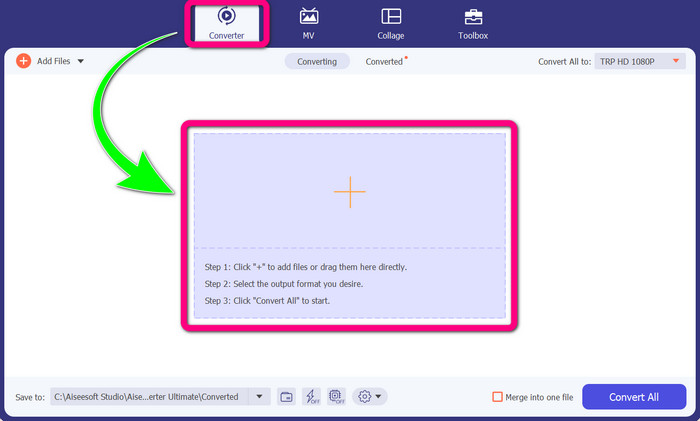
Vaihe 2: Kun olet avannut Video Converter Ultimate ‑ohjelman laitteellasi, valitse Converter-paneeli. Napsauta sitten +‑kuvaketta lisätäksesi DIVX‑videotiedostosi.
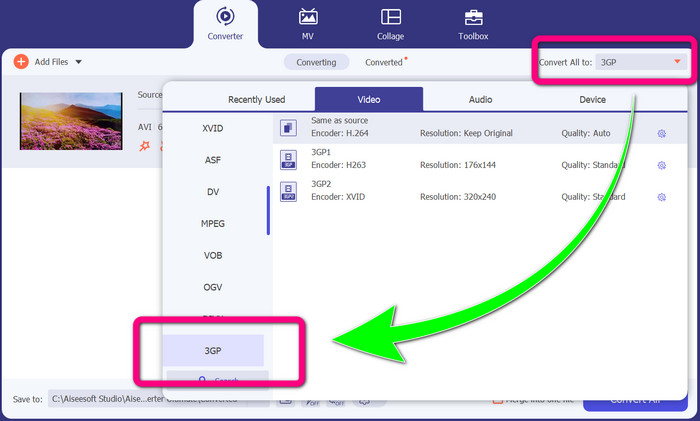
Vaihe 3: Kun olet lisännyt videotiedostosi, napsauta Convert all to ‑vaihtoehtoa, etsi 3GP‑tiedostomuoto ja valitse se.
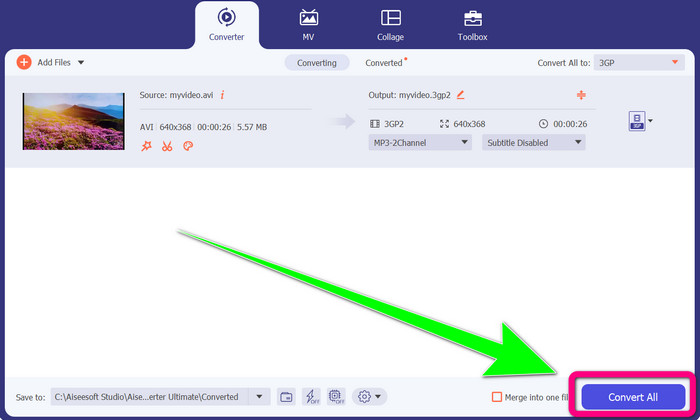
Vaihe 4: Kun olet valinnut 3GP‑tiedostomuodon, napsauta Convert All ‑painiketta. Odota muunnosprosessin valmistumista ja tallenna lopullinen videosi laitteellesi.
Osa 2: Erinomaiset online-muuntimet DIVX:n muuntamiseksi 3GP:ksi
FVC Free Video Converter Online -sovelluksen käyttö
Yksi parhaista verkkotyökaluista DIVX:n muuntamiseksi 3GP:ksi on FVC Free Video Converter Online. Tällä työkalulla voit muuntaa erilaisia tiedostomuotoja vain muutamalla napsautuksella. Se tukee lähes kaikkia yleisiä video- ja äänimuotoja MP4:ään, MOV:iin, MKV:hen, FLV:hen, VOB:iin, MP3:een, AAC:hen ja muihin. FVC Free Video Converter Online on yksinkertainen ja helppokäyttöinen. Myös aloittelijat pystyvät käyttämään tätä sovellusta. Lisäksi, olitpa Windows‑ tai Mac‑käyttäjä, voit luottaa tähän työkaluun, sillä se on saatavilla sekä Windowsille että Macille. Seuraa alla olevia helppoja ohjeita muuntaaksesi DIVX:n 3GP:ksi.
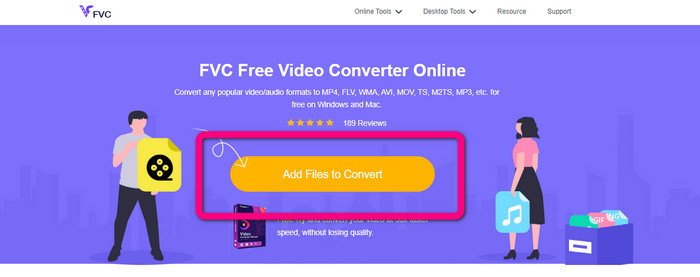
Vaihe 1: Siirry sivustolle FVC Free Video Converter Online. Valitse sitten Add Files to Convert ‑painike tuodaksesi muunnettavan DIVX‑tiedostosi.
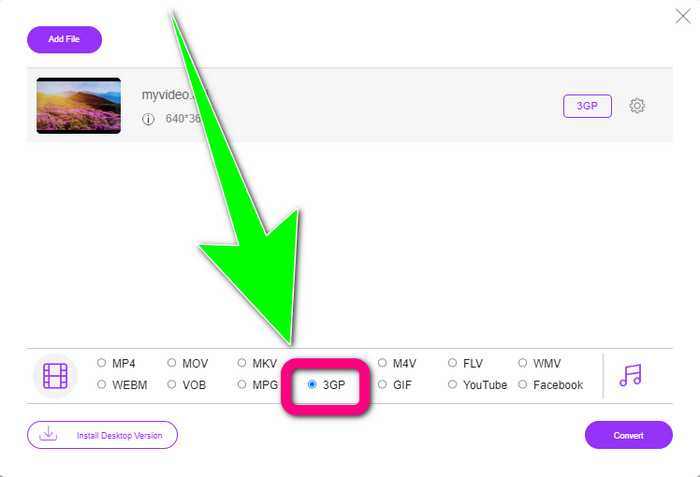
Vaihe 2: Kun olet lisännyt DIVX‑tiedostosi, valitse 3GP‑tiedostomuoto alla olevista muotoiluvaihtoehdoista.
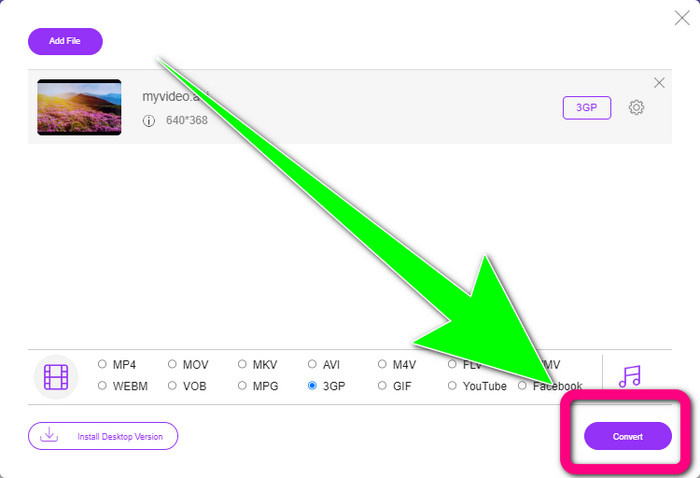
Vaihe 3: Jatka napsauttamalla Convert-painiketta. Odota muunnosprosessin valmistumista ja tallenna muunnettu videosi.
Convertion käyttö
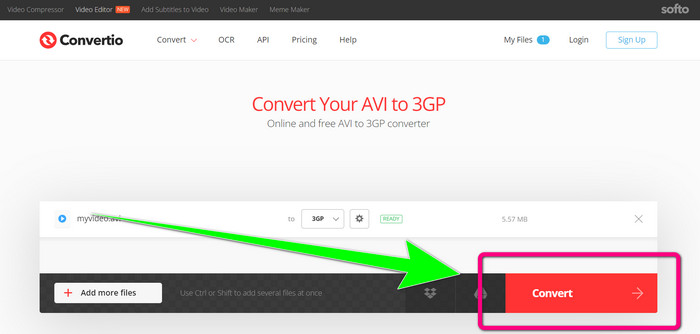
Jos haluat muuntaa DIVX:n 3GP:ksi verkossa, Convertio on yksi työkaluista, joita voit hyödyntää. Se tukee monia formaatteja, kuten 3GP, DIVX, XVID, AVID, MP4, M4V, ASF, HEVC ja muita. Videotiedostojen muuntamisen lisäksi voit muuntaa myös kuvia, ääniä, asiakirjoja, arkistoja ja muita tiedostoja. Convertio on myös yksinkertainen työkalu, koska muuntaminen onnistuu muutamassa vaiheessa, joten sinun ei tarvitse nähdä liikaa vaivaa muuntaessasi DIVX‑tiedostosi 3GP‑tiedostoksi. Kuten muutkin verkkotyökalut, et kuitenkaan voi käyttää tätä ohjelmistoa ilman internet‑yhteyttä. Lisäksi on tilanteita, joissa tämä verkkotyökalu ei toimi kovin hyvin. Convertio‑palvelun ilmaisversiossa on rajoitus: voit muuntaa vain enintään 100 Mt:n tiedostoja. Joudut ostamaan ohjelmiston nostaaksesi enimmäistiedostokokoa ja saadaksesi paremman suorituskyvyn. Seuraa alla olevia ohjeita muuntaaksesi DIVX‑tiedoston 3GP‑tiedostomuotoon.
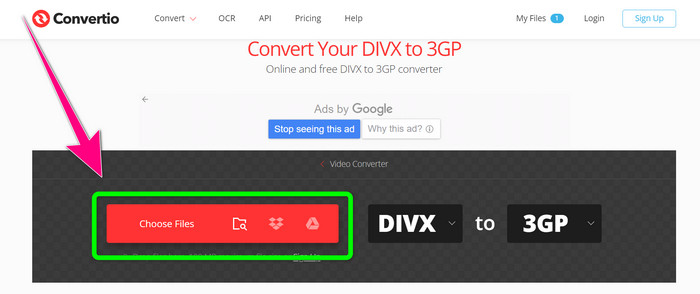
Vaihe 1: Siirry Convertio-verkkosivustolle. Napsauta Choose Files ‑painiketta ja lisää DIVX‑muotoinen videosi.
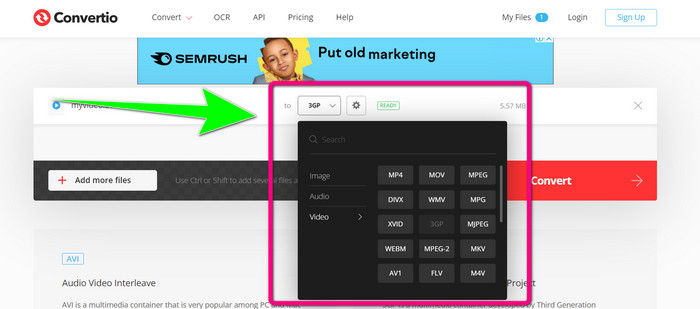
Vaihe 2: Kun olet lisännyt videosi, siirry muotovaihtoehtoihin ja valitse 3GP‑tiedostomuoto.
Vaihe 3: Kun olet valinnut 3GP‑tiedostomuodon, napsauta Convert-painiketta, odota muunnosprosessin valmistumista ja tallenna 3GP‑videotiedostosi.
Osa 3: Yleiskatsaus DIVX- ja 3GP-tiedostomuodoista
DIVX
DIVX on videopakkausohjelmisto, joka pystyy pakkaamaan videotiedostoja jopa yhteen kahdestoistaosaan alkuperäisestä koosta vain vähäisellä laadun heikkenemisellä. Tämä videoformaatti on yleinen suurilla elokuvayhtiöillä, kuten Disney, Dreamworks SKG, Universal ja Paramount.
3GP
3GP on multimediakontti. Third Generation Partnership Project kehitti sen vuonna 1998 GSM‑pohjaisia (Global System for Mobile Communications) puhelimia varten. 3GP‑kontti vaatii vain vähän tallennustilaa, dataa ja kaistanleveyttä, mikä sopii erinomaisesti matkapuhelimiin.
Lisälukemista
Muunna MTV helposti MKV:ksi näillä tehokkailla muuntimilla
Kuinka muuntaa TRP MKV:ksi ilman laadun heikkenemistä
Osa 4: Usein kysyttyä DIVX:n muuntamisesta 3GP:ksi
Mikä on DIVX-muunnin?
Se on erinomainen työkalu, joka pystyy muuntamaan erilaisia tiedostotyyppejä lukuisiin muihin tiedostomuotoihin. Näihin kuuluu muun muassa AVI, MP4, MPEG, MOV, FLV ja paljon muuta. Kun muuntaminen on valmis, voit toistaa videosi millä tahansa mediasoittimella, joka tukee kyseistä formaattia. FVC Free Video Converter Online on yksi parhaista muuntimista, joita voit käyttää.
Onko DIVX-tiedostomuoto sama kuin AVI?
DIVX-tiedostomuoto perustuu AVI-säilöön, mutta se voi sisältää upeita ominaisuuksia, kuten lukuja ja tekstityksiä. Lisäksi sekä AVI- että DIVX-tiedostomuotoja voidaan toistaa DIVX-sertifioiduilla laitteilla.
Voinko muuntaa DIVX-tiedoston 3GP:ksi laadun heikkenemättä?
Kyllä, totta kai voit. Käyttämällä Video Converter Ultimate ‑ohjelmaa voit muuntaa DIVX‑tiedoston 3GP:ksi ilman, että sinun tarvitsee huolehtia laadun muuttumisesta. Tämä erinomainen muunnin pystyy muuntamaan erilaisia tiedostoja heikentämättä videosi laatua.
Johtopäätös
Kuten näet, on olemassa useita tehokkaita menetelmiä muuntaa DIVX 3GP:ksi käyttämällä sekä offline‑ että online‑työkaluja. Joskus verkkotyökalut ovat kuitenkin hankalia, erityisesti, jos internet‑yhteytesi on hidas, jolloin voit käyttää ladattavaa sovellusta. Jos etsit erinomaista offline‑työkalua, voit kokeilla ohjelmaa Video Converter Ultimate.
-
 4 parhaista MKV-3GP-muuntimista Windowsille ja Macille
 Jos etsit helppokäyttöisiä MKV-3GP-muuntimia, olet onnekas! Löysimme parhaat ja ilmaiset MKV-3GP-muuntimet, joita sinun täytyy kokeilla.
-
 5 parasta MOV-3GP-muunninta, joita et saa missata
 Jos etsit parhaita online- ja offline-MOV-3GP-muuntimia, olet oikealla tiellä. Lue tämä artikkeli muuntaaksesi MOV:si 3GP-tiedostoksi.
-
 3 tapaa muuntaa MPG 3GP:ksi Windowsissa ja Macissa [ilmainen]
 Jos etsit tapoja muuntaa MPG 3GP:ksi, lue tämä artikkeli saadaksesi selville parhaat tavat muuntaa MPG 3GP:ksi Windowsissa ja Macissa.
