


 Video Converter Ultimate
 Näytön tallennin
 Videon korjaus
 Suojattu lataus
100% ilmaista tapaa pakata M4V-tiedostokoko gigatavusta megatavuun
MP4: n kaltainen M4V-tiedostomuoto on loistava videokonttisäiliö, jonka on tuottanut Apple. Voit toistaa M4V-tiedostoja melkein kaikilla suosituilla soittimilla, kuten iTunes, QuickTime, VLC Media Player, RealPlayer ja paljon muuta. Mutta joskus saatat huomata, että M4V-videosi on liian suuri tallentamista tai jakamista varten. Tässä tilanteessa sinun on pienennettävä tiedoston kokoa.
Jos et tiedä, miten pakata M4V-tiedosto, voit kokeilla alla olevia vaihtoehtoja.

Osa 1. Kuinka pakata M4V Online ilmaiseksi
Kuten mainitsimme, voi olla hieman vaikeaa muokata ja jakaa suurta videotiedostoa YouTubessa, Facebookissa, Instagramissa tai muissa suoratoistosivustoissa. Koska näillä sivustoilla on yleensä tiukka kokorajoitus lataamallesi videolle. Lisäksi suuret tiedostot voivat viedä paljon tilaa tietokoneellasi, levyasemalla, puhelimella, flash-asemalla, muistikortilla jne.
Siksi, kun sinulla on suuri M4V-tiedosto, on parasta pienentää sen kokoa ammattimaisella videopakkausohjelmalla. Jos etsit ilmaista ohjelmaa, mikset kokeilisi FVC Free Video Compressoria? Se on täysin ilmainen käyttää. Lisäksi se on verkkopohjainen pakkaustyökalu, mikä tarkoittaa, että voit pakata minkä tahansa videon haluttuun kokoon asentamatta raskaita ohjelmistoja tietokoneellesi.
Voit käyttää sitä missä tahansa valtavirran selaimessa, kuten Google Chrome, Mozilla Firefox ja Microsoft Edge. Ja pakattuun videoon ei lisätä vesileimaa. Voit jopa nauttia videosta korkealla kuvanlaadulla.
Tässä on vaiheet kuinka pakata suuria M4V-tiedostoja verkossa.
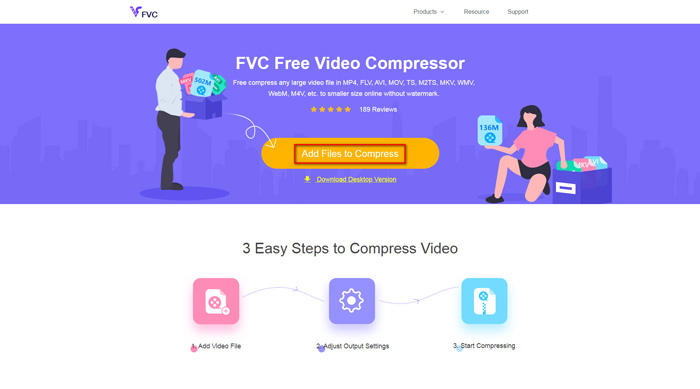
Vaihe 1. Siirry selaimellasi FVC Free Video Compressor -sivustolle. Näet bannerissa painikkeen Add Files to Compress. Napsauta sitä ja seuraa ohjeita ladataksesi ja asentaaksesi FVC-käynnistysohjelman tietokoneellesi.
Vaihe 2. Sen jälkeen sinun tulee valita pakattava M4V-tiedosto. Voit sitten siirtää liukusäädintä Size-ruudun perässä säätääksesi ja löytääksesi helposti juuri haluamasi tiedostokoon. Voit myös muuttaa tarkkuutta ja bittinopeutta erikseen tarpeidesi mukaan.
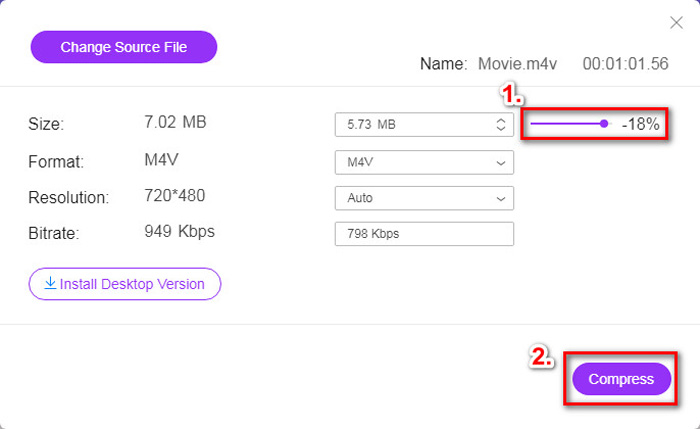
Vaihe 3. Jos haluat pakata M4V-tiedoston MP4-muotoon, valitse tässä ulostuloformaatiksi MP4. Muussa tapauksessa voit napsauttaa suoraan oikeassa alakulmassa olevaa Compress-painiketta. Valitse kansio pakatun videon tallentamista varten ja odota hetki, kunnes saat halutun videon.
Osa 2. M4V-tiedoston koon pienentäminen Macissa / Windowsissa
Koska M4V on Applen kehittämä muoto, voit käyttää myös Applen oletussoitinta QuickTime Playeria M4V-tiedostojen pakkaamiseen Macilla. QuickTime Playerista on lisäksi Windows-versio PC-käyttäjille. Huomaa kuitenkin, että uusin Windows-versio on QuickTime 7.7.9, joka julkaistiin vuonna 2016. Jos siis haluat uudemman ohjelman, voit kokeilla FVC Free Video Compressoria, joka pystyy käsittelemään jopa 4K-videoita.
Noudata joka tapauksessa seuraavia ohjeita pienentääksesi M4V-tiedostokokoa QuickTimessa.
Vaihe 1. Avaa pakkausta odottava M4V-tiedosto QuickTimessa.
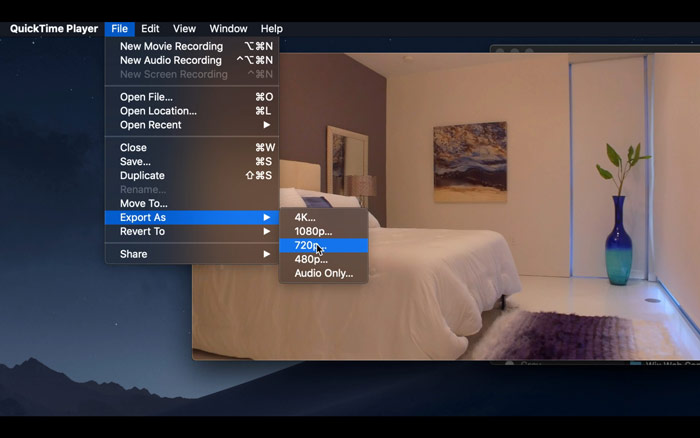
Vaihe 2. Etsi vasemmasta yläkulmasta File-valikko. Napsauta sitä ja etsi listasta vaihtoehto Export As. Valitse sitten alkuperäistä videota matalampi tarkkuus videon pakkaamiseksi. Emmehän halua kasvattaa tiedoston kokoa.
Vaihe 3. Jos et halua muuttaa tallennussijaintia, voit vain napsauttaa Save. Odota kärsivällisesti videon vientiä.
Osa 3. M4V-pakkauksen usein kysytyt kysymykset
1. Voinko vain nimetä M4V: n MP4: ksi?
Ei, jos tarkoitat M4V-tiedoston muuntamista MP4-muotoon pelkästään vaihtamalla tiedostopäätteen .mp4:ksi. Niiden koodaus ei ole sama. Sinun tulisi käyttää ammattimaisempaa työkalua, jotta voit muuntaa M4V:n MP4:ksi.
2. Hyväksyykö YouTube M4V-muodon?
Valitettavasti YouTube tukee vain rajoitettua määrää tiedostomuotoja, jotka eivät sisällä M4V: tä. Joten, jos haluat ladata M4V-videosi YouTubeen, sinun on muunnettava se YouTube-tuettuun muotoon, kuten MP4.
3. Kuinka yhdistää useita M4V-videoita yhdeksi?
Jos sinulla on useita M4V-videotiedostoja, jotka pitää yhdistää yhdeksi, voit kokeilla työkalua FVC Free Online Video Merger erilaisten videotiedostojen yhdistämiseen.
Johtopäätös
Nyt sinulla on 2 yksinkertaista ja ilmaista tapaa pakata M4V-tiedosto. Jos olet Mac-käyttäjä, voit pienentää videon kokoa QuickTime Playerilla. Mutta jos et ole tyytyväinen QuickTimen tarjoamiin kiinteisiin tarkkuuksiin tai käytät Windows-tietokonetta, voit antaa mahdollisuuden ohjelmalle FVC Free Video Compressor.
-
 M4V to MP3 Converter - 4 parasta tapaa purkaa MP3 M4V-tiedostoista
 Kun haluat purkaa MP3-äänen M4V-videoista helposti, voit oppia lisää 4 parhaasta M4V-MP3-muuntimesta saadaksesi haluamasi äänitiedostot artikkelista.
-
 4 tapaa muuntaa QuickTime-elokuvat MP4: ksi ilmaiseksi puhelimella / tietokoneella
 Lue ja hanki neljä tapaa muuntaa QuickTime MP4-videoiksi ilmaiseksi puhelimellasi tai tietokoneellasi. Voit vaihtaa tiedostomuodon MOV: stä MP4: ksi Windows / Mac / iPhone / Android / verkossa helposti.
-
 4 parasta MP4-M4V-muunninta MP4-videoiden muuttamiseksi M4V: ksi helposti
 Kun sinun on vaihdettava MP4-tiedostot M4V-tiedostoiksi, sinun kannattaa oppia lisätietoja artikkeleista kahden muodon eroista sekä parhaista MP4-M4V-muuntimista.
