


 Video Converter Ultimate
 Näytön tallennin
 Videon korjaus
 Suojattu lataus
Nopein tapa MXF:n muuttamiseksi M4V:ksi työpöydällä ja verkossa
MXF-tiedosto on alan standardimuoto ääni- ja videomateriaalille. Tätä tiedostomuotoa ei kuitenkaan tueta Apple QuickTime Playerissa, joten MXF-tiedostoasi ei voi toistaa kyseisellä ohjelmalla. Jos et pysty toistamaan MXF-tiedostoasi Apple QuickTime Playerilla, sinun on muunnettava se toiseen tiedostomuotoon, kuten M4V:ksi. Olet onnekas, sillä meillä on sinulle paras ratkaisu. Tässä artikkelissa esittelemme tehokkaimmat ja hyödyllisimmät menetelmät, joilla voit muuntaa MXF:n M4V:ksi luotettavilla offline- ja online-muuntimilla. Lisäksi annamme sinulle käsityksen siitä, miten saat videoistasi houkuttelevampia muokkaamalla niitä yksinkertaisesti. Lue tämä artikkeli heti ja hanki tarvitsemasi tiedot.

Osa 1: Upea tapa muuntaa MXF M4V:ksi verkossa
Yksi parhaista verkkomuuntimista, joita voit käyttää MXF:n muuntamiseen M4V:ksi, on FVC Free Video Converter Online. Tämä verkkopohjainen ohjelma pystyy muuntamaan erilaisia videotiedostoja, kuten MOV, MKV, AVI, FLV, MP4, WEBM, VOB ja monia muita. Lisäksi voit muuntaa useita tiedostoja yhdessä prosessissa, koska tämä muunnin tukee erämuunnosta. Ennen videoiden muuntamista voit myös muokata niiden resoluutiota, bittinopeutta ja kuvanopeutta mieltymystesi mukaan. Sillä on lisäksi helppokäyttöinen käyttöliittymä ja yksinkertainen tapa muuntaa tiedostoja. Näin jokainen voi käyttää tätä verkkotyökalua – sekä kokeneet että aloittelevat käyttäjät. Lisäksi tämä verkkomuunnin toimii kaikissa selaimissa, kuten Google Chromessa, Mozilla Firefoxissa, Microsoft Edgessä ja muissa, mikä tekee siitä helposti käyttäjien saatavilla olevan.
Lisäksi videon muuntamisen lisäksi voit muuntaa myös lukuisia ääniformaatteja, mukaan lukien AAC, MP3, M4A, M4B, FLAC ja paljon muuta. Siinä on myös ääniasetus, jonka avulla voit säätää niiden näyte- ja bittinopeutta. Näiden ominaisuuksien avulla voit kertoa, että FVC Free Video Converter Online on luotettava.
Ominaisuudet
◆ Muunna erilaisia videomuotoja, kuten MP4, AVI, M4V, MXF, MOV, WMV, MKV, FLV ja paljon muuta.
◆ Pystyy muokkaamaan videon resoluutiota, bittinopeutta ja kuvanopeutta.
◆ Tarjoaa erämuunnosprosessin.
◆ Muunna äänitiedostoja, kuten MP3, AAC, AC3, M4B, FLAC ja paljon muuta.
◆ Voi muokata äänen näytteenottotaajuutta ja bittinopeutta.
Katso alla olevat vaiheet saadaksesi lisätietoja MXF-tiedoston muuntamisesta M4V-muotoon FVC Free Video Converter Ultimate -sovelluksella.
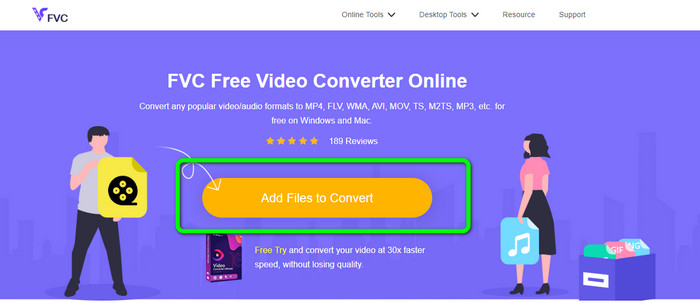
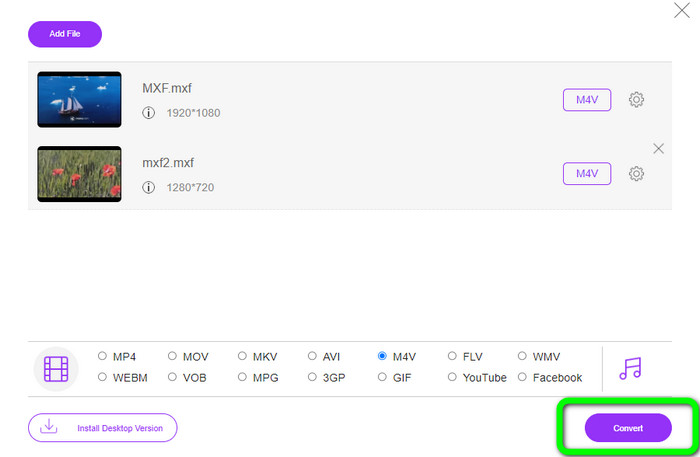
Vaihe 1: Avaa selaimesi ja siirry FVC Free Video Converter Online -sivustolle. Kun olet etusivulla, napsauta Add Files to Convert ladataksesi muunnettavan MXF-videotiedoston.
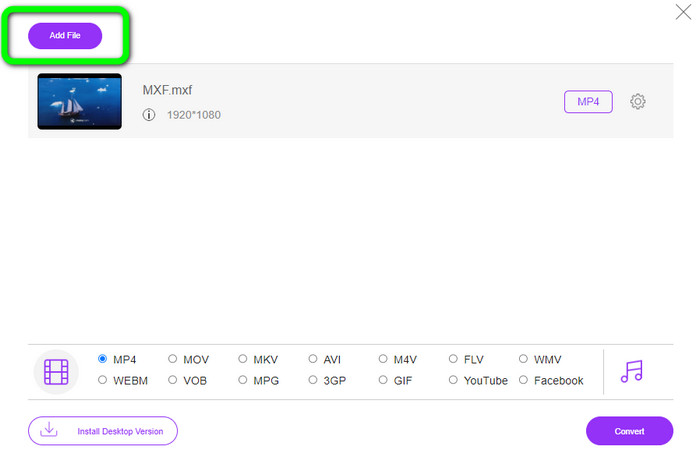
Vaihe 2: Tämä muunnin tarjoaa erämuunnostoiminnon. Jos haluat ladata lisää MXF-tiedostoja, napsauta Add File -painiketta.
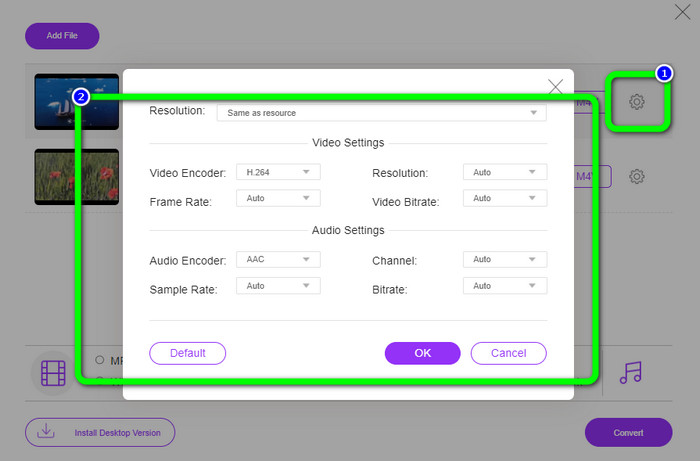
Vaihe 3: Tässä vaiheessa voit muokata videoitasi napsauttamalla Setting-kuvaketta. Kuvaketta napsautettuasi voit säätää videon kuvanopeutta, resoluutiota ja bittinopeutta. Voit myös muuttaa äänen näytteenottotaajuutta ja bittinopeutta. Napsauta sitten OK-painiketta.
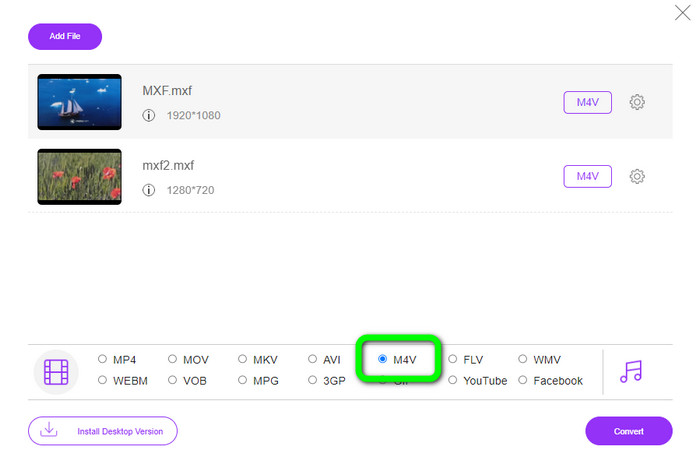
Vaihe 4: Videoiden muokkaamisen jälkeen voit vaihtaa tulostusmuodon napsauttamalla M4V-muotoa käyttöliittymän alaosassa olevista formaattiluokista.
Vaihe 4: Viimeisessä vaiheessa paina Convert-painiketta. Odota muunnosprosessin valmistumista ja tallenna videosi haluamaasi sijaintiin.
Osa 2: Nopein tapa muuntaa MXF M4V:ksi häviöttömästi
Jos haluat ladattavan työkalun MXF:n häviöttömään muuntamiseen M4V:ksi, Video Converter Ultimate on paras valinta. Tämä tehokas muunnin kykenee käsittelemään erilaisia tiedostoja nopeasti, sillä sen muunnosnopeus on nopea – ei 10-, ei 20-, vaan 30-kertainen keskimääräiseen muunnosnopeuteen verrattuna. Lisäksi siinä on muita erinomaisia ominaisuuksia, joista voit hyötyä. Voit muuntaa useita tiedostoja samanaikaisesti, koska ohjelma tukee erämuunnosta. MXF:n ja M4V:n lisäksi tämä työkalu tukee monia muita videoformaatteja, kuten MP4, FLV, AVI, MKV, MOV, WMV, VOB ja niin edelleen. Video Converter Ultimate on lisäksi saatavilla sekä Windows- että Mac-käyttöjärjestelmille, mikä on kätevää sekä Mac- että Windows-käyttäjille.
Lisäksi tässä ladattavassa sovelluksessa on muita hienoja ominaisuuksia videoiden muuntamisen lisäksi. Jos haluat luoda musiikkivideon kumppanillesi, perheellesi, ystävillesi jne., voit käyttää tätä työkalua. Video Converter Ultimate tarjoaa musiikkivideon luojan, jossa voit tehdä upeita elokuvia musiikilla. Se tarjoaa myös ilmaisia teemoja, kuten iloisia, tyylikkäitä, yksinkertaisia, lumisia öitä, romanttista ja paljon muuta. Lisäksi, jos sinulla on video, jonka tiedostokoko on suuri, voit pakata sen Video Compressorilla. Tämän työkalun avulla voit helposti muuttaa videosi kokoa.
Ominaisuudet
◆ Muunna yli 100 videotiedostomuotoa, mukaan lukien M4V, MXF, FLV, AVI, MP4, XVID, VOB, MOV, SWF, MKV ja paljon muuta.
◆ Muunna useita tiedostoja samanaikaisesti.
◆ Tarjoaa musiikkivideon valmistajan.
◆ Luo upea kollaasi.
◆ Tarjoa videon muokkaustyökaluja, kuten videoleikkuri, kompressori, tehostin, värinkorjaus jne.
◆ Muunna kuvatiedostomuotoja, kuten BMP, PNG, JPG ja paljon muuta.
Noudata alla olevia yksityiskohtaisia ohjeita muuntaaksesi MXF:n M4V:ksi häviöttömästi FVC Video Converter Ultimate -sovelluksella.
Vaihe 1: Lataa Video Converter Ultimate laitteellesi napsauttamalla Download-painiketta. Alla on kaksi latauspainiketta. Jos olet Windows-käyttäjä, valitse Windows-versio. Jos käytät Macia, napsauta Mac-versiota. Käynnistä sitten sovellus.
Ilmainen latausWindows 7 tai uudempiTurvallinen lataus
Ilmainen latausMacOS 10.7 tai uudempiTurvallinen lataus
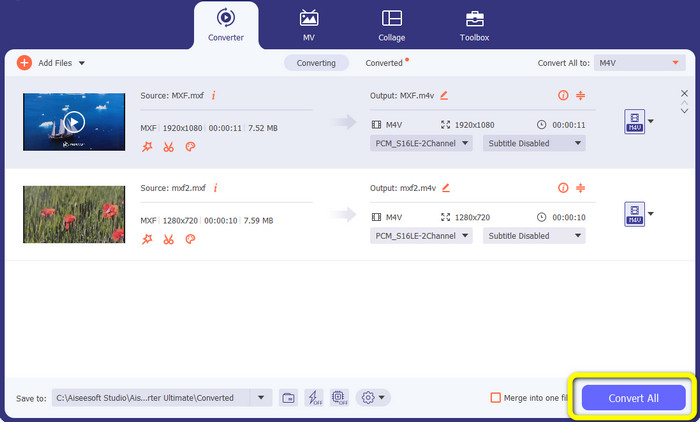
Vaihe 2: Valitse seuraavaksi Converter-välilehti. Napsauta +-kuvaketta tai Add File -painiketta tuodaksesi MXF-videotiedoston.
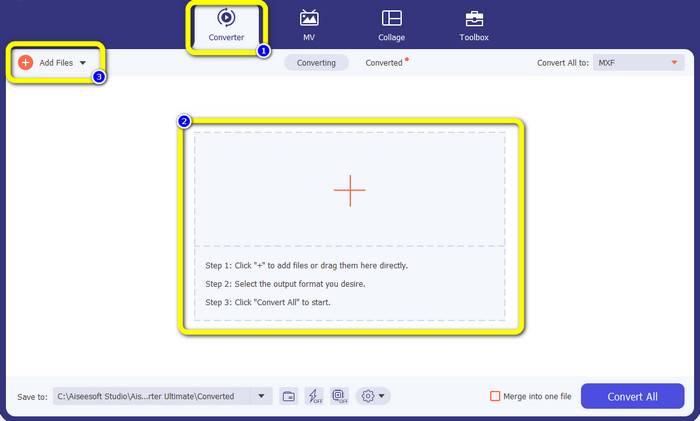
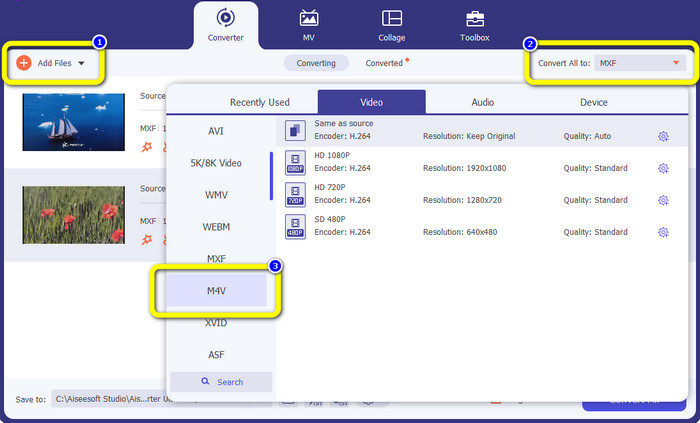
Vaihe 3: Jos haluat muuntaa useita tiedostoja samanaikaisesti, napsauta Add File -painiketta. Napsauta sitten Convert All to -painiketta ja valitse M4V-tiedostomuoto. Voit myös valita videollesi haluamasi resoluution.
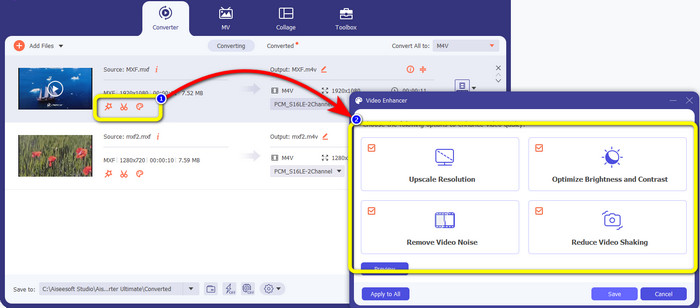
Vaihe 4: Jos haluat muokata videoitasi ennen muuntamista, se on mahdollista. Napsauta ensimmäisessä ruudussa näkyviä muokkaustyökaluja. Valitse sen jälkeen video enhance -kuvake. Ruksaa kaikki ruudut parantaaksesi resoluutiota, optimoidaksesi kirkkautta ja kontrastia sekä vähentääksesi videokohinaa ja tärinää.
Vaihe 5: Kun olet valmis muokkaamaan ja muuttamaan videoidesi tulostusmuodon, napsauta Convert All -painiketta ja tallenna video laitteellesi.
Osa 3: Mikä on MXF?
SMPTE-yhdistys loi MXF-mediasäiliön yrityskäyttöön. MXF toteuttaa osan Advanced Authoring Format (AAF) -tietoskeemasta, ja se on hiljattain noussut alan standardiksi ei-lineaariseen ammattimaiseen videoeditointiin. MXF-tiedostot voidaan helposti muuntaa mihin tahansa yleiseen videomuotoon ja pakata lähes millä tahansa koodekilla. On tärkeää huomata, että tämän muodon toteutuksessa Sonyn, Panasonicin ja Canonin toimesta oli lukuisia yhteensopimattomuuksia, mikä on tämän säiliön suuri heikkous. Standardin vuoden 2009 versio korjaa nämä ongelmat.
Osa 4: Mikä on M4V?
M4V on eräänlainen videosäiliö, jota iTunes-tiedostot käyttävät sekä ääni- että videodatan tallentamiseen. Ääni- tai videotiedostot kannattaa ostaa iTunes Storesta, jos ne ovat Apple FairPlay DRM -suojattuja luvattomalta katselulta ja kopioimiselta. Koska muoto perustuu MPEG-4-rakenteeseen, käytännössä mikä tahansa nykyaikainen soitin voi näyttää suojaamattomia tiedostoja.
Lisälukemista:
Parhaat MXF–WMV-muuntimet MXF:n muuntamiseen WMV:ksi ilmaiseksi
Neljä parasta ratkaisua MXF:n muuntamiseen MKV:ksi [Ratkaistu]
Osa 5: Usein kysyttyä MXF:n muuntamisesta M4V:ksi
Kuinka suuri MXF-tiedosto on?
MXF tukee tiedostokokoja 2 gigatavuun asti. Lisäksi MXF tukee pidempiä tiedostoja. OMF-muodon mediatiedoston sieppausaika on enintään kolme tuntia. MXF pystyy käsittelemään 12 tuntia ääntä kahdella kanavalla 48 kHz:n taajuudella.
Kuka käyttää MXF-tiedostoja?
Useat tuotantomainokset, mukaan lukien SONY MSW 2000 -sarjan IMX-videonauhurit, käyttivät sitä. Myös Avid-editointilaitteet tukevat tiettyä MXF-versiota.
Kuinka voin muuntaa MXF: n MOV: ksi?
Voit käyttää työkalua FVC Free Video Converter Online. Lataa MXF-tiedostosi, valitse formaattiluettelosta MOV-muoto ja napsauta Convert-painiketta. Näin voit muuntaa MXF:n MOV:ksi välittömästi.
Johtopäätös
On monia tapoja muuntaa MXF M4V:ksi. Jos kuitenkin haluat parhaat ja eniten vaivan arvoiset muuntimet, voit käyttää yllä mainittuja ohjelmia: Video Converter Ultimate ja FVC Free Video Converter Online. Nämä kaksi muunninta voivat muuntaa tiedostoja nopeammin kuin monet muut muuntimet, ja voit käyttää niitä ilmaiseksi.
-
 Erilaisia menetelmiä MOV-tiedoston muuttamiseen M4V-tiedostomuotoon
 Haluatko tehokkaan tavan muuntaa MOV-tiedosto M4V-muotoon? Sitten tämä artikkeli täyttää toiveesi. Tässä ovat parhaat muuntimet, joita voit käyttää.
-
 Erinomaiset tekniikat GIF:n muuntamiseen M4V-muotoon välittömästi
 Tämä opas tarjoaa sinulle tehokkaimmat strategiat GIF:n muuntamiseksi M4V:ksi. Lisäksi esittelemme sinulle kaksi parasta muuntajaa, joita voit kokeilla.
-
 2 parasta poikkeuksellista tapaa M2TS:n muuttamiseksi M4V:ksi
 Luuletko, että M2TS-tiedoston muuntaminen toiseen muotoon on mahdollista? Näytämme sinulle kuinka muuntaa M2TS M4V-tiedostomuotoon, jos haluat parhaan ratkaisun.
