


 Video Converter Ultimate
 Näytön tallennin
 Videon korjaus
 Suojattu lataus
FLAC vs. MP3: Ääniformaattien esittely ja vertailu
The debate between FLAC vs. MP3 file formats has been ongoing for years. While MP3 is one of the oldest and most widely-used formats, FLAC has gained popularity among audiophiles for its lossless audio compression. But which one is better? In this guide, we'll take a closer look at the differences between FLAC and MP3, including their sound quality, file size, compatibility, and more, to help you decide which format to choose for your music collection.

Osa 1. FLAC vs. MP3: Ääniformaattien käyttöönotto
MP3 Anecdote
MP3 on suosittu digitaalisten äänitiedostojen muoto, jota on käytetty laajalti sen käyttöönotosta 1990-luvulla. Se käyttää häviöllistä pakkausta pienentääkseen äänitiedostojen kokoa säilyttäen samalla hyvän äänenlaadun. MP3-tiedostoja voidaan helposti jakaa, ladata ja toistaa eri laitteilla, joten se on kätevä valinta digitaalisen musiikin ystäville. Kysymys kuuluu, onko FLAC parempi kuin MP3? Selvitetään lukemalla FLAC:n kuvaus.
FLAC Anecdote
FLAC (Free Lossless Audio Codec) on korkealaatuinen äänitiedostomuoto, joka käyttää häviötöntä pakkausta säilyttääkseen alkuperäisen äänidatan laadusta tinkimättä. Tämä tarkoittaa, että FLAC-tiedostot ovat paljon suurempia kuin MP3-tiedostot, mutta säilyttävät saman äänentarkkuuden kuin alkuperäinen lähdemateriaali.
Osa 2. Tuetut FLAC- ja MP3-laitteet/-alustat
Katsokaamme nyt MP3- ja FLAC-vertailua nähdäksemme, kuinka ne toimivat tukemissaan alustoissa tai laitteissa.
MP3 on laajalti tuettu äänitiedostomuoto, jota voidaan toistaa eri alustoilla, mukaan lukien:
◆ Tietokoneet, joissa on Windows-, macOS- ja Linux-käyttöjärjestelmä.
◆ Portable media players, such as iPods and other MP3 players.
◆ Älypuhelimet ja tabletit, joissa on iOS, Android ja muut mobiilikäyttöjärjestelmät.
◆ Autostereot USB- tai lisätuloilla.
◆ Kotiteatterijärjestelmät ja stereovastaanottimet USB- tai verkkoliitännällä.
◆ Musiikin suoratoistopalvelut, kuten Spotify ja Apple Music, käyttävät usein MP3:a oletusmuotona musiikin suoratoistoon ja lataamiseen.
FLAC ei ole yhtä laajasti tuettu kuin MP3, mutta sitä voi silti toistaa useilla alustoilla, mukaan lukien:
◆ Tietokoneet, joissa on Windows-, macOS- ja Linux-käyttöjärjestelmä.
◆ Jotkut kannettavat mediasoittimet, kuten Astell&Kern AK Jr ja PonoPlayer.
◆ Jotkut älypuhelimet ja tabletit, joissa on Android ja muut mobiilikäyttöjärjestelmät.
◆ Jotkut autostereot ja kotiteatterijärjestelmät USB- tai verkkoliitännällä.
◆ Jotkin suoratoistomusiikkipalvelut, kuten Tidal, jotka tarjoavat korkealaatuisia FLAC-suoratoisto- ja latausvaihtoehtoja.
Osa 3. Onko FLAC parempi kuin MP3?
Tällä kertaa voimme luetella erot FLAC:n ja MP3:n välillä vertaamalla näitä äänimuotoja kattavasti.
Tässä on kattava FLAC- ja MP3-vertailu eri tekijöiden perusteella:
Sound quality: FLAC offers better sound quality than MP3, for it is a lossless format that preserves all the audio data in the source material. On the other hand, MP3 is a lossy format that discards some audio data during compression, which can result in a loss of audio quality.
File size: MP3 files are much smaller than FLAC files, as MP3 uses lossy compression to reduce the file size. This makes MP3 a more practical choice for those with limited storage space or those who need to share or download music files quickly over the internet.
Compatibility: MP3 is widely compatible with various devices and software, including desktop and laptop computers, portable media players, smartphones, car stereos, and streaming music services. FLAC, on the other hand, may not be compatible with some devices and software due to its larger file size and lossless compression.
Bitrate: MP3 files can be encoded at a lower bitrate to reduce the file size further, but this also results in a loss of audio quality. FLAC files, on the other hand, always maintain the same bitrate as the original source material.
Editing: FLAC is a better choice for audio editing, as it offers a higher level of audio fidelity and doesn't introduce any additional compression artifacts. MP3 files, on the other hand, may introduce additional compression artifacts during editing due to their lossy compression.
Price: Both FLAC and MP3 are free and open-source formats, so there is no cost associated with using either format.
Osa 4. Muunna FLAC MP3:ksi tai MP3 FLAC:ksi
Nyt kun FLAC- ja MP3-vertailuprosessi on valmis, siirrytään prosessiin, jolla muunnetaan MP3 FLAC-muotoon tai päinvastoin.
Video Converter Ultimate is a powerful software tool that allows you to easily convert audio and video files from one format to another. One of the many formats supported by FVC Video Converter Ultimate is FLAC, a high-quality, lossless audio format that is often used by audiophiles and music enthusiasts. You can quickly and easily convert your FLAC files to MP3, allowing you to save space on your device and make your music more easily shareable. Video Converter Ultimate offers a user-friendly interface and a range of options for customization, making it a convenient and helpful tool for anyone who needs to convert audio and video files.
Jos haluat muuntaa äänitiedostoja FLAC- ja MP3-muotojen välillä tällä työkalulla, sinun on noudatettava muutamia yksinkertaisia vaiheita.
Step 1. First, download and install the program on your computer by clicking on one of the Free Download buttons and following the setup wizard. Next, launch the program to access its user-friendly interface.
Ilmainen latausWindows 7 tai uudempiSuojattu lataus
Ilmainen latausMacOS 10.7 tai uudempiSuojattu lataus
Step 2. Next, add the audio file you want to convert by clicking the plus sign button from the main interface. Once added, you'll see a thumbnail of each file on the interface.
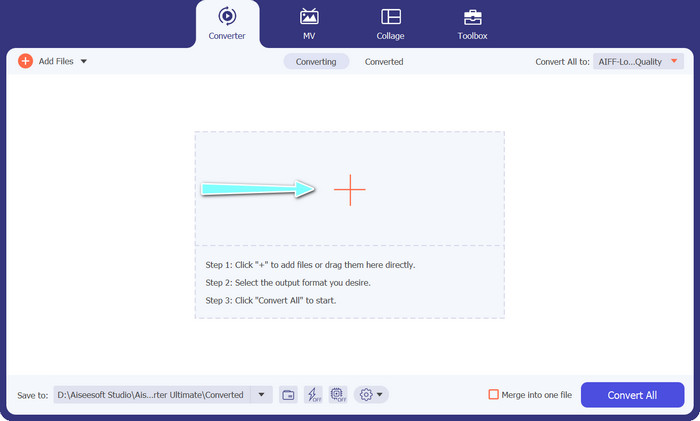
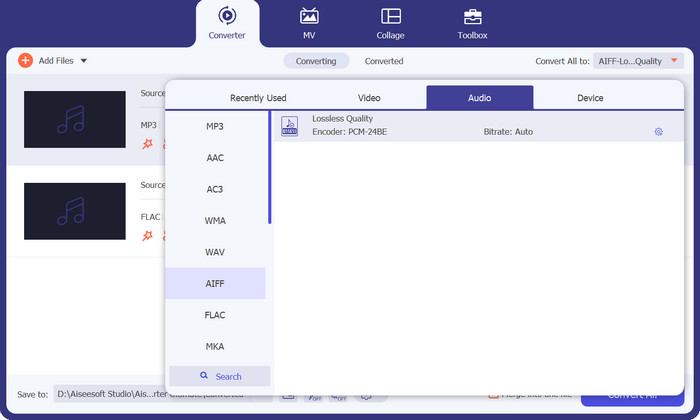
Step 3. Specify the output format by selecting the Audio tab from the Profile menu on the upper right side of the tool. Choose either MP3 or FLAC, depending on the direction of the conversion.
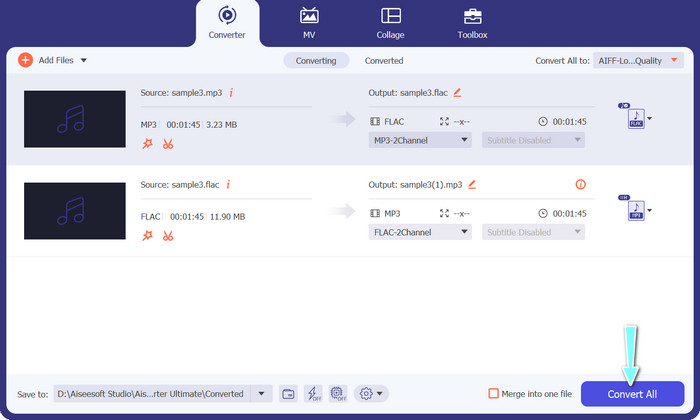
Step 4. Specify the output folder where you want to save the converted files by selecting the appropriate location at the bottom of the interface. Lastly, hit on the Convert All button to start the conversion process.
If you're in need of a free online tool to convert FLAC to MP3, look no further than Free Video Converter Online. This convenient program allows users to convert video and audio files without any cost and also offers the ability to customize output settings according to your preference. The conversion speed is also reliable, so long as you have an internet connection. To get started, follow these steps:
Step 1. Launch your preferred web browser and navigate to the Free Video Converter Online website.
Step 2. Click the Add Files to Convert button to upload the FLAC file you want to convert to MP3.
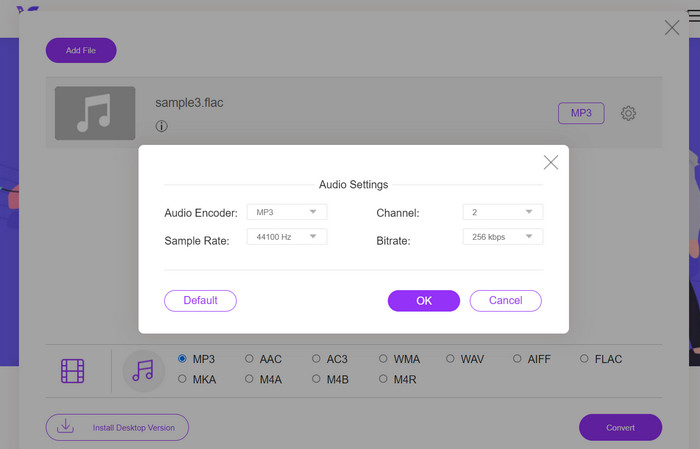
Step 3. Choose MP3 as the output format from the list of available formats under the Audio format menu. You can also select your desired bitrate or output quality for the MP3 file.
Step 4. Click the Convert button to start the conversion process.
Osa 5. Usein kysytyt kysymykset FLAC vs. MP3:sta
Kumpi on parempi 16-bittinen FLAC vs 320 kbps MP3?
Valinta 16-bittisen FLAC:n ja 320 kbps:n MP3:n välillä riippuu henkilökohtaisista mieltymyksistä ja äänitiedoston käyttötarkoituksesta. Jos asetat äänenlaadun etusijalle ja tallennustilaa on riittävästi, 16-bittinen FLAC voi olla parempi vaihtoehto. Jos tarvitset pienemmän tiedostokoon äänenlaadusta tinkimättä, 320 kbps MP3 voi olla hyvä valinta.
Ovatko FLAC-tiedostot suurempia kuin MP3-tiedostot?
Kyllä, FLAC-tiedostot ovat yleensä suurempia kuin MP3-tiedostot häviöttömän luonteensa vuoksi.
Tukevatko kaikki mediasoittimet FLACia?
Ei, kaikki mediasoittimet eivät tue FLACia. Monet nykyaikaiset mediasoittimet ja ohjelmistot tukevat kuitenkin FLAC-toistoa, mukaan lukien VLC, Foobar2000 ja Winamp.
Johtopäätös
Choosing between MP3 and FLAC depends on your personal preference and specific needs. Therefore, FLAC vs. MP3 is a must for your decision-making. Ultimately, the decision on which format to use comes down to your priorities in terms of sound quality, file size, and compatibility.
-
 4 parasta tapaa muuntaa MOV MP3-tiedostoiksi Windowsissa ja Macissa helposti
 Kun haluat purkaa MP3-äänitiedostot MOV-tiedostoista, voit oppia lisää 4 tehokkaimmasta MOV-MP3-muuntimesta saadaksesi haluamasi tiedostot artikkelista.
-
 Parhaat MP3-muuntimet äänitiedostojen muuntamiseksi MP3-muotoon helposti
 Muunna mikä tahansa äänimuoto vaivattomasti MP3-muotoon käyttäjäystävällisillä online- ja offline-MP3-muuntimillamme. Saat laadukkaita tuloksia muutamalla napsautuksella.
-
 3 parasta FLAC-metatietoeditoria Macissa ja Windowsissa [Päivitetty 2023]
 Haluatko muuttaa FLAC-metatietoja? Tässä tapauksessa sinun on luettava tämä artikkeli, koska tarjoamme riittävästi tietoa uusimmasta FLAC-metatietojen muokkausohjelmasta.
