


 Video Converter Ultimate
 Näytön tallennin
 Videon korjaus
 Suojattu lataus
M4A vs. MP3 Kahden äänimuodon perusteellinen katsaus ja vertailu
Digitaalisen musiikin yleistymisen vuoksi sopivan äänimuodon valitseminen on nyt tärkeämpää kuin koskaan. Vaikka M4A ja MP3 ovat laajalti käytössä, näiden kahden välillä on tärkeitä eroja. Vaikka MP3 on de facto musiikkitiedostojen standardi, M4A:ta käytetään usein erinomaisen äänenlaadun saavuttamiseksi.
In M4A vs. MP3 comparison, we'll examine the finer points between the M4A and MP3 file formats so you can make an informed decision. We'll also present a comprehensive analysis of the differences and similarities between the two file types regarding audio quality, compatibility, file size, and more. If you're a music lover or a working musician, you'll want to read on to find out which format is ideal for you.

Osa 1. M4A vs. MP3
Tässä on yksinkertainen taulukko, jossa verrataan näitä muotoja eri tärkeiden näkökohtien perusteella tietoon perustuvan päätöksen tekemiseksi. Katso alla oleva taulukko.
| M4A | MP3 | |
| Äänenlaatu | Korkea | Hyvä |
| Tiedoston koko | Suuri | Pieni |
| Yhteensopivuus | Rajoitettu | Laajalti yhteensopiva |
| Metatiedot | Tuettu | Rajoitettu |
| DRM-suojaus | Joo | Ei |
| Suositut käyttötavat | Musiikkia, äänikirjoja, podcasteja | Musiikkia, podcasteja, soittoääniä |
Osa 2. M4A- ja MP3-esittely
Riittää MP3 vs. M4A -taistelussa. Pysähdytään hetkeksi ja opimme lisää näistä muodoista esittelemällä niistä lyhyesti.
M4A Introduction
Applen oma digitaalinen äänimuoto on MPEG-4 Audio (tai M4A). Se on loistava äänimuoto musiikille, äänikirjoille ja podcasteille, koska se voi sisältää monia bittinopeuksia ja näytteenottotaajuuksia. M4A-tiedostoja voidaan avata iTunesissa, QuickTimessa ja muissa mediasoittimissa, joten ne ovat ihanteellisia Apple-laitteille.
MP3 Introduction
MP3, joka tulee sanoista "MPEG-1 Audio Layer 3", on digitaalinen äänimuoto, josta on tullut pakatun äänen standardi laajan käyttöönoton ja alhaisen bittinopeuden pakkauksen ansiosta. MP3-tiedostot sopivat erinomaisesti musiikkiin, podcasteihin ja soittoääniin, koska niiden koko on pieni verrattuna muihin äänimuotoihin. Niitä voidaan pelata useilla eri laitteilla ja ladata nopeasti ja helposti Internetistä. Toisaalta MP3-tiedostoilla on usein huonompi äänenlaatu kuin vaihtoehtoisilla tiedostomuodoilla, kuten M4A.
Osa 3. Onko M4A parempi kuin MP3?
M4A:lla ja MP3:lla on erilaisia vahvuuksia ja heikkouksia. M4A tunnetaan erinomaisesta äänenlaadustaan ja on musiikin harrastajien ja ammattilaisten suosima. Toisaalta MP3:lla on pienempi tiedostokoko ja se on laajalti yhteensopiva eri laitteiden ja mediasoittimien kanssa.
M4A:n ja MP3:n valinta riippuu siitä, mikä on sinulle tärkeämpää: korkea äänenlaatu vai pienempi tiedostokoko ja yhteensopivuus.
Osa 4. Ero MP3:n ja M4A:n välillä
Suosituilla digitaalisilla musiikkimuodoilla MP3 ja M4A on omat ominaisuudet. Seuraavassa on yksityiskohtainen selitys eroista MP3:n ja M4A:n välillä:
Sound Quality: M4A is known for its superior sound quality compared to MP3. M4A uses a better compression algorithm and supports a broader range of bitrates and sample rates. M4A also supports lossless compression, which preserves the original audio quality, while MP3 uses lossy compression, which reduces the file size but also reduces the audio quality.
File Size: MP3 files are smaller in size compared to M4A files. This is because MP3 uses a more efficient compression algorithm that reduces the file size without significantly affecting the audio quality. M4A, on the other hand, uses a less efficient compression algorithm that results in larger file sizes but better audio quality.
Compatibility: MP3 is widely recognized as the industry standard for digital audio and is compatible with a wide range of devices and media players, including smartphones, tablets, and computers. M4A, on the other hand, is less widely compatible and is primarily used on Apple devices and software, such as iTunes and QuickTime.
Metadata: M4A supports a wider range of metadata compared to MP3. This means that M4A files can store more information about the audio, such as album art, lyrics, and track information.
DRM Protection: M4A supports Digital Rights Management (DRM) protection, which allows copyright holders to control the use and distribution of their audio files. MP3, on the other hand, does not support DRM protection.
Osa 5. Kuinka muuntaa M4A MP3:ksi tai MP3 M4A:ksi
Näiden kahden ääniformaatin vertaamisen ja tarkastelun lisäksi on myös tärkeää oppia muuttamaan M4A:sta MP3:ksi tai päinvastoin. Tässä on joitain ohjelmia, joita voit käyttää:
Whether you are online or offline, Video Converter Ultimate is a great tool you can use to convert between M4A and MP3. This utility comes with a lot of features you can take advantage of. The tool offers the capability to convert multiple files into batches, which means you can transform a collection of music files. What is intriguing is that it grants you access to the output settings of your audio files. Find out how this tool works by looking at the steps below.
Step 1. Initiate the download by clicking one of the Free Download buttons and then following the on-screen instructions. The next step is launching the app and getting used to its simple interface.
Ilmainen latausWindows 7 tai uudempiSuojattu lataus
Ilmainen latausMacOS 10.7 tai uudempiSuojattu lataus
Step 2. Click the add button on the main screen, then find the audio file you want to convert. A preview of an uploaded file will be displayed on the UI shortly after the upload. You can convert multiple M4As at once to MP3 by uploading a folder.
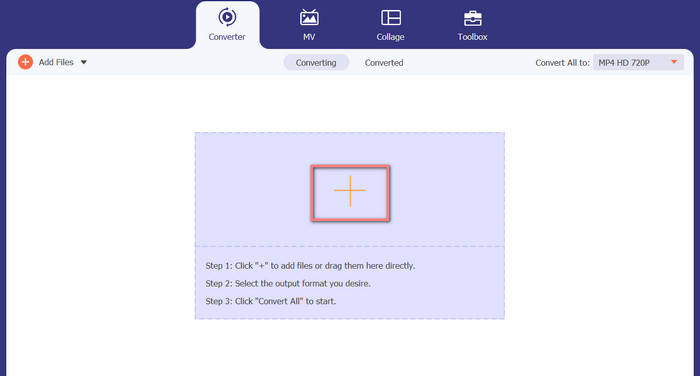
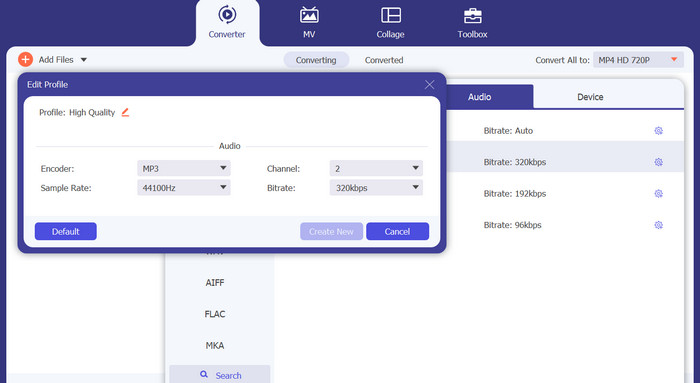
Step 3. To change the tool's output format, go to the Profile menu's Audio tab (found in the tool's upper right). You can change an M4a file into an MP3 file and vice versa.
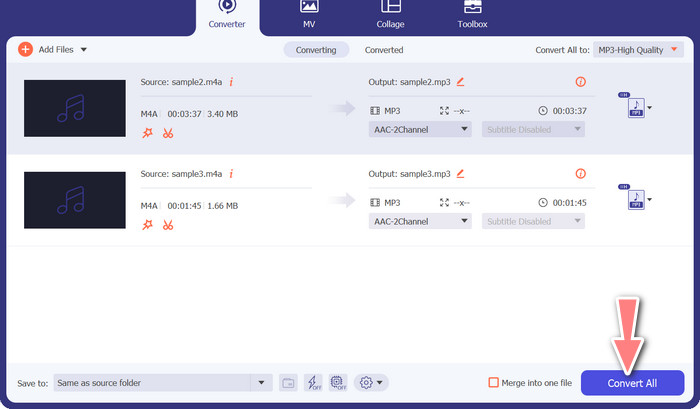
Step 4. Select the desired location at the very bottom of the screen. To get started with the conversion, select Convert All.
Ilmainen Video Converter Online (Online)
No room for another show to air? The good news is that using a web-based converter can prevent downloading software altogether. The Free Video Converter Online web tool allows for in-browser conversion. It also supports a wide variety of music and video file types. In addition, this web tool supports batch conversions. In addition, the user can alter the final audio file's settings. Learn how to convert MP3 to M4A online.
Step 1. First, fire up your preferred web browser and navigate the Free Video Converter Online website.
Step 2. Click the Add Files to Convert option, then navigate to the M4A file you want to convert and select it.
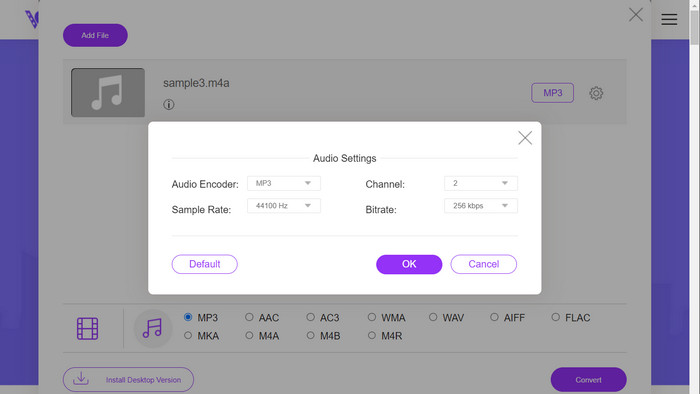
Step 3. Select MP3 as the output file type from the Audio format menu. It is also possible to adjust the bitrate, or output quality, of the MP3 file.
Step 4. To start the conversion process, click the Convert button. That's the procedure for changing M4A to MP3 on the web.
Lisälukemista:
Guidelines on How to Convert M4A to WAV [PC and Mac]
Best Tools that You Can Use to Batch Convert MP3 to M4R Files
Osa 6. Usein kysyttyä M4A:sta ja MP3:sta
Mikä on MP3 vs. M4A metatietojen suhteen?
M4A tukee laajempaa metadataa kuin MP3, mikä tarkoittaa, että M4A-tiedostot voivat tallentaa enemmän tietoa äänestä.
Voinko muokata MP3- tai M4A-tiedostoja?
Voit muokata MP3- ja M4A-tiedostoja erilaisilla äänenmuokkausohjelmistoilla.
Kumpi on parempi podcasteille, MP3 vai M4A?
MP3 sopii paremmin podcasteihin pienemmän tiedostokoon ja laajemman yhteensopivuuden vuoksi.
Johtopäätös
Understanding the MP3 vs. M4A comparison can help you choose the best digital audio format. Whether you're streaming music or producing it, selecting the right format is crucial for ensuring the best possible audio quality and compatibility.
-
 MP3 VS MP4: Mikä ei ole ero MP3: n ja MP4: n välillä
 MP3 tai MP4, mikä on parempi? Mitä eroa on MP3: lla ja MP4: llä? Tässä artikkelissa verrataan MP3: ta MP4: ään kaikilla näkökohdilla, joita voit kuvata.
-
 M4A Player - Top 5 M4A-soitinta Androidille ja tietokoneelle
 Kuinka pelata M4A-tiedostoja Android-puhelimessa? Mikä pelaaja voi pelata M4A: ta? Tämä viesti jakaa 5 parasta ilmaista M4A-soitinta Androidille, Macille ja PC: lle.
-
 4 parasta menetelmää MP3-metatietojen korjaamiseen ja muokkaamiseen Windowsissa ja Macissa
 Haluatko tietää MP3-metatietojen muokkaamisen salaisuudet helposti? Tämä blogi opettaa sinulle erilaisia tekniikoita eri työkaluilla, joita pääset helposti käsiksi.
