


 Video Converter Ultimate
 Näytön tallennin
 Videon korjaus
 Suojattu lataus
MOV MPG:ksi: Pikaopas näiden muotojen muuntamiseen vuonna 2023
Tietojen vuoksi MOV-tiedostot saavat nykyään paljon kiitosta, sillä niitä pidetään yhtenä parhaista formaateista elokuvien tallentamiseen. Tämä tiedostomuoto on yleisesti tunnustettu Apple-tuotteiden, kuten iPhonen, iPadin ja MacBookien, oletusmuodoksi. Kun kuitenkin yrität ladata MOV-tiedostoja internetiin, se voi olla hankalaa, koska niiden koko on suurempi kuin monissa muissa videoformaateissa. Tämän ratkaisemiseksi voit valita vaihtoehdon muuntaa MOV MPG-muotoon. Jatka siis lukemista, niin tämä opas auttaa sinua oppimaan, miten muunnos tehdään.

Osa 1. Muunna MOV MPG:ksi
1. Video Converter Ultimate
Video Converter Ultimate on kattava offline-ratkaisu kaikkiin tarpeisiisi, kun haluat muuntaa MOV-tiedostoja MPG-muotoon. Vain muutamalla napsautuksella ohjelma muuntaa tiedostot koosta riippumatta, olivatpa ne pieniä tai suuria. Lisäksi työkalu sisältää tulosteen mukautusasetukset, joiden avulla käyttäjät voivat saada korkealaatuisen tulostusmuodon ja vastata omia mieltymyksiään. Alla on yksinkertainen, nopea opas MOV-tiedostojen muuntamiseksi MPG-muotoon.
Vaihe 1. Asenna ohjelma
Aloita napsauttamalla alla laitteellesi sopivaa Lataa-painiketta. Napsauta sen jälkeen asennusohjelmaa ja suorita se, jotta saat ohjelman käynnistettyä näytöllesi.
Ilmainen latausWindows 7 tai uudempiTurvallinen lataus
Ilmainen latausMacOS 10.7 tai uudempiSuojattu lataus
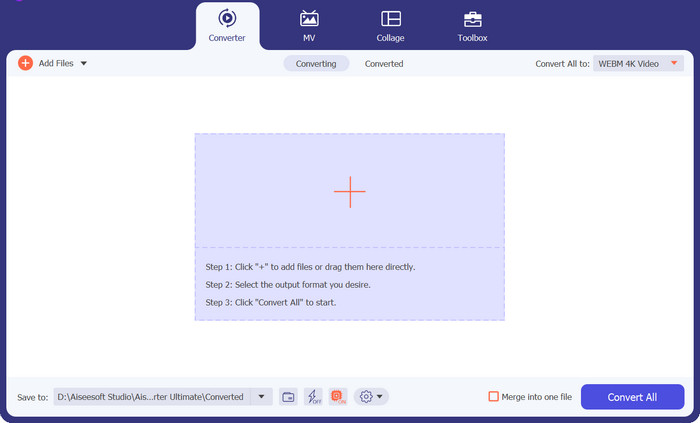
Vaihe 2. Lisää muunnettavat MOV-tiedostot
Kun ohjelma on asennettu, valitse käyttöliittymän keskeltä Plus-painike. Kun tietokoneen hakemisto avautuu, valitse ladattava MOV-tiedosto. Voit myös lisätä useamman kuin yhden tiedoston joukkokonversiota varten.
Vaihe 3. Valitse tulostemuoto
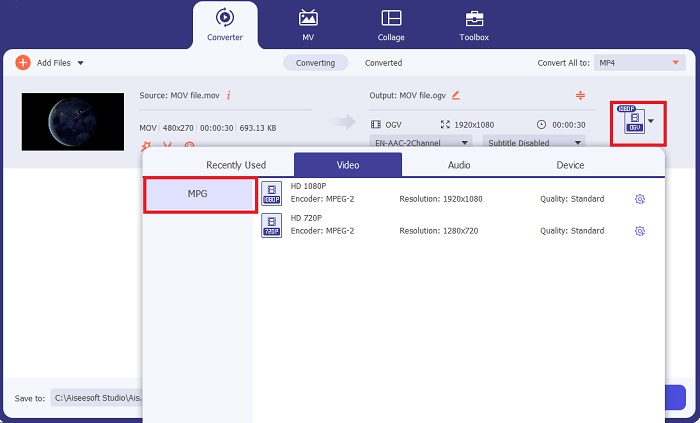
MOV-tiedostosi pikkukuva näkyy ohjelmassa, mikä vahvistaa, että lataus onnistui. Valitaksesi tulostusmuodon laajenna Tuloste-välilehti ja napsauta Video-paneelia. Vieritä listaa ja valitse MPG.
Vaihe 4. Käynnistä muunnos
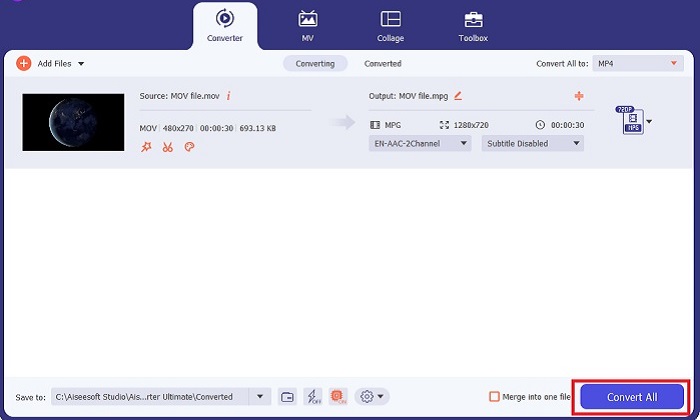
Muokkaa lopuksi tulosteen laatuvaatimuksia säätämällä tulostusasetuksia. Kun olet valmis, paina Muunna-painiketta käynnistääksesi MOV–MPG-muunnoksen.
Tärkeimmät ominaisuudet
◆ Saumaton muuntaminen MOV:sta MPG:ksi: Yksi asia, jota rakastamme Video Converter Ultimatessa, on sen käyttäjäystävällinen käyttöliittymä. Tämä työkalu sopii kaikille, olipa se aloittelija tai kokenut käyttäjä.
◆ 50x nopeampi muunnosnopeus: GPU Acceleration -koodaustekniikan ansiosta Video Converter Ultimate ylittää kaikki muut offline-muuntimet sen nopean muunnoksen ansiosta ilman viiveitä ja kaatumisia.
◆ Joukkomuunnosominaisuus: Video Converter Ultimaten avulla voit myös muuntaa MOV-tiedostojen kansion 100o+-muotoon, joka ei ole MPG.
2. Ilmainen Video Converter verkossa
Free Video Converter Online on toinen ohjelma, joka uudistaa formaattien muunnosprosessin. Vaikka tämä verkkotyökalu ei tarjoa yhtä kattavia ominaisuuksia kuin jotkin offline-ohjelmistot, se on silti luotettava työkalu MOV–MPG-muunnokseen verkossa. Se tukee joukkokonversiota ja antaa sinulle täyden hallinnan tulosteen osalta.
Vaihe 1. Siirry ensin Free Video Converter Online -palvelun pääsivulle. Ennen kuin lataat MOV-tiedoston, napsauta Lisää tiedostoja, jolloin sinua pyydetään ensin käynnistämään verkkotyökalu.
Vaihe 2. Lataa muunnettava tiedosto napsauttamalla uudelleen Lisää tiedostoja -painiketta ja valitsemalla tiedoston. Voit myös käyttää vedä ja pudota -toimintoa.
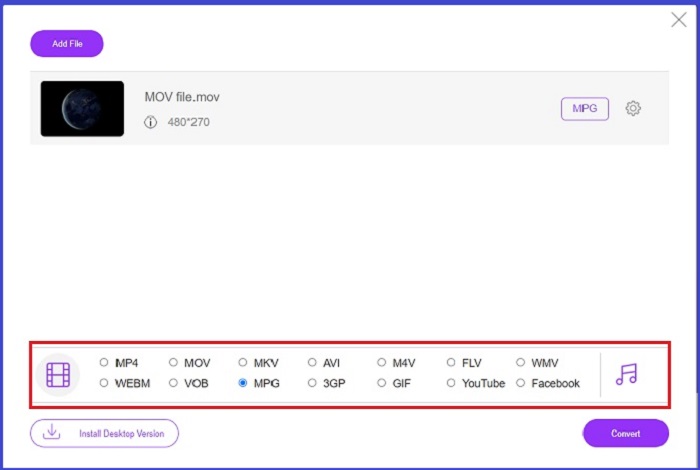
Vaihe 3. Kun raakaversio tiedostosta näkyy, valitse tulostusmuoto näytön alakulmasta. Video-paneelissa näet kaikki mahdolliset formaatit; tässä tapauksessa valitse MPG. Lopuksi paina Muunna-painiketta ja odota, että tiedosto latautuu valmiina.
Tärkeimmät ominaisuudet
◆ Multi-platform Online Converter: Olitpa puhelimella, tabletilla tai tietokoneella, tämä työkalu toimii täydellisesti, mikä mahdollistaa videon tai äänen muuntamisen.
◆ Tietosuojatakuu: Kuka haluaa saada yksityisiä tietoja tunkeutumaan? Ilmaisen Video Converter Online -sovelluksen avulla sinun ei pitäisi kohdata ongelmia tämän ongelman suhteen. Tämän online-työkalun avulla käyttäjät voivat muuntaa MOV:n MPG:ksi ilmaiseksi ilman rekisteröitymisprosesseja.
◆ Ei asennusvaatimuksia: Tämä työkalu on toinen vaivaton muuntaja, jonka avulla pääset eroon kiireisistä asennuksista, varsinkin jos digitaalinen tila loppuu.
Osa 2. Muunna MPG MOV:ksi
1. Video Converter Ultimate
Jälleen kerran Video Converter Ultimate on yhä paras ratkaisu, jonka voimme tarjota, kun haluat muuntaa MOV–MPG Mac- ja Windows-laitteilla. Tämä työkalu tukee yli 1000 video- ja ääniformaattia, mukaan lukien laitekohtaiset muodot esimerkiksi Samsungille, Applelle, Sonylle ja monille muille. Seuraa alla olevaa ohjetta muuntaaksesi minkä tahansa MPG-tiedostosi MOV-muotoon.
Ilmainen latausWindows 7 tai uudempiTurvallinen lataus
Ilmainen latausMacOS 10.7 tai uudempiSuojattu lataus
Vaihe 1. Napsauta Lisää tiedostoja -painiketta tuodaksesi MPG-tiedoston ohjelmaan.
Vaihe 2. Kun tiedostosi on latautunut näytölle, valitse tulostemuoto napsauttamalla Tuloste > Video > MOV. Voit myös parantaa laatua muokkaamalla videon parametreja.
Vaihe 3. Valitse Muunna-painike käskeäksesi ohjelmaa muuntamaan tiedostot MPG:stä MOV:ksi. Voit tarkistaa tulosteen ohjelmassa, kun muunnos on valmis.
2. AnyConv
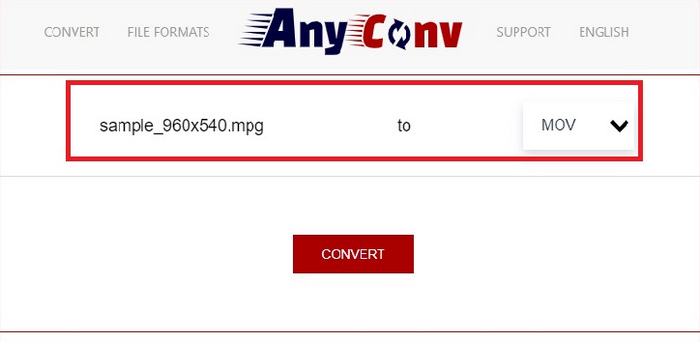
AnyConv on ilmainen MPG-MOV-muunnin verkossa. Tämä ohjelma toimii hyvin kaikilla laitteilla ja tarjoaa vedä ja pudota -ominaisuuden, kun lataat MPG-tiedostoja. Lisäksi tämä online-ratkaisu suojaa käyttäjien tiedot poistamalla muunnetut tiedostot tunnin kuluttua. MOV:n lisäksi voit muuntaa MPG-tiedostosi 3GP-, AVCHD-, MP4-, MKV- ja muihin muotoihin.
Vaihe 1. Avaa ensin AnyConv-sivusto. Kun sivu on näytölläsi, napsauta Valitse tiedosto ja valitse muunnettavaksi haluamasi MOV-video.
Vaihe 2. Kun MOV-tiedostosi on ladattu, valitse MPG tulostusmuotolistasta keskellä olevalta Output-sarakkeelta.
Vaihe 3. Napsauta lopuksi Muunna-painiketta ja odota, että tiedosto on ladattavissa.
Lisälukemista:
3 parasta tapaa muuntaa MPG nopeasti MP4-muotoon
5 parasta MOV–3GP-muunninta, joita et saa ohittaa
Osa 3. Usein kysyttyä MPG:n muuntamisesta MOV:ksi
Onko olemassa ilmaista MOV-MPG-muunninta?
Ehdottomasti kyllä! Online-muuntimet ovat paras valintasi estääksesi maksujen maksamisen. Voit valita ilmaisen Online Video Converterin muuntaaksesi MOV: n MPG:ksi ilmaiseksi.
Onko MPG parempi kuin MOV?
MOV on parempi kuin MPG niiden tyyppierojen vuoksi. MOV on säilömuoto, joka tallentaa kaikki alkuperäiset tietosi. Samaan aikaan MPG on pakattu koodekki, jota käytetään pienentämään videon tiedostokokoa nopeamman tiedostonsiirron saavuttamiseksi Internetin kautta.
Mitä hyötyä MOV-tiedostosta on?
MOV-tiedostot soveltuvat editoitavaksi ja niitä pidetään standardeina parhaan videomuodon valinnassa. Yksi tämän tiedoston haittapuoli on, että vain muutama mediasoitin avaa tämän muodon.
Heikentääkö MOV to MPG laatua?
Joo. Tiedostojen muuntaminen MOV:sta MPG:ksi ei vain pienennä videosi tiedostokokoa, vaan myös heikentää laatua. Molemmat tiedostot ovat mahtavia joka tapauksessa saatat tarvita niitä.
Voinko toistaa MOV:ta Windows Media Playerissa?
Onneksi MOV-tiedostoja Windows Media Playerissa voi toistaa niin kauan kuin se on versiossa 12 tai uudemmassa.
Johtopäätös
Siinä ovat käytettävissäsi olevat tavat muuntaa MPG MOV-muotoon tai päinvastoin. Molemmat formaatit palvelevat eri tarpeitasi erinomaisesti. Verkkopohjaisilla muuntimilla saat hyvin suoraviivaisen muunnosprosessin. Jos taas haluat viimeistellä tiedostosi säätämällä niiden laatua ja jopa muokkaamalla niitä, suosittelemme Video Converter Ultimate -ohjelmaa.
-
 FLV to MPG - Kuinka muuntaa FLV MPG: ksi Macissa, PC: ssä ja verkossa ilmaiseksi
 Miten muuntaa FLV MPEGiksi? Voinko muuntaa FLV: n MPG: ksi ilmaiseksi? Tämä viesti jakaa 3 ilmaista videomuunninta, joiden avulla voit muuntaa FLV: n MPG: ksi ilman laadun heikkenemistä.
-
 Kuinka muuntaa MPG M4V: ksi Macissa ja Online-työkalun avulla
 Oletko uusi Mac-käyttäjä etkä tiedä kuinka muuntaa MPG M4V:ksi? Sitten voit lukea tämän artikkelin saadaksesi lisätietoja ja oppia muuttamaan tiedostoja Macilla.
-
 8 parasta MOV-pelaajaa toistamaan QuickTime MOV -tiedostoja alkuperäisellä laadulla
 Vain lisätietoja 8 parhaasta MOV-soittimesta, jotka ovat käytettävissä sekä Windowsissa että Macissa. Voit valita haluamasi ja sopivan toistamaan MOV-tiedostoja alkuperäisellä laadulla.
