


 Video Converter Ultimate
 Näytön tallennin
 Videon korjaus
 Suojattu lataus
Virhekoodin 224003 korjaaminen: Kaikki mitä sinun tarvitsee tietää
Vähintään, mitä henkilö haluaa kokea, on, että hän näkee virhekoodin 224003 näytöllään. Virhekoodin 224003 yleisten syiden, kuten verkko-ongelmien, selaimen yhteensopivuuden ja vanhentuneiden ohjelmistojen ymmärtäminen on ratkaisevan tärkeää tehokkaan vianetsinnän kannalta. Oikeiden työkalujen tunteminen on välttämätöntä tällaisen asian käsittelyssä, mikä edellyttää päätöksentekoa, jotta et pilaa videotiedostoa kokonaan.
Tässä artikkelissa käydään läpi vaiheittaiset ratkaisut, joissa käsitellään jokaista mahdollista syytä ja annetaan käytännön vinkkejä virheen korjaamiseksi. Oppaan lopussa hallitset Error Code 224003 -virheen taustalla olevat monimutkaiset tekijät ja pystyt varmistamaan sujuvan digitaalisen käyttökokemuksen. Olitpa kohdannut tämän virheen ensimmäistä kertaa tai kamppaillut sen kanssa toistuvasti, oppaamme tavoitteena on antaa sinulle työkalut Error Code 224003 -virheen vianetsintään, korjaamiseen ja ehkäisyyn jatkossa. Muista lukea koko artikkeli jo tänään, jotta tiedät, miten toimia, jos virhe ilmenee uudelleen tulevaisuudessa.

Osa 1. Videon virhekoodin 224003 ymmärtäminen
Virhekoodi 224003 voi ilmetä eri muodoissa, mikä usein osoittaa häiriötä tai ongelmaa järjestelmässä. Käyttäjät voivat kohdata tämän virheen käyttäessään tiettyjä sovelluksia, suoratoistopalveluita tai selaimia, mikä aiheuttaa merkittävää haittaa. Jotta tämä virhe voidaan korjata ja ratkaista tehokkaasti, on tärkeää ymmärtää sen mahdolliset syyt, jotka on lueteltu alla.
Virhekoodin 224003 yleisiä syitä
◆ Verkko-ongelmat: Heikko tai epävakaa internet-yhteys voi laukaista virhekoodin 224003, erityisesti suoratoistettaessa sisältöä verkossa. Tämä on myös syy virhekoodiin 232404.
◆ Selaimen yhteensopivuus: Tietyt selaimet eivät välttämättä ole täysin yhteensopivia sovelluksen tai palvelun kanssa, mikä johtaa virheeseen.
◆ Vanhentunut ohjelmisto: Vanhentunut ohjelmisto, kuten selaimet ja sovellukset, voi olla yksi tekijä tämän virheen ilmenemisessä.
◆ Vioittunut välimuisti tai evästeet: Selaimeen kertynyt välimuisti tai vioittuneet evästeet voivat häiritä sovelluksen moitteetonta toimintaa ja johtaa virhekoodiin 224003.
Missä tilanteissa virhekoodi esiintyy
◆ Ongelmat suoratoistoalustalla: Suoratoistoalustan palvelinpuolen ongelmat, kuten huoltotyöt, tekniset häiriöt tai suuri kuormitus, voivat aiheuttaa virhekoodin 224003. Tällaisissa tapauksissa käyttäjän mahdollisuudet ratkaista ongelma ovat rajalliset, ja hänen on ehkä odotettava, että alusta korjaa sen.
◆ Laitteistokiihdytys: Selaimen asetuksissa käytössä oleva laitteistokiihdytys voi joskus aiheuttaa yhteensopivuusongelmia tietyn videot sisällön kanssa ja johtaa virhekoodiin 224003. Laitteistokiihdytyksen poistaminen käytöstä voi joissain tapauksissa ratkaista ongelman sekä muita videotoisto-ongelmia, kuten vihreänä näkyvä video, videon jumittuminen ja muut vastaavat.
◆ Laitteen yhteensopimattomuus: Tietyt laitteet tai käyttöjärjestelmät eivät välttämättä ole täysin yhteensopivia videon sisällön kanssa, mikä aiheuttaa virheitä toiston aikana.
◆ Verkon palomuuri tai tietoturvaohjelmisto: Tietyt tietoturvaohjelmistot tai palomuurit voivat estää tietyn videosisällön suoratoiston, mikä johtaa virhekoodin 224003 näyttämiseen.
◆ Selaimen laajennusten aiheuttamat häiriöt: Tietyt selaimen laajennukset tai lisäosat voivat häiritä verkkovideotoistimien normaalia toimintaa ja aiheuttaa virhekoodin 224003.
On tärkeää ymmärtää, että virhekoodiin 224003 johtaneet erityisolosuhteet voivat vaihdella. siksi myös vianmääritystoimenpiteet voivat vaihdella. Taustalla olevan syyn tunnistaminen riippuu kontekstista, jossa virhe ilmenee, jotta ongelma voidaan korjata oikein.
Osa 2. Vaiheittainen opas virheen 224003 ratkaisemiseen
Aiseesoft videon korjaus
Virhe 224003 voi kohdata ketä tahansa, milloin tahansa ja minkä tahansa videotiedoston kohdalla, ja virheen sattuessa näet mahdollisesti viestin, kuten Error 224003: The video file cannot be played (Videotiedostoa ei voi toistaa). Aiseesoft Video Repair on luotettava työkalu korjaamaan ongelmia, kuten vioittuneita tai vaurioituneita videotiedostoja, joista virhe 224003 voi johtua. Se pystyy korjaamaan videoita useissa eri formaateissa, kuten MP4, MOV, AVI, WMV, MKV ja FLV. Se tukee myös virusten, haittaohjelmien ja muiden tekijöiden vaurioittamien videoiden korjaamista. Seuraa tätä vaiheittaista ohjetta ratkaistaksesi ongelmasi Aiseesoft Video Repair -ohjelmalla ja saadaksesi videosi takaisin moitteettomassa kunnossa.
Vaiheet virheen 224003 ratkaisemiseksi Aiseesoft Video Repair -ohjelmalla:
Vaihe 1. Siirry Aiseesoftin verkkosivuille, lataa Video Repair ja seuraa asennusohjeita.
Ilmainen latausWindows 7 tai uudempiSuojattu lataus
Ilmainen latausMacOS 10.7 tai uudempiSuojattu lataus
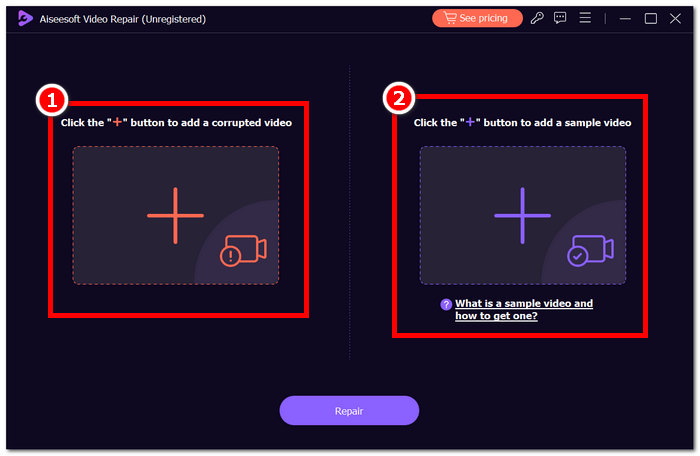
Vaihe 2. Avaa Aiseesoft Video Repair ja lisää video, jossa esiintyy virhekoodi 224003, punaisesta +-symbolista. Napsauta oikealla olevaa violettia +-symbolia lisätäksesi esimerkkivideosi.
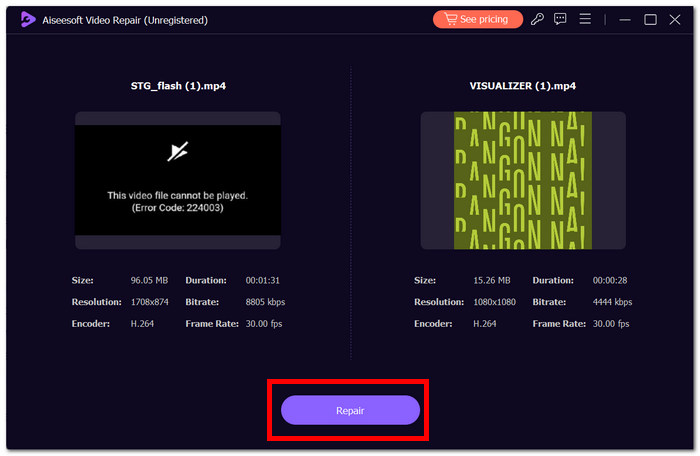
Vaihe 3. Napsauta Repair (Korjaa), jolloin ohjelmisto analysoi ja korjaa videon.
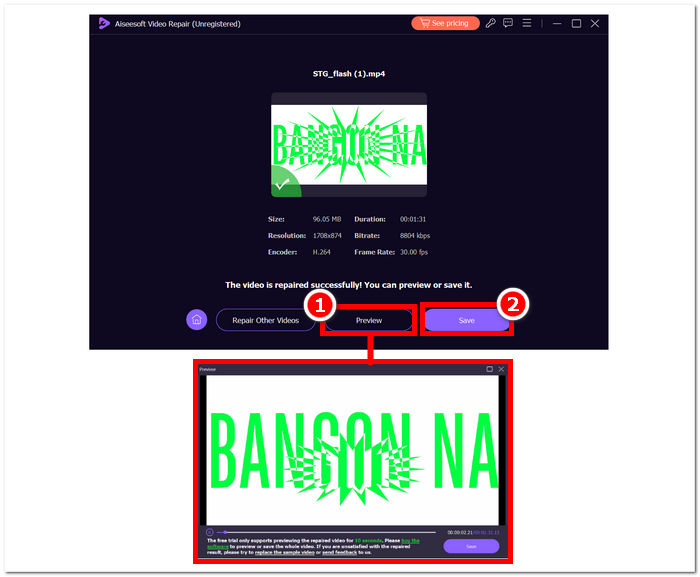
Vaihe 4. Korjauksen jälkeen napsauta Preview (Esikatselu) tarkistaaksesi tuloksen. Napsauta sitten Save (Tallenna), jotta korjattu video ladataan, ja avaa se mediasoittimellasi tarkistaaksesi, onko virhe 224003 poistunut.
Lisävinkkejä:
◆ Pidä alkuperäisestä videotiedostosta varmuuskopio ennen kuin yrität korjata mitään.
◆ Varmista, että käytät Aiseesoft Video Repairin uusinta versiota optimaalisen suorituskyvyn saavuttamiseksi.
Seuraamalla ahkerasti näitä vaiheittaisia ohjeita voit käyttää Aiseesoft Video Repairia tehokkaasti korjaamaan ja poistamaan virheen 224003 palauttaen videotiedostosi toimivaan ja nautinnolliseen tilaan. Muista tallentaa korjattu video haluamaasi paikkaan ja nauttia keskeytymättömästä katselusta ilman virheen 224003 aiheuttamaa turhautumista. Jos kohtaat haasteita prosessin aikana, tutustu Aiseesoft Video Repair -dokumentaatioon tai pyydä apua heidän tukiresursseistaan saadaksesi lisäohjeita.
Osa 3. Usein kysyttyä virhekoodista 224003
Miksi Firefox sanoo jatkuvasti videon virhekoodin 224003?
Firefoxin videovirhe 224003 voi johtua verkkoyhteysongelmista, selaimen asetusten eroista tai yhteensopimattomuudesta videosisällön kanssa. Voit korjata tämän virheen aloittamalla tarkistamalla Internet-yhteytesi vakauden, varmistamalla, että selaimesi on ajan tasalla ja tyhjentämällä selaimesi välimuistin ja evästeet. Lisäksi laajennusten tilapäinen poistaminen selaimesta voi auttaa paikantamaan ja ratkaisemaan yhteensopivuusristiriitoja, mikä saattaa poistaa virheen 224003 esiintymisen videon toiston aikana.
Heikentääkö videotiedoston korjaaminen videon laatua?
Videotiedoston korjaaminen voidaan suorittaa laadusta tinkimättä, jos se suoritetaan oikein. Tämä prosessi käsittelee ensisijaisesti ongelmia, kuten tiedoston vioittumista tai muotoiluvirheitä. On erittäin tärkeää luottaa luotettuihin videonkorjaustyökaluihin ja varotoimenpiteenä luoda varmuuskopio alkuperäisestä videotiedostosta ennen korjaustoimenpiteiden aloittamista.
Voitko korjata online-videon virhekoodin?
Voit korjata online-videon virhekoodin, kuten 224003, päivittämällä sivun, tarkistamalla internetyhteytesi ja päivittämällä selaimesi. Jos ongelma jatkuu, kokeile toista selainta yhteensopivuuden varmistamiseksi. Jos mikään muu epäonnistuu, ota yhteyttä alustan tukeen tai yhteisön foorumeihin saadaksesi apua virheen ratkaisemisessa ja saumattoman videotoiston palauttamisessa.
Johtopäätös
Error Code 224003 voi olla turhauttava, mutta oikeiden tietojen ja vianetsintätoimien avulla siitä on mahdollista selvitä. Tunnistamalla ja korjaamalla mahdolliset syyt, kuten verkko-ongelmat, selaimen yhteensopivuus ja vanhentunut ohjelmisto, voit helposti korjata virheen ja palauttaa häiriöttömän digitaalisen käyttökokemuksen. Jos kohtaat virhekoodin 224003 uudelleen, tutustu oppaaseemme saadaksesi vaiheittaiset ratkaisut. Näiden oivallusten avulla tekniikkaan liittyvät turhautumiset jäävät historiaan, ja voit nauttia keskeytymättömistä digitaalisista toiminnoista vaivattomasti.
-
 Mikä on 0xc10100bf -virhe videossa ja kuinka korjaan sen
 Eikö videosi toistu virheen 0xc10100bf vuoksi, ja etsit tapoja korjata se? Tässä artikkelissa opit, mikä se on ja kuinka korjata se.
-
 Nopeat ratkaisut videon toiston epäonnistumisen 150 korjaamiseen
 Oletko koskaan kohdannut turhauttavaa kyvyttömyyttä toistaa videovirhettä 150 videon katselukokemuksesi aikana? Älä huoli, sillä olemme neuvoneet sinua korjaamaan sen.
-
 [Yksityiskohtainen opas] Kuinka korjata Google Drive -videota, joka ei toistu tietokoneella
 Google Driven videoita ei voi toistaa virheellä "Tämän videon toistamisessa oli ongelma". Se voi johtua itse Google Drivesta tai kromi-ongelmista. Tässä artikkelissa esitellään yksityiskohtaisesti 6 ratkaisua.
