


 Video Converter Ultimate
 Näytön tallennin
 Videon korjaus
 Suojattu lataus
7 parasta tapaa muuntaa MTS AVI: ksi
Kun haluat siirtää videotiedoston HD-videokamerasta tietokoneeseen, oletko koskaan tavannut, että tiedostoja ei voida avata tai toistaa useimmissa mediasoittimissa? Tämä johtuu siitä, että näiden videoiden muoto on MTS, joka ei ole yhteensopiva useimpien soittimien ja videonmuokkaussovellusten kanssa.
Kun haluat toistaa tai muokata MTS-tiedostoja muilla alustoilla tai kannettavissa laitteissa, sinun on muunnettava MTS AVI: ksi tai muiksi tuetuiksi muodoiksi. Tässä viestissä jaamme sinulle 7 ilmaista tapaa auttaa MTS-tiedostojen muuntamisessa AVI: ksi. Joten voit toistaa tai muokata videotiedostojasi eri alustoilla haluamallasi tavalla.

Osa 1: Mikä on MTS?
MTS on Advanced Video Codec High Definition tai AVCHD -tiedostotunniste. Sitä käytetään usein videomuotona teräväpiirtovideoille. MTS-muoto tukee sekä 1080i: tä että 720p: tä suhteellisen pienessä koossa ja on yhteensopiva Blu-Ray-levymuodon kanssa. MTS-tiedostot voidaan kuitenkin avata ja muokata vain Panasonic- ja Sony HD -videokameroilla.
Osa 2. Muunna MTS AVI: ksi Windowsissa parhaalla ilmaisella MTS Converterilla
MTS-muoto ei ole useimpien mediasoittimien laajasti tukema formaatti. Jotta voisit toistaa MTS‑tiedostojasi useammilla soittimilla ja alustoilla, sinun täytyy muuntaa ne AVI‑muotoon. Tässä on paras MTS–AVI‑muunnin – Free MTS Converter. Tällä tehokkaalla MTS‑muuntimella voit ilmaiseksi muuntaa MTS‑videot AVI‑muotoon korkealla laadulla ja nopeasti.
Ilmainen MTS-muunnin voi muuntaa MTS-videot suosituiksi AVI-videoiksi toistettaviksi kannettavissa laitteissa. Ohjelma tukee myös MTS-videoiden muuntamista sekunneissa MP3: ksi korkealaatuisen musiikin nauttimiseksi. Lisäksi sen avulla voit tehdä erämuunnoksen paljon odottamiseen.
Ilmainen latausWindows 7 tai uudempiTurvallinen lataus
Ilmainen latausMacOS 10.7 tai uudempiTurvallinen lataus
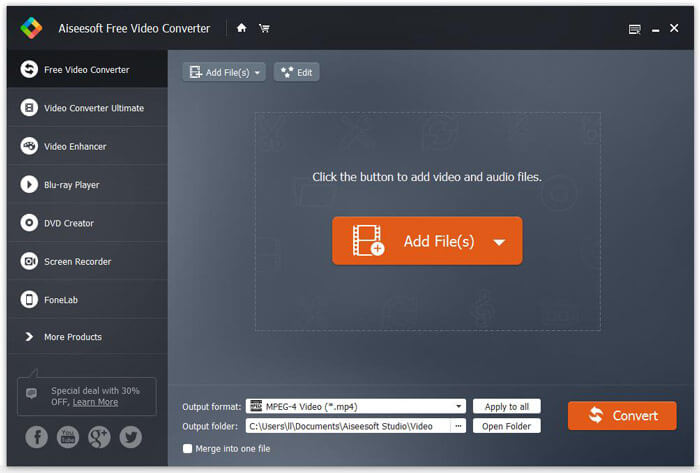
Vaihe 1. Napsauta yllä olevaa latauspainiketta ladataksesi ohjelmiston nopeasti. Asenna ja käynnistä sitten tämä Free MTS Converter Windows‑tietokoneellasi. Napsauta valikkorivillä Add File ‑painiketta ladataksesi MTS‑tiedostot.
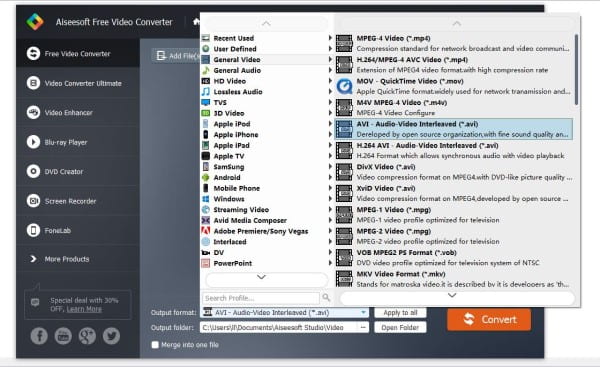
Vaihe 2. Napsauta Profile ja valitse AVI tulostusmuodoksi. Valitse sitten Destination‑kohdan vierestä Browse asettaaksesi uuden kohdekansion. Lopuksi napsauta Convert‑painiketta muuntaaksesi MTS‑tiedostot AVI‑muotoon.
Osa 3. Muunna MTS AVI: ksi Macissa ilmaisilla MTS: llä AVI-muuntimille
Käsijarru
HandBrake on ilmainen ja tehokas videomuunnin. Se on saatavana Windowsille, macOS: lle. Sen avulla käyttäjät voivat muuntaa MTS-tiedostot AVI: ksi. Ei ole väliä haluat muuntaa MTS-videot AVI-muotoon tai haluat muokata videoita, HandBrake voi auttaa sinua paljon. Voit tehdä muunnoksen seuraamalla seuraavia vaiheita.
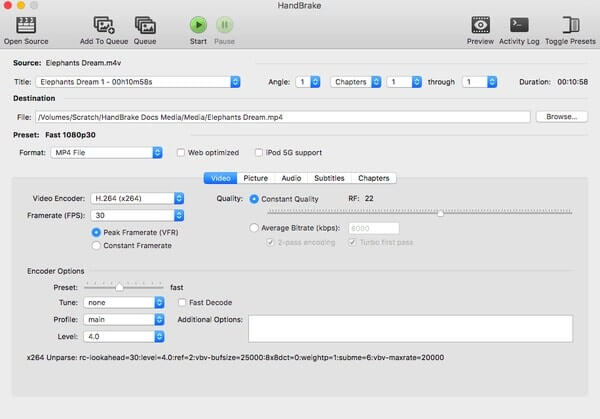
Vaihe 1. Lataa ja asenna HandBrake ilmaiseksi Macillesi. Käynnistä ohjelma ja napsauta Open Source vasemmassa yläkulmassa. Sen jälkeen voit valita paikallisesta kansiosta, minkä MTS‑videon haluat tuoda.
Vaihe 2. Valitse pudotusvalikosta Format vaihtoehto AVI. Se löytyy Preset-kategoriasta. Myöhemmin voit säätää videon ulostulon laatua, kuvanopeutta ja muita asetuksia.
Kun olet varmistanut nämä asetukset, napsauta Start muuntaaksesi MTS‑videon AVI‑muotoon ilmaiseksi.
VLC-mediasoitin
VLC Media Player on monipuolinen mediatiedostojen toisto-ohjelmisto, joka voi toistaa erilaisia video- ja äänitiedostoja, kuten MP4, MP3 jne. ja enemmän helposti. Tämän MTS-muunnostyökalun avulla voit myös muokata tiedoston parametreja, kuten kehysnopeutta, tarkkuutta, koodekkeja ja muita. Tässä sinun on tehtävä.
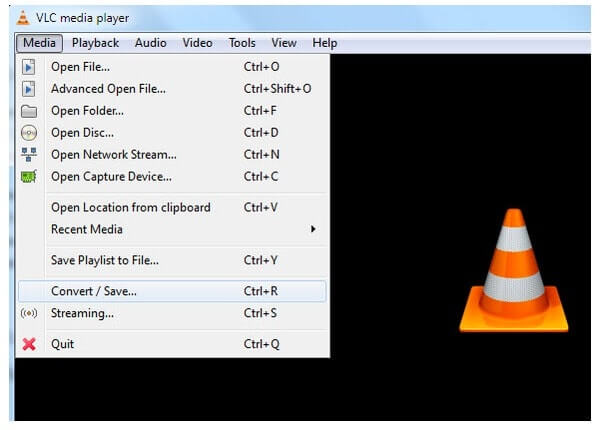
Vaihe 1. Lataa ja asenna VLC Media Player. Kaksoisnapsauta käynnistääksesi sen. Valitse vasemmasta yläkulmasta Media. Valitse pudotusvalikosta Convert/Save…. Napsauta sitten Add… tuodaksesi MTS‑videon.
Vaihe 2. Valitse ikkunan alareunasta Convert/Save. Siirry Convert‑sivulle ja etsi Profile-osio. Valitse sitten AVI kohdemuodoksi. Napsauta lopuksi Start muuntaaksesi MTS‑tiedoston AVI‑muotoon ilmaiseksi.
Osa 4. Muunna MTS-tiedostot AVI: ksi online-muuntimilla
Kun haet ilmaisia MTS-muuntimia verkossa, löydät monia ilmaisia verkkomuuntimia, jotka tukevat muuntamista MTS: stä AVI: ksi. Tämä artikkeli näyttää sinulle viisi parasta MTS-muunninta. Voit valita sinulle parhaiten sopivan.
Ilmainen online-videomuunnin
FVC Free Online Video Converter on ilmainen verkossa toimiva medianmuunnossovellus, jonka avulla voit muuntaa MTS‑videon moniin eri formaatteihin, mukaan lukien AVI, MP4, FLV, MOV jne. Se voi muuntaa mediaa ilmaiseksi, nopeasti ja verkossa. Mitään ohjelmistoa ei tarvitse asentaa.
Vaihe 1. Aloita siirtymällä osoitteeseen https://www.free-videoconverter.net/free-online-video-converter/ ja napsauta sitten Add Files to Convert ‑painiketta ladataksesi ja asentaaksesi käynnistysohjelman.
Vaihe 2. Valitse sitten tietokoneeltasi muunnettavat MTS‑tiedostot.
Vaihe 3. Valitse AVI kohdemuodoksi.
Vaihe 4. Napsauta seuraavaksi Convert‑painiketta, niin MTS‑tiedostosi muunnetaan välittömästi AVI‑muotoon ilmaiseksi.

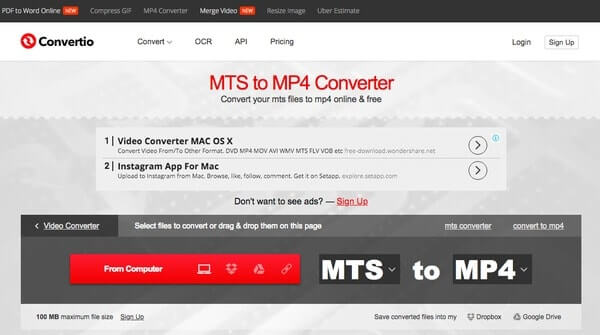
Convertio
Convertio on ilmainen MTS-AVI-verkkomuunnin, jonka avulla voit muuntaa MTS-videot enintään 100 Mt: n AVI: ksi. Ja sen muunnokset tapahtuvat pilvessä kuluttamatta tietokoneen resursseja.
Vaihe 1. Tuo MTS‑tiedosto tietokoneelta, URL-osoitteesta, Dropboxista tai Google Drivesta
Vaihe 2. Valitse AVI tulostusmuodoksi
Vaihe 3. Napsauta Convert muuntaaksesi MTS‑tiedoston AVI‑muotoon verkossa ilmaiseksi
Muunna tiedostot
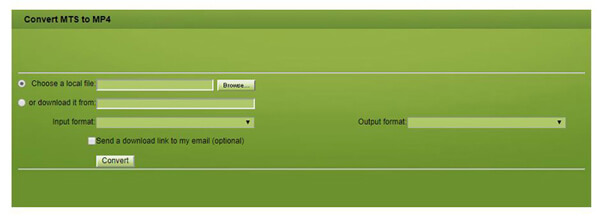
Convert.Files on online-pohjainen tiedostomuunnin, joka voi muuntaa tiedostot MTS: stä AVI: ksi helposti ja helposti. Siinä on paljon erilaisia lähdemuotoja. Eroten kahdesta edellisestä muuntimesta, Convert.Files käsittelee vain 250 Mt tiedostoja.
Vaihe 1. Siirry Convert.Files‑sivustolle. Lataa MTS‑tiedosto Convert.Filesiin
Vaihe 2. Valitse AVI tulostusmuodoksi kohdasta “Output format”
Vaihe 3. Napsauta Convert muuntaaksesi MTS‑tiedoston AVI‑muotoon verkossa ilmaiseksi
FreeCconvert
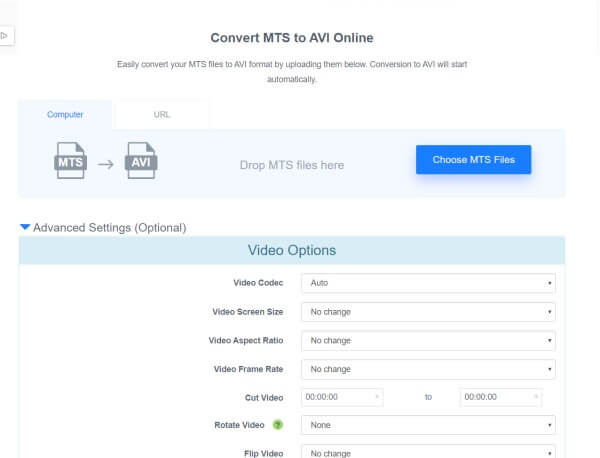
FreeCconvert on ilmainen online-tiedostojen muuntotyökalu. Voit käyttää sitä missä tahansa selaimessa tai laitteessa. Se tukee eräkonversioita. Se tarjoaa myös Lisäasetukset-osiot, jos haluat hienosäätää muunnosta.
Vaihe 1: Vedä ja pudota MTS‑tiedostosi yllä olevaan latausruutuun
Vaihe 2: Napsauta Convert‑painiketta aloittaaksesi muunnoksen
Vaihe 3: Kun muunnos on valmis, napsauta Download tai Download All (Zip‑arkisto kaikista tiedostoista) ladataksesi AVI‑tiedostosi.
Johtopäätös
Yllä olevien menetelmien avulla voit muuntaa MTS-tiedostot helposti AVI: ksi. Ilmainen MTS-muunnin on ehdottomasti ammattimainen videomuunnin. Sen avulla voit muuntaa MTS: n AVI: ksi laadukkaasti ja nopeasti. Se ansaitsee luottamuksesi. Hauskaa päivän jatkoa!
-
 Top 10 ilmaista ja maksettua HD Video Converter -ohjelmistoa (plussat ja miinukset)
 Mikä on parempi videomuoto, AVI tai MP4? Jos haluat saada yksityiskohtaisen vertailun, voit tarkistaa tämän AVI VS MP4 -artikkelin. Voit tietää AVI: n ja MP4: n erot ja yhtäläisyydet monista näkökohdista.
-
 3 ilmaista tapaa muuttaa AVI MP4: ksi Windows / Macissa
 Joskus katsellessamme elokuvaa puhelimellamme, käyttämämme soitin kysyy, ettei videota voida toistaa, koska se ei tue AVI-muotoa. Joten miten voimme nopeasti muuttaa AVI: n MP4: ksi ilman laadun heikkenemistä? Tässä on useita ilmaisia menetelmiä, joita voit kokeilla.
-
 Top 10 ilmaista ja maksettua HD Video Converter -ohjelmistoa (plussat ja miinukset)
 Lue ja vertaa saadaksesi parhaan HD-videomuunninohjelmiston 10 suosituksesta. Tässä ovat yksityiskohtaiset katsaukset jokaisesta HD-videomuuntimesta monialustalle.
