


 Video Converter Ultimate
 Näytön tallennin
 Videon korjaus
 Suojattu lataus
3 tapaa pakkaa valokuvat helposti sähköpostiin [opas]
Sähköposti on loistava alusta valokuvien liitteiden ja muiden tarvittavien tiedostojen lähettämiseen. Joillakin käyttäjillä on kuitenkin vaikeuksia lähettää suuria tiedostokuvia, koska ne hidastavat latausaikoja, epäonnistuvat toimituksissa tai ylittävät sähköpostin tarjoajien asettamat liitekokorajoitukset. Näiden ongelmien välttämiseksi on tärkeää muuttaa valokuvien kokoa ennen niiden lähettämistä.
Tässä artikkelissa esittelemme sinulle 3 menetelmää siitä, miten pakata valokuvia sähköpostia varten, jotta valokuvien liitetiedostot on helppo lähettää ja vastaanottaa tinkimättä laadusta.

Osa 1. Edut valokuvien pakkaamisesta sähköpostiin
Valokuvien pakkaamisesta on yleensä paljon etuja, mukaan lukien sähköpostin käyttö. Voit nauttia seuraavista asioista, kun muutat valokuvien kokoa sähköpostitse:
• Koska kuvien pakkaaminen tarkoittaa kuvan koon pienentämistä, voit lähettää yhteen sähköpostiin helposti useita valokuvia verrattuna pakkaamattomiin kuviin.
• Usein sähköpostipalvelut rajoittavat liitteiden enimmäiskokoa. Pakkamalla valokuvasi sähköpostia varten pysyt näissä rajoissa ja varmistat, että viestisi toimitetaan ongelmitta. Tästä on hyötyä, kun lähetät sähköpostia useille vastaanottajille tai kun liität kuvien lisäksi myös muuntyyppisiä tiedostoja.
• Kun valokuvat pakataan, ne vievät vain vähemmän tilaa, mikä auttaa hyödyntämään sähköpostin tallennuskiintiötä paremmin.
• Suuret liitetiedostot voivat joskus laukaista sähköpostipalvelimien suodattimia, mikä voi johtaa toimitusvirheisiin tai siihen, että viestit merkitään roskapostiksi. Pakkamalla valokuvasi sähköpostia varten vältät nämä ongelmat ja varmistat, että liitteet saavuttavat tarkoitetut vastaanottajat ongelmitta.
• Joissain tilanteissa käyttäjät lukevat sähköpostinsa mobiililaitteella. Pakatut kuvat on tällöin helpompi ladata ja katsella mobiililaitteilla kuin pakkaamattomat kuvat.
Osa 2. Pakkaa valokuvat sähköpostiin muuntamalla kuvamuotoa
Jos haluat pakata valokuvat sähköpostiin, ensimmäinen tapa, jota voit kokeilla, on käyttää kuvanmuunnintyökalua. Tämän avulla se muuntaa kuvasi haluamaasi muotoon, jossa muunnosprosessi myös optimoi valokuvasi haluttuun ja hallittavampaan kokoon.
FVC Free Image Converter on ilmainen muunnostyökalu, jonka avulla käyttäjät voivat muuntaa valokuvansa eri kuvamuotoihin, kuten JPG, PNG ja GIF. Jos siis lähetät sähköpostilla kuvatiedoston muodossa, joka sisältää paljon dataa ja tekee tiedostosta suuremman, voit ehdottomasti hyödyntää tätä työkalua. Lisäksi se on ihanteellinen silloin, kun haluat lähettää useita suuria tiedostoja, sillä se voi muuntaa eräkäsittelynä jopa 40 kuvaa kerralla. Näin voit käyttää tätä työkalua valokuvien pakkaamiseen sähköpostia varten:
Vaihe 1. Hae ensin selaimessasi FVC Free Image Converter päästäksesi käyttämään tätä verkossa toimivaa työkalua.
Vaihe 2. Valitse seuraavaksi haluamasi tulostiedostomuoto Convert to -valikosta. Napsauta sitten Add Images -painiketta tuodaksesi kuvat, jotka haluat muuntaa.
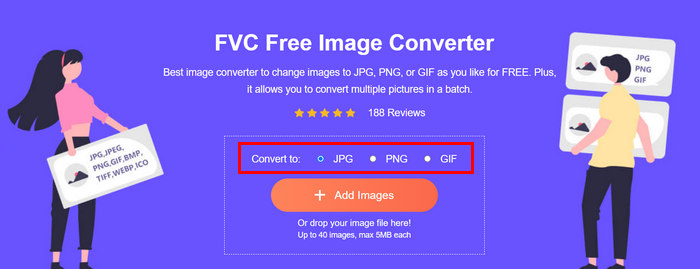
Vaihe 3. Kun kaikki on valmista, napsauta Download All -painiketta.
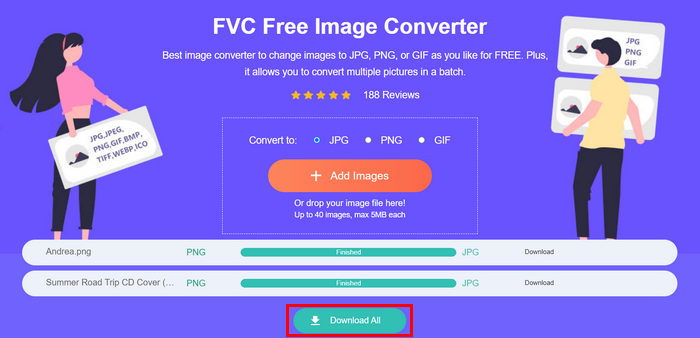 FVC Free Image Converter -työkalulla on taattu, että muunnetut valokuvasi on nyt pakattu ja niiden kokoa on pienennetty, mikä on täydellinen sähköpostikäyttöön.
 Osa 3. Kutista valokuvat sähköpostiin online-pakkaustyökalulla
FVC Free Image Compressor on ilmainen verkkopohjainen pakkaustyökalu, joka helpottaa valokuvien pakkaamista sähköpostia varten. Käyttäjien tarvitsee vain ladata tai tuoda kuvatiedostot, ja työkalu pakkaa ne automaattisesti. Jos olet huolissasi laadun heikkenemisestä, tämä työkalu hyödyntää parhaimpia optimointi- ja edistyneitä pakkausalgoritmeja. Näin varmistetaan, että kuviesi laatu säilyy, kun pakkaat niitä sähköpostia varten.
Lisäksi, jos sinun on pakattava kuva erässä, tällä työkalulla voit pakata 40 kuvaa samanaikaisesti kerralla. Lopuksi se tukee useita suosittuja kuvamuotoja, kuten JPEG, PNG, SVG ja animoituja GIF-tiedostoja.
Vaihe 1. Avaa selaimessasi työkalun virallinen verkkosivusto.
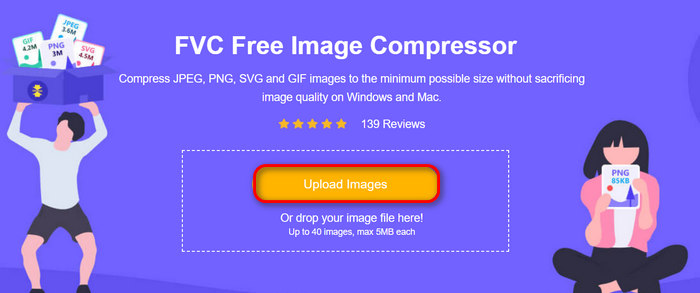
Vaihe 2. Napsauta sen jälkeen Upload Images tuodaksesi kuvat, jotka haluat pakata verkkoa varten. Huomaa, että tämä työkalu pakkaa kuvasi automaattisesti heti, kun olet valinnut ne ja klikannut Avaa.
Vaihe 3. Kuvien pakkaamisen jälkeen voit esikatsella niitä tarkistamalla niiden uuden koon pakkaamisen jälkeen. Lopuksi napsauta Download All tallentaaksesi kuvasi.
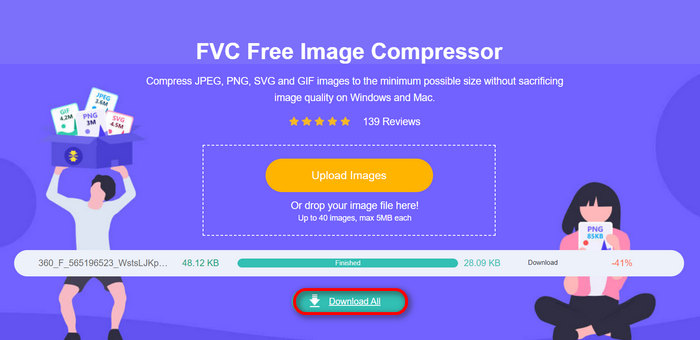
Tämä menetelmä voi todella auttaa pakkaamaan valokuvia sähköpostiin ilman monimutkaisia vaiheita ja tilausmaksuja. Lisäksi sen käyttäjäystävällinen ja intuitiivinen käyttöliittymä tekee siitä ihanteellisen työkalun kaikentasoisille käyttäjille. Joten jos haluat optimoida valokuvasi sähköpostin käyttöä varten, kokeile tätä menetelmää nyt.
Osa 4. Muuta sähköpostin valokuvien koko määritettyyn kokoon
Jos haluat muuttaa sähköpostin valokuvien koon tiettyyn kokoon, voit kokeilla IMGonline-työkalua. Tämän kuvanpakkaustyökalun avulla voit muuttaa kuvan kokoa haluamaasi kokoon. Voit tehdä sen seuraavasti:
Vaihe 1. Napsauta heidän verkkosivustollaan Choose File -painiketta lisätäksesi kuvan, jonka haluat pakata.

Vaihe 2. Määritä sitten JPEG-tiedoston pakkausasetukset. Syötä haluamasi koko kilotavuina (KB) tai megatavuina (MB) valintasi mukaan.

Vaihe 3. Valitse Size Reducing in Megapixel -valikosta, kuinka paljon haluat pakata kuvaa tai miten haluat rajoittaa kuvan pakkausta.
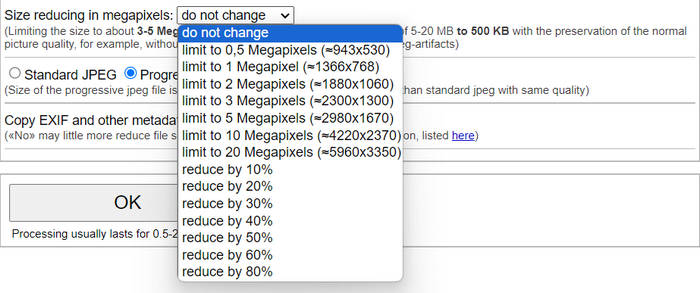
Vaihe 4. Valitse sen jälkeen Standard JPG tai Progressive JPG.

Vaihe 5. Kun olet valmis, napsauta OK-painiketta.
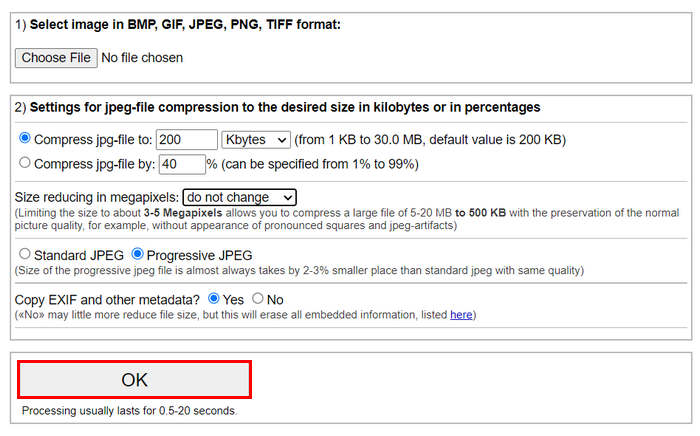
Kun valitset tavallisen JPG:n ja progressiivisen JPG:n välillä, muista, että progressiivisen jpeg-tiedoston koko on aina 2-3% pienempi paikka kuin samanlaatuinen tavallinen jpeg.
Osa 5. Usein kysytyt kysymykset valokuvien pakkaamisesta sähköpostitse
Mihin kokoon minun pitäisi muuttaa sähköpostikuvieni kokoa?
Mitä tulee ihanteelliseen kokoon kuvien lähettämiseen sähköpostitse, vaikka kuvien kokoa ei ole rajoitettu, yleensä suositellaan kuvien kokoa enintään 1024x768 pikseliin. Lisäksi kuvien koon pitäminen alle 1 megatavussa auttaa välttämään liiterajoituksiin liittyviä ongelmia ja helpottaa vastaanottajien lataamista ja katselemista.
Kuinka pakata kuvia Gmailia varten?
Kuvien pakkaaminen Gmailia varten onnistuu useilla eri tavoilla. Yksi helpoimmista on käyttää verkkopohjaisia pakkaustyökaluja, kuten FVC ilmaista kuvanpakkaustyökalua. Sen käyttöön riittää, että lataat kuvasi työkaluun, ja se pakkaa ne automaattisesti.
Mikä kuvatyyppi sopii parhaiten sähköpostiin?
Parhaat kuvamuodot sähköposteihin ovat JPEG ja PNG. JPEG on laajasti käytössä sen hyvän pakkaussuhteen ja tiedostokoon sekä laadun tasapainon vuoksi, mikä tekee siitä ihanteellisen valokuville ja monivärisille kuville. PNG:tä suositaan kuville, jotka vaativat läpinäkyvyyttä tai sisältävät tekstiä, logoja tai grafiikkaa, joissa on terävät reunat, koska se säilyttää näissä elementeissä korkeamman laadun – tiedostokoko voi tosin olla suurempi kuin JPEG:llä.
Johtopäätös
On erittäin tärkeää osata pakata valokuvia sähköpostia varten hitaiden lähetysaikojen, epäonnistuneiden toimitusten ja liiterajoitusten välttämiseksi. Noudattamalla tässä artikkelissa perusteellisesti esitettyjä menetelmiä varmistat, että valokuvien liitetiedostot ovat hallittavia ja ne on nopea lähettää ja vastaanottaa.
Mitä sinä odotat? Aloita sähköpostiliitteiden optimointi tänään näillä kolmella helpolla tavalla.
-
 Liian pakattu valokuva: Näin voit korjata ne helposti
 Mietitkö, mitä tehdä, kun kuvasi on liian pakattu? Lue tämä artikkeli ja opi, miksi tämä kuvaongelma ilmenee, ja opi kaksi tapaa korjata ongelmat.
-
 Muuta kuvan koko 100 kt: 3 parasta tapaa tehokkaaseen pakkaamiseen
 Etsitkö työkalua, jonka avulla voit muuttaa kuvan koon 100 kt? Lue tämä artikkeli ja opi kolme tapaa, joilla voit pienentää kuvat haluamaasi tiedostokokoon.
-
 Kuvien pakkaaminen Wordissa [Windows ja Mac]
 Mietitkö, kuinka voit hyödyntää Wordia kuvien pakkaamiseen? Tämä opas opettaa sinulle tapoja pakata kuvia Wordissa saumattoman pakkaamisen varmistamiseksi.
