


 Video Converter Ultimate
 Näytön tallennin
 Videon korjaus
 Suojattu lataus
4 hyödyllistä vinkkiä korjaamaan VLC-soitin ei toista MKV: tä
MKV (Matroska-videotiedosto) on ilmainen ja avoin multimedian tiedostomuoto. Monet usein käytetyt soittimet, kuten Windows Media Player ja QuickTime Player, eivät kuitenkaan tue sitä. Siksi saatat turvautua suosittuun VLC Media Playeriin MKV-toistoa varten. Monet käyttäjät ovat kuitenkin kohdanneet ongelman, että VLC-soitin ei toista MKV-tiedostoja.

MKV-toisto-ongelmat voivat olla erilaisia, esimerkiksi MKV-tiedoston ääniraidan viive, nykivä toisto, sumea kuva tai erilaiset käyttöliittymän häiriöt ja muut vastaavat. Tässä artikkelissa jaamme 4 hyödyllistä vinkkiä, joilla voit korjata ongelman, että MKV-tiedostoja ei voi toistaa VLC:llä.
Osa 1. Määritä asetukset korjaamaan VLC-soitin ei toista MKV: tä
VLC on erittäin suosittu mediatiedostojen toistotyökalu, joka tukee useimpia digitaalisia video- ja äänimuotoja, mukaan lukien MKV, MP4, AVI, FLV, MP3, AAC, M4A, FLAC jne. Ja VCD-, audio-CD- ja DVD-levyjä.
VLC Media Player houkuttelee miljoonia käyttäjiä, koska se voi toistaa mitä tahansa mediatiedostoja. Mutta VLC-soitin ei toista MKV-tiedostoja, ongelma esiintyy ajoittain. Jos VLC-soitin vain ohittaa MKV- tai HD MKV -tiedostosi, voit korjata sen mukauttamalla asetuksia.
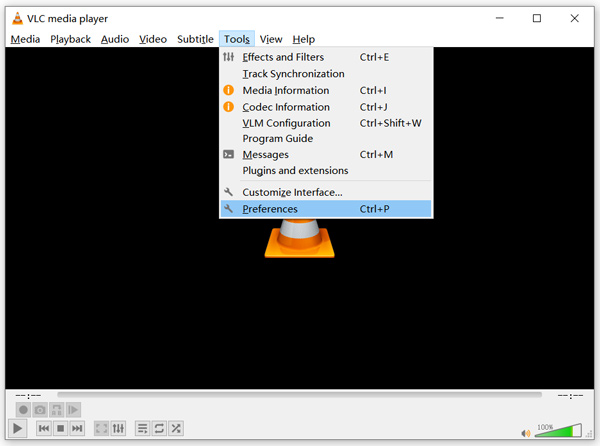
Vaihe 1. Avaa VLC Media Player ja valitse valikosta Työkalut. Valitse avautuvasta pudotusvalikosta Asetukset.
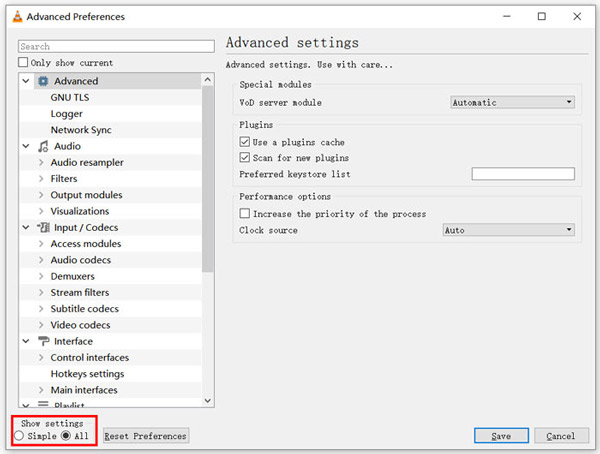
Vaihe 2. Valitse Kaikki kohdasta Näytä asetukset -valikossa valintaikkunan vasemmassa alakulmassa. Näin saat näkyviin Lisäasetukset-ikkunan.
Vaihe 3. Valitse vasemmalta Syöte/koodekit-osio ja etsi oikealta Tiedoston välimuisti (ms) -vaihtoehto. Saatat joutua vierittämään alaspäin löytääksesi sen.
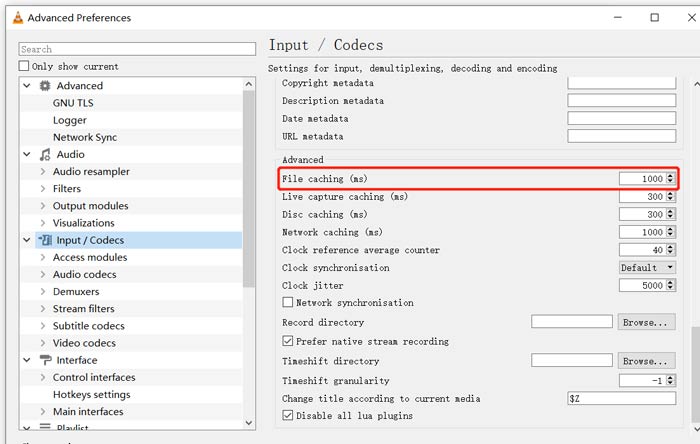
Vaihe 4. Aseta tiedoston välimuistin arvoksi 1000 ja napsauta sitten Tallenna-painiketta vahvistaaksesi toiminnon. Tämän jälkeen käynnistä VLC uudelleen ja toista MKV-tiedosto uudestaan.
Osa 2. Päivitä tai asenna VLC uudelleen korjaamaan soitin ei toista MKV: tä
Jos VLC-soitin ei toista MKV: tä, ongelma on edelleen olemassa, voit päivittää sen uusimpaan versioon. Sinun pitäisi tietää, että uusi versio korjaa aina monet vanhojen versioiden virheet. Voit päivittää VLC Media Playerin noudattamalla seuraavia vaiheita.
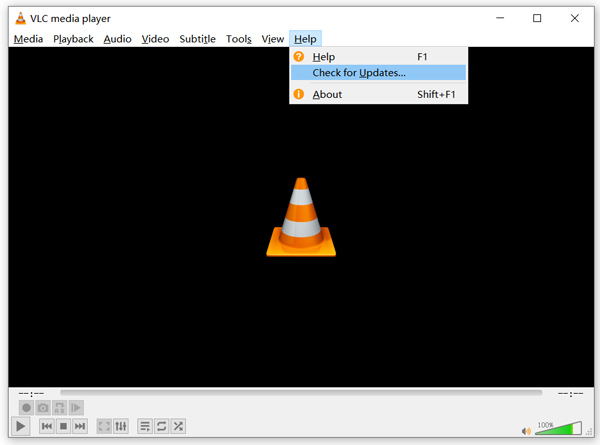
Avaa VLC ja napsauta Ohje-valikkoa. Valitse pudotusvalikosta Tarkista päivitykset. VLC alkaa tarkistaa, onko saatavilla uudempaa versiota. Voit sitten ohjeiden mukaan päivittää VLC:n uusimpaan versioon.
Voit myös poistaa VLC:n kokonaan tietokoneeltasi ja siirtyä sitten sen viralliselle sivustolle, VideoLAN, asentamaan oikean version. Kun uusi VLC Media Player on asennettu, voit toistaa MKV-tiedostosi ja tarkistaa, toimiiko toisto normaalisti.
Osa 3. Ota ääni käyttöön korjata VLC-soitin, josta ei kuulu ääntä MKV-toiston aikana
Jos VLC Media Player pystyy toistamaan MKV-tiedostoa, mutta ei ääntä, tarkista, ovatko sen ääniasetukset oikein.
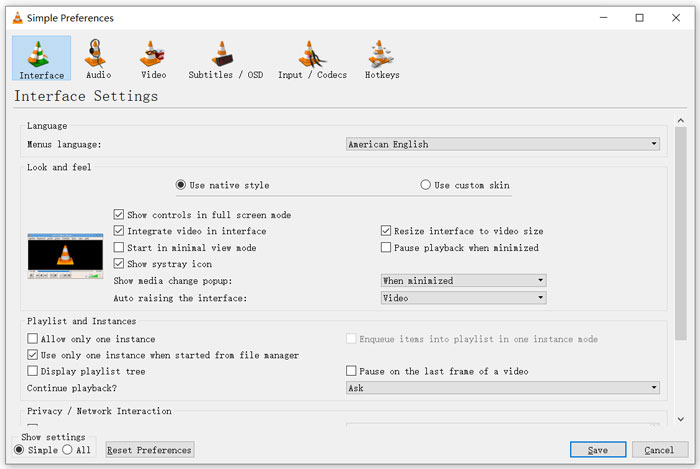
Vaihe 1. Valitse VLC:n valikkopalkista Työkalut. Pudotusvalikosta valitse Asetukset. Tämän jälkeen siirryt Yksinkertaiset asetukset -ikkunaan.
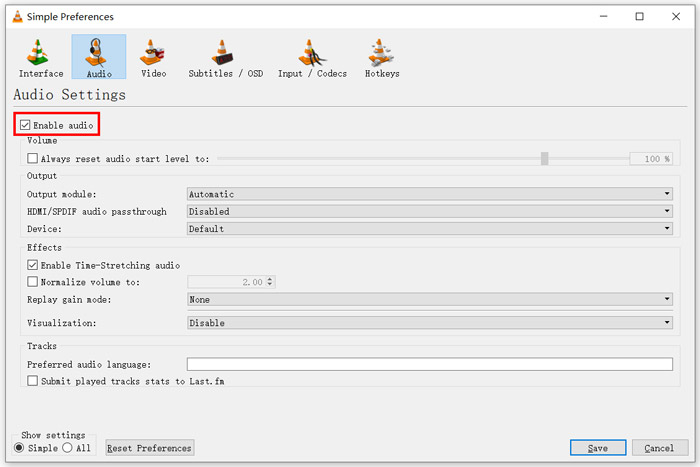
Vaihe 2. Napsauta Ääni-välilehteä ja ruksaa Ota ääni käyttöön -valinta. Tässä vaiheessa voit myös mukauttaa asetuksia Tulostemoduuli, HDMI/SPDIF-ääniläpivienti ja Laite tarpeidesi mukaan. Napsauta Tallenna-painiketta tallentaaksesi muutokset.
Nyt palaat VLC:n pääikkunaan. Voit napsauttaa Media ja sitten Avaa tiedosto toistaaksesi MKV-tiedoston.
Osa 4. Valitse vaihtoehto VLC Player toistaa MKV-tiedostoja
Kun haluat katsoa MKV-elokuvia, voit myös valita toisen soittimen VLC:n sijaan. Voit kokeilla suosittua Free Online Video Player -soitinta. Käytätpä sitten Windows 10/8/7 -tietokonetta tai Macia, voit luottaa siihen, että se toistaa MKV-tiedostot korkealla laadulla.
Tämä ilmainen online-soitin pystyy toistamaan 4K, 1080p / 720p HD, SD-videoita, 3D-videoita ja äänitiedostoja sujuvasti. MKV: n lisäksi se tukee myös monia muita formaatteja, kuten MP4, MOV, FLV, AVI, MPEG, WMV, WMA, AAC, MP3 ja paljon muuta.
Vaihe 1. Kun haluat katsella MKV-tiedostoja, siirry tälle Free Online Video Player -sivustolle. Se on yhteensopiva kaikkien yleisten verkkoselainten, kuten Chromen, IEn, Firefoxin ja Safarin kanssa. Napsauta Toista nyt -painiketta asentaaksesi nopeasti pienen käynnistysohjelman MKV-toistoa varten.
Vaihe 2. Kun asennus on valmis, tämä ilmainen online-MKV-soitin käynnistyy automaattisesti. Napsauta Avaa tiedosto -painiketta tuodaksesi MKV-tiedostosi. Voit myös napsauttaa Avaa levy katsoaksesi DVD-elokuvan.
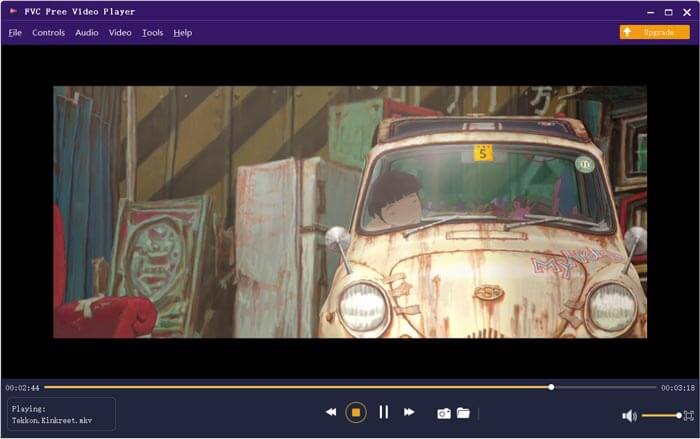
MKV-videosi alkaa toistua automaattisesti tämän jälkeen. Saat täydellisen hallinnan MKV-toistoon. Verrattuna VLC Media Playeriin se tarjoaa helpomman tavan nauttia MKV-tiedostoista. Tämä ilmainen online-MKV-soitin tukee sekä DTS-HD- että Dolby TrueHD -äänimuotoja varmistaakseen erinomaisen äänielämyksen.
Osa 5. VLC Playerin usein kysytyt kysymykset eivät toista MKV: tä
Toistaako älytelevisio MKV-tiedostoja?
Joo. Monet älytelevisiot, kuten Sony ja Samsung, tukevat MKV-tiedostoja. Voit toistaa MKV: täsi ulkoisen kiintolevyn tai UBS-laitteen kautta
Kuinka toistaa DVD: tä VLC Media Playerilla?
Kun haluat toistaa DVD-elokuvaa VLC: llä, aseta ensin DVD-levy tietokoneesi levyasemaan. Avaa VLC, napsauta valikkopalkissa Media ja valitse sitten Avaa levy. Selaa ja lataa tämä DVD-elokuva VLC: hen ja toista se.
Kuinka poistaa laitteistokiihdytyksen dekoodaus käytöstä VLC: ssä?
Jos haluat poistaa laitteistokiihdytyksen dekoodauksen käytöstä VLC Media Playerissa, siirry Työkalut-valikon Asetukset-kohtaan. Valitse Input / Codecs -luokka ja sitten Codecs. Etsi laitteistokiihdytetty dekoodausvaihtoehto ja poista se käytöstä siellä.
Johtopäätös
Kun kohtaat ongelman, että VLC-soitin ei toista MKV-tiedostoja, voit suoraan käyttää jotakin toista soitinta, kuten suositeltua Free Online Video Player -soitinta, katsoaksesi MKV-tiedostojasi. Voit myös päivittää VLC Media Playerin tai mukauttaa sen erilaisia asetuksia ongelman korjaamiseksi.
-
 Vapaa ja ammattimainen tapa muuntaa MKV MOV: ksi
 Kuinka muuntaa MKV MOV: ksi Macissa? Voiko iMovie lukea MKV: tä? Mitä MOV-muoto tarkoittaa? Tämä viesti kertoo 2 yksinkertaista tapaa auttaa muuntaa MKV MOV: ksi ilmaisilla online- ja ammattimaisilla videomuuntimilla.
-
 Kuinka muuntaa M2TS MKV: ksi menettämättä laatua
 Haluatko muuntaa M2TS: n MKV: ksi säilyttäen alkuperäisen laadun? Tämä viesti näyttää ilmaisia ja online-tapoja muuttaa M2TS MKV: ksi häviöttömästi.
-
 VLC Media Player - lyhyt katsausvideosoitin ja parhaat vaihtoehdot Windowsissa ja Macissa
 Miksi ääni ei toimi VLC Media Playerissa? Jos haluat oppia lisää suositusta mediasoittimesta, voit oppia lisää katsauksesta ja parhaista vaihtoehdoista artikkelista.
