


 Video Converter Ultimate
 Näytön tallennin
 Videon korjaus
 Suojattu lataus
2 tehokasta tapaa yhdistää videoita Instagramiin
"Kuinka voin yhdistää videoita Instagramiin? Minulla oli unohtumaton syntymäpäiväjuhla ja otin sen aikana monia videoita. Nyt haluan yhdistää videoleikkeet täydelliseksi ja lähettää sen Instagramiin. Opettakaa minulle, miten se tehdään ... ”Monissa tilanteissa monet videoleikkeet odottavat yhdistämistä yhdeksi. Tällaisen tarpeen täyttämiseksi tässä artikkelissa puhutaan kahdesta tehokkaasta menetelmästä videoiden liittämiseen Instagramiin.

Osa 1: Yhdistä Instagramin videot vahingoittamatta laatua
Aluksi tarvitset sovelluksen videoiden yhdistämiseen Instagramia varten. Et halua käyttää monimutkaisia videoeditointiohjelmia, kuten Adobe Premiere Pro tai Final Cut Pro, näin yksinkertaiseen tehtävään. Video Converter Ultimate riittää sinulle mainiosti.
Se voi auttaa yhdistämään useita videoita Instagramille helposti. Käsittelynopeus ja kuvanlaatu ovat molemmat täydellisiä. Muodosta riippumatta voit käyttää tätä sovellusta liittyäksesi Instagram-videoihin ilman rajoituksia.
Avainominaisuudet:
- • Yhdistä videot Instagramiin muodosta ja tarkkuudesta riippumatta
- • Laitteistokiihdytystekniikka takaa 70 kertaa nopeamman prosessinopeuden
- • Muokkaa ja liity Instagramin videoihin poistumatta vesileimasta
- • Rajaa ja Yhdistä videot eri resoluutioilla, jotta ne olisivat saumattomia
- • Yhdistä videot rajaustoiminnolla poistaaksesi ei-toivotut segmentit
- • Sileä ja intuitiivinen käyttöliittymä sekä aloittelijoille että ammattilaisille
Ilmainen latausWindows 7 tai uudempiTurvallinen lataus
Ilmainen latausMacOS 10.7 tai uudempiTurvallinen lataus
Vaiheet videoiden yhdistämiseen Instagramia varten ilman laadun heikkenemistä
Vaihe 1. Lataa ilmaiseksi, asenna ja käynnistä Video Converter Ultimate. Napsauta Lisää tiedostoja -painiketta lisätäksesi ne videot, jotka haluat yhdistää Instagramia varten.

Vaihe 2. Pääikkunassa voit vetää tuodut videot haluamaasi järjestykseen. Ruksaa Yhdistä yhdeksi tiedostoksi -valintaruutu, jotta videoita ei muunnettaisi erikseen.
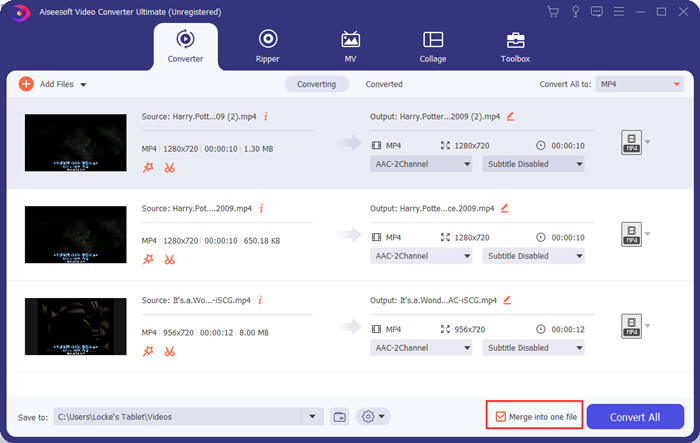
Vaihe 3. Napsauta Muunna kaikki muodosta -kehystä profiilivalikkoa varten. Sen jälkeen voit valita haluamasi muodon, tarkkuuden ja kooderin. Videoiden yhdistämiseen Instagramia varten MP4-muoto on hyvä valinta. Voit myös napsauttaa jotakin Mukautettu profiili -painikkeista mukauttaaksesi asetuksia.
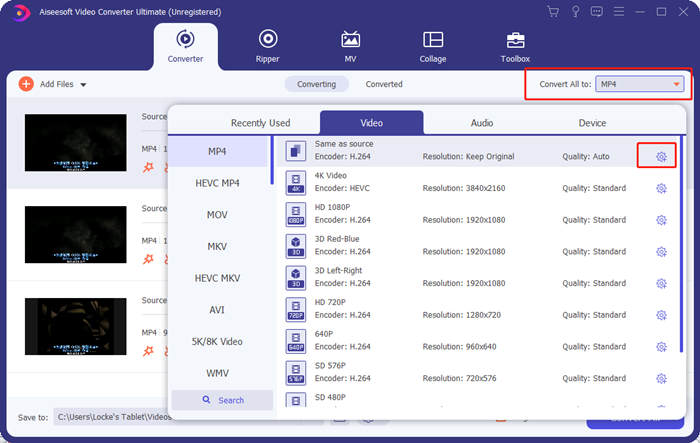
Muokkaa profiilia -ikkunassa voit mukauttaa kooderin, tarkkuuden, kuvataajuuden, bittinopeuden ja joitakin ääniasetuksia.

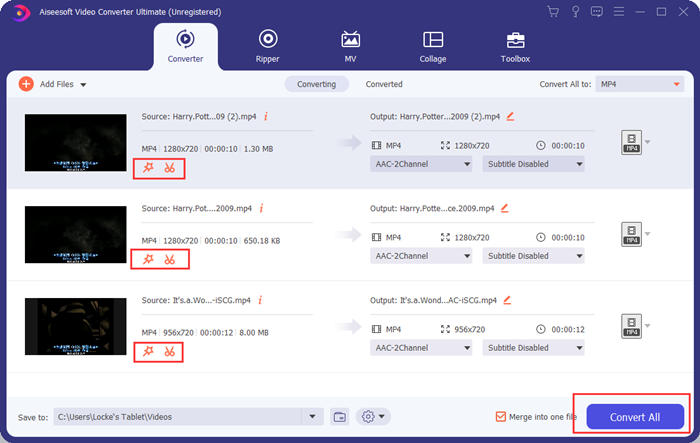
Vaihe 4. Palaa pääikkunaan ja napsauta Muunna kaikki -painiketta aloittaaksesi videoiden yhdistämisen Instagramia varten. Ennen sitä voit käyttää myös Leikkaa- ja Muokkaa-painikkeita videon trimmaamiseen, rajaamiseen, kiertämiseen ja muihin toimintoihin, joilla saat videostasi paremman näköisen.
Video Converter Ultimate on kätevä ja tehokas, mutta kukaan ei tykkää odottaa valtavan ohjelman lataamista. Emme myöskään. Joten onko mahdollista yhdistää videoita Instagramiin lataamatta ohjelmaa? Kyllä, lue lisää!
Osa 2: Yhdistä videot Instagram Online -palveluun ja ilmaiseksi
Tässä on toinen kätevä työkalu, FVC Free Online Video Merger, erinomainen verkkopohjainen työkalu videoiden yhdistämiseen Instagramia varten. Työkalu latautuu sekunnissa, ja sen jälkeen voit lähettää videosi seuraavassa sekunnissa. Säädä vain asetukset ja anna ohjelman hoitaa loput. Tärkeintä on, että tämä työkalu on täysin ilmainen käyttää.
Vaiheet videoiden yhdistämiseen Instagramia varten verkossa ja ilmaiseksi
Vaihe 1. Napsauta FVC Free Online Video Merger avataksesi sen. Työkalun verkkosivun keskellä napsauta Lataa yhdistettävät videot -painiketta. Tämän jälkeen avautuu tiedostoselainikkuna, jossa sinun tulee valita ja lähettää videot.

Vaihe 2. Kun videot on tuotu, voit säätää niiden järjestystä. Voit tehdä tämän poistamalla väärässä kohdassa olevan videon ja lisäämällä sen uudelleen oikeaan väliin.

Vaihe 3. Tämä verkkopohjainen videoyhdistin antaa sinun päättää Instagramia varten yhdistetyn videon tarkkuuden ja muodon. Voit valita Auto-vaihtoehdon säilyttääksesi alkuperäisen tarkkuuden tai valita jonkin muista viidestä tarkkuusvaihtoehdosta.
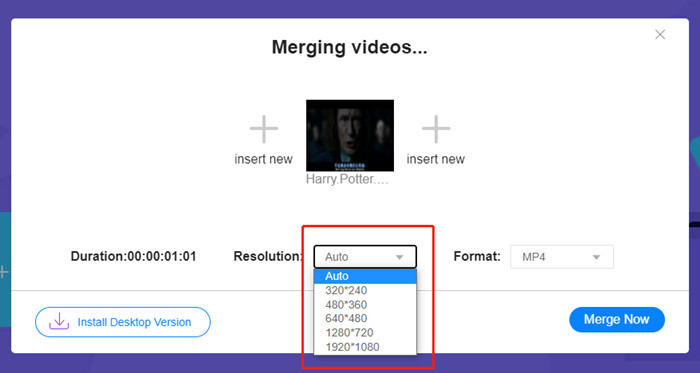
Verkkovideofuusio tarjoaa tällä hetkellä yhdeksän ulostulomuotoa, joista voit valita. MP4 voi olla paras Instagram-julkaisuusi.
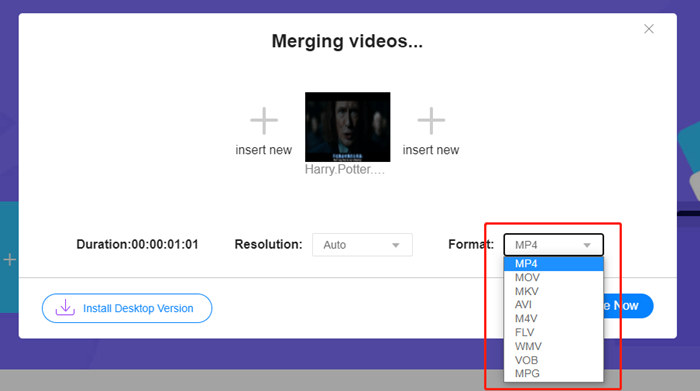
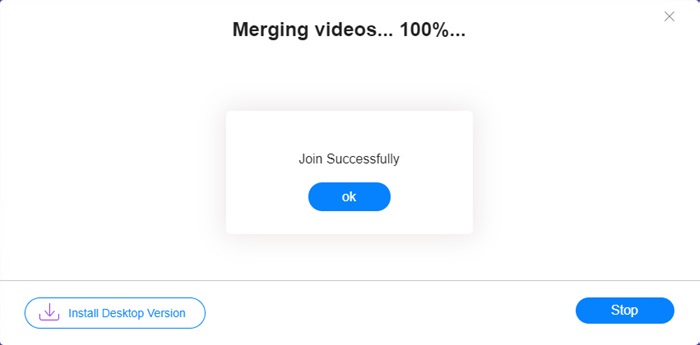
Vaihe 4. Napsauta Yhdistä nyt -painiketta ja odota, kunnes näet ilmoituksen Yhdistäminen onnistui.
Vaikka tämä online-työkalu on kätevä, se ei ole yhtä täydellinen kuin Video Converter Ultimate. Verkkotyökalussa et voi säätää videoiden järjestystä mukavasti, muuttaa kooderia tai kehysnopeutta tai muokata videoita. Lisäksi Video Converter Ultimate antaa sinulle enemmän valintoja tarkkuudessa ja muodoissa ja käsittelee videot paljon nopeammin.
Osa 3: Usein kysyttyjä kysymyksiä videoiden yhdistämisestä Instagramille
Mitkä tekniset tiedot ovat hyviä Instagram-videoille?
Kuvasuhde 9:16 olisi täydellinen. Käytä tarkemmin vain 1080 * 1920, jos se on mahdollista. Paras videoformaatti on MP4, vaikka myös muut suositut muodot hyväksytään.
Mitä tehdä, jos yhdistetty videoni on liian suuri Instagramille?
Video Converter Ultimaten pääikkunan yläreunassa on Työkalupakki, josta löydät Videokompressorin. Voit käyttää sitä videon pakkaamiseen haluttuun kokoon. Instagramia varten varmista, ettei koko ylitä 4 Gt.
Kuinka kauan yhdistetty videoni voi olla Instagramille?
Se riippuu videon lähettämispaikasta. Syötevideoiden raja on 3–1 min ja tarinoille alle 15 sekuntia. IGTV-videoihin mahtuu 60 minuuttia, mikä todennäköisesti vastaa tarpeitasi.
Johtopäätös
Tässä artikkelissa esiteltiin kaksi tehokasta tapaa yhdistää videoita Instagramia varten. Voit käyttää Video Converter Ultimatea yhdistääksesi videot Instagramiin ilman kuvanlaadun heikkenemistä sekä tehdä erilaisia säätöjä ja muokkauksia videoihin. Toinen työkalu, FVC Free Online Video Merger, on nopein ratkaisu, mutta tarjoaa vähemmän vaihtoehtoja tarkkuuksien ja tiedostomuotojen osalta. Lisäksi se ei pysty muuttamaan kooderia tai kuvataajuutta lainkaan. Jos sinulla on lopuksi minkäänlaisia vaikeuksia videoiden yhdistämisessä Instagramia varten, jätä meille kommentti ja kerro siitä.
-
 Videoiden yhdistäminen iPhonessa iMovien kanssa tai ilman
 Lue ja hanki neljä helppoa tapaa yhdistää videoita iPhoneen. Kaikki iPhone-mallit ja iOS-versiot ovat tuettuja. Voit yhdistää vähintään kaksi iPhonen videota uudeksi videoksi nopeasti.
-
 2 parasta tapaa liittyä MKV-tiedostoihin katsomaan elokuvaa jatkuvasti
 Kun lataat suosikkielokuvasi erillisillä MKV-tiedostoilla ja haluat liittyä MKV-tiedostoihin yhdessä katsellaksesi sitä jatkuvasti, voit oppia kahdesta tehokkaasta tavasta liittyä MKV-tiedostoihin tästä artikkelista.
-
 Top 6 parasta MP4-videoiden yhdistäjää yhdistämään MP4-videoita ilmaiseksi
 On olemassa monia MP4-liittimiä, jotka mahdollistavat erilaisten MP4-leikkeiden liittämisen. Tässä artikkelissa olemme valinneet joitain ilmaisia MP4-liittimiä Windows 10/8/7: lle ja Macille.
