


 Video Converter Ultimate
 Näytön tallennin
 Videon korjaus
 Suojattu lataus
Kuinka muuntaa FLV-videotiedostot AVI-muotoon PC / Macissa
Tämä opas keskittyy siihen, miten muuntaa FLV AVI:ksi tietokoneohjelmilla ja verkkosovelluksilla. FLV‑videoiden muuntamiseen on monia syitä. FLV kehitettiin videosisällön jakeluun verkossa, ei toistoon digitaalisilla laitteilla. Kun haluat katsoa FLV‑tiedostoja tietokoneella, sinun täytyy muuntaa ne toiseen videoformaattiin. Lisäksi on hyvä idea muuntaa FLV pakkaamattomaksi videoformaatiksi, jos haluat muokata videotiedostojasi.

Osa 1: Top 2 ilmaista tapaa muuntaa FLV AVI: ksi
Tapa 1: Muunna FLV AVI: ksi ilmaisella FLV Converterilla
Kun muunnetaan FLV AVI:ksi, saatat olla huolissasi useista tekijöistä, kuten lopputuloksen laadusta, käytön helppoudesta ja muusta. FVC Free FLV Converter on paras valinta. Vaikka se on ilmainen, saat käyttöösi runsaasti ammattitason toimintoja ilman suurta teknistä osaamista. Lisäksi se tarjoaa runsaasti lisätyökaluja, kuten videonmuokkauksen.
Parhaan FLV-muuntimen pääominaisuudet
- 1. Muunna FLV-videot helposti muiksi multimediamuodoiksi.
- 2. Tukee melkein kaikkia videoformaatteja, kuten AVI, MP4, MKV jne.
- 3. Eräprosessi satoja FLV-tiedostoja konversiota kohti.
Ilmainen latausWindows 7 tai uudempiTurvallinen lataus
Ilmainen latausMacOS 10.7 tai uudempiTurvallinen lataus
Kuinka muuntaa FLV AVI: ksi työpöydälle ilmaiseksi
Vaihe 1: Lisää FLV‑tiedostot
Kun olet asentanut parhaan ilmaisen FLV‑muuntimen tietokoneellesi, käynnistä se. Se on yhteensopiva sekä PC:n että Macin kanssa. Napsauta Lisää tiedosto(t) ‑valikkoa vasemmassa yläkulmassa avataksesi tiedostonvalintaikkunan. Etsi ja valitse sitten FLV‑videot tietokoneeltasi ja napsauta Avaa lisätäksesi ne.

Vaihe 2: Muokkaa videota ja aseta formaatti
Jos haluat muuttaa videotiedostojasi, valitse FLV‑tiedosto ja napsauta Muokkaa-valikkoa. Tämän jälkeen siirryt videoeditori‑ikkunaan. Seuraa näytöllä näkyviä ohjeita muokataksesi videota ja palaa sitten takaisin pääikkunaan.
Napsauta pääkäyttöliittymän alaosassa olevaa avattavaa Output format -valikkoa avataksesi profiili-valintaikkunan. Etsi sitten AVI ja valitse se Yleinen video -välilehdeltä.

Vaihe 3: Muunna FLV AVI:ksi
Napsauta kolmen pisteen kuvaketta Tulostekansio-kentän vieressä ja valitse hakemisto, johon AVI‑tiedostot tallennetaan. Lopuksi napsauta Muunna-painiketta aloittaaksesi FLV:n muuntamisen AVI:ksi välittömästi.

Tapa 2: Kuinka muuntaa FLV AVI: ksi VLC: llä
VLC on paljon enemmän kuin yksinkertainen mediasoitin. Löydät paljon hyödyllisiä ominaisuuksia, kuten videon muuntaminen. Avoimen lähdekoodin projektina VLC antaa sinun muuntaa FLV AVI: ksi ilmaiseksi. Lisäksi VLC pystyy korjaamaan vioittuneet AVI-videot.
Vaihe 1: Avaa ilmainen FLV‑muunnin. Jos sinulla ei ole VLC:tä, lataa se ilmaiseksi virallisilta verkkosivuilta.
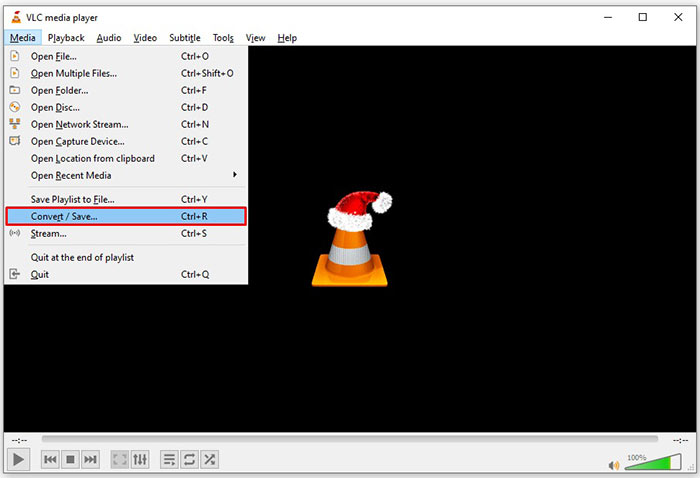
Vaihe 2: Siirry ylävalikosta Media-valikkoon ja valitse Muunna/Tallenna. Valitse Macilla Tiedosto-valikosta Convert/Stream.
Vaihe 3: Napsauta avoimen median ikkunassa Lisää-painiketta ja lisää FLV‑tiedosto, jonka haluat muuntaa.
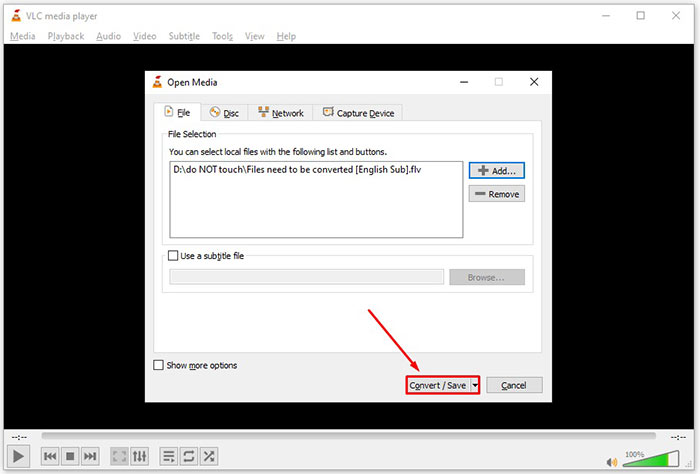
Vaihe 4: Napsauta sitten Muunna/Tallenna-painiketta siirtyäksesi seuraavaan ikkunaan.
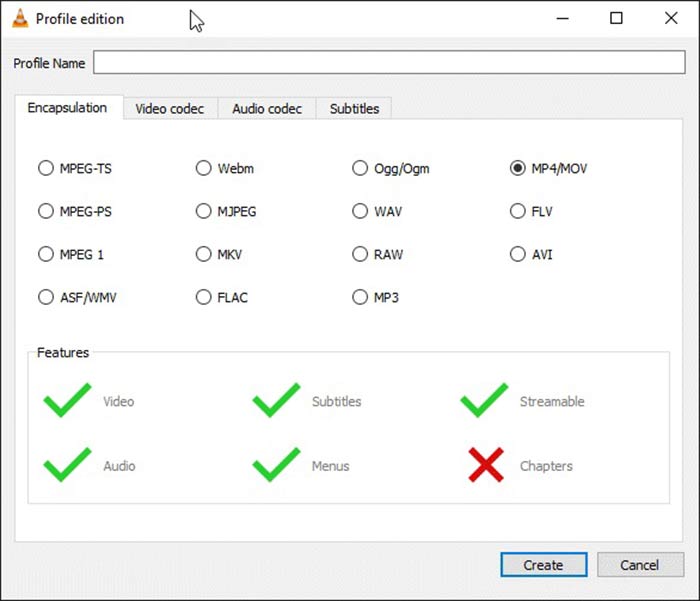
Vaihe 5: Avaa Profiili-pudotusvalikko ja valitse AVI. Jos et löydä sitä, napsauta kolmatta painiketta Profiili-kohdan vieressä. Se avaa Profiilin muokkaus -ikkunan. Valitse AVI ja kirjoita Profiilin nimi. Vahvista napsauttamalla Luo. Valitse sitten uusi profiili Profiili-luettelosta.
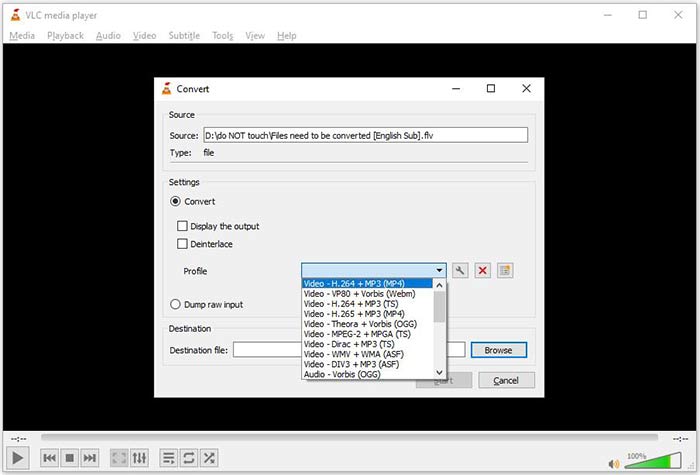
Vaihe 6: Määritä tulostekansio napsauttamalla Selaa-painiketta. Napsauta Aloita-painiketta, ja VLC muuntaa FLV‑tiedoston AVI:ksi.
Älä ohita tätä:
- • Kolme parasta tapaa muuntaa FLV MOV: ksi
- • Kuinka muuntaa FLV-videosi MP3-äänitiedostoiksi työpöydällä ja verkossa
Osa 2: Kuinka muuntaa FLV AVI Online: ksi
Joskus tarvitset FLV:n muuntamista AVI:ksi vain satunnaisesti. Lisäksi jotkut eivät halua asentaa ohjelmistoja. FVC Free Online Video Converter täyttää tarpeesi. Se toimii verkossa, mutta riittää useiden FLV‑tiedostojen muuntamiseen AVI:ksi. Toisin kuin monet muut verkkosovellukset, siinä ei ole rajoituksia tiedostokoon, vesileimojen tai muiden seikkojen suhteen.
Vaihe 1: Siirry osoitteeseen https://www.free-videoconverter.net/free-online-video-converter/ selaimella, kun tarvitset videomuunnosta. Napsauta Lisää tiedostoja muunnettavaksi ‑painiketta ja lataa käynnistysohjelma.
Lataa työpöytäversio muuntaaksesi tiedostoja erissä.
Vaihe 2: Latauksen jälkeen käynnistysohjelma avautuu automaattisesti. Napsauta vasemmassa yläkulmassa olevaa Lisää tiedosto ‑painiketta ja lähetä FLV‑tiedostot, jotka haluat muuntaa. Valitse sitten alhaalta AVI.
Jos haluat muuttaa tarkkuutta, kuvataajuutta tai muita parametreja, napsauta Hammasratas-kuvaketta avataksesi profiili‑ikkunan.
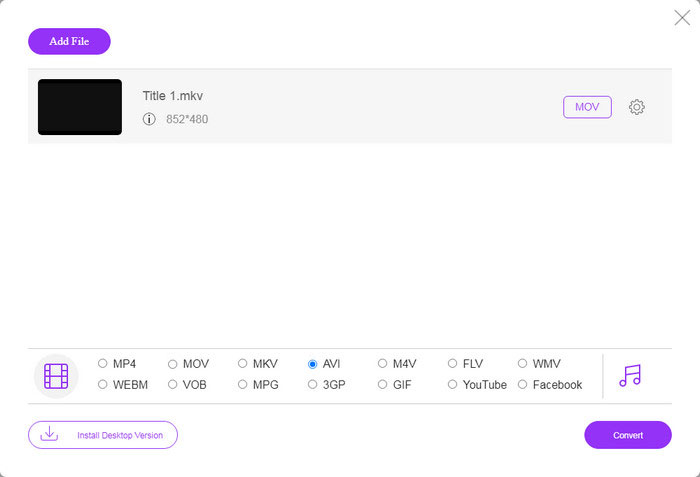
Vaihe 3: Kun napsautat Muunna-painiketta, verkkosovellus toimii toiveidesi mukaan. Lataa AVI‑videotiedostot kiintolevyllesi, kun sitä pyydetään.
Verrattuna muihin verkkovideomuuntimiin Free Online Video Converter toimii nopeasti, mutta tarvitset myös hyvän Internet-yhteyden.
FLV vs. AVI
Adobe Flash Player käytti FLV:tä videosisällön, kuten elokuvien ja TV-ohjelmien, toimittamiseen. Nykyään Adobe ei enää kehitä soitinta ja suosittelee käyttäjiä poistamaan sen asennuksen turvallisuussyistä. Voit kuitenkin käyttää FLV-muotoa monissa muissa kuin Adobe-/Macromedia-ohjelmissa.
Resource Interchange File Format (RIFF) -muotoon perustuvan AVI-muodon Microsoft esitteli vuonna 1992. Se voi tallentaa korkealaatuista videota/ääntä, koska se käyttää vähemmän pakkausta. Mutta tämä aiheuttaa myös AVI-tiedoston suuren tiedostokoon, mikä voi olla ongelma, kun tilaa on rajoitetusti.
Osa 3: UKK FLV: stä AVI: hen
Kuinka kauan minun pitäisi odottaa FLV: n muuntamista AVI: ksi?
Se riippuu tilanteestasi. Yleisesti ottaen videoiden muuntaminen työpöydälle on erittäin nopeaa. Verkkotyökalujen Internet-yhteys määrittää tehokkuuden.
Onko turvallista muuntaa FLV AVI: ksi verkossa?
Suurin osa online-FLV-muunnosohjelmista lupaa poistaa videosi muuntamisen jälkeen. Älä kuitenkaan lataa yksityisiä videoita verkossa, ellet ole varma, että verkkosovellus on turvallista käyttää 100%.
Onko AVI parempi kuin FLV?
FLV on häviöllinen videoformaatti, kun taas AVI on pakkaamaton videoformaatti. Se tarkoittaa, että FLV-tiedosto on pienempi kuin AVI samassa tilassa. AVI tarjoaa kuitenkin paremman videolaadun. FLV: tä käytetään videoiden jakamiseen verkossa, kun taas AVI on hyvä valinta videoiden muokkaamiseen.
Johtopäätös
Tässä oppaassa on jaettu kolme tapaa muuntaa FLV-videotiedostot AVI-muotoon työpöytäohjelmistolla ja verkkosovelluksella. VLC on sekä ilmainen mediasoitin että videomuunnin, vaikka sitä onkin vaikea käyttää. Lisäksi voit tehdä työn verkossa asentamatta mitään ohjelmistoja. Suosittelemme kuitenkin kokeilemaan FVC Free FLV Converteria, koska tulostuslaatu on uskomaton. Lisäksi sitä on melko helppo käyttää ja navigoida. Jos sinulla on muita kysymyksiä FLV: n AVI-muuntamisesta, jätä viesti tämän viestin alle.
-
 3 ilmaista tapaa muuntaa FLV WAV: ksi
 Kuinka voin muuntaa FLV-tiedoston? Voiko VLC muuntaa FLV:n WAV:ksi? Tämä viesti kertoo 3 ilmaista tapaa muuntaa FLV WAV:ksi ilman laadun heikkenemistä.
-
 3 ilmaista tapaa muuntaa FLV MPG: ksi
 Miten muuntaa FLV MPEGiksi? Voinko muuntaa FLV: n MPG: ksi ilmaiseksi? Tämä viesti jakaa 3 ilmaista videomuunninta, joiden avulla voit muuntaa FLV: n MPG: ksi ilman laadun heikkenemistä.
-
 3 ilmaista tapaa muuntaa FLV Xbox-pelaamista varten
 Etkö voi toistaa FLV-tiedostoja Xbox Onella tai Xbox 360: llä? Tarvitseeko muuntaa FLV Xbox-tuettuun muotoon, kuten MP4, AVI, MOV tai WMV? Tässä viestissä luetellaan 3 ilmaista FLV: stä Xbox-muuntimeen, jotta voit pelata FLV: tä Xboxilla.

