


 Video Converter Ultimate
 Näytön tallennin
 Videon korjaus
 Suojattu lataus
Kuinka muuntaa FLV-videotiedostosi 3GP-muotoon ilmaiseksi
Tässä artikkelissa näytetään parhaat tavat muuntaa FLV 3GP:ksi. Tutkimusten mukaan markkinoilla on valtava määrä erilaisia videoformaatteja. Kehittäjät ovat julkaisseet niitä eri tarkoituksiin. FLV, esimerkiksi lyhenne sanoista Flash Video, on tarkoitettu visuaalisen sisällön tallentamiseen ja toistamiseen Adobe Flash Playerilla internetissä.
3GP on toisaalta kolmannen sukupolven kumppanuushankkeen luoma multimediaformaatti kaistanleveyden ja datan käytön säästämiseksi mobiililaitteissa. Toisin sanoen sinun on parempi muuntaa FLV 3GP: ksi ja katsoa videoita luurilla.

Osa 1: Paras tapa muuntaa FLV 3GP: ksi työpöydällä
FVC Free FLV Converter on tehokas videomuunnin. Nimensä mukaisesti sen avulla voit muuntaa FLV:n 3GP:ksi täysin ilmaiseksi. Lisäksi se tarjoaa paljon hyödyllisiä toimintoja, kuten videon ja äänen muokkausta. Vieläkin tärkeämpää on, että sen käyttäjäystävällinen käyttöliittymä auttaa sinua löytämään etsimäsi nopeasti.
Parhaan ilmaisen FLV-muuntimen tärkeimmät ominaisuudet
- 1. Muunna FLV-videot mihin tahansa multimediamuodoon, kuten 3GP.
- 2. Erä käsittelee useita videotiedostoja samanaikaisesti.
- 3. Koodaa FLV-tiedostot mobiililaitteilla toistamista varten.
Ilmainen latausWindows 7 tai uudempiTurvallinen lataus
Ilmainen latausMacOS 10.7 tai uudempiTurvallinen lataus
Kuinka muuntaa FLV 3GP: ksi ilmaiseksi
Käynnistä paras ilmainen FLV-muunnin sen asentamisen jälkeen. Se on yhteensopiva Windows 10/8/7 -järjestelmien ja Mac OS X:n kanssa. Napsauta Add File(s) -painiketta avataksesi tiedostonvalintaikkunan. Valitse ne FLV-tiedostot, jotka haluat muuntaa, ja napsauta Open. Tämän jälkeen videot ilmestyvät kirjastoon.

Vaihe 2: Aseta tulostusmuoto
Napsauta alaosassa olevaa Profile format -pudotusvalikkoa ja laajenna se; sen jälkeen näet profiililuettelon. Kirjoita 3GP Search Profile -kenttään ja paina näppäimistöltäsi Enter. Valitse sitten lähtöformaatti. Jos haluat toistaa videot mobiililaitteellasi, valitse valmistaja ja sopiva malli suoraan listasta.

Vaihe 3: Muunna FLV 3GP:ksi
Määritä erityinen kansio tulostiedostojen tallentamiseen napsauttamalla alareunassa olevaa Open Folder -painiketta. Lopuksi napsauta Convert-painiketta aloittaaksesi FLV–3GP-muunnoksen. Muutaman minuutin kuluttua löydät 3GP-tiedostot kiintolevyltäsi.

Osa 2: Kuinka muuntaa FLV 3GP-verkkoon
Verkkopohjaiset videomuunnossovellukset ovat toinen suosittu tapa muuntaa FLV 3GP:ksi ilmaiseksi. Useimmilla niistä on kuitenkin erilaisia haittapuolia, kuten tiedostokokorajoitukset, vesileimat, tietoturvaongelmat ja paljon muuta. Onneksi FVC Free Online Video Converter auttaa ratkaisemaan nämä ongelmat. Se on täysin ilmainen eikä sisällä rajoituksia. Myös lähtölaatu on erinomainen.
Vaihe 1: Siirry osoitteeseen https://www.free-videoconverter.net/free-online-video-converter/ verkkoselaimella ja napsauta Add Files to Convert -painiketta ladataksesi käynnistysohjelman. Se ei vie paikallista levytilaa tietokoneeltasi.
Lataa työpöytäversio muuntaaksesi tiedostoja erissä.
Vaihe 2: Napsauta Add File -valikkoa ja lähetä FLV-tiedostot, jotka haluat muuntaa. Verkkosovelluksen avulla voit muuntaa useita videoita kerralla.
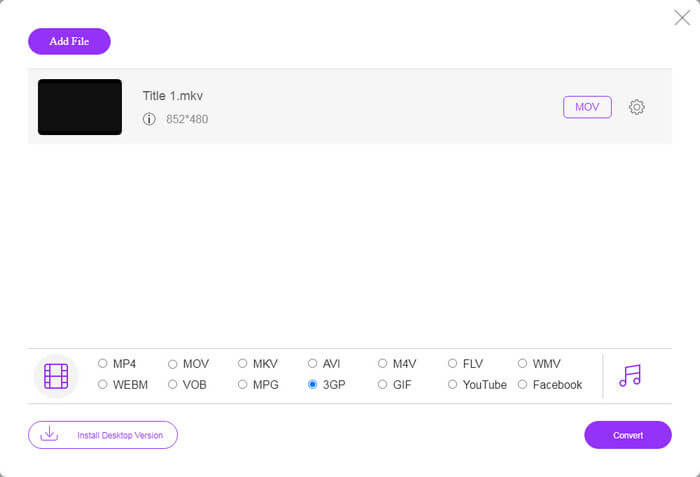
Vaihe 3: Siirry alareunaan ja valitse 3GP profiiliosasta. Napsauta Convert-painiketta aloittaaksesi FLV:n muuntamisen 3GP-muotoon verkossa. Jos yhteytesi on nopea, muunnos valmistuu muutamassa sekunnissa. Lataa sen jälkeen 3GP-tiedostot kiintolevyllesi.
Älä missaa:
Osa 3: Kuinka muuntaa FLV 3GP: ksi VLC: llä
Joskus ilmainen ohjelmisto on yhtä tehokas kuin ammattimainen ohjelmisto. Esimerkiksi VLC on suosittu avoimen lähdekoodin mediasoitin. Se pystyy muuntamaan FLV: n 3GP: ksi Windowsissa, Macissa ja Linuxissa ilmaiseksi. Tietenkin kustannus on ilmeinen, kuten vaikea käyttää. Siksi jaamme seuraavat vaiheet:
Vaihe 1: Käynnistä ilmainen FLV–3GP-muunnin tietokoneellasi. Sinun täytyy asentaa se ensin. Virallinen verkkosivusto tarjoaa turvallisen asennusohjelman.
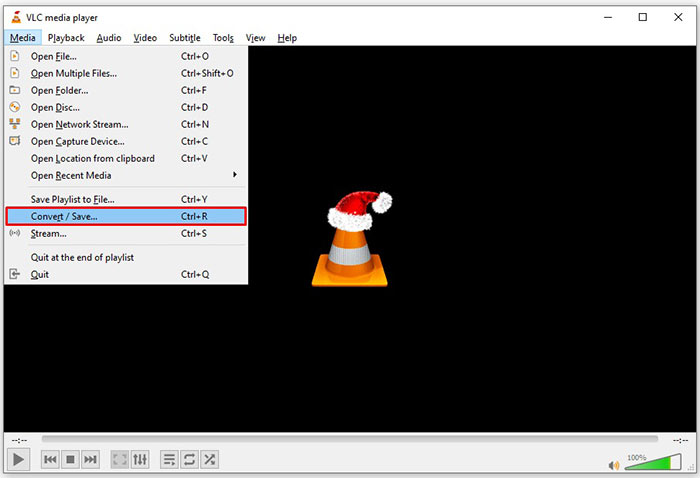
Vaihe 2: Avaa yläreunan Media-valikko ja valitse Convert/Save. Tämän jälkeen avautuu median avaamisen valintaikkuna.
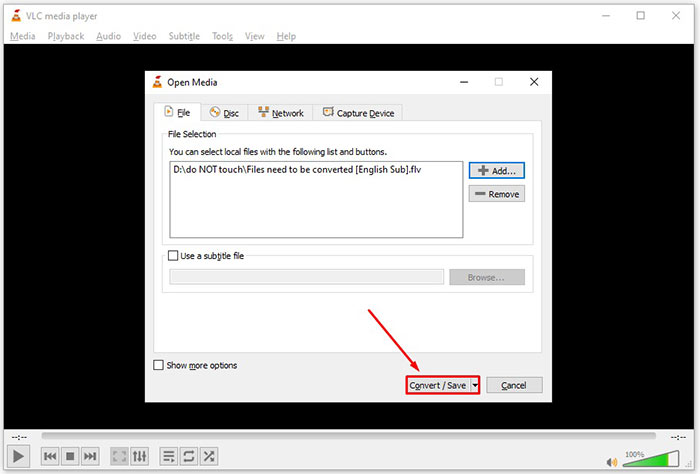
Vaihe 3: Napsauta Add-painiketta, etsi muunnettavaksi haluamasi FLV-tiedosto ja valitse se, ja napsauta sitten Open. Paina Convert/Save-painiketta siirtyäksesi seuraavaan ikkunaan.
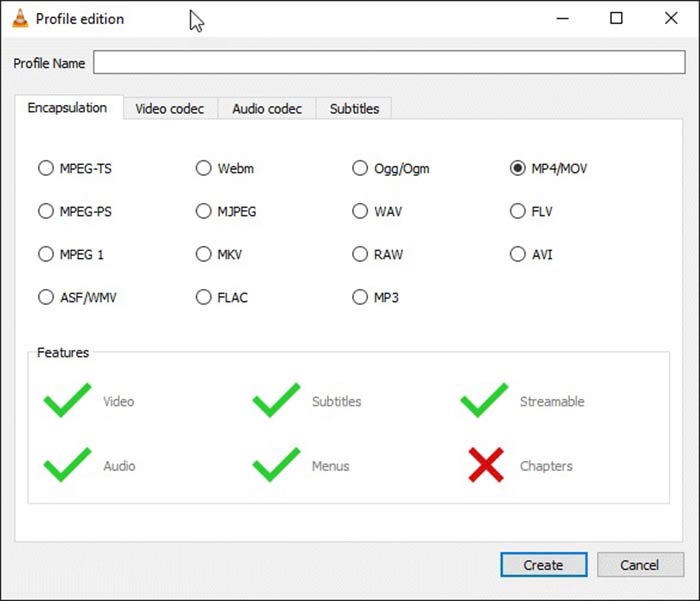
Vaihe 4: Avaa Profile-kohdan vieressä oleva pudotusvalikko ja valitse 3GP tai muu vastaava videoformaatti. Jos haluat muuttaa videokoodekkia tai muita parametreja, napsauta pudotusvalikon vieressä olevaa Profile Edit -painiketta ja lisää 3GP-asetukset.
Vaihe 5: Napsauta Browse-painiketta ja valitse Destination-kohdassa kansio, johon valmis 3GP-tiedosto tallennetaan.
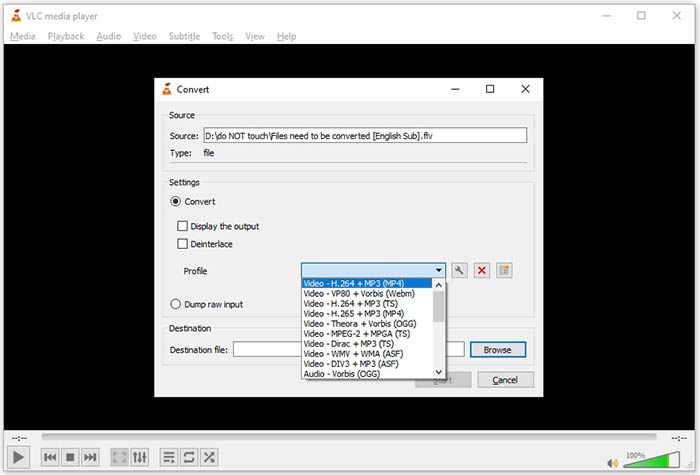
Vaihe 6: Heti kun napsautat Start-painiketta, VLC aloittaa FLV–3GP-muunnoksen.
Muuntamisen suorittaminen vie hetken, koska VLC tekee työn tallentamalla alkuperäisen videon. Se tarkoittaa, että prosessi vie niin kauan kuin FLV-videosi pituus.
FLV vs. 3GP
Adobe Flash Player käytti FLV:tä videosisällön, kuten elokuvien ja TV-ohjelmien, toimittamiseen. Nykyään Adobe ei enää kehitä soitinta ja suosittelee käyttäjiä poistamaan sen asennuksen turvallisuussyistä. Voit kuitenkin käyttää FLV-muotoa monissa muissa kuin Adobe-/Macromedia-ohjelmissa.
3rd Generation Partnership Project (3GPP) tuotti 3GP/3GPP-muodon multimediasäilömuotona. Se perustuu itse asiassa ISO-mediatiedostomuotoon. Käytämme sitä usein tallentaaksemme video-/äänivirtoja, jotka välitetään 3G-matkapuhelinten välillä ja verkossa.
Osa 4: UKK FLV: n muuntamisesta 3GP: ksi
Haittaako FLV: n muuttaminen 3GP: ksi videon laatua?
Yleisesti ottaen videon muuntaminen menettää laatua. Tehokas videonmuunninohjelma pystyy kuitenkin korjaamaan tämän ongelman ja optimoimaan videon laadun edistyneen tekniikan avulla.
Kuinka kauan FLV-videon muuntaminen kestää?
Sen määräävät useat tekijät, kuten videon pituus, käyttämäsi videonmuunnosohjelmisto, laitteiston suorituskyky ja paljon muuta. Jos käytät verkkovideomuunninta, Internet-yhteys on välttämätön elementti.
Miksi FLV ei pelaa iPhonellani?
iPhone tukee MOV: ää, joka on osa MP4-, ASF- ja AVI-tiedostoja. Siksi et voi avata FLV: tä suoraan iPhonessa. On kuitenkin tapoja katsella FLV: tä mobiililaitteilla. Jos FLV-tiedostosi isännöi Internet-palvelut, kuten Google Drive, sisäänrakennettu mediasoitin on käytettävissä. Lisäksi voit käyttää toista mediasoitinta, kuten VLC.
Johtopäätös
Tämä opas on kertonut sinulle kolme ilmaista tapaa muuntaa FLV-videotiedostot 3GP-muotoon tietokoneella tai verkossa. Jos valmistaudut katsomaan FLV-videoita mobiililaitteilla, sinun on parempi muuntaa se 3GP: ksi tai muiksi mobiiliystävällisiksi videoformaateiksi FVC Free FLV Converter -sovelluksella. Sitä ei ole vain helppo käyttää, vaan se pystyy myös suojaamaan videosi laatua. Lisää kysymyksiä? Jätä viesti alla.
-
 Kuinka muuntaa FLV-videotiedostosi MP4: ksi maksamatta penniäkään
 Tässä oppaassa jaetaan neljä ilmaista tapaa muuntaa FLV-videotiedostosi MP4-muotoon Windows 10/8/7 / XP: ssä ja Mac OS X: ssä, jotta voit nauttia videoista millä tahansa laitteella.
-
 Kuinka muuntaa FLV-videosi MP3-äänitiedostoiksi työpöydällä ja verkossa
 Kuinka muuntaa FLV MP3-tiedostoksi? Sinun tarvitsee vain lukea tämä artikkeli huolellisesti, löytää suosikkimenetelmäsi ja seurata vaiheittaista opasta saadaksesi haluamasi.
-
 Kolme parasta tapaa muuntaa FLV MOV: ksi
 Kuinka muuntaa FLV MOV: ksi? Kuinka voin muuntaa FLV:n MOV:ksi Macissa? Onko olemassa ilmaista tapaa muuntaa FLV MOV:ksi verkossa? Tämä viesti jakaa 3 FLV-MOV-muunninta FLV-tiedostojen muuttamiseksi MOV-muotoon.

