


 Video Converter Ultimate
 Näytön tallennin
 Videon korjaus
 Suojattu lataus
Kuinka muuntaa FLV-videotiedostosi 3G2-muotoon työpöydällä ja verkossa
It is said that technology changes life and make our daily life and work easier. However, every coin has two sides, so does technology. The digital video, for example, gives us the chance to access entertainment and information anywhere and anytime. The problem is video format. According to a recent survey, there are over a hundred video formats. This guide focus on how to help you convert FLV to 3G2 or 3GP on computer and online for free.

Osa 1: Kuinka muuntaa FLV 3G2: ksi PC / Mac-tietokoneella
Tapa 1: Muunna FLV 3G2: ksi ilmaisella FLV Converterilla
There are only limited video converters support 3G2 format. FVC Free FLV Converter is one of them. Moreover, it can meet your need without paying any penny. If you have a lot of FLV files, it can process them at the same time quickly.
Main Features of the Best FLV to 3G2 Converter
- 1. Muunna FLV 3G2: ksi ilman laadun heikkenemistä.
- 2. Eräajo useita FLV-tiedostoja monisäikeisellä tekniikalla.
- 3. Tarjoa laaja valikoima bonustyökaluja, kuten videon muokkaus.
Ilmainen latausWindows 7 tai uudempiTurvallinen lataus
Ilmainen latausMacOS 10.7 tai uudempiTurvallinen lataus
How to Convert FLV to 3G2 in Batch for Free
Vaihe 1: Lisää FLV-tiedostoja
When you need to convert FLV to 3G2, install the best free video converter on your computer and launch it. Click the Add File(s) button, find all FLV files that you want to converter, and open them.

Vaihe 2: Valitse tulostusmuoto
Go to the bottom area after video loading. Click and expand the Output format option, seek for 3G2 with the search bar, and select it on the right side. Click the Open Folder button and choose a specific folder to save the output.

Vaihe 3: Muunna FLV 3G2: ksi
Finally, click on the Convert button to begin converting FLV to 3G2 immediately. A few minutes later, you will find the 3G2 files on the folder you left.

Tapa 2: Kuinka muuntaa FLV 3G2: ksi VLC: llä
VLC ei ole vain avoimen lähdekoodin mediasoitin, mutta myös ilmainen FLV – 3G2-muunnin. Sen avulla voit tehdä videomuunnin ilmaiseksi sekä Windows että Mac. Tässä ovat vaiheet:
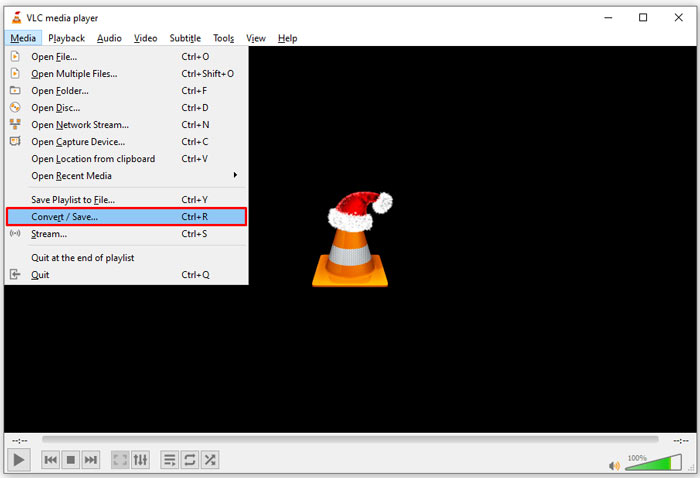
Step 1: Open VLC, go to the Media menu on the top ribbon, and choose Convert/Save.
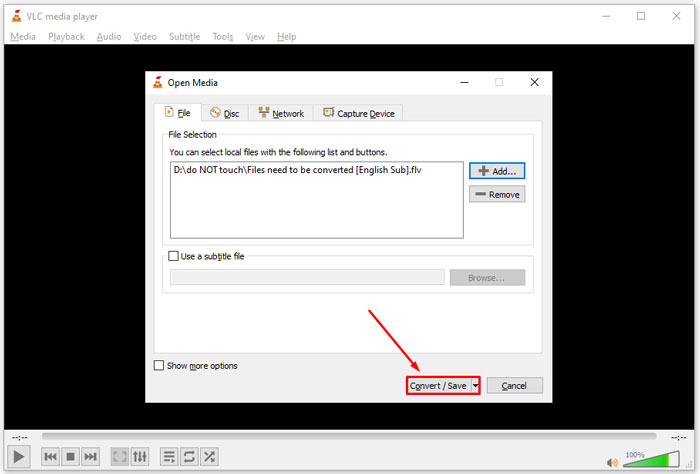
Step 2: Click the Add button and open the FLV file that you intend to change to other format. Hit the Convert/Save button to move on.
Step 3: Unfold the Profile option and select 3G2 or relative format. Then set the output folder by hitting the Browse button.
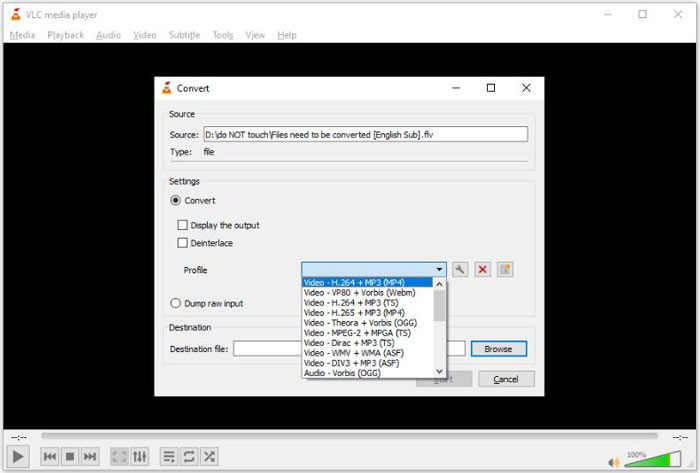
Step 4: Once you click the Start button, VLC will convert FLV to 3G2. It takes a while and you must be patient.
Osa 2: Kuinka muuntaa FLV 3G2-verkkoon
Sometimes, you just need to convert FLV to 3G2 occasionally. In such cases, a web app is a convenient choice, such as FVC Free Online Video Converter. It is free of charge with no registration or file size limit.
Step 1: Visit https://www.free-videoconverter.net/free-online-video-converter/ in any browser. Click the Add Files to Convert button and get the launcher.

Step 2: When downloading is done, the launcher will pop up. Click the Add File button and upload the FLV files. This web video converter app supports batch converting.
If you want to adjust the parameters, like resolution, framerate and more, click the Gear icon and open the Settings dialog.

Step 3: Head to the bottom and select a proper output format in the format area. As long as you are ready, click on the Convert button. Then download the result to your hard drive.
Here you may like:
Osa 3: UKK FLV: stä 3G2: een
Mikä on 3G2-tiedostot?
3G2, lyhenne sanoista 3rd Generation Partnership Project Group 2, on MPEG-4-pohjaisten multimediatiedostojen laajennus. Sen loi seitsemän CDMA-verkkoon kuuluvien matkapuhelinten vakiokehitysorganisaatioiden ryhmä. Se on hyvin samanlainen kuin 3GP.
Voiko Windows Media Player avata 3G2: n?
Ei, WMP ei voi avata tai toistaa 3G2-videotiedostoja, koska sillä ei ole vastaavia koodekkeja. Voit avata 3G2-tiedostot kolmella tavalla: muuntaa se tavalliseen videoformaattiin, ladata 3G2-videosoitin tai asentaa ylimääräinen koodekki WMP: lle.
Onko FLV parempi kuin 3G2?
Vastaus riippuu tarkoituksestasi. Jos katsot videota matkapuhelimessa, jossa on CDMA-verkko, 3G2 on parempi valinta. Videoiden jakamiseen FLV on parempi kuin 3G2.
Johtopäätös
Nyt sinun pitäisi ymmärtää, mitä 3G2 tarkoittaa ja kuinka muuntaa FLV 3G2: ksi ilman laadun heikkenemistä. VLC on ilmainen videomuunnin, jolla on kyky muuttaa videoformaatteja. FVC Free FLV Converter toimii kuitenkin paremmin. Sitä on helpompi käyttää kuin VLC: tä ja täysin ilmaiseksi. Jos sinulla on enemmän ongelmia, jätä viesti tämän viestin alle ja vastaamme siihen nopeasti.
-
 FLV WAV: ksi - Muunna FLV WAV: ksi verkossa ilmaiseksi ja Mac / PC: llä
 Kuinka voin muuntaa FLV-tiedoston? Voiko VLC muuntaa FLV:n WAV:ksi? Tämä viesti kertoo 3 ilmaista tapaa muuntaa FLV WAV:ksi ilman laadun heikkenemistä.
-
 FLV to MPG - Kuinka muuntaa FLV MPG: ksi Macissa, PC: ssä ja verkossa ilmaiseksi
 Miten muuntaa FLV MPEGiksi? Voinko muuntaa FLV: n MPG: ksi ilmaiseksi? Tämä viesti jakaa 3 ilmaista videomuunninta, joiden avulla voit muuntaa FLV: n MPG: ksi ilman laadun heikkenemistä.
-
 FLV to Xbox - Kuinka muuntaa ja toistaa FLV: tä Xboxilla
 Etkö voi toistaa FLV-tiedostoja Xbox Onella tai Xbox 360: llä? Tarvitseeko muuntaa FLV Xbox-tuettuun muotoon, kuten MP4, AVI, MOV tai WMV? Tässä viestissä luetellaan 3 ilmaista FLV: stä Xbox-muuntimeen, jotta voit pelata FLV: tä Xboxilla.
