


 Video Converter Ultimate
 Näytön tallennin
 Videon korjaus
 Suojattu lataus
3 ilmaista tapaa muuntaa WebM animoituiksi GIF -tiedostoiksi
Viime aikoina GIF-kuvista on tullut erittäin suosittuja erilaisissa sosiaalisissa sovelluksissa. Etsitkö tapaa muuntaa video, kuten WebM GIF-muotoon?
Itse asiassa omien GIF-kuvien tekeminen lyhyistä videoleikkeistä on varsin yksinkertaista, kunhan käytössäsi on hyvin toimiva animoitu GIF-muunnin tai GIF-työkalu. Monet videosta GIF:ksi -muuntimet, myös ilmaiset verkkoversiot, väittävät voivansa auttaa sinua muuntamaan WebM-tiedostot GIF-muotoon helposti. Tarjolla olevien työkalujen suuren määrän takia et kuitenkaan välttämättä tiedä, mitä niistä sinun kannattaisi käyttää.

Tarpeesi huomioiden tässä artikkelissa esitellään 3 ilmaista tapaa muuntaa WebM GIF-muotoon. Käyttöösi suositellaan kolmea tehokasta video–GIF-muunninta animoitujen GIF-kuvien luomiseen. WebM:n lisäksi ne tukevat myös muita yleisiä videoformaatteja, kuten MP4, MOV, AVI, FLV ja monia muita. Saat yksityiskohtaisen oppaan WebM-tiedostojen muuntamisesta GIF-muotoon näillä työkaluilla.
Osa 1. Muunna WebM GIF -muotoon ilmaisella online -muuntimella
Ensimmäisessä osassa esittelemme suositun verkkopohjaisen video–GIF-muuntimen, Free Online Video Converter -palvelun. Se voi toimia video–GIF-muuntimena ja auttaa sinua muuttamaan WebM-videosi GIF-kuvaksi verkossa.
WebM-muodon lisäksi se tukee laajasti kaikkia suosittuja videoformaatteja, kuten MP4, MOV, MKV, AVI, FLV, WMV, M4V ja muita. Tämä tarkoittaa, että voit helposti ladata minkä tahansa videon tähän online-GIF-muuntimeen ja muuntaa sen GIF-tiedostoksi. Voit nyt seurata alla olevaa ohjetta ja muuntaa WebM GIF-muotoon verkossa ilmaiseksi.
Vaihe 1. Avaa verkkoselain, kuten Google Chrome, Microsoft IE, Safari, Yahoo tai Firefox, ja siirry tälle ilmaiselle WebM–GIF-muunnossivulle. Kun olet sivustolla, napsauta Add Files to Convert -painiketta asentaaksesi nopeasti käynnistysohjelman GIF-muunnosta varten. Asennus tarvitaan vain ensimmäisellä käyttökerralla.
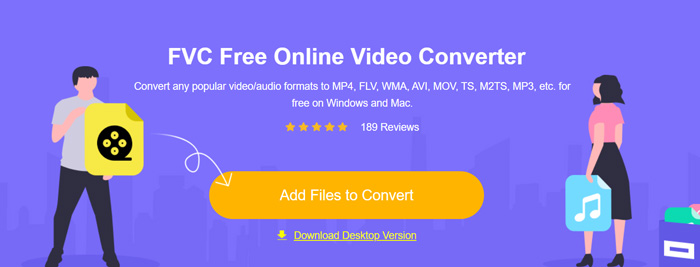
Vaihe 2. Tämän jälkeen voit etsiä ja valita WebM-videosi avautuvasta ikkunasta. Joissakin tapauksissa sinun on napsautettava Add Files to Convert -painiketta uudelleen ladataksesi tiedoston manuaalisesti. Sen jälkeen siirryt muunnosikkunaan.
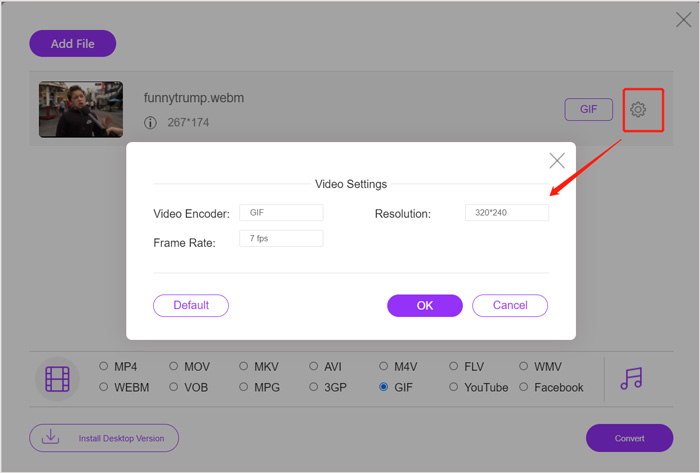
Vaihe 3. Näet luettelon monista yleisesti käytetyistä videoformaateista. Valitse tässä GIF tulostusmuodoksi. Napsauta asetukset-kuvaketta GIF-tulostusmuodon vieressä, niin voit mukauttaa videokoodekin, tarkkuuden ja kuvanopeuden. Napsauta OK tallentaaksesi muutokset. Kaikkien näiden vaiheiden jälkeen voit aloittaa WebM–GIF-muunnoksen napsauttamalla Convert-painiketta. Kuten edellä mainittiin, sen avulla voit myös helposti muuntaa MP4-tiedostot GIF-muotoon.
Osa 2. Ilmainen tapa muuntaa WebM GIF -muotoon ilman laadun heikkenemistä
Verkkopohjaisen WebM–GIF-muuntimen lisäksi on olemassa myös muita ilmaisia GIF-muuntimia, jotka voivat auttaa sinua muuttamaan WebM-tiedoston GIF-muotoon. Suosittelemme lämpimästi työkalua nimeltä Free Video to GIF Maker. Se on erityisesti suunniteltu käsittelemään erilaisia video- ja äänimuunnoksia. Sen avulla voit muuntaa WebM-tiedostot GIF-muotoon ilman laadun heikkenemistä.
Ilmainen latausWindows 7:lle tai uudemmalleTurvallinen lataus
Ilmainen latausmacOS 10.7:lle tai uudemmalleTurvallinen lataus
Vaihe 1. Tämä WebM–GIF-muunnin antaa sinun luoda omia GIF-kuvia sekä Windows 10/8/7 -tietokoneella että Macilla. Voit valita käyttöjärjestelmällesi sopivan version ja asentaa sen ilmaiseksi tietokoneellesi.
Käynnistä ohjelma ja napsauta vasemmalta More Products näyttääksesi lisää työkaluja. Etsi Video to GIF Converter ja napsauta sen kuvaketta asennusta varten.
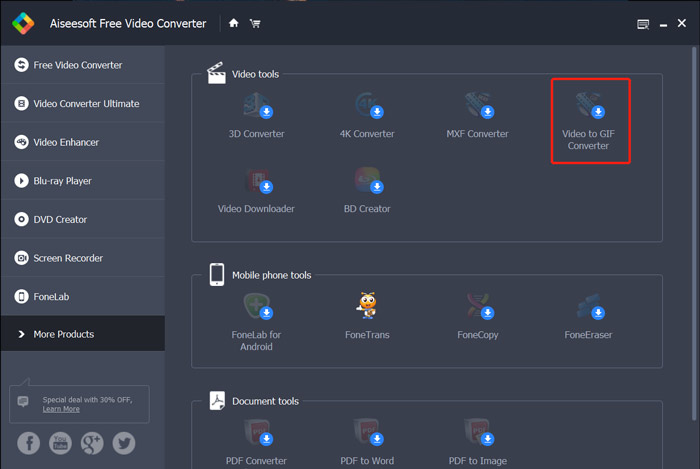
Vaihe 2. Kun asennus on valmis, sinut ohjataan Video to GIF Converter -työkaluun. Napsauta tässä Add File ladataksesi WebM-tiedostosi.
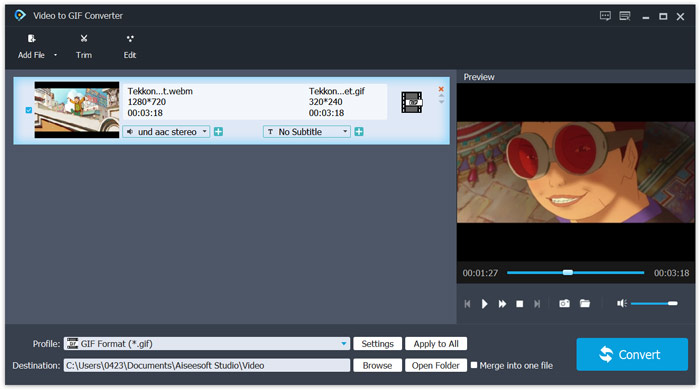
Vaihe 3. Tämä ilmainen WebM–GIF-muunnin sisältää monia muokkaustoimintoja, kuten leikkaus, yhdistäminen, kierto, tehosteet, vesileima ja paljon muuta. Ennen GIF-muunnosta voit käyttää näitä työkaluja tiedoston muokkaamiseen ja lähtölaadun säätämiseen.
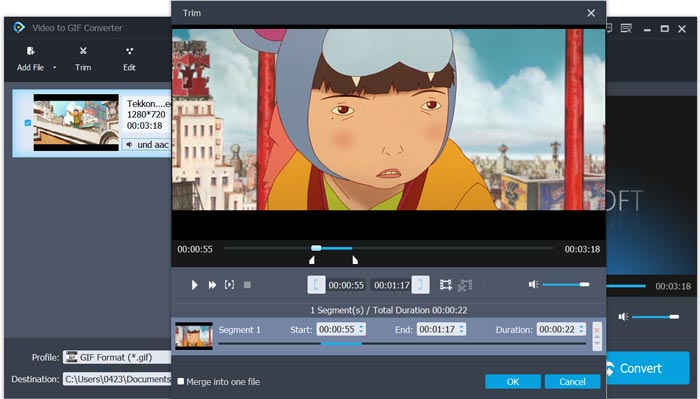
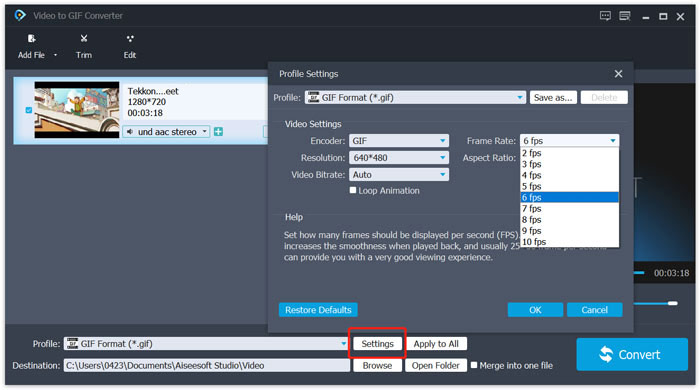
Vaihe 4. Kohdeformaatti asetetaan automaattisesti muotoon GIF. Voit napsauttaa Settings-painiketta Profile-kohdan vierestä mukauttaaksesi lisää asetuksia. Tämän jälkeen napsauta Convert-painiketta aloittaaksesi WebM-tiedoston muuntamisen animoiduksi GIF-kuvaksi.
Osa 3. Kuinka muuttaa WebM GIF -muotoon ZAMZARin avulla
Zamzar on monipuolinen verkkopohjainen tiedostomuunnin, jonka avulla voit vaivattomasti muuntaa WebM-tiedostot animoiduiksi GIF-kuviksi. Se tarjoaa erilaisia muunnospalveluja video-, ääni-, asiakirja-, e-kirja- ja muiden tiedostotyyppien muuntamiseen. Sillä on oma WEBM–GIF-sivu, jolla voit tehdä muunnoksen suoraan WebM-muodosta GIF-muotoon.
Vaihe 1. Siirry selaimellasi tälle ilmaiselle verkkopohjaiselle WebM–GIF-muunnossivulle.
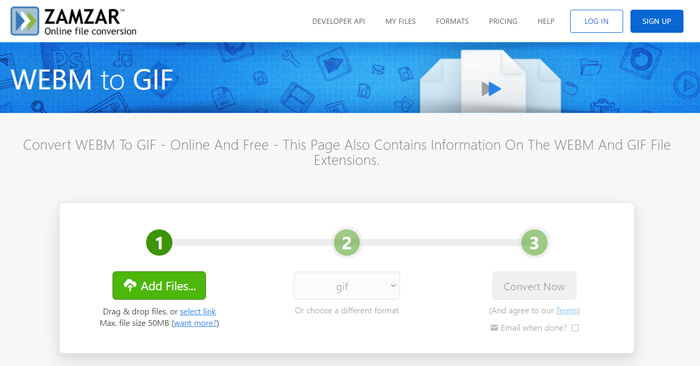
Vaihe 2. Napsauta Add Files -painiketta ladataksesi WebM-tiedostosi. Ladattavan tiedoston enimmäiskoko on 50 Mt.
Vaihe 3. Varmista, että tulostusmuoto on GIF, ja napsauta sitten Convert Now -painiketta. Tämä ilmainen online-GIF-muunnin aloittaa tiedoston lataus- ja muunnosprosessin.
Vaihe 4. Kun muunnos on valmis, voit napsauttaa Download tallentaaksesi muunnetun GIF-tiedoston tietokoneellesi. Muunnettu tiedosto säilytetään palvelussa 24 tunnin ajan.
Osa 4. Usein kysyttyä WebM: n muuntamisesta GIF -muotoon
Kysymys 1. Onko WebM GIF?
Ei. WebM on eräänlainen vaihtoehto GIF -muodolle. Verrattuna GIF -tiedostoon WebM tarjoaa paljon parempaa laatua ja pienempää tiedostokokoa. Lisäksi WebM: n avulla voit hallita sen toistoa, kuten pysäytys, käynnistys, automaattinen toisto ja silmukka. GIF ei edellytä kenenkään painavan toistoa.
Kysymys 2. Voinko muuttaa tiedostopäätteen muuttaakseni WebM: n GIF: ksi?
Voit helposti muuttaa WebM -tiedostotunnisteen muotoon .gif, jotta WebM muuntuu GIF -muotoon. Tällä menetelmällä voit vihdoin saada GIF -tiedoston. Useimmissa tapauksissa GIF -tiedosto on kuitenkin vioittunut, etkä voi avata tai toistaa sitä normaalisti.
Kysymys 3. Miksi GIF -tiedostot ovat niin heikkolaatuisia?
Useimmat GIF -tiedostot luodaan pienellä resoluutiolla ja pienellä koolla. Staattiseen kuvaan verrattuna on vaikeaa pitää sarja liikkuvia kuvia samassa tiedostokokossa. Joten useimmat GIF -tiedostot näyttävät niin huonolaatuisilta. Toisaalta GIF -tiedostoja voidaan jakaa usein. Lähdetiedosto pakataan ja näyttää huonommalta joka kerta, kun se tallennetaan tai ladataan uudelleen. Mutta on vielä paljon videoita GIF -muuntimiin ja GIF -luojat voivat helposti viedä korkealaatuisia GIF -tiedostoja.
Johtopäätös
GIF-kuvien tekeminen WebM-videoista on helppoa. Tästä artikkelista löydät kolme ilmaista tapaa muuntaa WebM GIF-muotoon tietokoneella tai verkossa. Näiden suositeltujen muuntimien avulla voit myös muuntaa FLV-tiedostot GIF-muotoon. Aina kun haluat muuttaa videoleikkeen animoiduksi GIF-kuvaksi, voit valita itsellesi sopivimman työkalun ja tehdä muunnoksen.
-
 Viisi parasta parasta hiiri- ja näppäimistötallenninta Windowsille ja Macille
 Tässä on viisi parasta hiiren ja näppäimistön tallenninohjelmaa, jotka voivat tallentaa hiiren liikkeet ja näppäimistön napsautukset ja toistaa tapahtumat.
-
 Opetusohjelma GIF-tiedostojen pakkaamiseen ja tiedostokoon pienentämiseen korkealaatuisina
 Tässä on 2 helppoa tapaa pakata GIF tietokoneellasi tai matkapuhelimellasi. Voit käyttää FVC Free Online Video Compressoria ja Photoshopia pienentämään GIF-tiedostokokoa eri näkökulmista.
-
 GIF Player - 5 parasta GIF-soitinta Windows PC: lle, Macille, Androidille ja iPhonelle
 Mikä ohjelma avaa GIF-tiedostot? Kuinka voin tarkastella GIF-tiedostoja Androidissa? Onko iPhonella GIF-soitin GIF-tiedostojen avaamiseen? Tämä viesti jakaa 5 parasta GIF-pelaajaa sinulle.
