


 Video Converter Ultimate
 Näytön tallennin
 Videon korjaus
 Suojattu lataus
Kuinka muuntaa M2TS iPad-yhteensopiviksi muodoiksi Windows / Mac / Online
Voitko toistaa M2TS‑tiedostoja suoraan iPadilla? Valitettavasti et. M2TS ei ole yhteensopiva iPadin kanssa. Jos haluat katsella M2TS‑videoita iPadilla, sinun täytyy asentaa iPadille M2TS‑soitinsovellus tai voit muuntaa M2TS‑tiedostot iPadille sopivaan muotoon. Tämä artikkeli valitsee selvästi jälkimmäisen ratkaisun. Lue eteenpäin ja opi, miten muutat M2TS‑videotiedostojen formaatin iPadille sopivaksi.

Osa 1: Kuinka muuntaa M2TS iPadiksi Windowsissa ja Macissa
Mitä formaatteja iPad tukee? Itse asiassa iPad hyväksyy yleiset H.264-, MP4-, M4V-, MOV-, MPEG-4- ja M-JPEG-videoformaatit. Jos haluat laittaa M2TS: n iPadiin, sinun on ensin muunnettava M2TS iPad-videoformaatiksi.
Kuinka muuntaa M2TS iPadiksi Windowsissa ilmaiseksi
FVC Free M2TS Converter on täysin ilmainen M2TS–iPad‑erämuunnin. Voit muuntaa joukkona M2TS‑tiedostoja iPadille jopa 50 kertaa nopeammin kuin tavallisilla M2TS‑muuntimilla. Näin ollen ei ole väliä, vaikka sinun täytyisi muuntaa suurikokoisia M2TS‑videotiedostoja iPadille isoissa erissä. Ilmainen M2TS–iPad‑muunnin selviää siitä vaivatta.
Lisäksi voit yhdistää M2TS‑tiedostoja ja lisätä teemoja ennen M2TS–iPad‑muunnosta. Reaaliaikainen esikatseluikkuna näyttää videotehosteet heti. Lyhyesti sanottuna voit sekä muokata että muuntaa AVCHD‑M2TS‑tiedostot iPadille Windowsissa yhdessä ja samassa ilmaisessa työkalussa.

Ilmainen M2TS-muunnin
113,456+ latausta- Muunna M2TS iPad H.264: ksi, MP4: ksi, MOV, MPEG-4 ja muut yhteensopivat muodot.
- 50 kertaa nopeampi nopeus erämuunnostuen avulla.
- Säilytä korkea laatu samalla kun muunnat iPadiksi kaikista HD-videokameroista.
- M2TS - iPad -muunnin toimii Windows 10/8/7 -tietokoneen kanssa.
Ilmainen latausWindows 7 tai uudempiTurvallinen lataus
Ilmainen latausMacOS 10.7 tai uudempiTurvallinen lataus
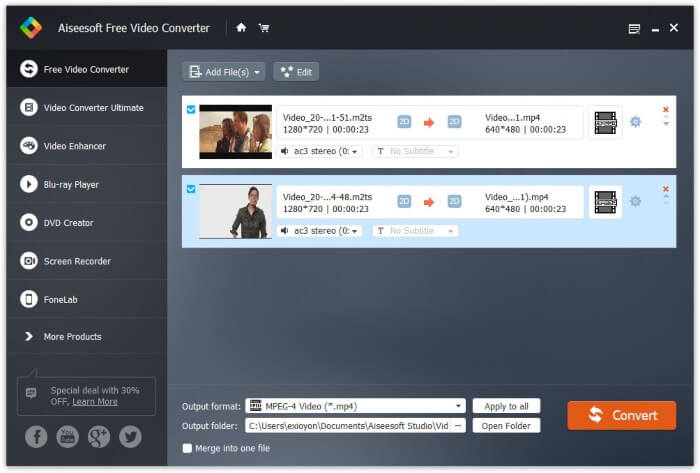
Vaihe 1: Lataa, asenna ja käynnistä FVC Free M2TS Converter ilmaiseksi. Vedä ja pudota M2TS‑tiedostot pääikkunaan.

Vaihe 2: Avaa alareunassa oleva Output format ‑luettelo. Jos haluat muuntaa M2TS‑tiedostot iPadille Windowsissa, voit valita tulostusmuodon suoraan Apple iPad ‑kategoriasta.

Vaihe 3: Napsauta ratas‑kuvaketta Settings säätääksesi videokooderin, kuvanopeuden ja muut asetukset. Lopuksi napsauta Convert muuntaaksesi videon M2TS‑muodosta iPad‑yhteensopivaan formaattiin.
Kuinka muuntaa M2TS iPadiksi Maciin ilmaiseksi
Jos haluat muuntaa M2TS-videon iPadiin ilmaiseksi Macissa, VLC Media Player voi olla hyvä valinta. Se on ilmainen ja avoimen lähdekoodin M2TS-soitin ja muunnin monialustalle.
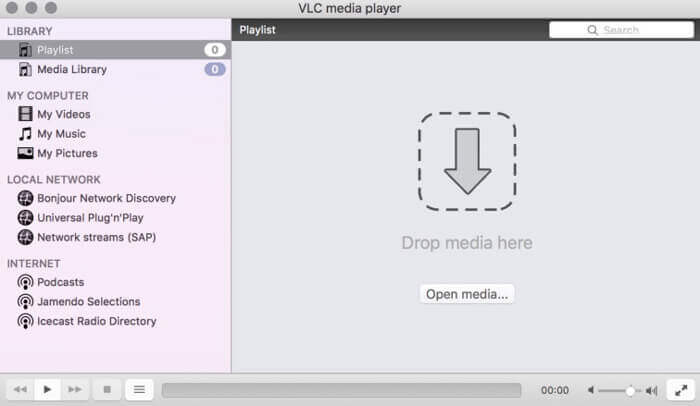
Vaihe 1: Avaa VLC Media Player Macilla. Valitse Convert/Save Media‑pudotusvalikosta.
Vaihe 2: Napsauta Add tuodaksesi M2TS‑tiedoston. Valitse sitten tiedosto ja napsauta alareunasta Open jatkaaksesi.
Vaihe 3: Napsauta alareunasta Convert/Save siirtyäksesi seuraavaan ikkunaan.
Vaihe 4: Valitse iPad‑muoto Profile ‑pudotusvalikosta. Voit napsauttaa vieressä olevaa Tools ‑kuvaketta säätääksesi videoasetuksia.
Vaihe 5: Napsauta Start aloittaaksesi M2TS‑tiedoston muuntamisen iPad‑muotoon Macilla VLC:n kautta.
Osa 2: M2TS: n muuntaminen iPad Onlineen
Mobiilikäyttäjille M2TS-muunnin iPadiin -muuntimen käyttäminen on myös mukava valinta. Voit muuntaa M2TS-tiedoston iPadiin ilmaiseksi lataamatta, asentamatta tai rekisteröimättä.
Vaihe 1: Avaa jokin M2TS–iPad‑verkkomuunnin, kuten FVC Free Online Video Converter.

Vaihe 2: Lataa FVC‑käynnistysohjelma napsauttamalla Add Files to Convert ja asenna se.

Vaihe 3: Etsi tietokoneeltasi M2TS‑tiedosto muunnettavaksi. Äläkä unohda valita tulostusmuotoa.

Vaihe 4: Napsauta Start Converting muuntaaksesi M2TS‑tiedoston iPadille ilmaiseksi verkossa.
Osa 3: Usein kysyttyjä kysymyksiä M2TS: n muuntamisesta iPadiksi
Mitä tapahtuu, että yhtäkkiä ei ääntä M2TS-tiedostoissa iMovie-ohjelmassa?
Apple-laitteet eivät tue luonnollisesti M2TS: ää. Sinun on muunnettava M2TS Mac-muotoon ongelman ratkaisemiseksi.
Kuinka avaan M2TS-tiedostot iPhonessa ja iPadissa?
AVCHD M2TS ei ole yhteensopiva iOS-laitteiden kanssa. Jos vaadit M2TS-videoiden toistamista iPadissa, voit käyttää videotoistoa VLC Media Player -sovelluksella.
Onko mitään hyvää videosoittimen sovellusta iPadille?
Voit saada suuremman näytön iPadissa kuin iPhone. Joten myös videoiden katselukokemus on parempi. Suositeltuja videosoittimia ovat PlayerXtreme Media Player, KMPlayer, VLC, AirPlayer ja muut. Voit valita minkä tahansa, jotta saat video-ohjaimet joustavasti.
Siinä kaikki tavoista muuntaa M2TS‑tiedostot iPadille verkko‑ ja työpöytätyökaluilla. Nämä M2TS‑videomuuntimet ovat ilmaisia ja turvallisia käyttää. Riippumatta siitä, kuinka monta M2TS‑tiedostoa haluat muuntaa iPad‑yhteensopiviksi formaateiksi, saat täällä käyttöönsi nopeimman muunnosnopeuden.
-
 Kuinka muuntaa M2TS MP4: ksi heikentämättä laatua
 Haluatko muuntaa videon HD-videokamerasta tavalliseksi MP4: ksi? Tässä on 4 yksinkertaista ja ilmaista tapaa muuttaa M2TS-tiedosto MP4: ksi Windowsissa ja Macissa.
-
 Kuinka muuntaa M2TS MKV: ksi menettämättä laatua
 Haluatko muuntaa M2TS: n MKV: ksi säilyttäen alkuperäisen laadun? Tämä viesti näyttää ilmaisia ja online-tapoja muuttaa M2TS MKV: ksi häviöttömästi.
-
 Mikä on ero MTS: n ja M2TS: n välillä
 Mikä on MTS- tai M2TS-tiedosto? Mitä eroa on M2TS: llä ja MTS: llä? Kuinka voin katsella videokameralla tallennettua MTS- tai M2TS-tiedostoa? Löydä kaikki vastaukset tästä viestistä.
