


 Video Converter Ultimate
 Näytön tallennin
 Videon korjaus
 Suojattu lataus
Kuinka muuntaa M2TS MKV: ksi menettämättä laatua
”Etsin hyvää muunninta. Tarvitsen sen muuntamaan m2ts-tiedostoni MKV: ksi, mutta haluan säilyttää tekstitysasetukset ja ääniasetukset. Nämä tiedostot ovat noin 40 Gt, ja haluan muuntaa ne pienemmiksi tiedostoiksi, mutta ei laadun heikkenemistä. Onko olemassa suositeltua muunninta? "
M2TS-tiedostot vievät yleensä paljon tilaa, joten saatat haluta muuntaa M2TS:n MKV-muotoon toistamista varten joillakin mediasoittimilla. Tässä artikkelissa näytämme helpoimmat tavat muuntaa M2TS-tiedosto MKV:ksi häviöttömästi Windowsissa ja Macissa.

Osa 1. Paras tapa muuntaa M2TS MKV: ksi ilmaiseksi
Vaikka markkinoilla on paljon muuntimia, löydät vain harvoja ilmaisia M2TS–MKV-muuntimia, jotka todella toimivat. Kannattaa kuitenkin vilkaista tätä FVC Free M2TS Converter -ohjelmaa. Se on monipuolinen M2TS-muunnin ja -editointiohjelma, jonka avulla voit muuntaa M2TS-tiedostoja MKV-, MP4-, AVI-, MOV-, MP3- jne. muotoihin toistettavaksi suosituilla mediasoittimilla.

Ilmainen M2TS-muunnin
112 345+ latausta- Muunna M2TS MKV, MP4, AVI, TS, VOB, WMV, FLV, SWF, jne.
- Muunna M2TS-tiedostot laite- ja mediatuetuiksi tiedostomuodoiksi.
- Muokkaa M2TS-tiedostoa, kuten yhdistäminen, pakkaus, teeman lisääminen ja 3D-tehosteiden käyttöönotto.
- Täysin yhteensopiva Windows 10/8/7 / Vista / XP (SP2 tai uudempi) kanssa.
Ilmainen latausWindows 7 tai uudempiTurvallinen lataus
Ilmainen latausMacOS 10.7 tai uudempiTurvallinen lataus
Vaihe 1. Lisää M2TS-tiedosto
Kun olet ladannut tämän ilmaisen M2TS-muuntimen, asenna ja käynnistä se Windows-tietokoneellesi. Tuo M2TS-tiedostot napsauttamalla Lisää tiedosto (t) -painiketta. Jos sinulla on useita M2TS-tiedostoja, voit liittää alareunassa olevan vaihtoehdon Yhdistä yhdeksi tiedostoksi.

Vaihe 2. Muokkaa M2TS-tiedostoa
Napsauta “Muokkaa” -painiketta käyttöliittymän yläosassa ja voit lisätä teeman, muokata otsikkoa, tekijää, aikaa ja tarjoajaa alkuun ja loppuun.

Vaihe 3. Muunna M2TS MKV: ksi
Napsauta ”Output format” -kohdan alla olevaa avattavaa painiketta ja valitse MKV lähtömuodoksi. Voit myös asettaa kohdekansion. Sen jälkeen napsauta "Muunna" -painiketta aloittaaksesi M2TS: n muuntamisen MKV: ksi ilmaiseksi.

Osa 2. Vie MKV M2TS Online Free -sovelluksesta
Haluatko löytää ilmaisen verkkotyökalun M2TS:n nopeaan muuntamiseen MKV-muotoon? FVC Free Online Video Converter tarjoaa ilmaisen alustan, jolla voit helposti muuntaa M2TS-tiedoston MKV-muotoon. Lisäksi voit erämuuntaa useita M2TS-tiedostoja MKV-muotoon. Katso tarkat vaiheet, kuinka M2TS-tiedosto muunnetaan MKV-muotoon verkossa ilmaiseksi.
Vaihe 1. Siirry verkkosivustolle napsauttamalla yllä olevaa linkkiä. Etsi Add Files to Convert ja lataa sekä asenna FVC-käynnistysohjelma.

Vaihe 2. Asennuksen ja päivityksen jälkeen lisää video ja valitse muoto, johon haluat Convert.

Vaihe 3. Kirjoita tai avaa kansio, johon haluat tallentaa videosi. Odota hetki, ja MKV-videosi on valmis.
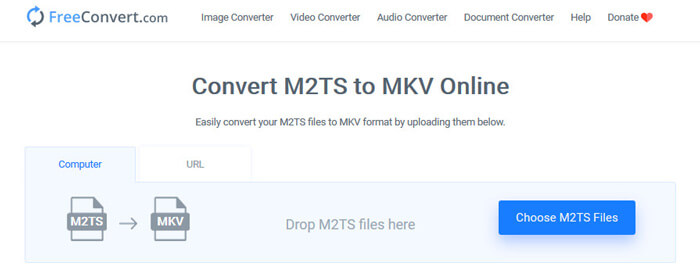
Osa 3. Muunna M2TS MKV: ksi FreeConvert.com -sivustolla
Tai voit vain kokeilla FreeConvert.comia, ilmaista online-tiedostomuunnostyökalua, jolla voit muuntaa tiedostosi (kuva, video, asiakirja ja musiikki) muodosta toiseen.
Vaihe 1. Vedä ja pudota M2TS-tiedosto latausalueelle. Voit myös napsauttaa “Choose M2TS Files” -painiketta tuodaksesi M2TS-tiedoston.
Vaihe 2. Advanced Settings -kohdassa voit säätää videokoodekkia, kuvan kokoa, kuvasuhdetta, kuvanopeutta, videon suuntaa, äänikoodekkia ja bittinopeutta.
Vaihe 3. Napsauta “Convert To MKV” -painiketta muuntaaksesi M2TS:n MKV-muotoon. Tämä kestää muutaman sekunnin. Napsauta sitten “DOWNLOAD MKV” -painiketta tallentaaksesi MKV-tiedoston tietokoneelle.
Osa 4. Muunna M2TS MKV: ksi käsijarrulla
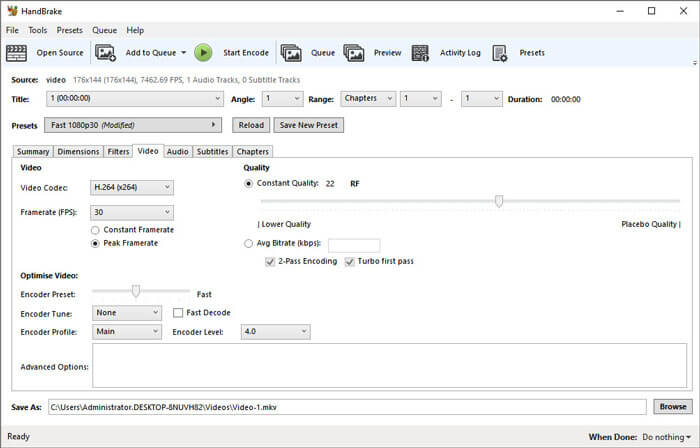
HandBrake on ilmainen ja avoimen lähdekoodin M2TS - MKV -muunnin, joka muuntaa videon lähes kaikista videoformaateista. Se tukee monia käyttöjärjestelmiä, kuten Windows, macOS ja Linux OS. Seuraa vaiheittaista opasta M2TS-tiedoston muuntamiseksi MKV: ksi HandBrake-toiminnolla.
Vaihe 1. Lataa Handbrake tietokoneellesi. Napsauta “Open Source” -painiketta ladataksesi M2TS-tiedoston ohjelmaan.
Vaihe 2. Valitse Summary-välilehdeltä “MKV” tulostusmuodoksi. Voit säätää videon suodattimia, koodekkia, laatua, bittinopeutta, tekstityksiä ja muuta muilla välilehdillä, kuten Dimensions, Filters, Video, Audio, Subtitles, Chapters.
Vaihe 3. Napsauta “Start Encode” -painiketta aloittaaksesi M2TS-tiedostojen muuntamisen MKV-muotoon.
Osa 5. Vaihda M2TS MKV: ksi MakeMKV: llä
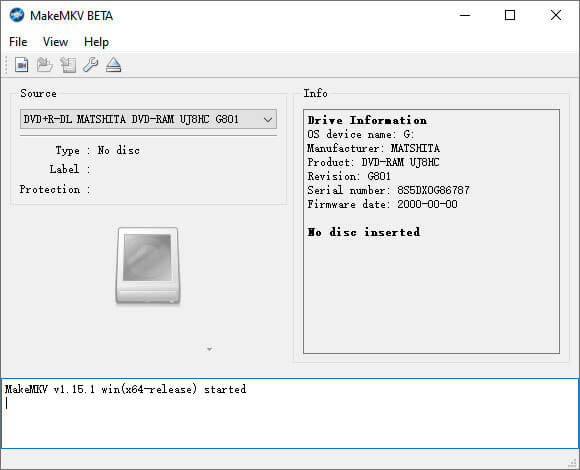
MakeMKV on yhden napsautuksen ratkaisu, jolla M2TS voidaan muuntaa MKV: ksi ilmaiseksi. MakeMKV: n avulla voit muuntaa M2TS: n MKV: ksi Windows 10: ssä ja Macissa.
Vaihe 1. Avaa MakeMKV tietokoneellasi. Valitse “Open Files” “File”-valikosta lisätäksesi M2TS-tiedoston ohjelmaan.
Vaihe 2. Valitse lisäämäsi M2TS-tiedosto ja napsauta kansiokuvaketta valitaksesi tulostuskansion.
Vaihe 3. Napsauta “Make MKV” -painiketta aloittaaksesi M2TS-tiedoston muuntamisen MKV-muotoon ilmaiseksi.
Osa 6. FAQ M2TS: n muuntamisesta MKV: ksi
Mikä on M2TS-muotoinen video?
M2TS on lyhenne sanoista BDAV (Blu-ray Disc Audio-Video) MPEG-2 Transport Stream. Se on Blu-ray- ja AVCHD (Advanced Video Coding High Definition) -tiedostosäiliötiedostomuoto, joka sisältää video-, ääni- ja muita virtoja.
Voiko Plex toistaa M2TS-tiedostoja?
Ei. Plex Media Server ei voi toistaa M2TS-tiedostoja, sillä sillä on hyvin rajoitettu ulkopuolinen koodekkituki. Jos haluat toistaa M2TS-tiedostoja Plexillä, voit muuntaa M2TS-tiedoston Plex-tuettuun muotoon FVC Free M2TS Converter -ohjelmalla.
Tukeeko YouTube M2TS: ää ja MTS: ää?
Ei. YouTube ei tue M2TS- tai MTS-tiedostoja. Muunna M2TS- tai MTS-tiedosto tuetuksi tiedostomuodoksi, kuten MP4, ja lataa ne sitten YouTubeen.
Johtopäätös
Siinä ovat kaikki ratkaisut, joilla voit muuntaa M2TS:n MKV:ksi Windowsissa ja Macissa. FVC Free Video Converter takaa MKV-tiedostojen häviöttömän lopputuloksen. Voit helposti muuntaa kaikkien HD-videokameroiden M2TS-videot muihin videoformaatteihin ilman laadun heikkenemistä. Nyt on aika kokeilla sitä.
-
 Mikä on MTS-tiedosto ja kuinka muuntaa / toistaa MTS-tiedostoa
 Mikä on MTS-tiedosto ja miten voin toistaa sitä? Tämä viesti antaa sinulle MTS-tiedoston perusohjeet. Lisäksi saat 3 yksinkertaista tapaa muuntaa MTS-tiedosto MP4-, MOV-, AVI-, MPEG-, MTS-, MKV- tai muuhun korkealaatuiseen tiedostomuotoon.
-
 2 yksinkertaista tapaa vapaasti muuntaa MTS MP3: ksi
 Onko sinulla tarvetta purkaa MP3-ääni MTS-tiedostosta, mutta et tiedä miten? Mikä on paras MTS to MP3 -muunnin? Tämä viesti jakaa kaksi helppoa tapaa auttaa sinua muuntamaan MTS / M2TS MP3: ksi korkealla äänenlaadulla.
-
 Katsaus Snagit ja sen paras vaihtoehto
 Mikä on paras vaihtoehto Snagitille? Onko olemassa Snagitin kaltaista näytön kaappaustyökalua? Tämä viesti tarkistaa Snagitin ja jakaa parhaan vaihtoehdon Snagitille näytön kaappaamiseksi.
