


 Video Converter Ultimate
 Näytön tallennin
 Videon korjaus
Kuinka muuntaa AMV FLV:ksi luotettavin ja luotettavin tavoin
Niille, joille termi ei ole tuttu, AMV tarkoittaa Anime Music Video -videota. .amv-tiedostopääte käyttää pakattuja videotiedostoja. Kiinassa valmistetut kannettavat mediasoittimet käyttävät todennäköisimmin AMV‑tiedostoja. Pienen tarkkuuden videotiedostot sopivat mediasoittimen näytölle, jolla videotiedostoa voidaan katsella toiston aikana. Adobe Systems puolestaan on kehittänyt FLV‑tiedostomuodon (Flash Video File), joka sisältää lyhyen otsakkeen, lomitetut ääni-, video- ja metatietopakettien lisäksi ääni- ja videotiedot, jotka voidaan tallentaa SWF‑tiedostoihin. Videovirrat voidaan upottaa käyttämällä Flash Video ‑muotoa Adoben sovelluksissa ja Flash‑liitännäisissä. Nyt kun olet saanut hieman johdantoa näihin kahteen formaattiin, valmistaudu perehtymään muuntimiin. Sinun kannattaa harkita AMV:n muuntamista FLV:ksi.

Osa 1. Erinomaisin muunnin käytettäväksi AMV:n muuntamisessa FLV:ksi
Video Converter Ultimate on ammattimainen ohjelma, joka pystyy hoitamaan videotiedostojen muunnoksen. Se tukee vaivatonta ja häviötöntä FLV–MOV‑muunnosta sekä Windows‑ että Mac‑tietokoneilla, ja on saatavilla maksutta. Lisäksi työkalu voi muuntaa yli 100 eri formaatin välillä, mukaan lukien teräväpiirtotiedostot. Ohjelmaan sisältyy myös monipuolinen videoeditori, jonka avulla voit rajata, leikata, katkaista, lisätä vesileimoja ja käyttää erikoistehosteita. Videomuunnoksen lisäksi Video Converter Ultimate tukee videon latausta, siirtoa ja muita toimintoja. Oppiaksesi käyttämään tätä ohjelmistoa sinun on tutustuttava tässä osiossa annettuihin ohjeisiin.
Vaihe 1: Saadaksesi pääsyn ohjelmistoon sinun on ensin ladattava se tietokoneellesi. Tee tämä napsauttamalla Free Download ‑painiketta, joka sijaitsee tämän vaiheen alaosassa. Kuten näet, sinulla on kaksi vaihtoehtoa ohjelmiston lataamiseen: Windows tai Mac. Asenna ohjelmisto tietokoneellesi latauksen jälkeen ja käynnistä se.
Ilmainen latausWindows 7 tai uudempiTurvallinen lataus
Ilmainen latausMacOS 10.7 tai uudempiTurvallinen lataus
Vaihe 2: Kun käynnistät ohjelmiston, näytölle ilmestyy ikkuna. Converter-käyttöliittymä näkyy näytölläsi yhdessä latausalueen kanssa. Napsauta +‑painiketta tai vedä mikä tahansa videotiedosto työpöydältäsi jatkaaksesi.
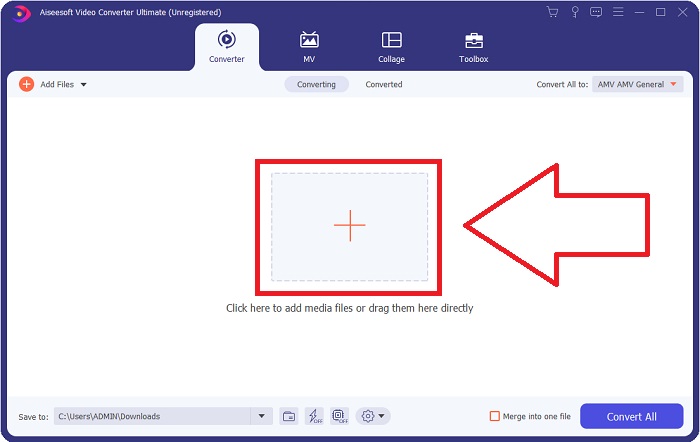
Vaihe 3: Muuntaaksesi AMV‑videomuodon FLV:ksi sinun on tiedoston lataamisen jälkeen siirryttävä valittuun formaattiin ohjelmistossa ja valittava FLV‑muoto. Voit tämän jälkeen myös valita haluamasi videolaadun.
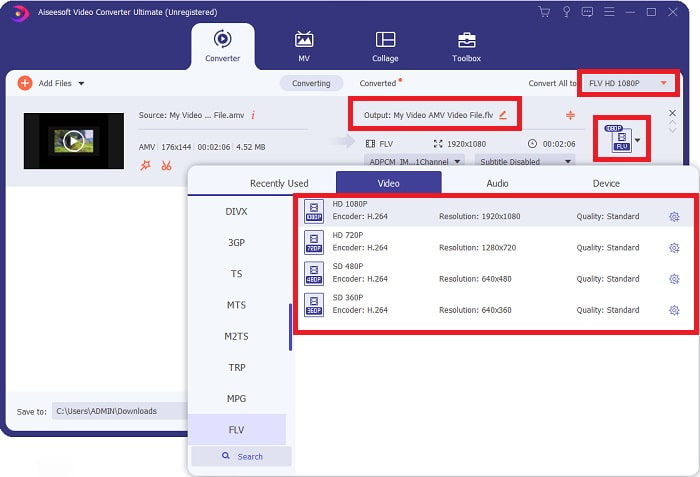
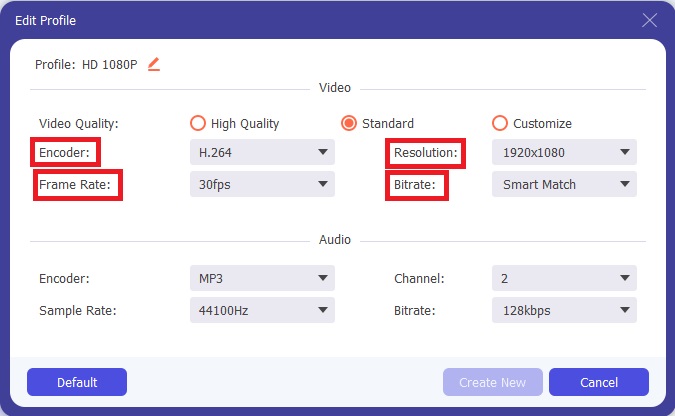
Vaihe 4: Jos haluat mukauttaa tai luoda uuden haluamasi videolaadun, voit napsauttaa hammasrataskuvaketta videolaatuvalintojen vieressä.
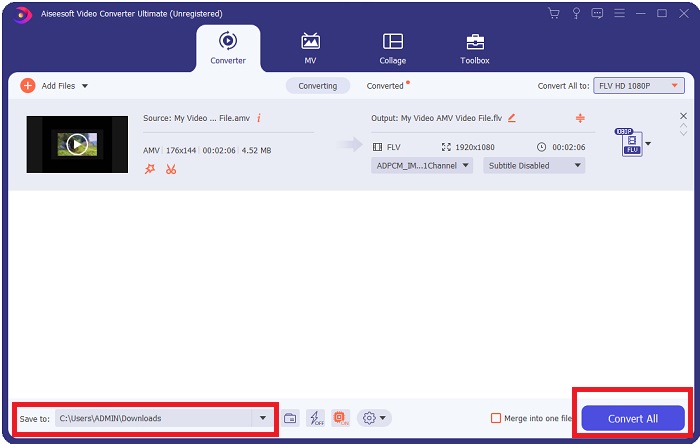
Vaihe 5: Olet melkein valmis! Kun olet määrittänyt kaikki haluamasi asetukset ja säädöt, voit valita muunnetun tiedoston tallennuspaikan napsauttamalla kansiokuvaketta Save to ‑kentän vieressä ikkunan alareunassa. Nyt voit muuntaa videotiedostosi napsauttamalla Convert All ‑painiketta.
Osa 2. Online-työkalu, jota kannattaa harkita muuntaessa AMV FLV:ksi
Verkkopohjaisten muuntimien käyttäminen on helppoa, koska ne eivät vaadi minkään ohjelmiston lataamista tai asentamista. Free Video Converter Online on erinomainen esimerkki ohjelmasta, joka voi muuntaa AMV:n FLV:ksi nopeasti ja helposti. Tämän ohjelman avulla voit muuntaa laajan valikoiman ääni‑ ja videoformaatteja, ja se on täysin maksuton. Voit ladata tähän ohjelmaan kaksi tiedostoa muunnettavaksi, ja kun prosessi on valmis, muunnettu tiedosto tallennetaan automaattisesti kiintolevyllesi. Seuraavaksi esittelen kaikki vaiheet, jotka sinun on hyvä tietää tämän erinomaisen verkkotyökalun käyttämiseksi.
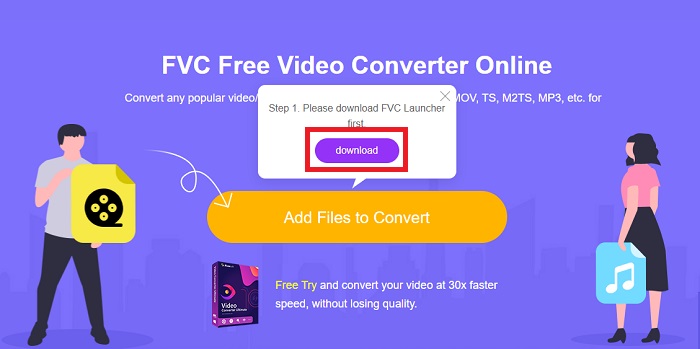
Vaihe 1: Napsauta tätä linkkiä päästäksesi työkalun pääsivulle. Kun olet edennyt eteenpäin, aloita tiedoston muuntaminen napsauttamalla Add Files to Convert. Latauspainike ilmestyy tämän jälkeen näytön yläkulmaan. Kun käynnistysohjelma on asentunut, voit alkaa ladata tiedoston tietokoneeltasi tähän työkaluun.
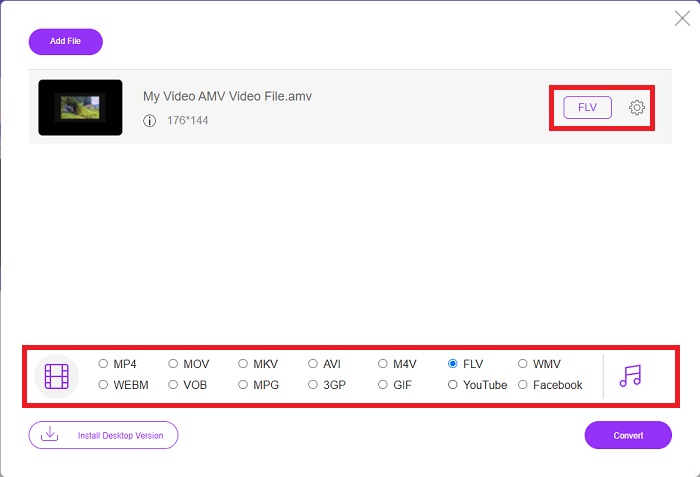
Vaihe 2: Kun tuotu tiedostosi on valmis, napsauta alapuolella olevaa FLV‑videomuotoa. Kuten ohjelmisto tekee, voit myös säätää tulostevideosi kaikkia asetuksia napsauttamalla hammasrataskuvaketta.
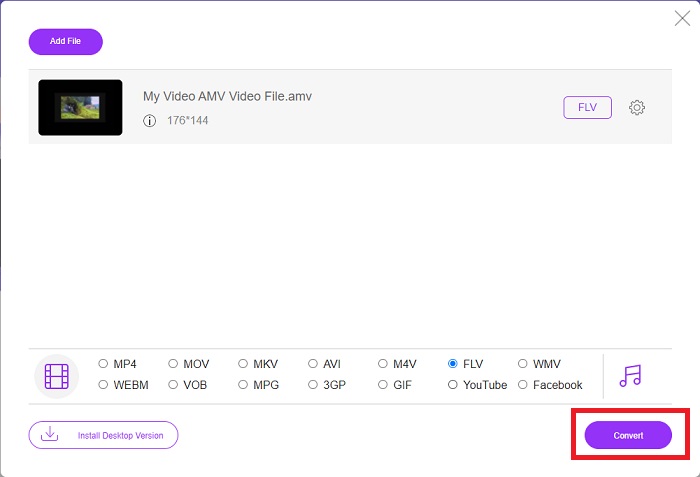
Vaihe 3: Lopuksi napsauta Convert‑painiketta muuntaaksesi AMV‑tiedostosi FLV‑muotoon.
Aiheeseen liittyvää:
Osa 3. Laajennettu tieto AMV:stä ja FLV:stä
AMV optimoi matalat monipuoliset mediasoittimet hitailla prosessoreilla ja pienillä näytöillä, kuten S1 MP3 -soitin. Videokoodekki on Motion JPEG kiinteillä kvantisointitaulukoilla. Äänikoodekki on IMA ADPCM, jossa kunkin kehyksen 8 ensimmäistä tavua ovat lähde (16 bittiä), indeksi (16 bittiä) ja salattujen 16-bittisten näytteiden määrä (32 bittiä). Näiden yksinkertaistettujen koodekkien dekoodaus on mitätöntä. Videon pakkaus on alhainen (4 pikseliä/tavu vs. yli 10 pikseliä/tavu MPEG-2:lle), mutta tiedostokoot ovat pieniä pienentyneen resoluution (96x96 suurempi tai yhtä suuri kuin 208x176) ja fps (10, 12, tai 16 kuvaa/s). 30 minuutin video, joka on pakattu 128 x 96 pikseliin ja 12 kuvaa sekunnissa, on 80 megatavua.
Kuitenkin videotiedosto, jonka laajennus.flv voit käyttää FLV-tiedostotunnistetta, jos haluat suoratoistaa videota tai ääntä Adobe Flash Playerista tai Adobe Airista Internetin kautta. Flash Video oli pitkään oletusvideomuoto lähes kaikille online-videoille, mukaan lukien YouTuben, Hulun ja lukemattomien muiden sivustojen videot. Tästä syystä suoratoistopalvelut ja ohjelmistokehittäjät eivät enää käytä Adoben omaa Flash-muotoa. Kun tämä vertailu on todettu, tässä on sinulle vähän apua, tämä artikkeli tarjosi sinulle vertailukaavion:
| Tiedostopääte | AMV | FLV |
| Tiedoston nimi | Anime musiikkivideo | Flash-videotiedosto |
| Kehittäjä | Jim Kaposztas | Adobe System Incorporated |
| Plussat | ◆ AMV on yksi suosituimmista fanien tekemistä anime-musiikkivideoista tähän mennessä. ◆ Tiedoston koko on pieni. | Adobe Flash dynaamisille ja interaktiivisille verkkosivuille voi olla valtava etu. Vaikka tämä on yksinkertainen prosessi, tulokset voivat olla merkittäviä. Flash oli aikoinaan suosittu valinta myös yksinkertaisiin videopeleihin. |
| Haittoja | ◆ Ei yhteensopiva useimpien mediasoittimien ja laitteiden kanssa; heikkolaatuinen. | FLV:n suosion lasku on ollut haittapuoli. FLV-sisällön luominen voi olla aikaa vievää ja kallista. Flash-tuen puute iOS-laitteissa rajoittaa vakavasti sen kykyä houkutella uusia käyttäjiä. |
| Ohjelmat, jotka tukevat tiedostoa | ◆ VLC Media Player ◆ iOrgsoft AMV Converter | ◆ RealPlayer ◆ Apple QuickTime Player ◆ VLC Media Player ◆ MPlayer |
Osa 4. Usein kysytyt kysymykset AMV:n muuntamisesta FLV:ksi
Mikä on AMV:n tarkoitus?
Synkronointi ja yhtenäisyys AMV:ssä voivat saavuttaa erilaisia videoeditointityylejä. On mahdollista saavuttaa raakamuokkaus yksinkertaisilla zoomaus- ja loitonna "tehosteilla" ja yksinkertaisilla siirtymäsiirtymillä. Monien esimerkkien joukossa ovat seuraavat.
Miten AMV:t valmistetaan?
Jotta AMV onnistuisi, siinä on käytettävä kappaletta, joka liittyy läheisesti aiheeseen ja kuvaa sitä lähes täydellisesti. Jokainen tämän lukeva voi vastata sanomalla: "Vau, tämä on mahtavaa! Tämä kappale on hänen, hänen tunnuslaulunsa. Tämän vuoksi olet valinnut hyvän kappaleen.
Onko FLV parempi laatu?
FLV-muoto ja MP4 pystyvät tallentamaan korkealaatuisen videon ja äänen digitaalisen koodauksen. FLV-tiedostojen laatu on keskustelunaihe, mutta FLV:n edut ja haitat voivat keskustella tiedostomuodosta. Korkeammat pakkaussuhteet MP4:ssä vähentävät laadun heikkenemistä.
Johtopäätös
Lopuksi tiedät, kuinka tärkeää on valita paras muuntaja AMV:n muuntamisessa FLV:ksi. Toiset tuottavat huonolaatuisia ja synkronoimattomia videoita videon muuntamisen jälkeen. Mutta tässä artikkelissa suosittelemat kaksi muuntajaa ovat huippuluokan muuntimet, joiden laadusta sinun ei tarvitse huolehtia.
-
 Paras menetelmä AMV:n muuntamiseksi AVI:ksi [Hyväksytty]
 Onko sinulla vaikeuksia muuntaa AMV-muotoista videotiedostoa AVI:ksi? Tässä on joitain vinkkejä, jotka löydät vain tästä artikkelista.
-
 3 uusinta AMV-muunninta saatavilla AMV:n muuntamiseksi MOV-muotoon [2022]
 Etkö tiedä kuinka muuntaa AMV-tiedostosi MOV-muotoon? Sitten tässä artikkelissa puhutaan 3 AMV-MOV-muuntimesta, joita voit käyttää online- tai offline-tilassa.
-
 4 tarkistettua tapaa muuntaa TS FLV: ksi työpöydällä / verkossa
 Et voi avata TS: ää tietokoneellasi tai matkapuhelimellasi oletuksena. Ainoa tapa katsella videotiedostoja on muuntaa TS FLV: ksi tai muuhun muotoon konkreettisen oppaan avulla.
